
Surge Shopify Theme Review: Is ConversionWise’s CRO Theme Worth $497?

Summarize this article with AI


An honest review of Surge, ConversionWise’s CRO Shopify theme: what the $497 licence and $197 renewal buy, how its A/B test claims hold up, and who should skip it.
Surge is a Shopify theme built by ConversionWise, a conversion rate optimization (CRO) agency, and sold on its own site rather than on the Shopify Theme Store. Its pitch is simple: every block in the theme comes from A/B tests the agency ran for client stores, so you start with a store that is already laid out to convert. It costs $497 for the first year, then $197 a year to keep updates and support. That is more than most premium Shopify themes, so the real question is whether the CRO data is worth paying for twice.
To answer it, we went through surgetheme.com(opens in a new tab), the Surge 2.0 sales page(opens in a new tab), the product page and licence options(opens in a new tab), the refund policy(opens in a new tab), the help center(opens in a new tab), the Surge 2.0 launch article(opens in a new tab) and what founders and buyers say on X. We did not buy a licence for this review, since sales are final, but we did enter the demo stores (password “surge”) and ran our own speed tests on them. Where a claim comes only from ConversionWise, we say so.
Our take in short: Surge is a serious CRO Shopify theme with more conversion features out of the box than almost any theme on the Theme Store, especially sales pages, advertorials and a full cart drawer. It suits brands that already run paid traffic and want tested page layouts fast. It is a weaker deal for a new store, for anyone who wants to try before paying, or for anyone who wants a one-time price: the licence is yearly, there are no refunds, and the published test results come from the agency’s clients, not from independent tests of the theme.
What is the Surge Shopify theme?
Surge is the theme product of ConversionWise, a London CRO agency (ConversionWise Ltd) that says it has worked on conversion since 2013, optimized 4,000+ brands and run more than 2,000 A/B tests behind the blocks it ships. The co-founders are Oliver Kenyon and Andy Haskins. The first version went on sale in December 2025 as a limited drop of about 500 “Founder’s Licenses”, as Kenyon recalled on X(opens in a new tab). Surge 2.0(opens in a new tab) followed in September 2026, again as a batch of 500 licences with the cart open for about a week. The current release is version 2.1.8.
Surge also had an earlier name. An archived copy of ConversionWise’s theme page from February 2023(opens in a new tab) presents the same project as Rocket theme: “Coming soon: February 2023”, “Current Version: 1.0”, built on “10 years” of conversion work, installed through the Shopify marketplace and sold as a “pay once” purchase. The Rocket name has since disappeared, and the theme came back as Surge with a yearly renewal on top of the licence. If you see “Rocket theme” by ConversionWise in an old forum thread or video, it refers to this theme.
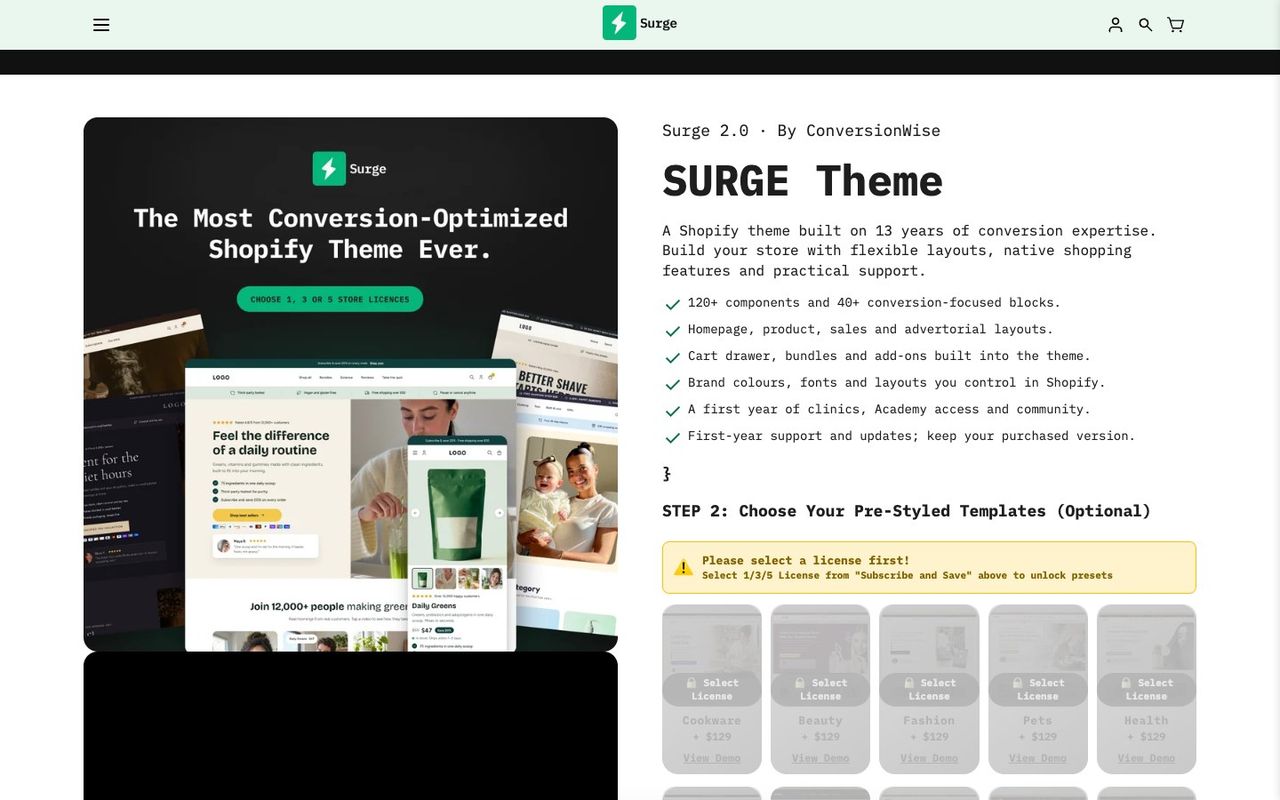
ConversionWise counts its parts differently from page to page: 120+ components on the homepage, 40+ CRO blocks and 10+ page layouts in one section, 140+ blocks and 80+ sections on the sales page. Either way, Surge is a large Online Store 2.0 theme, closer to a page builder than to a minimal theme like Dawn.
Surge is not on the Shopify Theme Store. You buy it on surgetheme.com, upload it to your store, and activate it with a licence key. That has three practical effects: you cannot preview it in your own theme editor before paying, Shopify’s Theme Store review (performance, accessibility and code checks) has not been applied to it, and updates arrive through ConversionWise’s own updater tool rather than through Shopify.
Surge pricing
Licence plans
Surge is sold per store, with a first-year price and a yearly renewal. These are the prices on the product page in November 2026:
Plan | First year | Per store | Renewal |
|---|---|---|---|
1 licence | $497 | $497 | $197/year |
3 licences | $847 | about $282 | $197/year |
5 licences | $997 | about $199 | $197/year |
During our review, a “30% off” countdown banner ran across the site, and launches are sold as limited batches, so check the live price on the day you buy. Niche presets (for example beauty, pets, kitchen or fitness) cost $129 each, or $497 for all of them.
What the first year includes
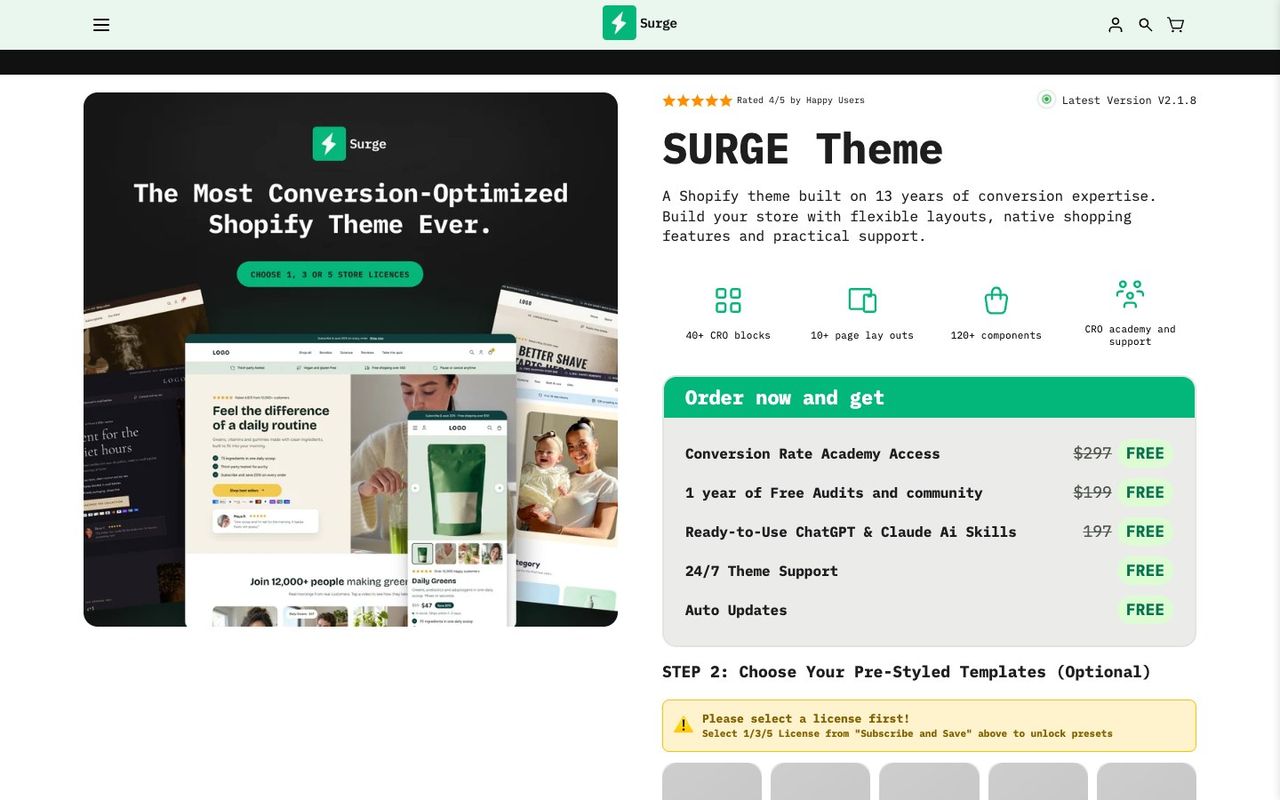
The first-year price bundles training and services around the theme. ConversionWise lists:
- The Conversion Rate Academy, a CRO course it values at $297.
- One year of store audits and access to the community, valued at $199.
- “AI skills” for ChatGPT and Claude, valued at $197.
- 24/7 support, automatic updates and weekly CRO clinics.
These extras are the main reason the first year costs more than the renewal. If you already work with a CRO agency or have no time for courses, you are paying for things you will not use.
Renewal and refund policy
The renewal pays for 12 more months of updates and support. If you stop paying, you keep a perpetual right to use the last version you downloaded, so the store does not break, but it stops getting fixes and new blocks. The refund policy(opens in a new tab) is strict: all sales are final, with no refunds “under any circumstances” except duplicate payments, fraud or where the law requires one. For buyers in the EU and UK, the policy states that you waive the right of withdrawal for digital goods. Support also excludes custom development and conflicts with third-party apps.
What Surge costs over three years
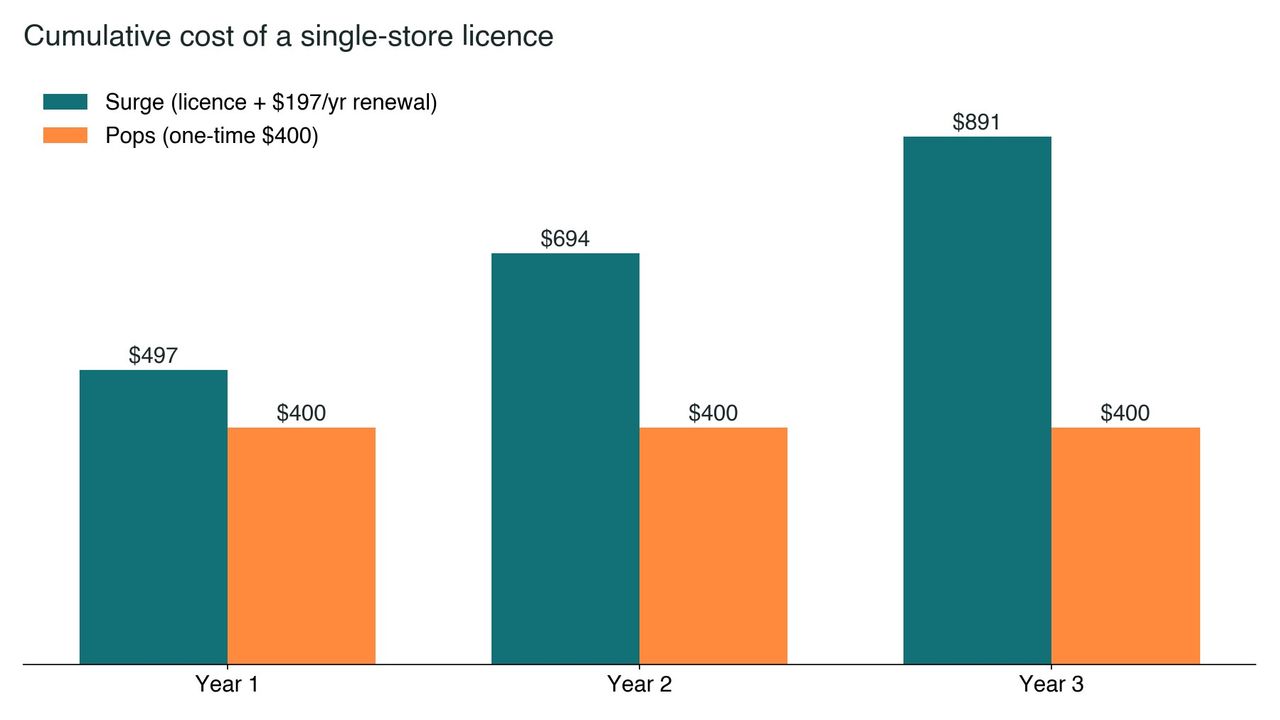
For one store kept up to date, Surge costs $497 in year one and $197 in each following year: $891 over three years. A premium theme from the Shopify Theme Store is a one-time payment with updates included, and Pops, the theme we develop, starts at $400 paid once. The gap is not huge in year one, but it grows every year you renew.
Surge CRO features
This is where Surge earns its price. Most themes give you a homepage, product, collection and cart. Surge adds the page types that paid-traffic brands normally build with a page builder app.
Sales pages, advertorials and listicles
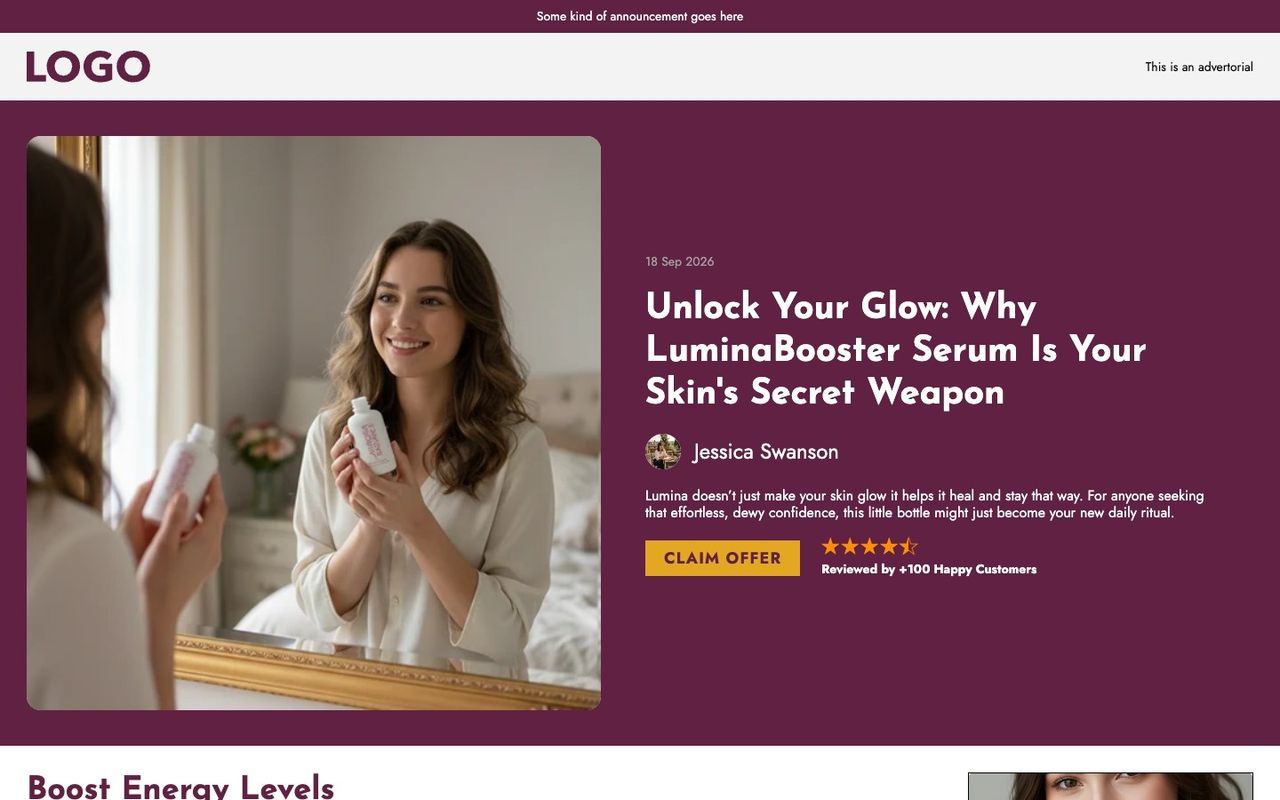
Surge ships templates for homepages, product pages, dedicated sales pages, advertorials, listicles, the cart and add-ons, each designed for mobile first. Sales pages and advertorials are the big difference with most Theme Store themes: you can send Meta or TikTok traffic to a long-form page with a hero product, benefits timeline, comparison table and FAQ tabs without installing a landing page app.
Product page blocks
The product page is built from blocks ConversionWise says it tested one by one:
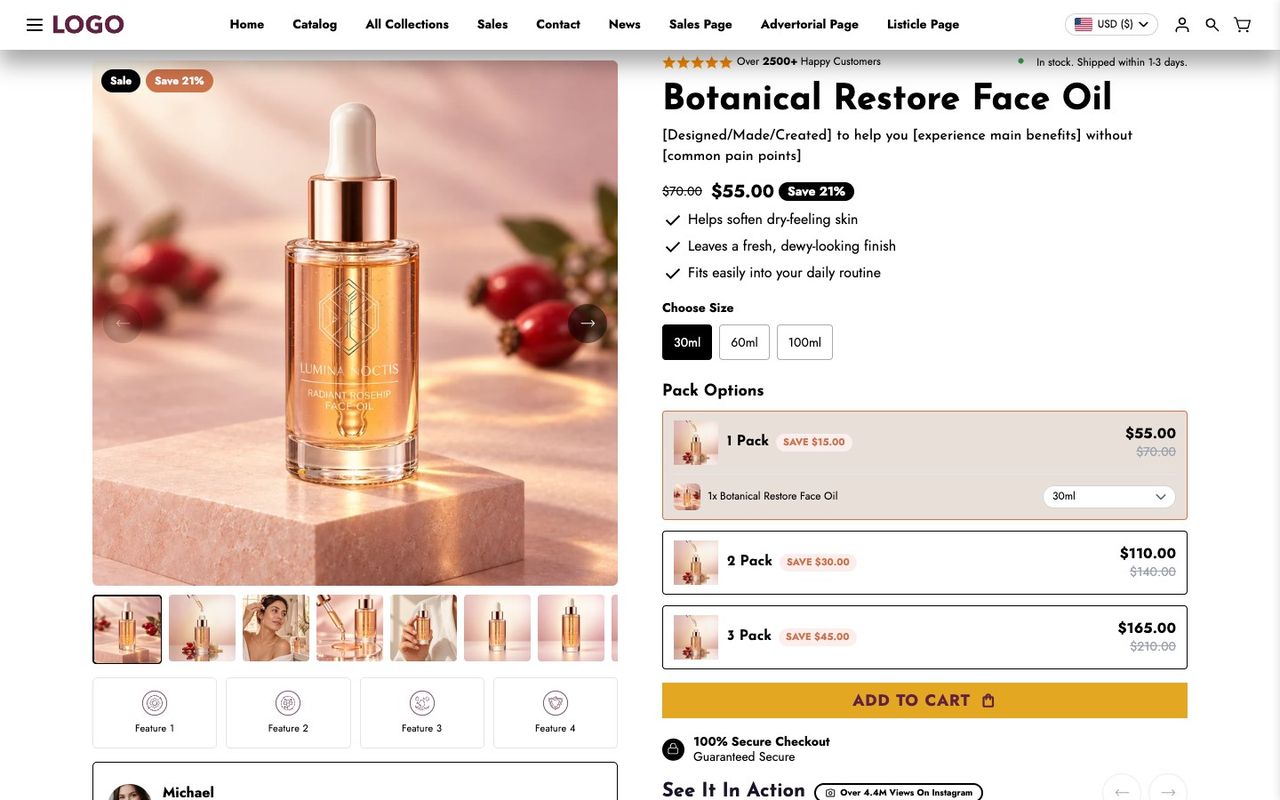
- Buying: purchase buttons, price and savings, product options, pack options, size guide and a dispatch countdown.
- Proof: testimonials, trust icons, highlight cards, a benefits timeline and static reviews.
- Media: media gallery, product video carousel, before/after slider, shoppable images with hotspots and shoppable video.
- Selling more: complete the look, a bundle builder, a side-by-side comparison and a comparison table.
Cart drawer
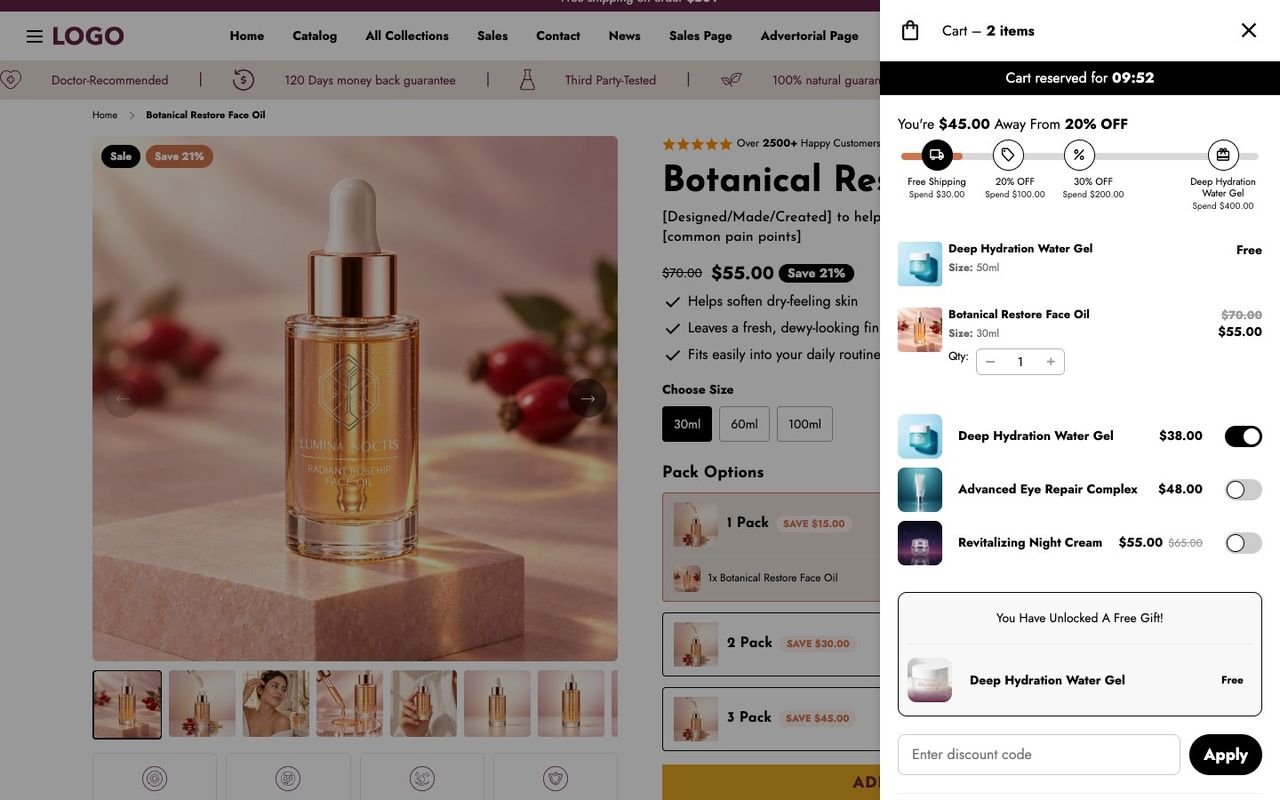
The cart drawer is the most complete part of the theme: a goal bar with up to four tiers, up to three add-ons, a free-gift tier, a discount code field and a cart reservation timer. That covers most of what a cart drawer app does, including the free shipping threshold and cart upsells you would otherwise pay for monthly.
Built-in “apps”
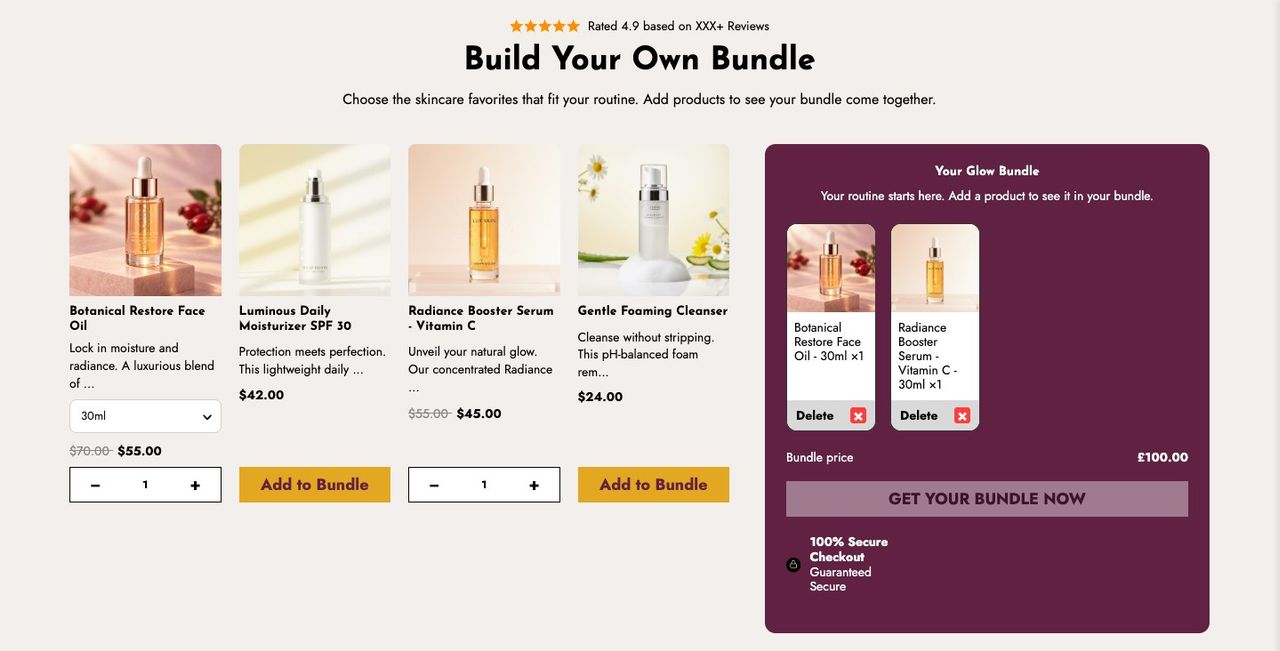
ConversionWise says Surge replaces several apps natively: bundles, cart upsells, UGC videos and reviews. Three of those hold up. Reviews need a caveat: Surge’s review blocks are static, meaning you type the reviews in. They do not collect reviews from customers, send review requests or add review stars to Google, so most stores will still need a review app. For bundles, Surge’s builder covers simple offers; for mix-and-match bundles with tiered discounts, compare it with a dedicated app first.
Niche demos and AI skills
Surge 2.0 ships demo stores for twelve niches: luxury handbags, outdoor, kitchen, jewelry, hair care, home, artisan food, fitness, audio, pets, beauty and kids, with supplements, coffee, fragrance and men’s grooming listed as coming soon. The demos sit behind a password page; the password, which Kenyon shared on X(opens in a new tab), is “surge”. The first year also includes prompts (“skills”) for ChatGPT and Claude to write copy and plan pages around the theme’s blocks.
Do Surge’s A/B test results hold up?
The sales page backs each block with a result from a ConversionWise client test. A selection:
Test (as described by ConversionWise) | Claimed result |
|---|---|
Optimized cart drawer | +$149,227 per month |
Dedicated sales page | +$95,615 per month |
Comparison table | +$32,884 per month |
Product page add-on | +25.86% revenue per visitor |
USPs on the product page | +25% revenue |
Mega menu layout | +19.39% revenue per visitor |
Review above the fold | +8.5% conversion rate |
Enhanced features and benefits | +8.16% revenue per visitor |
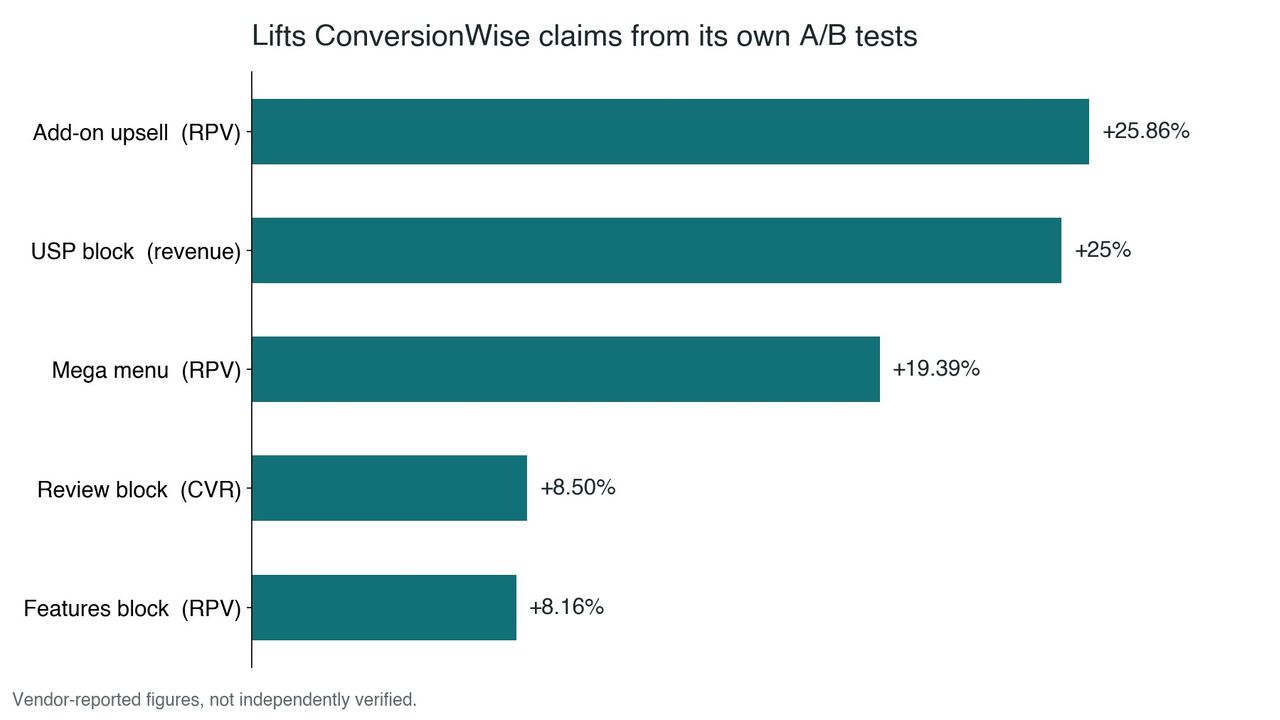
These are useful as CRO ideas, but read them for what they are:
- They are client tests, not tests of Surge. Each one compares two versions of a single element on a client store, often before Surge existed. None compares Surge with another theme.
- Dollar figures depend on the store. “+$149,227 a month” describes one large client. A store doing $20,000 a month cannot get that number, whatever theme it uses.
- A winning test does not always transfer. A review above the fold may lift one brand’s conversion rate and do nothing for another. ConversionWise itself adds “Results vary.”
- There is no independent data yet. We found no published before-and-after numbers from merchants who switched to Surge.
A CRO theme gives you proven patterns to start from, not a guaranteed conversion rate. Measure your own baseline first (here is what an average Shopify conversion rate looks like), then test the changes that matter for your products.
How fast is Surge? Our Lighthouse test against the Theme Store rules
Before a theme goes on sale in the Shopify Theme Store, Shopify’s team checks it against its published requirements(opens in a new tab), which set two Lighthouse minimums: an average performance score of at least 60 and an average accessibility score of at least 90, across the home, product and collection pages, on both mobile and desktop. Surge is sold outside the Theme Store, so nobody has checked it against that bar. We ran the same test ourselves on the two demo stores (password “surge”).
We ran Lighthouse 12.8 on 24 November 2026 on each demo’s homepage, a product page and the full collection page: three runs in mobile mode (a mid-range phone on slow 4G, simulated), keeping the median, and one run in desktop mode. Shopify tests submitted themes with its own benchmark content, so a demo score is an indication, not the official result: the demos carry their own videos and photos.
Lighthouse scores against the Theme Store minimums
Demo page | Performance, mobile | Performance, desktop | Accessibility | LCP, mobile | Page weight |
|---|---|---|---|---|---|
Beauty, homepage | 71 (62 to 77) | 77 | 88 | 5.5 s | 2.7 MB |
Beauty, product page | 46 (36 to 51) | 89 | 75 | 11.4 s | 24 MB |
Beauty, collection | 72 (70 to 72) | 87 | 92 | 7.0 s | 2.3 MB |
Fitness, homepage | 76 (63 to 81) | 89 | 88 | 5.8 s | 3.5 MB |
Fitness, product page | 66 (59 to 69) | 88 | 77 (80 on desktop) | 10.6 s | 35 MB |
Fitness, collection | 70 | 87 | 88 | 9.6 s | 2.9 MB |
Beauty, average | 63 | 84 | 85 | – | – |
Fitness, average | 71 | 88 | 84 (85 on desktop) | – | – |
Theme Store minimum | 60 | 60 | 90 | – | – |
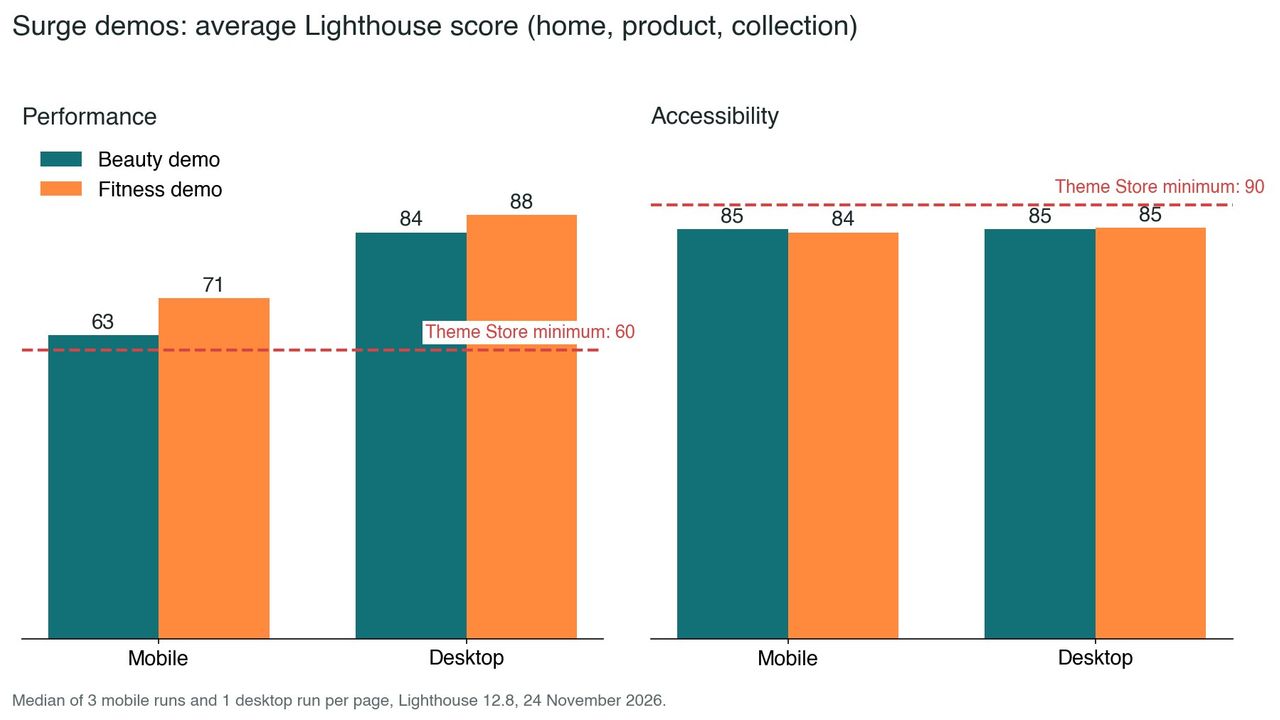
Performance passes, accessibility does not. Both demos clear the performance minimum on mobile (63 and 71) and comfortably on desktop (84 and 88), though the beauty demo only just: its product page scores 46 on mobile. Accessibility averages 84 to 85, under the 90 Shopify requires, and every product page sits between 75 and 80. As things stand, the demos would not pass the Theme Store’s Lighthouse check.
What fails on accessibility
Lighthouse flags the same issues on both demos. Some come from the theme’s code: the logo link has no accessible name, the comparison table on product pages uses table roles without the rows and cells screen readers expect, the product tabs give labels a role they are not allowed to have, and the rating stars carry a label on an element that does not accept one. Others depend on your settings and content: sale badges and crossed-out prices with too little colour contrast, and images without alt text, including the video preview images. You can fix the second group from the theme editor and the admin; the first needs code changes or a fix from ConversionWise.
For comparison, when we tested the three demo stores of Pops, the theme we develop, the same way in November 2026, their homepages scored 92 to 100 for accessibility.
Where the mobile time goes
The theme code itself is light. Surge’s own JavaScript weighs 71 to 95 KB per page, less than the scripts Shopify loads on every store (160 to 190 KB). The problem is media: each demo product page loads three 1080p MP4 videos (up to 7.2 Mbps, 20 to 32 MB in total) even on a phone, which pushes the largest contentful paint (LCP) past 10 seconds on mobile. Lighthouse also flags a lazy-loaded main image on the fitness product page, and the beauty product page shifts by 0.33, well above the 0.1 limit Google treats as good for cumulative layout shift(opens in a new tab).
On desktop, the same product pages score 88 and 89, with an LCP around 2 seconds. So the speed risk is mobile and video weight, not the theme’s code. Part of it is demo content you would replace, but test with your own product videos before going live: compress them, cap their resolution on mobile, and check that the first product image is not lazy-loaded.
Limits and red flags
- No try-before-you-buy. Theme Store themes let you try them in your own editor for free. With Surge, your only preview is the password-protected demos, and every sale is final.
- A yearly bill. The $197 renewal is optional, but without it you stop getting fixes and new blocks. Over five years, one store pays $1,285.
- No Shopify review. Themes sold outside the Theme Store skip Shopify’s performance and accessibility checks. On the demos, Surge passes the performance minimum but not the accessibility one (84 to 85 against 90). With 100+ blocks in one theme, test speed on your own products before going live.
- Scarcity marketing. Limited batches of 500 licences, a cart that closes after a week and countdown banners push you to decide fast. Give yourself time to check the demos.
Surge theme reviews: what merchants say
Independent Surge reviews are rare. Searching X turns up mostly posts from ConversionWise and its founders. Among outside voices, Olly Hudson, who shares clients with the ConversionWise team, called it(opens in a new tab) “the clearest execution of proven conversion principles I’ve seen in a customisable Shopify theme”, while one reply to the first launch said(opens in a new tab) “Your demo pages are full of bugs.” Kenyon later acknowledged(opens in a new tab) bugs and setup issues in version 1 and said they were fixed over the nine months before Surge 2.0.
The site shows a “Rated 4/5 by Happy Users” badge without a review platform behind it. ConversionWise’s Trustpilot page rates the agency, not the theme, so it says little about Surge itself. Given how new 2.0 is, expect real merchant feedback to build through 2027.
Surge alternatives
If you want a high-converting Shopify theme without a yearly licence, there are three routes. First, premium themes on the Theme Store: you pay once, can try before buying and get Shopify’s quality review. We compared the main ones in our guide to the highest-converting Shopify themes. Second, a lighter theme plus a few apps for the cart drawer, bundles and reviews; this costs more each month but keeps every piece replaceable. Third, if you are buying Surge mostly for its CRO knowledge, a Shopify CRO agency will test changes on your own traffic rather than someone else’s.
Do you need a CRO theme at all?
Conversion rate optimization is a process: find where shoppers drop off, change one thing, measure. A theme cannot do that for you, but it can save you from building basics like a cart drawer with a free-shipping bar and upsells, a comparison table or a before/after slider. The question is which features your store actually needs.
For transparency: we develop Pops, a Shopify theme, so weigh this table with that in mind. Here is how Surge compares with what Pops includes out of the box.
Feature | Surge | Pops |
|---|---|---|
Price | $497 first year, then $197/year | From $400, one-time payment |
Cart drawer with goal bar | Yes, up to 4 tiers | Yes, free shipping bar |
Cart upsells | Yes, up to 3 add-ons | Yes, upsell slider |
Free gift in cart | Yes | No |
Bundles | Yes, bundle builder | Yes, build-a-box with 4 discount tiers |
Countdown timer | Yes | Yes |
Comparison table | Yes | Yes |
Before/after slider | Yes | Yes |
Sticky add to cart | Not mentioned | Yes |
Size guide | Yes | No |
Shoppable and UGC video | Yes | No |
Sales page and advertorial templates | Yes | No |
Presets | Niche presets at $129 each | Yes, 3 presets: Pops, Lueur, Scoop |
On the Shopify Theme Store | No, sold on surgetheme.com | No, in review |
Developer | ConversionWise | Trafik Plus (us) |
In short, Surge goes further on paid-traffic pages: sales pages, advertorials, shoppable video and a free-gift cart tier. Pops covers the cart, bundles and product page features most beauty, food and drink brands use every day, for a one-time price and with no renewal.
How to evaluate Surge before you buy
- Open the demo for your niche on surgetheme.com and enter the password “surge”.
- Browse it on your phone, since most of your traffic is mobile: open the cart drawer, add a bundle, scroll a product page to the bottom.
- Open Chrome DevTools on the demo (after entering the password) and run Lighthouse in Mobile mode, then Desktop, on the homepage, a product page and a collection page. Compare the averages with Shopify’s Theme Store minimums: 60 for performance, 90 for accessibility. PageSpeed Insights will not work here: it runs from Google’s servers and only sees the password page.
- List the apps Surge would replace in your store and add up their monthly cost. If the total is under about $16 a month, the renewal will cost you more.
- Check which of your current apps you would keep (reviews, subscriptions, loyalty), since support does not cover app conflicts.
- Decide whether you need sales pages and advertorials. If you do not run paid traffic to dedicated landing pages, a Theme Store theme or Pops will cover the rest.
Our verdict
Surge is one of the most complete CRO Shopify themes you can buy, and the sales page, advertorial and cart drawer templates are genuinely useful for brands that live on paid traffic. The A/B test numbers are good inspiration, not a forecast for your store. The weak points are commercial rather than technical: a yearly renewal, no refunds, no free trial and almost no independent reviews yet. If you run ads to dedicated landing pages and would otherwise pay for a page builder plus a cart app, Surge can pay for itself. If you run a smaller catalog store, a one-time theme such as Pops or a Theme Store premium theme, plus your own testing, gets you most of the way for less.
Surge Shopify theme FAQ
How much does the Surge Shopify theme cost?
A single-store licence costs $497 for the first year, then $197 a year for updates and support. Three licences cost $847 and five cost $997. Niche presets cost $129 each, or $497 for all.
Is Surge on the Shopify Theme Store?
No. Surge is sold on surgetheme.com and activated with a licence key. A buyer asked on X whether it would come to the Theme Store, and we found no public answer.
Is the Surge Shopify theme fast?
Its code is light: Surge’s own JavaScript is 71 to 95 KB per page. In our Lighthouse test on the two demos, average performance was 63 and 71 on mobile and 84 and 88 on desktop, above the Theme Store minimum of 60. Accessibility averaged 84 to 85, below the 90 Shopify requires of Theme Store themes. Product pages are the weak spot on mobile, because they load several 1080p videos (24 to 35 MB per page).
Can I get a refund on Surge?
No. ConversionWise states that all sales are final, except for duplicate payments, fraud or where the law requires a refund. Check the demos carefully before you buy.
What happens if I don’t renew my Surge licence?
You keep the right to use the last version you downloaded, so your store keeps working. You stop receiving updates, new blocks and support.
Who makes Surge?
Surge is developed by ConversionWise Ltd, a London CRO agency co-founded by Oliver Kenyon and Andy Haskins. Rezwan Kabir is the theme’s head of product.
Is Surge the best Shopify theme for conversion?
It is one of the most feature-rich CRO themes, especially for sales pages and advertorials. But no theme guarantees a conversion rate; your products, offer and traffic matter more. Compare it with Theme Store premium themes and Pops for your own use case.
Keep reading

Highest-Converting Shopify Themes: 8 Picks Judged on CRO
No theme publishes a conversion rate. Here are 7 CRO criteria (INP, cart drawer, sticky add to cart, search, bundles, reviews, mobile) and 8 Theme Store themes judged on them.

Shopify Taste Theme: Review, Features, Image Sizes and Setup Guide
Taste is a free Shopify theme built on Dawn for specialty food, drinks and craft brands. Features, image sizes, Taste vs Dawn, honest limits and a safe setup guide.

Shopify Dawn Theme: Review, Features, Image Sizes and Setup Guide
Dawn is Shopify's free reference theme and the most used theme on Shopify. Features, image sizes, Dawn vs Horizon, honest limits and how to update it safely.