
Upsell vs Cross-Sell: What's the Difference? (With Shopify Examples)

Summarize this article with AI


Upselling offers a better version of what the shopper picked. Cross-selling offers something that goes with it. Here is the difference, and where each belongs on Shopify.
The short answer to upsell vs cross-sell: an upsell offers the shopper a better or bigger version of what they already chose, and a cross-sell offers something that goes with it. A larger bag of coffee is an upsell. A grinder next to the coffee is a cross-sell.
Both raise the value of an order, and most stores need both. They work at different moments, though, and they fail in different ways. This guide covers what each one means, how they differ, where down-selling fits, and where each offer belongs in a Shopify store, from the product page to the thank-you page.
What is upselling?
Upselling is offering a customer a higher-priced, upgraded or larger version of the product they are already considering. The shopper keeps the same need; you offer a better way to meet it. Upgrades include a bigger size, a premium material, a longer warranty or a multi-pack.
On an online store, an upsell usually looks like one of these:
- A size or pack selector where the bigger option shows a better price per unit ("3 for €45 instead of €20 each").
- A "Pro" or "Deluxe" variant shown above the standard one.
- A one-click offer after payment to upgrade or add a second unit at a discount.
The upsell works when the upgrade is easy to justify. Price per unit, durability or a clear extra feature do the convincing. It fails when the jump in price feels arbitrary.
What is cross-selling?
Cross-selling is offering a customer a different product that complements the one they are buying. The shopper's main choice does not change; you add something that makes it work better, last longer or feel complete. Think charger with a phone, case with glasses, conditioner with shampoo.
On an online store, cross-selling shows up as:
- "Frequently bought together" sets on the product page.
- Add-ons the shopper can tick before adding to cart (gift wrap, a refill, a matching accessory).
- A "You may also like" or "Complete the look" slider in the cart.
Amazon is the textbook case. McKinsey estimated in 2013(opens in a new tab) that 35% of what consumers buy on Amazon comes from product recommendations. Many of those recommendations, such as "Frequently bought together", are cross-sells.
Upsell vs cross-sell: the key differences
The difference between cross-sell and upsell comes down to what you are changing: the product the shopper picked, or the size of the basket around it.
Upsell | Cross-sell | |
|---|---|---|
What you offer | A better or bigger version of the same product | A different product that goes with it |
Shopper's question | "Is the upgrade worth it?" | "Do I need this too?" |
Effect on the order | Higher price for the same item | More items in the basket |
Best moment | Before the add to cart, or right after payment | Product page, cart, and after payment |
Typical format | Size/pack selector, premium variant, post-purchase upgrade | Add-ons, bundles, cart slider |
Main risk | Price jump that feels pushy | Irrelevant suggestions that add noise |
Use an upsell when the shopper has a clear need and a better option exists. Use a cross-sell when the product works better with something else. Many offers mix the two: a bundle that turns one item into a set is a cross-sell priced like an upsell.
And down-selling?
Down-selling is the opposite move: offering a cheaper alternative when the shopper is about to leave without buying. A smaller pack, an older model, a trial size, or the same product without the premium option.
A down-sell saves a sale you were about to lose. It belongs at moments of hesitation, not as the first offer. Two places work well:
- After an upsell is declined. If a shopper refuses the post-purchase upgrade, a cheaper second offer (a smaller add-on, a lower discount threshold) gives them an easier yes.
- On exit or in a recovery email. A lighter version of the product they viewed, for shoppers put off by price.
A down-sell should not undercut your main product. Offer a genuinely different option, not the same thing at a lower price, or shoppers learn to wait for the discount.
Where each one goes in a Shopify store
A Shopify store has five places where an offer can appear. Each suits a different tactic.
Placement | Best tactic | How it's set up on Shopify |
|---|---|---|
Product page | Cross-sell (add-ons, bundles) and upsell (packs, variants) | Theme blocks plus an app for discounted add-ons and bundles |
Cart and cart drawer | Cross-sell (complementary products) | Theme block using Shopify's product recommendations |
Checkout | Light cross-sell only | Checkout extensions, Shopify Plus only |
Thank-you page | Upsell, then down-sell | App only: post-purchase pages are not available to themes |
Email after the order | Cross-sell and replenishment | Email app (Shopify Email, Klaviyo, etc.) |
Product page: add-ons and "frequently bought together" bundles
The product page is where the shopper is still deciding, so it carries the most weight. Two formats work here.
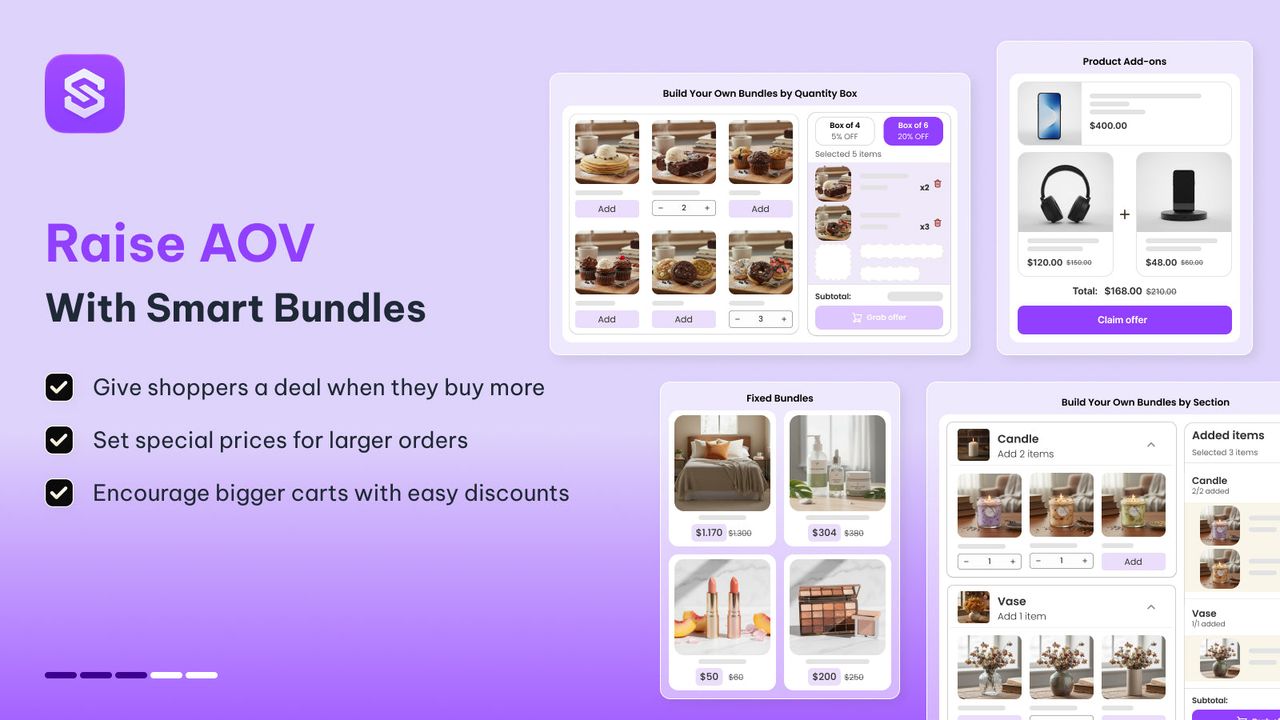
Product add-ons sit under the add-to-cart button: a short list of extras the shopper can tick before buying. With Snap Bundle's product add-ons, you choose the add-on products, set a minimum and maximum number of picks and give each one a discount. Shoppers pick variants in place, and Shopify applies the discount at checkout through a discount function, with no code to enter.
Frequently bought together bundles turn two or three products into one set with a single price. They read as a cross-sell, but the discounted set price works like an upsell: the shopper spends more and feels they got a deal. If you are new to the format, our guide on what a bundle is covers the main types.
Keep the product page to one or two offers. A wall of suggestions above the fold competes with the product itself.
Cart and cart drawer: a complementary product slider
Once the main item is in the cart, the shopper has committed. That makes the cart the right place for small, low-friction cross-sells: refills, accessories, a care product.
Shopify can do this without an app. Its product recommendations(opens in a new tab) come in two kinds: related, worked out automatically, and complementary, which you set yourself in the Search & Discovery app. The Pops theme's cart upsell slider reads those recommendations and shows them in both the cart page and the cart drawer.
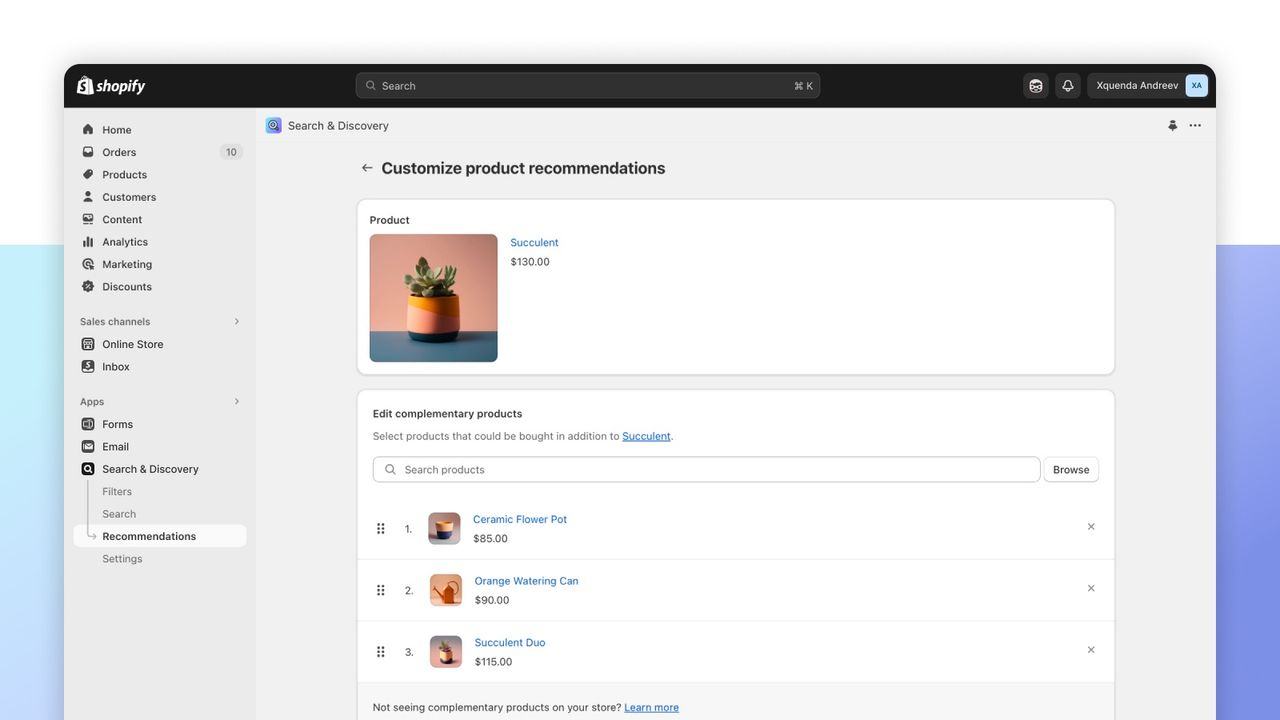
Pick complementary over related where you can. Related products are often alternatives to what is already in the cart, which can make the shopper second-guess the choice instead of adding to it.
Checkout: keep it light
The checkout is where you protect conversion. Offers here need a Shopify Plus plan, since only Plus stores can add extensions to the checkout steps(opens in a new tab). Even on Plus, keep it to a single low-price item that does not need explanation.
Thank-you page: post-purchase upsell and downsell
The moment after payment is the safest place for an offer, because the main order is already paid. Whatever the shopper decides, you do not lose the sale.
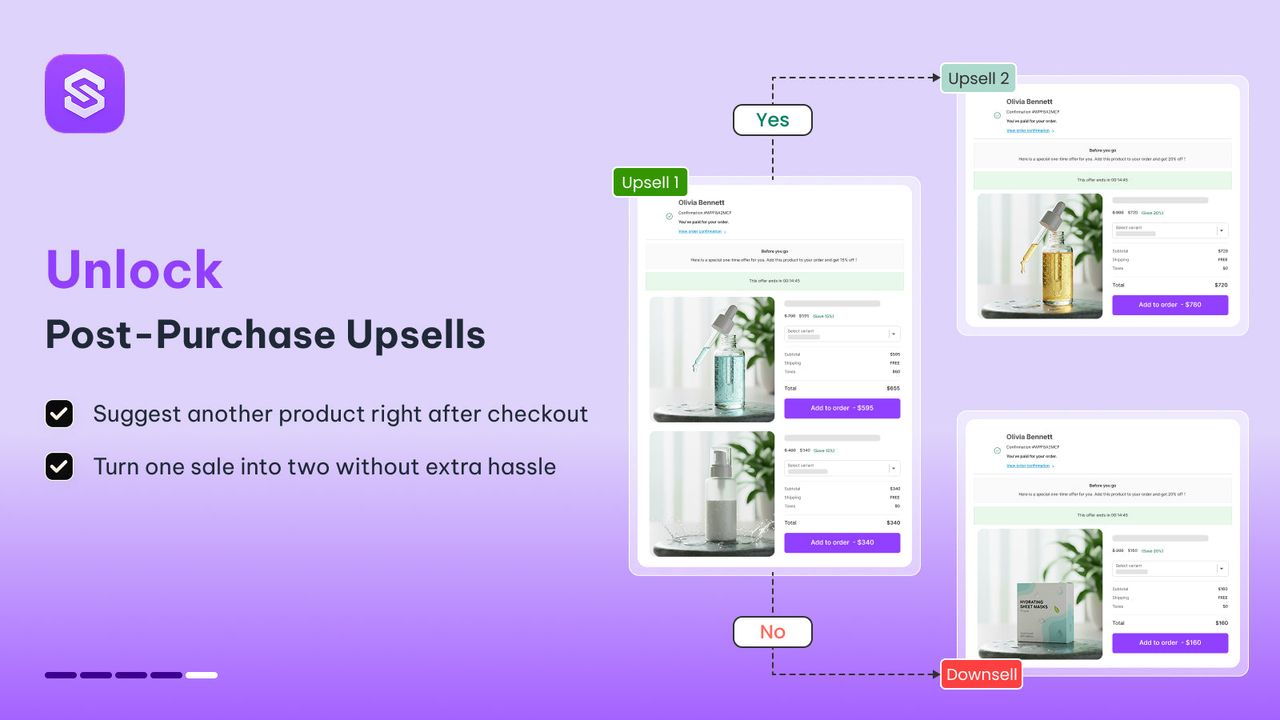
A Shopify theme cannot add this step; only apps can(opens in a new tab). Snap Bundle's post-purchase upsell shows up to two upsells and one downsell after payment, with a percentage, fixed-amount or fixed-price discount. Each offer can be targeted by cart total, products, collections, product tags, vendors, customer tags or segments, currency, language or market.
A typical sequence:
- Upsell: "Add a second bottle at 20% off."
- If declined, down-sell: "Try the travel size for €8."
For the full setup, with seven examples, see our guide to Shopify post-purchase upsells.
Email after the order
A few days after delivery, a cross-sell email can suggest the product that pairs with what the customer bought, or a refill when the first one is likely to run out. It works best for consumables and for products with clear accessories.
Upsell and cross-sell examples from Shopify stores
Three Shopify stores, each showing a different offer. Prices are the ones listed in October 2026.
Brooklinen: an upsell and a cross-sell on the same product page
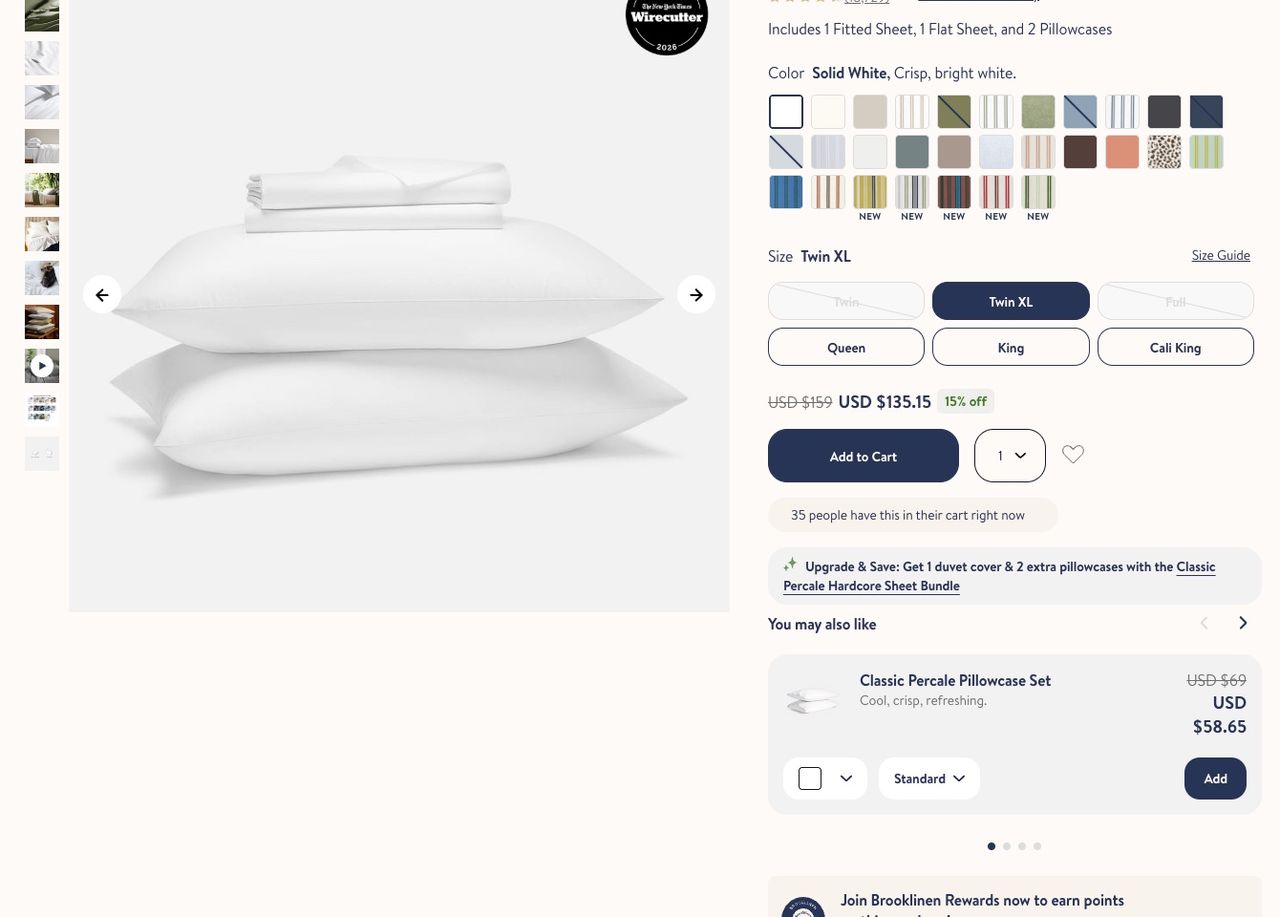
On the Classic Percale Core Sheet Set page (fitted sheet, flat sheet and two pillowcases), Brooklinen(opens in a new tab) places two offers right under the add-to-cart button. The first is an upsell: "Upgrade & Save" points to the Hardcore Sheet Bundle, the same set plus a duvet cover and two extra pillowcases, listed at $387 in queen against $199 for the Core set. The second is a cross-sell: a "You may also like" carousel with the matching pillowcase set and its own Add button.
The order is the lesson. The upgrade comes first, while the shopper is still choosing what to buy. The add-on comes second, once the main choice is made.
Allbirds: socks in the cart drawer
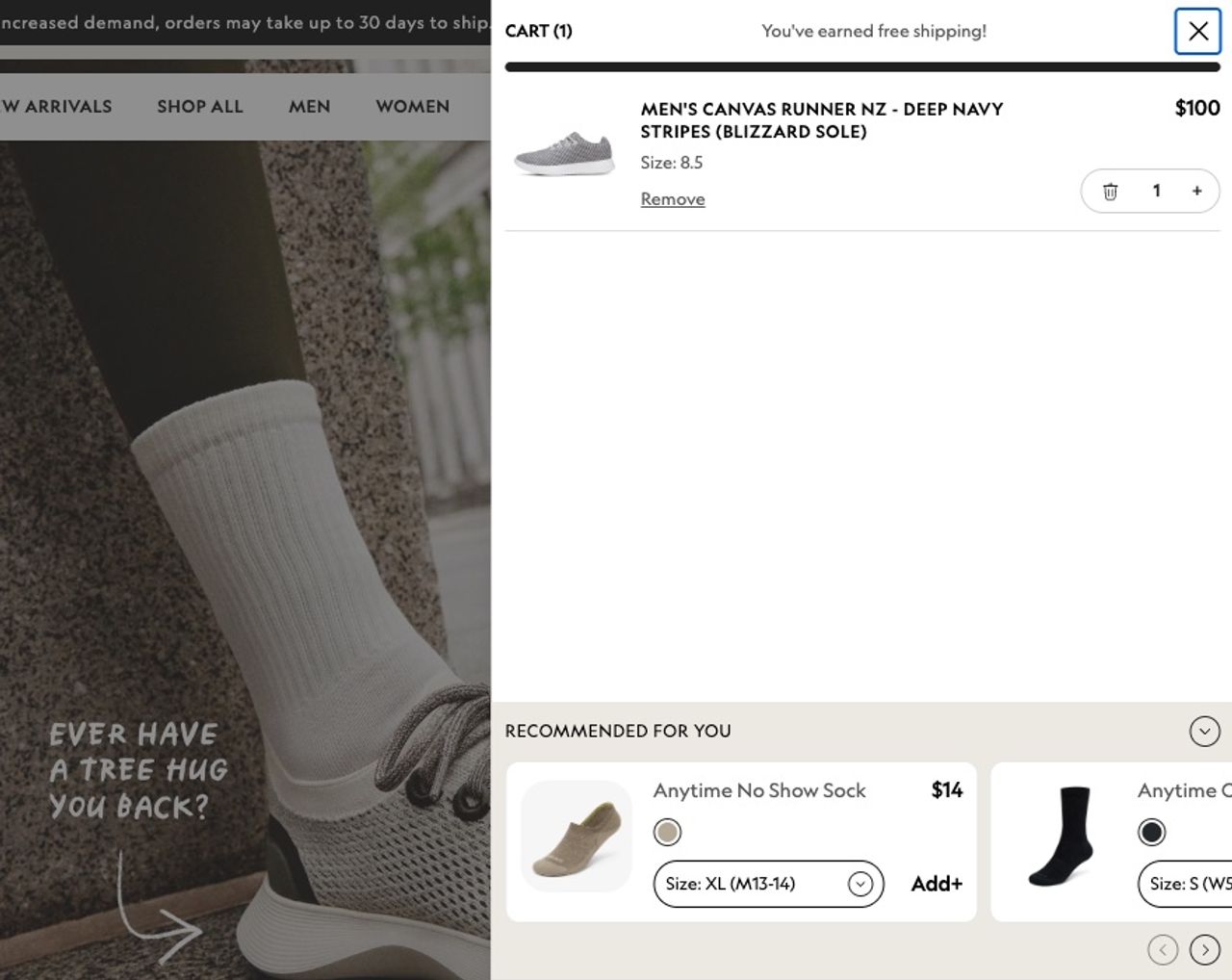
Add a pair of Canvas Runners ($100) on Allbirds(opens in a new tab) and the cart drawer opens with a "Recommended for you" row: no-show socks at $14, with a size picker and an Add button. That is a cart cross-sell done by the book: the item costs a fraction of the shoes, it obviously goes with them, and the shopper adds it without leaving the cart.
Native: a bigger size and a subscription on one page
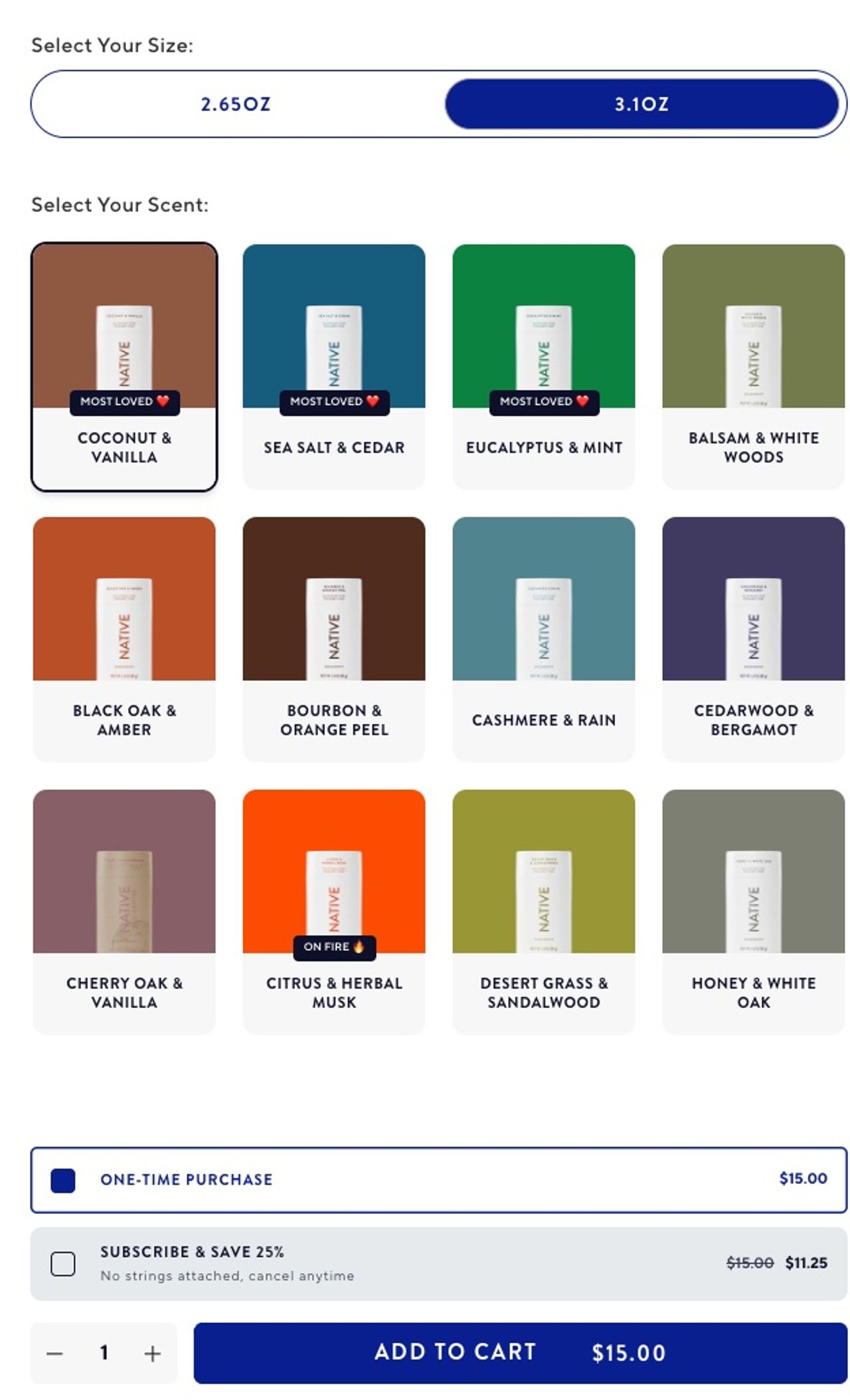
On the Native(opens in a new tab) deodorant stick page, the size toggle does the upselling. The 2.65 oz stick costs $14 and the 3.1 oz one costs $15, so the bigger stick comes to about $4.84 per ounce against $5.28. A "Subscribe & save 25%" option sits above the add-to-cart button, and a "You may also like" row below it offers body wash, hand soap and body lotion in the same scent.
More ideas by store type
These are illustrations of how each tactic looks by store type, not results from a specific store.
Cross-selling examples
- Coffee: a grinder or a filter pack offered as an add-on to a bag of beans.
- Skincare: cleanser, serum and moisturiser sold as a routine bundle.
- Apparel: a "complete the look" slider in the cart drawer with the matching belt or socks.
- Electronics: a case and screen protector as add-ons on the phone page.
Upselling examples
- Coffee: a 1 kg bag shown next to the 250 g bag with the price per 100 g.
- Skincare: a 100 ml size with a lower price per ml than the 50 ml.
- Apparel: a 3-pack of T-shirts at a set price on the single-T-shirt page.
- Electronics: a two-year extended warranty offered after payment.
How to measure whether it works
An offer that nobody accepts is clutter. Track three numbers:
- Average order value (AOV): total revenue divided by number of orders. It should rise after you add offers. Our page on how to increase average order value covers the levers.
- Take rate per offer: how many shoppers who saw an offer accepted it. Low take rate usually means a weak pairing or a price that's too high.
- Revenue per visitor: total revenue divided by sessions. This one catches the trap where AOV goes up but conversion goes down, because a crowded page or checkout made some shoppers leave.
Compare periods of the same length and avoid sale periods, which inflate every number. If you also run ads, plug the new AOV into a ROAS calculator: a higher basket lets you pay more per click and stay profitable.
Mistakes to avoid
- Too many offers. One or two per page. More than that dilutes attention and slows the page.
- Irrelevant pairings. A cross-sell has to make sense next to the main product. Set complementary products by hand for your best sellers.
- Upsells far above the original price. A jump that doubles the cart reads as pushy. Keep upgrades close to the original price unless the value is obvious.
- Blocking the checkout. Pop-ups between cart and payment cost sales. Save bigger offers for after payment.
- Discounting everything. If every add-on is discounted, the discount stops meaning anything. Keep discounts for bundles and post-purchase offers.
Tools: native Shopify vs upsell apps
Shopify covers part of this on its own: the Search & Discovery app lets you set complementary products, and a theme block can show them in the cart. What needs an upsell app on Shopify is anything with a discount tied to the offer (add-ons, bundles, volume pricing) and anything after payment.
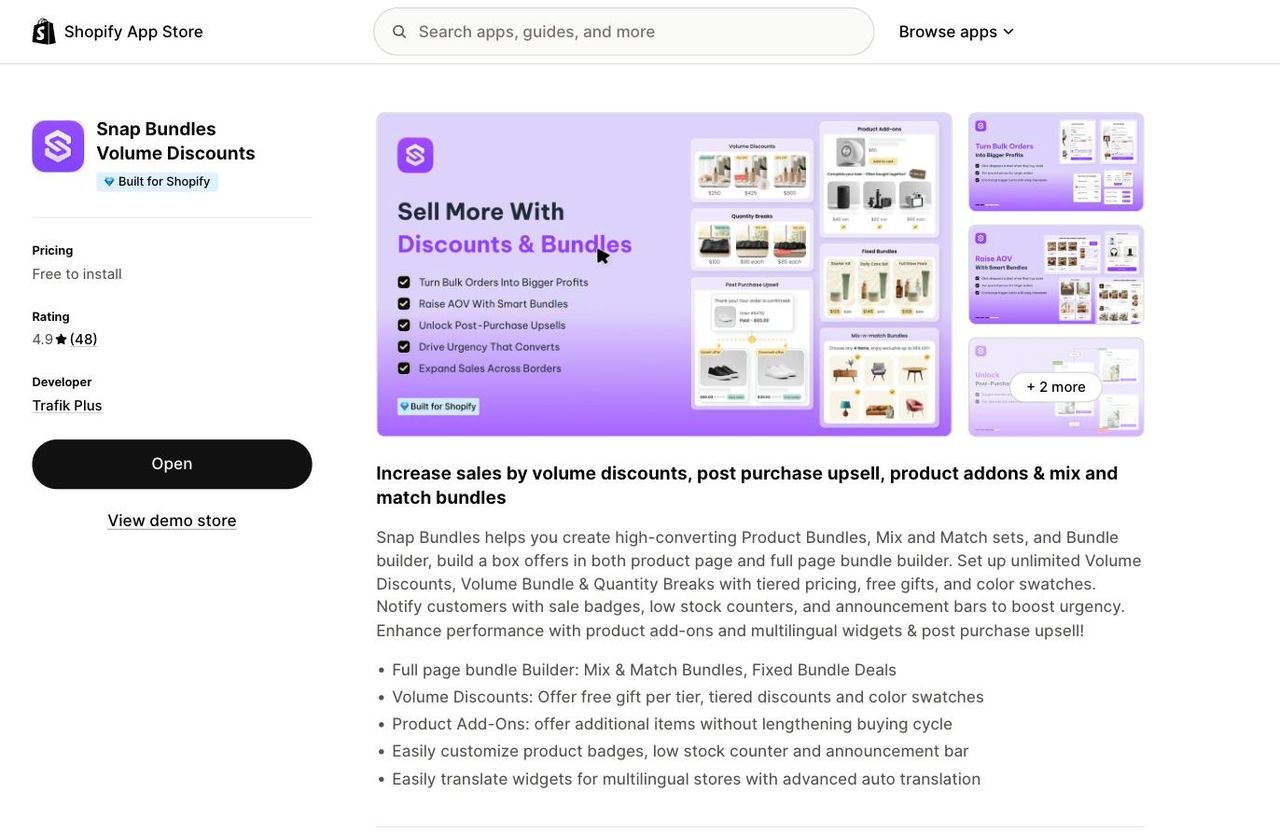
When you compare the best Shopify upsell apps, check four things:
- Does the discount apply automatically at checkout, without codes?
- Can it show offers after payment, with a downsell when the upsell is declined?
- Does it add blocks through the theme editor, without editing theme code?
- Is the price flat, or does it rise with your order volume?
Snap Bundle covers the product page (add-ons, bundles, volume discounts) and the post-purchase page, with discounts applied by Shopify discount functions. The Pops theme adds the cart and cart-drawer slider without an extra app.
Frequently asked questions
What is the difference between upselling and cross-selling?
Upselling offers a better, bigger or more expensive version of the product the shopper already chose, such as a larger size or a premium model. Cross-selling offers a different product that goes with it, such as a case for a phone. An upsell replaces the choice; a cross-sell adds to it.
Is a bundle an upsell or a cross-sell?
Both. A bundle groups complementary products, which makes it a cross-sell, and sells them at one higher price, which works like an upsell. A "frequently bought together" set is the most common example. See our guide on what a bundle is for the main types.
Which works better, upselling or cross-selling?
It depends on the moment rather than the tactic. Upsells work while the shopper is still choosing, on the product page, or right after payment. Cross-sells work once the main item is decided, in the cart or in a follow-up email. Test both and compare the take rate of each offer and your revenue per visitor.
What is an example of upselling on Shopify?
A size or pack selector where the bigger option has a lower price per unit, like Native's 3.1 oz deodorant stick at $15 next to the 2.65 oz one at $14. Another is an "Upgrade" link to a larger set, like Brooklinen's Hardcore Sheet Bundle on its Core Sheet Set page.
Can you upsell and cross-sell on Shopify without an app?
Partly. Variants handle size and pack upsells, and the free Search & Discovery app lets you set complementary products that a theme can show in the cart. You need an app for discounts tied to an offer (add-ons, bundles, volume pricing) and for offers after payment. Offers inside the checkout steps also require Shopify Plus.
Do upsells annoy customers?
They do when the offer is irrelevant, when the price jump is too large, or when a pop-up stands between the cart and payment. One or two relevant offers per page, priced close to the original item, rarely get in the way.
Conclusion
Upselling changes what the shopper buys; cross-selling adds to it; down-selling catches the shopper who was about to leave. On Shopify, put cross-sells on the product page and in the cart, keep the checkout clean, and use the page after payment for upgrades and a down-sell fallback. Then watch take rate and revenue per visitor, not just AOV.

Keep reading

The IKEA Effect: What It Is, Real Examples, and How to Use It to Sell More
The IKEA effect makes people value what they help create. Here is the research behind it, brands that use it, and how to turn it into build-your-own bundles.

Trendtrack Review: Complete Guide (2026)
Trendtrack in 2026: features, pricing from $34 to $111/month, user reviews, limits and alternatives, to decide whether the tool is worth its price.

What Are Bundles in Ecommerce? Types, Examples and Pricing
What are bundles in ecommerce? The 7 types of product bundles, real examples, how to price them without losing margin, and how to create a Shopify bundle.