
Upsell Examples: 10 Real Shopify Upsells, by Placement

Summarize this article with AI


Ten upsell examples from Our Place, MUD\WTR and Pura Vida, by placement (product page, cart, checkout, post-purchase, email), with why each works.
An upsell asks a shopper who is already buying to spend more on a better version of the same purchase: the bigger size, the set instead of the single item, the subscription instead of the one-off order. The upsell examples below come from live Shopify stores (Our Place, MUD\WTR and Pura Vida), grouped by where the offer appears: product page, cart, checkout, after payment and email.
For each one you get what the shopper sees, why it works and how to copy it on your own store. If you need the definitions first, read our guide to upsell vs cross-sell. This article is the gallery.
Upsell examples at a glance
# | Store | Placement | Offer | Type |
|---|---|---|---|---|
1 | Our Place | Product page | Single pan → duo → 8-piece set | Tier upgrade |
2 | Our Place | Product page | Utensil set and storage as checkboxes | Add-on |
3 | MUD\WTR | Product page | Subscribe and save, pre-selected | Subscription |
4 | Pura Vida | Cart drawer | $10 items to reach free shipping | Threshold |
5 | Pura Vida | Cart drawer | Returns + protection on the checkout button | Add-on |
6 | Our Place | Checkout | "Complete your kitchen upgrade" | Add-on |
7 | Pura Vida | Checkout | $7 gift box | Add-on |
8 | Any store | After payment | One-click offer before thank-you page | Post-purchase |
9 | Flow idea | Refill reminder → subscription | ||
10 | Flow idea | "Complete the set" |
All screenshots were taken on October 27, 2026 in a fresh browser session from the US. Prices and offers change, so check the live store before you quote them.
Product page upsell examples
The product page is where the shopper decides what to buy, so it is the cheapest place to make "the bigger option" the default. There is no extra step: the upsell is part of the choice.
1. Our Place: the single pan, the duo or the full set
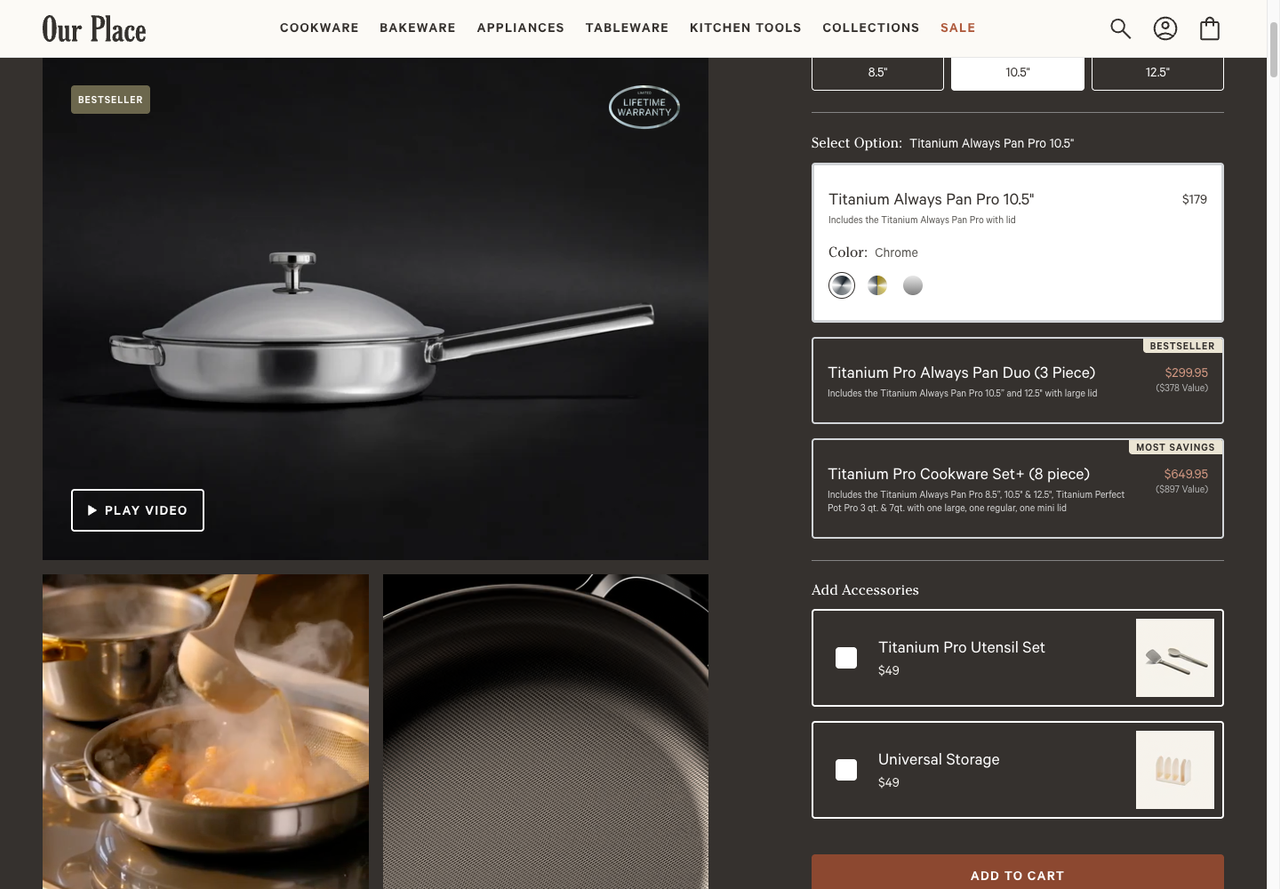
On the Titanium Always Pan Pro page, Our Place doesn't stop at a size picker. Under "Select Option" it stacks three cards: the 10.5" pan alone at $179, the Always Pan Duo at $299.95 tagged "Bestseller" with "($378 Value)" underneath, and the Cookware Set+ (8 piece) at $649.95 tagged "Most savings" with "($897 Value)".
Why it works:
- The upgrade is the same decision. The shopper isn't asked to look at another product. They pick a card, as they would pick a size.
- The "value" line does the maths for them. The duo is the 10.5" pan ($179) plus the 12.5" pan ($199), so $378 bought separately: the shopper saves $78.05. The set saves $247.05 against its $897 value, and Our Place repeats "Save $247" in its homepage banner.
- Two labels, two jobs. "Bestseller" reassures; "Most savings" gives the high-end option a reason to exist.
How to copy it: build the duo and the set as real products (or with a bundle app), then show them as options on the hero product's page, each with its saving written as a dollar amount. Our article on ecommerce bundles covers the pricing side.
2. Our Place again: accessories as checkboxes
Same page, one block lower: "Add Accessories" lists the Titanium Pro Utensil Set ($49) and Universal Storage ($49), each with an empty checkbox, right above Add to cart. Strictly, that's a cross-sell (a different product), but it is built like an upsell: one tick and it goes in the same add-to-cart click.
Why it works: the accessory is chosen while the shopper is still picturing the pan in their kitchen, and the checkbox starts unticked, so nobody feels tricked. On Shopify, apps call this "product add-ons". Snap Bundle(opens in a new tab) is one that does it, along with volume discounts and fixed bundles; it is free while bundle revenue stays under $500 a month, then $12.99 a month with no order cap.
3. MUD\WTR: subscribe and save, pre-selected
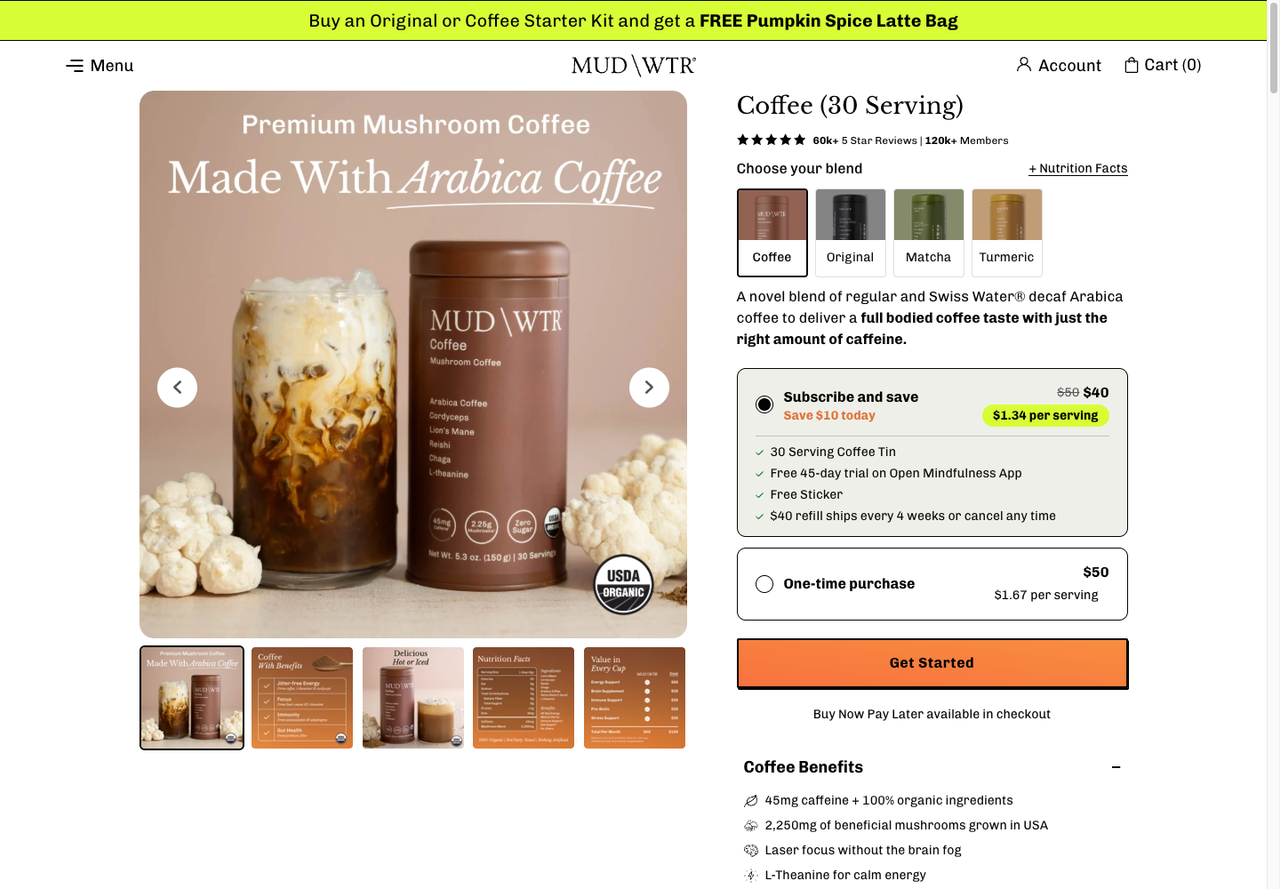
MUD\WTR's Coffee (30 Serving) page offers two purchase options. The first, already selected, is Subscribe and save: $40 instead of $50 ("Save $10 today"), $1.34 per serving, with a free 45-day trial of a mindfulness app, a free sticker and the line "$40 refill ships every 4 weeks or cancel any time". Below it, the one-time purchase costs $50, or $1.67 per serving.
Why it works:
- Price per serving makes the gap concrete. $50 / 30 = $1.67 and $40 / 30 = $1.34: the shopper compares two small numbers instead of a commitment.
- The order gets smaller, the customer gets bigger. The first basket drops by $10, but a refill every 4 weeks is 13 orders a year, or $520 at $40, against one $50 order.
- "Cancel any time" sits on the offer itself, where the doubt appears, not in a FAQ.
How to copy it: Shopify's free Subscriptions app or any subscription app adds the purchase options to your product form. Show the per-unit price on both options, and put the cancellation terms next to the button.
Cart upsell examples
Once the item is in the cart, the shopper has already said yes. The cart's job is to add the next small yes without blocking the checkout button.
4. Pura Vida: "only $40 away from free shipping", with $10 answers
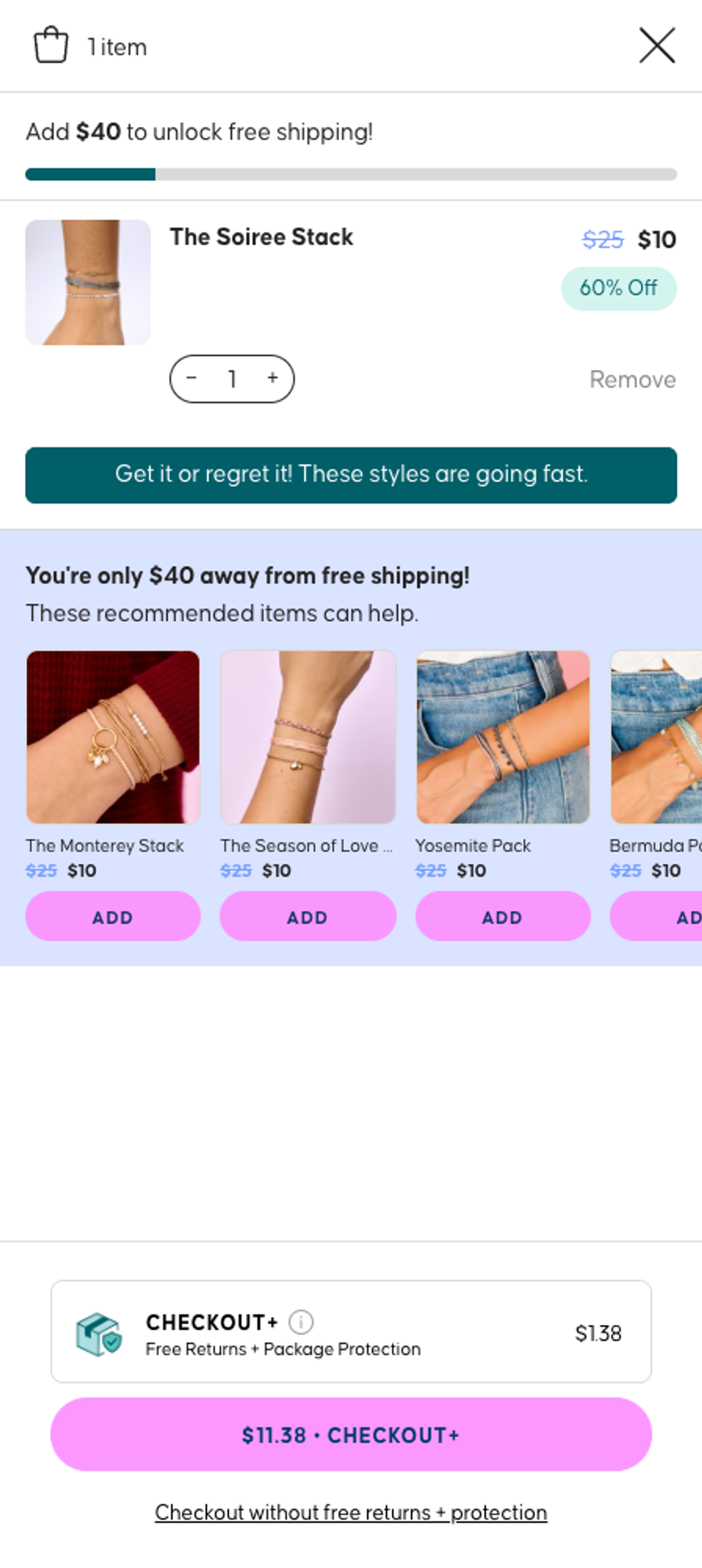
Add one $10 bracelet stack to the Pura Vida cart and the drawer opens with a progress bar ("Add $40 to unlock free shipping!") and, below the item, a block that reads "You're only $40 away from free shipping! These recommended items can help." The row shows other stacks at $10 (marked down from $25), each with an Add button.
Why it works:
- The upsell solves a cost the shopper already dislikes. Baymard Institute lists(opens in a new tab) "extra costs too high (shipping, tax, fees)" as the top reason for abandoning an order, cited by 40% of shoppers who abandoned. The recommendations are presented as the way out.
- The price of each suggestion fits the gap. At $10 each, four more stacks close the $40 gap exactly.
- One tap, no page change. Each card has its own Add button inside the drawer.
How to copy it: set the threshold above your current average order (our guide to the Shopify free shipping bar explains how to pick it), then fill the recommendations with products priced at a fraction of the gap. In Shopify's Search & Discovery app, you can pick up to 10 complementary products(opens in a new tab) per product, but your theme needs a section that displays them. Our themes ship with a cart drawer upsell for this.
5. Pura Vida: protection on the checkout button
The same drawer ends with a "Checkout+" line: free returns and package protection for $1.38, and a main button that reads "$11.38 · Checkout+". The plain option is a text link underneath: "Checkout without free returns + protection".
Why it works: it is cheap relative to the order and it answers a worry (lost parcel, wrong size) at the moment of paying. The trade-off is that the paid option is the default button. If you sell to the EU, Article 22 of the Consumer Rights Directive(opens in a new tab) says a customer who paid an extra because of a pre-selected default can get that payment back, so make protection an opt-in there.
Checkout upsell examples
Checkout upsells are the most delicate: the shopper is typing an address, and anything that looks like a detour costs orders. The two examples below sit in the order summary column, away from the form.
A Shopify constraint first: apps that add content to the information, shipping and payment steps of checkout are available only on Shopify Plus(opens in a new tab). On other plans, the cart and the thank-you page are where these offers go.
6. Our Place: "Complete your kitchen upgrade"
With the 10.5" pan in the order, Our Place's checkout shows a card titled "Complete your kitchen upgrade" under the order summary: the 8.5" Always Pan Pro at $155 with a colour selector, and the Utensil Set at $49, each with an Add button.
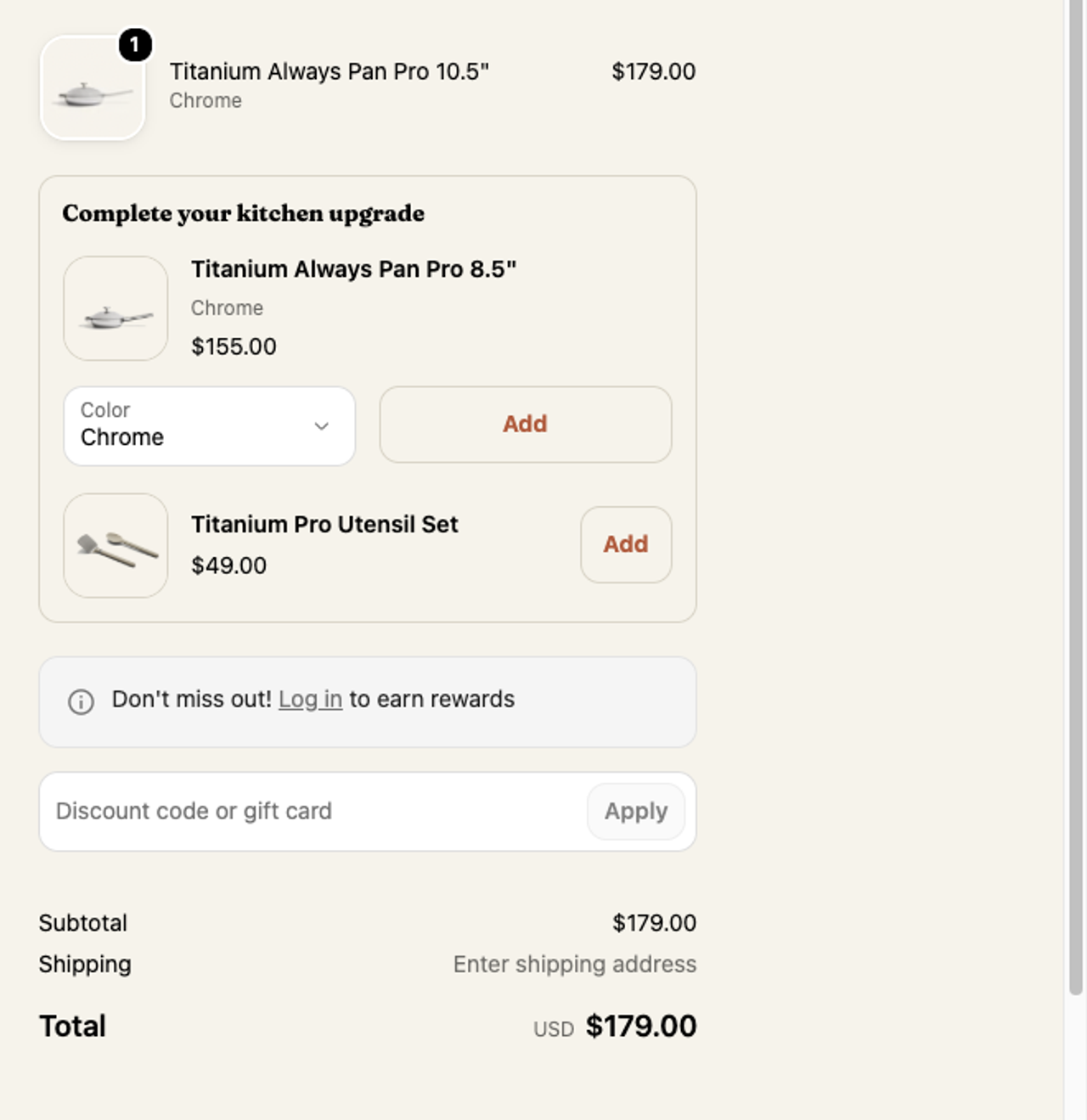
Why it works: the headline frames the offer as finishing a purchase the shopper has already made ("upgrade" is the word they chose on the product page), and the colour is pre-matched to the pan in the order. Both items are things that only make sense next to the pan.
7. Pura Vida: a $7 gift box
Pura Vida's checkout carries a "Sending A Gift?" carousel with a Gift Box at $7.00 and a plus button. The Free Returns + Package Protection line from the cart ($1.38) is already in the summary, with a Remove link.
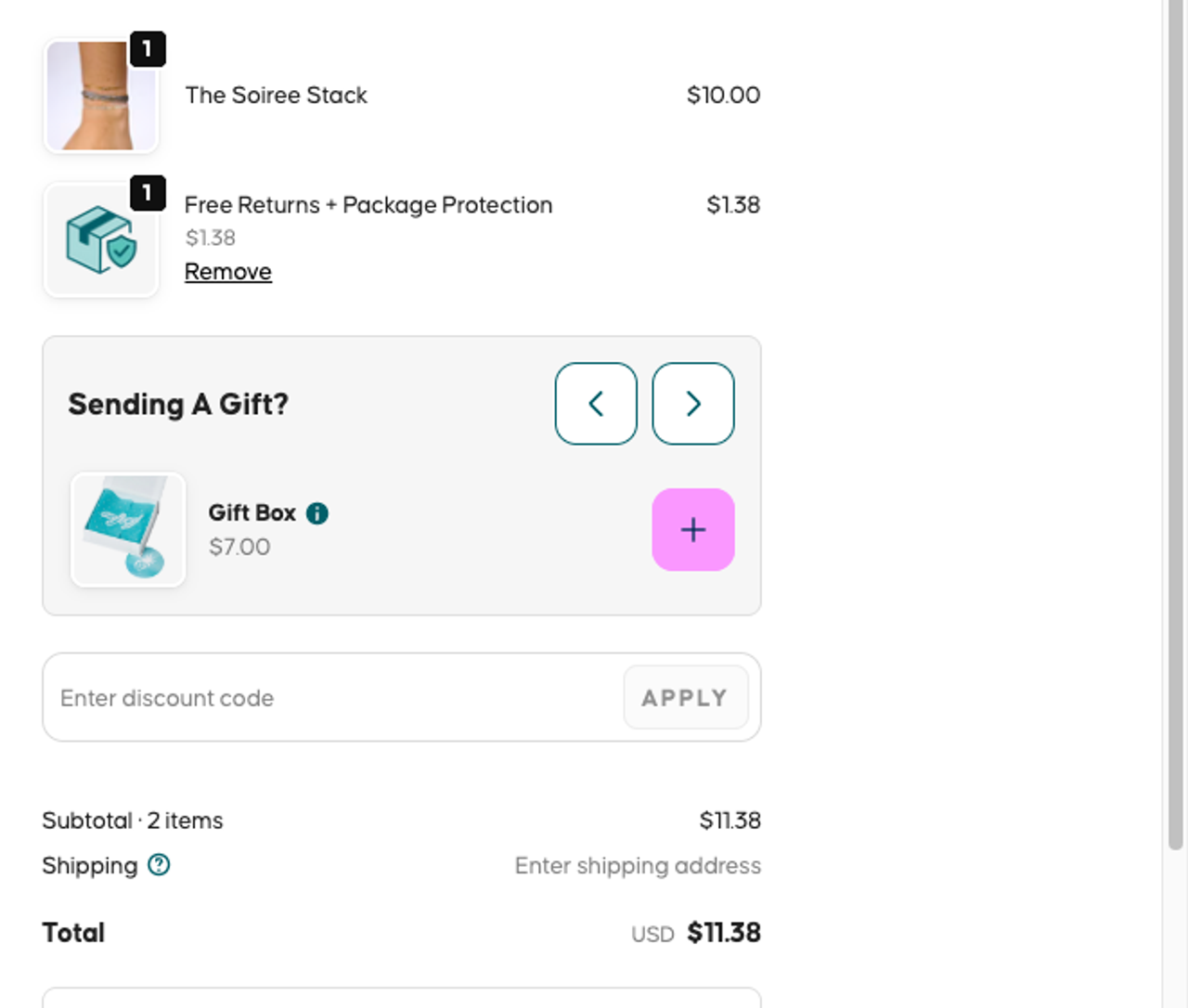
Why it works: gift packaging is relevant to a large share of jewelry orders, it costs little compared with the order, and it asks a yes/no question instead of sending the shopper browsing.
Post-purchase upsell examples
8. The one-click offer after payment
After payment and before the thank-you page, a post-purchase offer can add a product to the order with one click, without re-entering card details. Shopify lists the limits: the page doesn't show for some payment methods(opens in a new tab) (Apple Pay, Google Pay, buy-now-pay-later and gift cards among them), only one app can run it, and a customer can accept up to three offers per checkout.
We cover this placement in depth, with seven real offers (True Classic's second tee, Overtone's hair set and more), in our guide to Shopify post-purchase upsells. In short: offer something cheaper than the order just placed, related to it, and with a discount that only exists on that screen. Our themes support post-purchase upsells and downsells too.
Upsell email examples
Email is the only placement that works on customers who have left your site, at no media cost. Here are two flows built on the stores above.
9. The refill email that becomes a subscription offer
A customer bought MUD\WTR's 30-serving tin as a one-time purchase. At 1 serving a day, it runs out in about 30 days. A Shopify Flow or Klaviyo flow triggered around day 21 can say: "Running low? Your next tin is $40 instead of $50 on subscription." It's the product-page upsell from example 3, sent at the moment the argument is strongest.
10. The "complete the set" email
A customer bought the single 10.5" Always Pan. Two weeks later, the email offers the 12.5" pan, or the difference between what they paid and the duo price. The anchor is the same as on the product page ("$378 value"), but now the customer knows the pan.
How to judge an upsell email: Klaviyo publishes benchmarks for post-purchase flows(opens in a new tab) by revenue band and order value. For a store doing $1M–5M a year with an average order between $44 and $83, revenue per recipient runs from $0.11 (25th percentile) to $0.44 (75th percentile). On 10,000 post-purchase emails a month, moving from one to the other is 10,000 × $0.33 = $3,300 a month.
What these upsells have in common
- They are tied to the item already chosen. The duo contains the pan; the refill is the same coffee; the gift box wraps the bracelet.
- The saving is written as a number. "$378 value", "Save $10 today", "$40 away": no "great deal" adjectives.
- The upsell is smaller than the order or is the order. Add-ons are a fraction of the basket; tier upgrades replace the item instead of stacking on it.
- One click. Every example adds the item without leaving the page.
How much an upsell adds: a worked example
Take a store with 10,000 sessions a month, a 2.5% conversion rate and a $60 average order: 250 orders and $15,000 in revenue. These are illustrative numbers, not data from the stores above.
Upsell | Assumption | Extra revenue |
|---|---|---|
Tier upgrade on the product page | 20% of 250 orders take a set $40 above the single item | 50 × $40 = $2,000 |
$10 add-on in the cart | 10% of 250 orders add it | 25 × $10 = $250 |
Total | $15,000 + $2,000 + $250 | $17,250 (AOV $69) |
Total: $17,250, or a $69 average order, with the same traffic and the same ad spend. If you want to track this properly, start with your average order value by placement.
How to add your first upsell on Shopify
- Pick the placement your plan allows. Product page, cart and thank-you page work on every plan; checkout steps need Plus.
- Start with one offer on your best-seller. A bigger pack, a set or an add-on that only makes sense with it.
- Write the saving in currency. "$78 less than buying both" beats "Save big".
- Keep paid options unticked, especially if you sell in the EU.
- Measure take rate and AOV for four weeks before adding a second offer. Our list of Shopify upsell apps compares the tools by placement and price.
If your first upsell is a pack, a set or a volume tier, Snap Bundle(opens in a new tab) builds them on the product page and in post-purchase, free until your bundle revenue passes $500 a month.
FAQ
What is an example of an upsell?
A shopper picks a single pan and the product page offers the two-pan set for less than both bought separately. Our Place does this: $299.95 for a duo worth $378. A larger size, a premium version or a subscription are other common upsells.
What is the difference between an upsell and a cross-sell?
An upsell replaces the item with a bigger or better version; a cross-sell adds a different, complementary product. Our guide to upsell vs cross-sell covers both with Shopify examples.
Where should I put upsells on a Shopify store?
Start on the product page of your best-seller, then the cart. Checkout upsells in the information, shipping and payment steps need Shopify Plus; the thank-you page and post-purchase offers work on other plans.
What makes a good upsell email?
Send it when the argument is strongest (a refill when the product runs out, the matching item after the customer has used the first one), and state the saving in currency. Compare your revenue per recipient with Klaviyo’s post-purchase benchmarks.
Can I pre-select a paid add-on?
In the EU, no: a customer who paid an extra because of a default option can claim it back. Elsewhere it is legal but risky for trust. Keep paid add-ons unticked and let the shopper opt in.

Keep reading

How to Increase ROAS From Your Store, Not Your Ad Account
ROAS = conversion rate × AOV ÷ CPC. Here is how to raise the store side of that formula, landing pages, bundles, checkout, email and LTV, with worked numbers.

Shopify Free Shipping Threshold: How to Set It to Raise AOV
Pick a free shipping threshold from your order data, check the break-even math, set it up in Shopify (rate or discount), and give shoppers an item that closes the gap.

Repeat Purchase Rate: Formula, Benchmarks and 9 Ways to Raise It
The repeat purchase rate formula, how to find it in Shopify analytics, real benchmarks, and 9 ways to get more second orders without spending more on ads.