
Repeat Purchase Rate: Formula, Benchmarks and 9 Ways to Raise It

Summarize this article with AI


The repeat purchase rate formula, how to find it in Shopify analytics, real benchmarks, and 9 ways to get more second orders without spending more on ads.
Repeat purchase rate is the share of your customers who bought from you more than once in a given period. The formula is repeat customers ÷ total customers × 100: if 1,000 of your 4,000 customers last year placed two or more orders, your repeat purchase rate is 25%.
It is the cheapest growth lever a Shopify store has, because those customers are already paid for. This guide covers the formula (and the two other versions you will run into), where to find the numbers in Shopify analytics, what a good repeat purchase rate looks like, and the levers that raise it without adding a dollar to your ad budget.
What is repeat purchase rate?
Repeat purchase rate (RPR, also called repeat customer rate) measures how many of the people who bought from you came back and bought again within a time window you choose. It answers one question: of the customers I already acquired, how many turned into more than one order?
That matters more than it looks. Research by Frederick Reichheld of Bain & Company(opens in a new tab), summarized in Harvard Business Review, found that increasing customer retention rates by 5% increases profits by 25% to 95%. The same article puts the cost of acquiring a new customer at five to 25 times the cost of keeping an existing one. If you spend on Meta or Google to bring in first orders, every second order you earn without that spend lowers your blended acquisition cost.
Repeat purchase rate formula
The standard formula is customer-based:
Repeat purchase rate = (customers with 2+ orders in the period ÷ customers with at least 1 order in the period) × 100
Each customer counts once, no matter how many orders they placed. Pick the period before you calculate, and keep it fixed when you compare months or years.
How to calculate repeat purchase rate: a worked example
Take a store with these 12-month numbers:
- 4,000 unique customers placed at least one order
- 1,000 of them placed two or more orders
- 5,200 orders in total
Repeat purchase rate = 1,000 ÷ 4,000 × 100 = 25%.
Two related numbers come out of the same data. Purchase frequency is orders ÷ customers = 5,200 ÷ 4,000 = 1.3 orders per customer. And the 3,000 one-time buyers placed 3,000 orders, so the 1,000 repeat customers placed the other 2,200: 2.2 orders each.
Three definitions, three different answers
Not every tool uses the customer-based formula, which is why benchmarks rarely line up. Polar Analytics worked through one hypothetical store(opens in a new tab) (1,000 customers, 220 of them repeat buyers, 1,600 orders, 820 of those orders placed by repeat buyers) and got an answer ranging from 22% to 51% depending on the definition:
Definition | Calculation | Result |
|---|---|---|
Repeat customers ÷ all customers | 220 ÷ 1,000 | 22% |
Repeat orders (orders after the first) ÷ all orders | 600 ÷ 1,600 | 37.5% |
Orders placed by repeat buyers ÷ all orders | 820 ÷ 1,600 | 51.25% |
None of these is wrong; they measure different things. Use the customer-based version for this metric, write down which one your apps and reports use, and only compare numbers that share a definition and a time window.
Repeat purchase rate vs retention rate
Customer retention rate is the cohort version of the same idea: of the customers who first bought in a given month, what share bought again in each later month? Repeat purchase rate gives you one number for a period; retention rate shows when people come back and when they drop off. In ecommerce without subscriptions, a customer counts as retained when they place another order, so both metrics are driven by the same thing: second and third orders.
How to find repeat purchase rate in Shopify analytics
Shopify does not show a ready-made "repeat purchase rate" tile with a published formula, but it gives you everything you need to calculate it. Shopify defines a returning customer(opens in a new tab) as "a customer who placed an order, and whose order history already includes at least one order."
- In your Shopify admin, go to Analytics > Reports.
- Click the Category filter and select Customers. You will see reports including New vs returning customers, Returning customers, One-time customers and Customer cohort analysis.
- Open New vs returning customers and set the date range to your period (12 months is a good default). It shows how many first-time and returning customers ordered in that range.
- To get the customer-based RPR, divide the number of customers with two or more orders by all customers who ordered in the period. The Returning customers report lists every customer whose order history includes two or more orders, with their first and latest order dates, so you can filter it to your window.
- Open Customer cohort analysis to see the retention view. Customers are grouped by the month of their first order, and the Metric menu lets you switch between number of customers, customer retention rate, gross sales, net sales and average order value.
Two details matter when you read these reports. "Returning" in Shopify looks at the customer's whole order history, not only the date range you picked, so a customer whose first order was two years ago counts as returning this month. And in the cohort analysis(opens in a new tab), the "period 0" column captures repeat orders placed in the same month as the first order, which is where bundles and quick follow-up offers show up.
The cohort report also tells you your typical gap between first and second order. That number sets the timing for every lever below.
What is a good repeat purchase rate?
Klaviyo puts a good repeat purchase rate(opens in a new tab) at around 20% to 30%, and notes that the rate is naturally higher for affordable or perishable products and lower for expensive ones like tech or luxury items. Treat that range as a sanity check, not a target: Klaviyo does not publish the underlying dataset, and as shown above, the definition alone can move the number by 30 points.
A more useful benchmark is your own store over time:
- Consumables (coffee, skincare, supplements, pet food): the product runs out, so a rate below 20% usually means customers are reordering somewhere else, or nobody reminds them.
- Considered purchases (furniture, electronics, mattresses): a low rate is normal. Measure repeat on accessories and complementary products instead.
- Fashion and gifts: repeat is driven by new collections and seasonal moments, so watch it by cohort around launches.
Compare this year's cohorts with last year's at the same age (for example, the share of customers who reordered within 90 days). If that number goes up, your retention work is paying off, whatever the industry average says.
How to increase repeat purchase rate without more ad spend
Every lever below works on customers you already have. Most can be set up with free Shopify features.
1. Send a post-purchase sequence that earns the second order
The second order is the hardest one to get. Shopify Messaging (formerly Shopify Email) includes ready-to-use automation templates(opens in a new tab), "from welcome and winback automations to the first-purchase upsell," and the first 10,000 emails each month are free(opens in a new tab). The first-purchase upsell template is built to bring first-time buyers back after their order has arrived.
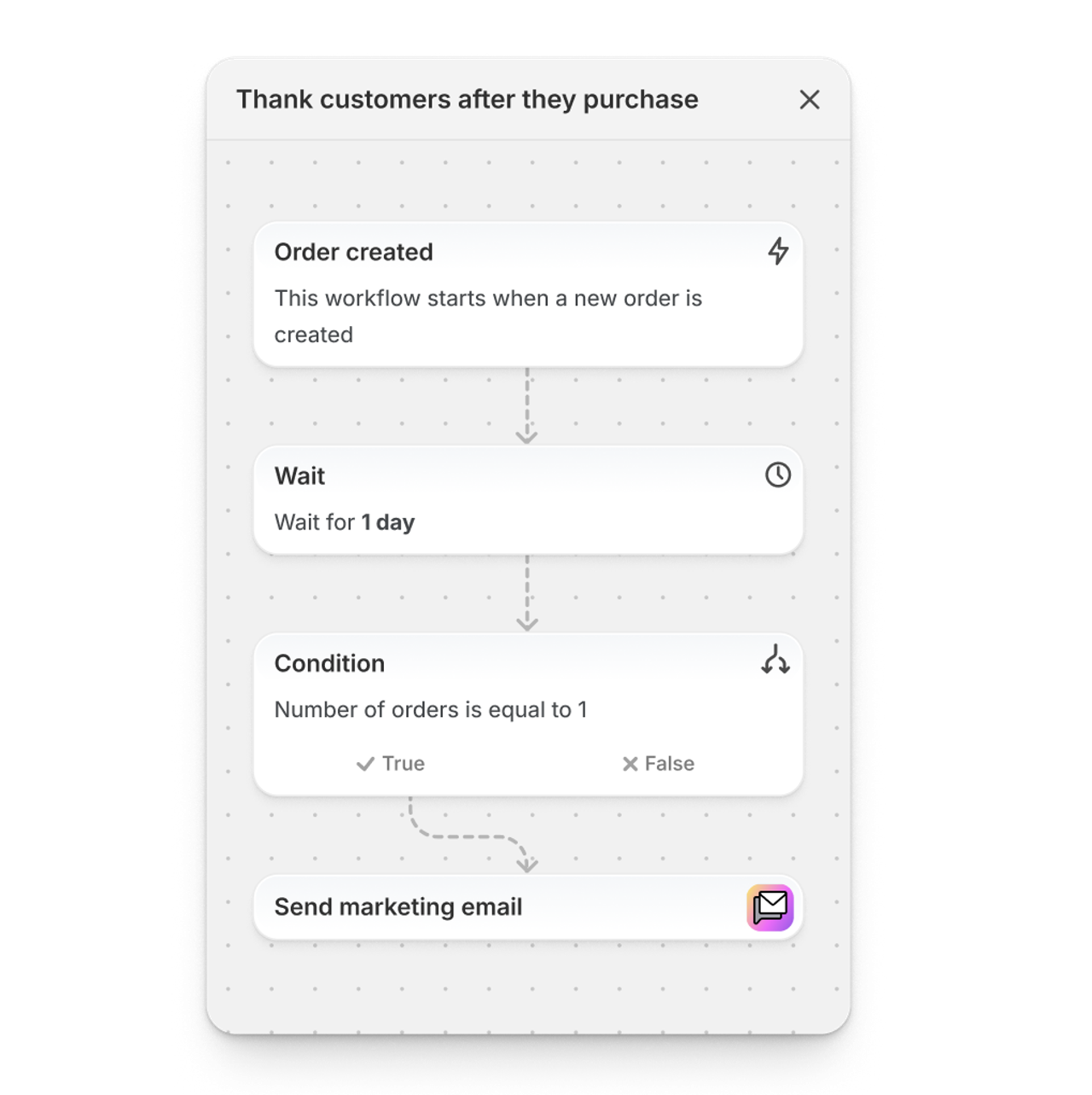
A simple sequence for a first-time buyer:
- Day 1: thank-you email with how to use the product. No discount.
- Delivery + 3 days: tips, reviews from other customers, the product most often bought next.
- Typical reorder gap minus a week (from your cohort report): an offer for the second order.
Pair it with a one-click upsell on the thank-you page. That offer lands in the "period 0" column of your cohort report because it is a second order placed minutes after the first. Our guide to Shopify post-purchase upsells covers how those offers work and what to offer.
2. Time replenishment reminders to the real usage cycle
If a product lasts 30 days, a reminder at day 25 beats a generic newsletter. Work out usage per product (a 60-capsule bottle at two a day lasts 30 days), then trigger an email or SMS a few days before it runs out. Shopify's winback template already lets you change the wait step to match your purchase cycle; Shopify's own example(opens in a new tab) raises it to 365 days for products bought once a year.
3. Make reordering one click
Friction kills repeat orders. Stores on new customer accounts get a Buy again button(opens in a new tab) on the order history and order details pages automatically; Shopify's changelog notes that "easy reordering is automatically enabled within any store using new customer accounts." Link to the account page from your replenishment emails so the reorder is one tap from the inbox.
4. Offer subscriptions on products people reorder anyway
For consumables, a subscribe-and-save option turns a customer who might reorder into one who reorders by default. The free Shopify Subscriptions app(opens in a new tab) adds a purchase option on the product page with a discount per delivery frequency, and customers can pause, skip or cancel from their account.
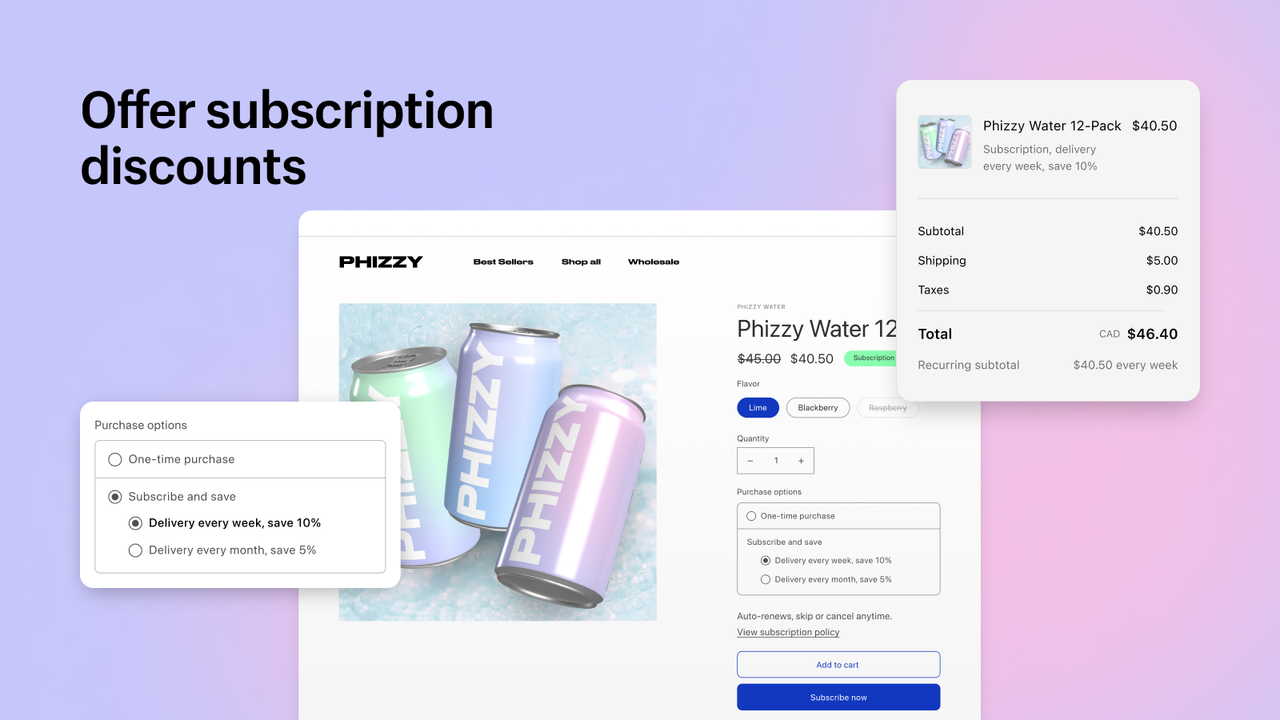
We cover plan design, discount levels and app choice in how to increase sales on Shopify with subscriptions. For this metric, one point is enough: a subscriber is a repeat customer by definition, so even a small share of subscribers lifts your RPR every month.
5. Use bundles to start the habit and fill the gap between orders
Bundles help repeat purchase in two ways. A starter kit or build-a-box gets a new customer to try several products, so the second order has more to choose from. And volume discounts ("2 for 10% off, 3 for 15% off") reward buying a larger supply, which you can follow with a refill offer timed to when that supply runs out. If bundles are new to you, start with what bundles are and how to price them.
Snap Bundle(opens in a new tab) handles volume discounts, mix-and-match boxes and free gifts on Shopify. It is free while your bundle revenue is under $500 a month, then $12.99 a month, with no order cap.
6. Add a free gift or sample that leads to the next product
A free gift with a quantity tier does double duty: it raises the current basket and puts a second product in the customer's hands. Choose the gift deliberately. A travel-size version of your second-best seller is a better gift than a tote bag, because it creates the reason for the next order.
7. Reward the second order, not the tenth
Points programs often pay out too late to change behavior. If most customers never order twice, the reward that matters is on order two: a credit or a gift that applies only to the next purchase, with an expiry date that matches your reorder gap. Once a customer has three or four orders, a tier or early access to new products keeps them engaged without stacking discounts.
8. Win back lapsed customers before they are gone
Shopify's customer winback template emails customers who have not ordered again after a wait you set. Set the wait to about twice your typical reorder gap. Lead with what is new (a product, a flavor, a restock) rather than a discount; keep the discount for a second email to those who did not respond.
9. Fix the reasons people do not come back
Some customers do not reorder because the first experience let them down. Read the reviews and support tickets from one-time customers (the One-time customers report gives you the list) and look for repeated themes: late delivery, wrong size, a product that did not match the photos. A clearer size guide or a better delivery estimate on the product page raises repeat purchase rate without any marketing at all.
What raising repeat purchase rate is worth
Back to the example store: 4,000 customers a year, a 25% repeat purchase rate and a $50 average order value.
Repeat purchase rate | Repeat customers (of 4,000) | Extra orders vs 25% | Extra revenue at $50 AOV |
|---|---|---|---|
25% (today) | 1,000 | 0 | $0 |
28% | 1,120 | 120 | $6,000 |
30% | 1,200 | 200 | $10,000 |
35% | 1,400 | 400 | $20,000 |
Moving from 25% to 30% means 200 more customers ordering again. If each places just one extra $50 order, that is $10,000 in extra revenue from customers the store already acquired, with no added ad spend. Any extra orders beyond that, and any higher basket from bundles, come on top.
The levers compound with your acquisition: a store that reliably turns first orders into second orders can afford a higher cost per first order, which buys more volume from the same campaigns. And recovering carts from customers who are already on your list is the step before all of this; our guide to Shopify abandoned cart emails covers that flow.
Start with the two levers that cost nothing: the post-purchase sequence and replenishment timing. Then add subscriptions or bundles where your products fit, with an app like Snap Bundle(opens in a new tab) for the volume discounts and build-a-box offers that make the next order larger.
FAQ
What is the repeat purchase rate formula?
Divide the number of customers who placed two or more orders in a period by the number of customers who placed at least one order in that period, then multiply by 100. 1,000 repeat customers out of 4,000 gives 25%.
What is a good repeat purchase rate for ecommerce?
Klaviyo puts it(opens in a new tab) at around 20% to 30%, higher for affordable or perishable products and lower for expensive ones. Compare your own cohorts year over year rather than chasing a single industry number.
How do I find repeat purchase rate on Shopify?
Go to Analytics > Reports, filter by the Customers category and open New vs returning customers or Returning customers for your period. Divide customers with two or more orders by all customers who ordered. The Customer cohort analysis report shows retention by month of first order.
What is the difference between repeat purchase rate and retention rate?
Repeat purchase rate is one number for a period: the share of customers with more than one order. Retention rate follows a cohort of first-time customers over time and shows when they come back or drop off.
How do I increase repeat purchase rate without spending more on ads?
Work on customers you already have: a post-purchase email sequence, replenishment reminders timed to usage, one-click reordering, subscriptions for consumables, bundles and volume discounts, and a reward on the second order.

Keep reading

How to Increase ROAS From Your Store, Not Your Ad Account
ROAS = conversion rate × AOV ÷ CPC. Here is how to raise the store side of that formula, landing pages, bundles, checkout, email and LTV, with worked numbers.

Shopify Free Shipping Threshold: How to Set It to Raise AOV
Pick a free shipping threshold from your order data, check the break-even math, set it up in Shopify (rate or discount), and give shoppers an item that closes the gap.

Ecommerce Blog: How to Build a Shopify Blog That Actually Sells (2026)
A profitable ecommerce blog answers a problem, then shows the product that solves it. A 6-step method to build a Shopify blog that converts.