
Shopify Free Shipping Threshold: How to Set It to Raise AOV

Summarize this article with AI


Pick a free shipping threshold from your order data, check the break-even math, set it up in Shopify (rate or discount), and give shoppers an item that closes the gap.
A free shipping threshold is the order amount above which a store stops charging for shipping: "Free shipping on orders over $65". On Shopify, you set it in Settings > Shipping and delivery as a shipping rate with Offer free shipping and a minimum order amount, or as an automatic free shipping discount with a minimum purchase amount. The right number is not a round figure or a competitor's: it sits just above the spot where most of your orders cluster, and far enough above it that the extra items pay for the shipping you give away.
This guide covers how to pick that number from your own order data, the break-even math with a worked example, the two ways to set it up in Shopify, and how to help shoppers actually reach it, so the threshold raises average order value from the traffic you already pay for instead of just costing you shipping fees.
What a free shipping threshold does (and what it costs)
Shipping fees are the main reason people leave a checkout. In Baymard Institute's checkout research(opens in a new tab), "extra costs too high (shipping, tax, fees)" is the top reason for abandonment, cited by 40% of shoppers once "just browsing" is set aside. A threshold turns that cost into a goal: instead of paying $6.95 to ship, the shopper adds a $20 item and pays nothing for delivery.
"Free" also pulls harder than a small price. In a study published in Marketing Science, Shampanier, Mazar and Ariely(opens in a new tab) found that people treat a zero price as an extra benefit, not just a lower cost: dramatically more participants picked an option when its price dropped to zero than when it was merely cheap.
The catch: a threshold can raise sales and still lose money. Lewis, Singh and Fay(opens in a new tab) studied an online retailer that had tested many shipping fee schedules. Free shipping above a threshold was "very effective in generating additional sales", but the shipping revenue it gave up, and the shoppers who did not respond, made it unprofitable for that retailer. The fix is not to skip the threshold. It is to set it with your numbers, which is what the next sections do.
How to calculate your free shipping threshold in 4 steps
1. Export your orders and look at the spread, not just the average
Your average order value is a starting point, but two stores with the same $53 AOV can need very different thresholds. What matters is where orders bunch up.
In the Shopify admin, go to Orders, select Export, choose Orders by date and pick the last 90 days. Shopify's export guide(opens in a new tab) lists a Subtotal column ("the order's subtotal before shipping and taxes"), which is the number to use. The file has one row per line item, so keep one row per order number. Then count orders in $10 bands: $30–39, $40–49, $50–59, and so on.
2. Find the cluster just below your target
Look for the largest band of orders that sits a little under where you would like them to be. If 80 of your 200 monthly orders fall between $45 and $65, those are the shoppers a $65 threshold can move. Orders far below the line ($20 carts) will not jump $45 for free delivery, and orders already above it get free shipping they would have paid for anyway.
3. Check the gap against your margin
Every shopper who climbs to the threshold stops paying you for shipping. Their extra items have to make up for it. The minimum extra spend is:
Minimum extra spend = shipping fee you stop collecting ÷ gross margin
With a $6.95 fee and a 60% gross margin, that is $6.95 ÷ 0.60 = $11.58. If the typical climber only adds $8, the threshold loses money on every one of them. If they add one $20 product, each climb is worth $20 × 0.60 − $6.95 = $5.05 of extra gross profit.
4. Match the gap to a real product
A threshold works when there is an obvious item that fills the gap. If most of your products cost $18–25 and the cluster sits around $50–55, a $65 threshold means "add one more", which shoppers understand at a glance. A threshold that needs $3 more invites cheap filler; one that needs $40 more gets ignored.
Worked example: is a $65 threshold worth it?
Take a store with 10,000 sessions a month, a 2.0% conversion rate (200 orders), a $53 AOV ($10,600 in revenue) and a 60% gross margin. Today it charges a flat $6.95 for shipping; the label costs it $7.50. Its order export looks like this:
Order subtotal | Orders per month | Share |
|---|---|---|
Under $45 | 70 | 35% |
$45 to $64.99 | 80 | 40% |
$65 to $89.99 | 35 | 17.5% |
$90 and over | 15 | 7.5% |
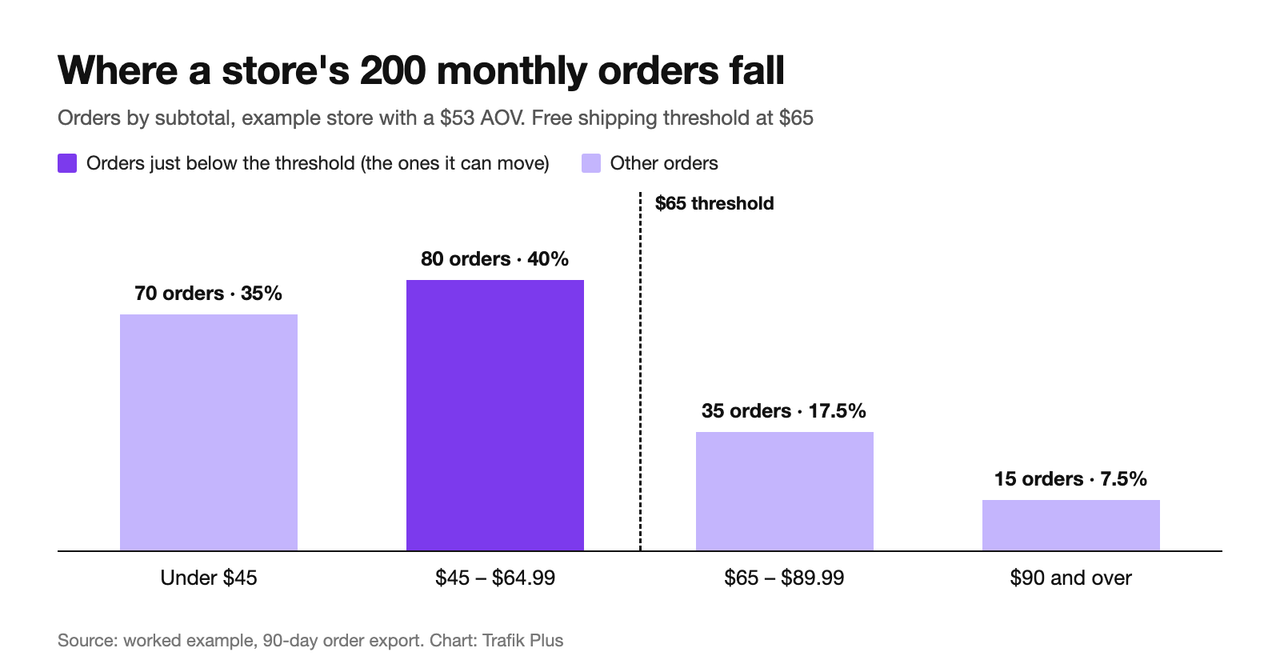
It tests a free shipping threshold of $65, about 23% above its AOV. Here is the monthly math:
Line | Calculation | Monthly impact |
|---|---|---|
Shipping fees no longer collected on orders already over $65 | 50 orders × $6.95 | −$347.50 |
Extra gross profit from shoppers who climb to $65 | 35% of 80 = 28 orders × $20 added × 60% | +$336.00 |
Shipping fees no longer collected from those climbers | 28 × $6.95 | −$194.60 |
Net before any new orders | 336.00 − 347.50 − 194.60 | −$206.10 |
Profit per new order won by free shipping | $68 × 60% − $7.50 label | +$33.30 |
New orders needed to break even | 206.10 ÷ 33.30 = 6.2 | 7 orders |
So the threshold needs about 7 extra orders a month to break even: the conversion rate has to move from 2.00% to 2.07% (207 ÷ 10,000). If it gets there, AOV rises from $53 to about $56.21 ($11,636 ÷ 207 orders).
Two things stand out. First, the biggest cost is the 50 orders that were already over $65: they get a $347.50 gift and change nothing. That is why a threshold set below your cluster (at $50, here) costs far more than it earns. Second, the climbers barely pay for their own shipping at a 35% climb rate. Raise that share, or the size of what they add, and the threshold works without needing many new orders. The section on closing the gap covers how.
If you currently ship everything free, run the same table the other way: a threshold means charging a fee below it, and the question becomes how many small orders you lose against the shipping revenue you collect.
How to set up free shipping over a certain amount on Shopify
Shopify gives you two ways to do it. Both work on every plan.
Shipping rate with free shipping | Automatic free shipping discount | |
|---|---|---|
Where | Settings > Shipping and delivery | Discounts > Create discount |
Best for | A permanent threshold | Campaigns, tests, holiday windows |
Dates | Always on | Start and end date |
Targeting | Per shipping zone and profile | Countries, customers, segments or markets |
Shown in cart and checkout | As a $0 rate | As a named discount |
Option A: a free shipping rate with a minimum order amount
Use this for a permanent threshold. Steps from Shopify's guide to flat shipping rates(opens in a new tab):
- Go to Settings > Shipping and delivery and open your shipping profile (most stores only have the general one).
- In the shipping zone, click Add shipping option and give it a name shoppers will see, like "Standard shipping".
- Set the rate type and price as usual (for example, $6.95).
- Select Offer free shipping and enter the minimum order amount, for example $65.
- Click Done, then Save.
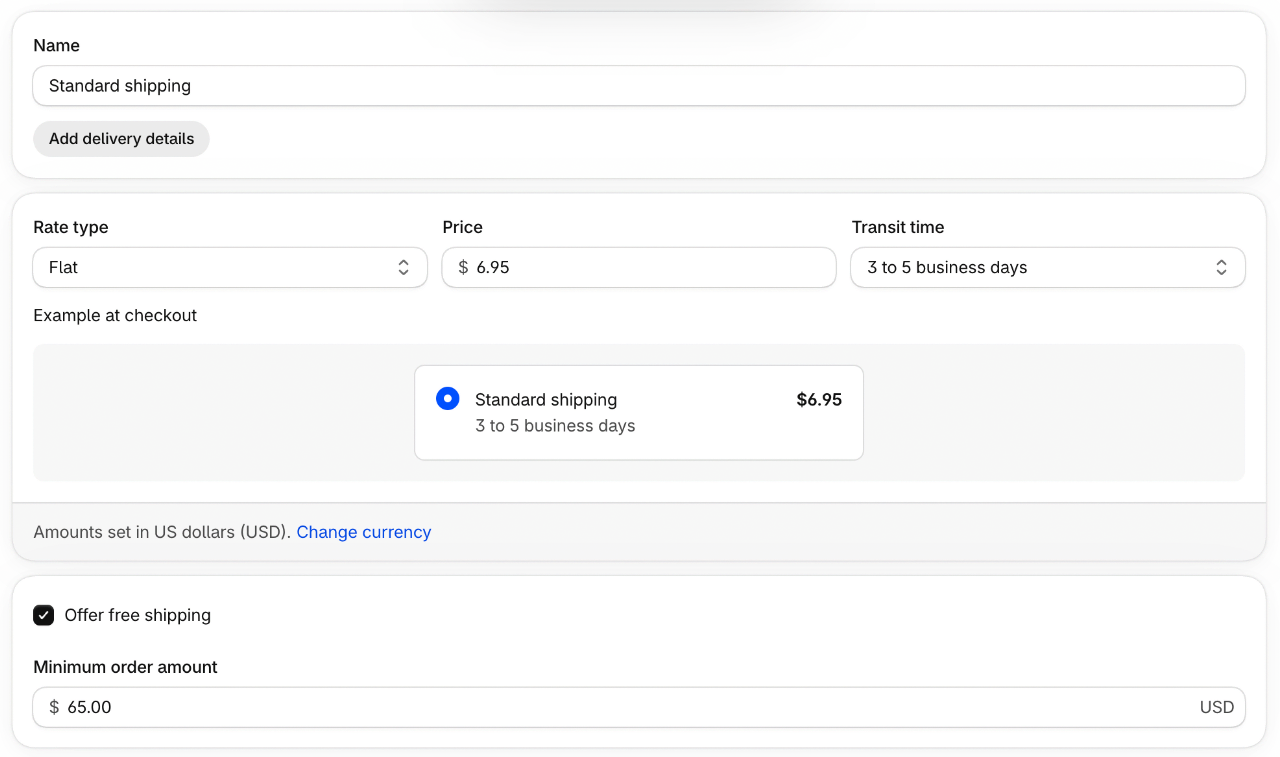
Repeat it for every zone you ship to. If you use order amount tiers instead (rate type Order amount with a minimum and maximum per tier), Shopify warns(opens in a new tab) to leave the highest tier's maximum empty, or larger orders end up with no rate and an error at checkout.
Option B: an automatic free shipping discount
Use this for a campaign, a holiday window or a test. Steps from Shopify's free shipping discount guide(opens in a new tab):
- Go to Discounts > Create discount and choose Free shipping.
- Under Method, choose Automatic discount and enter a title (shoppers see it in the cart and at checkout).
- Under Countries, keep all countries or pick some. Tick Exclude shipping rates over a certain amount so express delivery stays paid.
- Under Eligibility, choose all customers, specific customers, customer segments or markets.
- Under Minimum purchase requirements, choose Minimum purchase amount and enter $65.
- Set Combinations and Active dates, then Save.
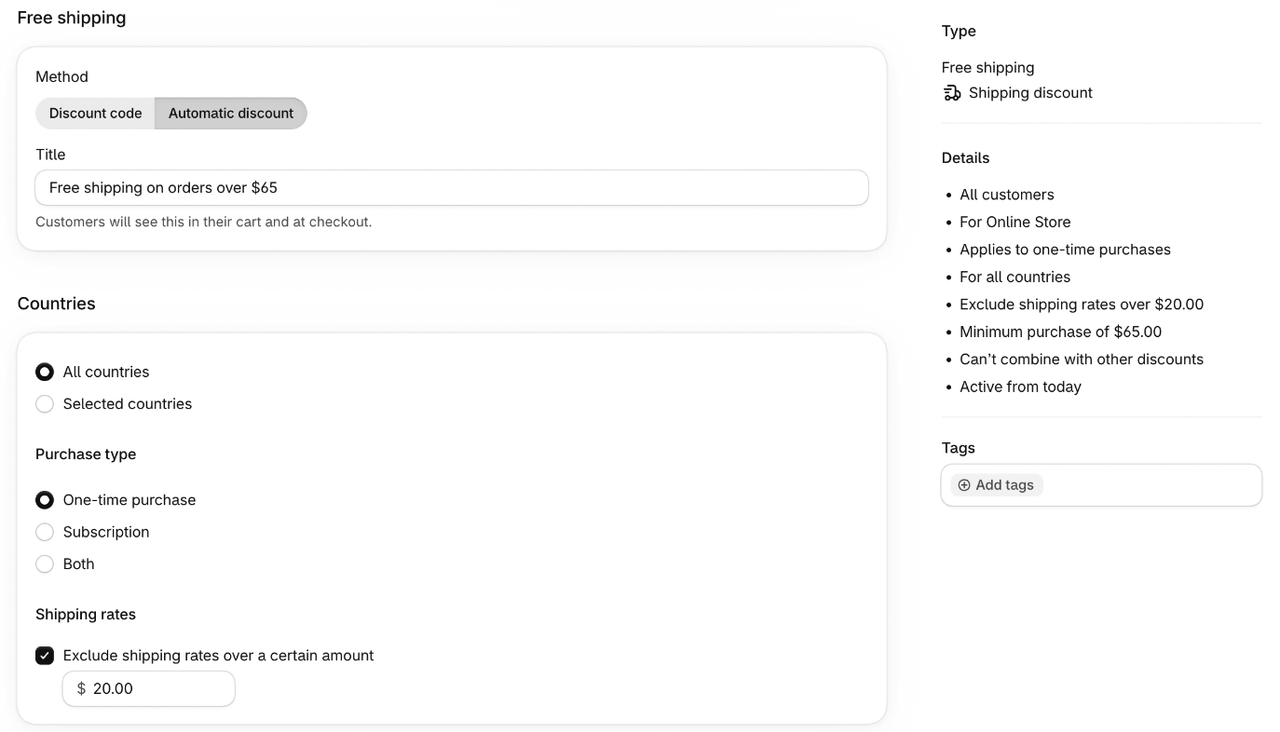
Two details from that guide matter for the threshold. The minimum counts product prices only, never taxes. And items count at their discounted price only when the other discount can combine with free shipping. If you run volume discounts or bundles, place a discounted test order to see which subtotal unlocks free delivery.
Free shipping on specific products or regions
Heavy or bulky products can wreck the math. Put them in a custom shipping profile(opens in a new tab) with their own paid rates, so a $70 order of one heavy item does not ship free across the country. You can also set a different threshold per zone: $65 at home, a higher one abroad where labels cost more. If you sell in several currencies, check how the threshold reads in each one: a converted amount like €59.83 is harder to aim for than a round local number.
Make the threshold reachable, or it only costs money
A threshold nobody sees does not change behavior. Two things turn it into a higher basket.
Show the remaining amount
Shoppers should not have to do the subtraction. A progress bar in the cart that says "You're $12 away from free shipping" makes the goal concrete. Our guide to the Shopify free shipping bar covers what it should say and where to put it. If you use one of our themes, the free shipping progress bar is a theme setting: enter the same amount as in Shopify and it fills as the cart grows.
Offer the item that closes the gap
The climb rate from the worked example (35%) is the number you can move most. Shoppers climb when the cart offers something worth adding at roughly the price of the gap:
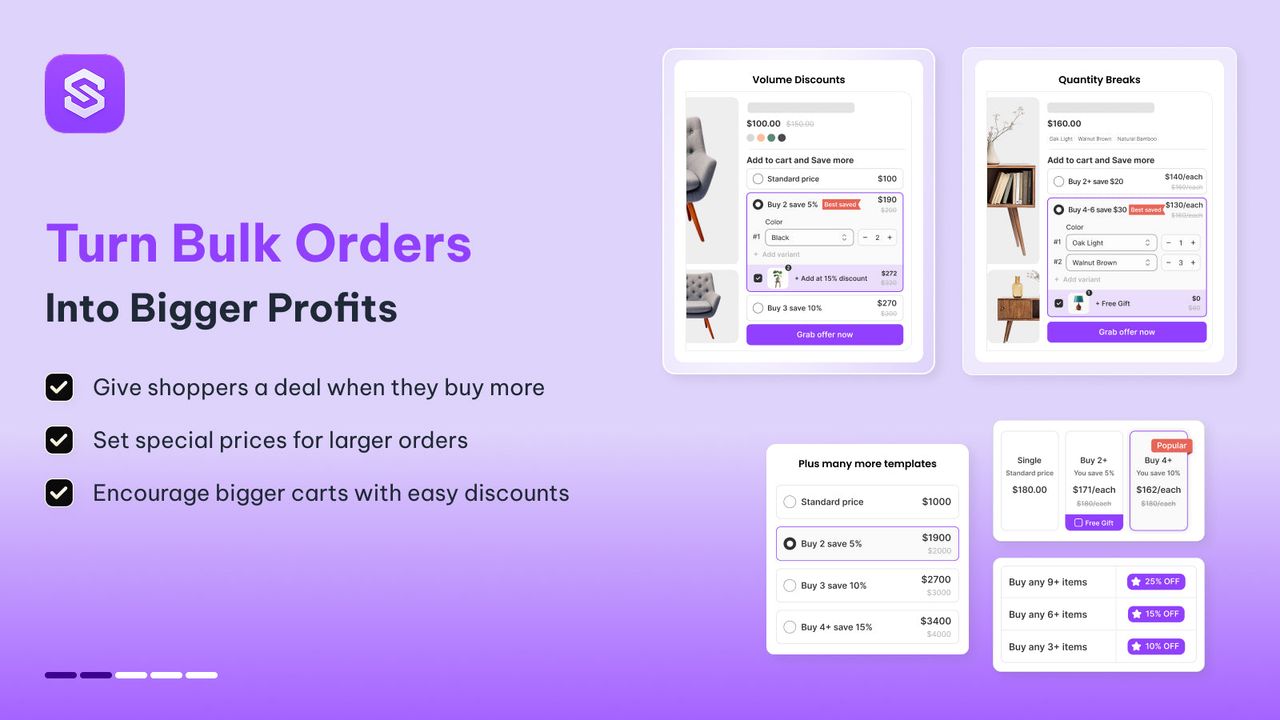
- A second unit at a discount. A volume discount like "Buy 2, save 10%" turns a $54 cart into a $97 one in a single tap, well past the threshold.
- A free gift tier above the threshold. "Free shipping at $65, free gift at $90" gives shoppers who already qualify a reason to keep going. A free gift on a quantity tier does this without a code.
- A cart upsell priced at the gap. One cart upsell in the $10–20 range, chosen to match what is in the cart, beats a carousel of random best sellers.
- Add-ons on the product page. A refill, a case or a care kit added as a product add-on raises the first item's value before the cart even opens.
Snap Bundle(opens in a new tab) handles the first two (volume discount tiers, quantity breaks with a free gift, mix and match and build-a-box bundles) in one app. It is free while bundle revenue stays under $500 a month, then $12.99 a month, with no cap on orders.
How to measure whether your threshold works
Shopify does not split-test shipping rates natively, so compare four weeks before and after the change, outside of sales periods. Track:
- Average order value, on the Shopify Analytics dashboard.
- Conversion rate. If it holds steady while AOV rises, the threshold is working. If it drops, the threshold may be too far from your cluster.
- Share of orders just above the threshold. In your next order export, count orders between $65 and $75. A spike there means shoppers are aiming for it.
- Shipping cost as a share of revenue. Compare it with the extra gross profit from the worked example's table. That is your real result.
Revisit the threshold when your AOV moves, when carriers change their rates, or when you change prices.
Mistakes to avoid
- Setting the threshold at or below AOV. Half your orders get free shipping for doing nothing.
- Different amounts in different places. If the bar says $65 and the shipping rate says $75, checkout charges a fee the shopper was told they would not pay.
- Ignoring heavy products. One bulky item shipped free to the far end of the country can erase a week of gains.
- A gap with nothing to fill it. If your cheapest product costs $35 and the gap is $12, shoppers either overshoot (fine) or give up (not fine). Add a low-priced item worth having.
- Forgetting discounts. Check whether your threshold counts the subtotal before or after bundle and volume discounts, and say so in the bar.
For the full list of levers beyond shipping, see our guide to increasing average order value.
A free shipping threshold is one of the cheapest ways to raise AOV from visitors you already have, as long as the number comes from your own orders and the cart gives shoppers a good reason to cross it. Pair it with a "buy 2" tier or a free gift above the line, for example with Snap Bundle(opens in a new tab), and the threshold pays for itself.
FAQ
What is a good free shipping threshold?
One that sits just above the band where most of your orders cluster, usually somewhat above your average order value, with a gap of at least your shipping fee divided by your gross margin. With a $6.95 fee and a 60% margin, the gap should be at least $11.58.
How do I set up free shipping over a certain amount on Shopify?
Go to Settings > Shipping and delivery, open your shipping profile, add or edit a shipping option, select Offer free shipping and enter the minimum order amount. For a time-limited offer, create an automatic free shipping discount with a minimum purchase amount under Discounts instead.
How do I change the free shipping threshold on Shopify?
Edit the shipping option in Settings > Shipping and delivery (open its menu, then Edit shipping option) and update the minimum amount in every zone. Then update the same amount in your free shipping bar and any announcement bar so they match checkout.
Can I offer free shipping on specific products on Shopify?
Yes. Create a custom shipping profile, add the products, and give that profile a free rate. You can also do the reverse: keep heavy products in their own profile with paid rates so they never ship free.
Does the free shipping threshold include taxes and discounts?
For an automatic free shipping discount, Shopify counts product prices only, never taxes, and counts discounted prices only when the other discount can combine with free shipping. Place a test order with your usual discounts to see which subtotal unlocks it.
Should I show free shipping on the product page?
Yes, briefly: one line near the price such as "Free shipping over $65" sets the goal early. Keep the live "you are $12 away" message for the cart, where the shopper decides what to add.

Keep reading

How to Increase ROAS From Your Store, Not Your Ad Account
ROAS = conversion rate × AOV ÷ CPC. Here is how to raise the store side of that formula, landing pages, bundles, checkout, email and LTV, with worked numbers.

Repeat Purchase Rate: Formula, Benchmarks and 9 Ways to Raise It
The repeat purchase rate formula, how to find it in Shopify analytics, real benchmarks, and 9 ways to get more second orders without spending more on ads.

Ecommerce Blog: How to Build a Shopify Blog That Actually Sells (2026)
A profitable ecommerce blog answers a problem, then shows the product that solves it. A 6-step method to build a Shopify blog that converts.