
Shopify Free Shipping Bar: How to Set the Threshold and Add a Progress Bar

Summarize this article with AI


A free shipping progress bar shows shoppers how much more they need to spend. How to pick the threshold, set it up in Shopify, and what the bar should say.
A free shipping bar tells shoppers how far they are from free shipping: "You're $18 away". As they add items, a progress bar fills up until the offer is unlocked.
It works because shipping costs are the most common reason people give up on an order: the Baymard Institute(opens in a new tab) found that extra costs being too high (shipping, tax, fees) is the top reason for abandoning checkout. A bar turns that cost into a goal the shopper can reach.
Step 1: choose the threshold
The threshold matters more than the bar. A few rules of thumb:
- Start just above your average order value. If your AOV is $62, try $75. Most customers are then one item away.
- Check the margin. The extra order value should cover the shipping you now absorb. If your average shipping cost is $8, the extra spend needs to bring in more than $8 of margin.
- Look at your price points. If most products cost $20–30, a $75 threshold means "add one more item", which is easy to understand.
- Test it. Run the threshold for a few weeks, then compare average order value and conversion rate with the period before.
Step 2: set up free shipping in Shopify
The bar only displays the threshold. The free shipping itself is set in Shopify, and the two must use the same amount.
Method in Shopify | Where | Good for |
|---|---|---|
Price-based shipping rate | Settings > Shipping and delivery | A permanent threshold, e.g. free over $75 |
Free shipping discount | Discounts, automatic with a minimum purchase | A temporary offer, e.g. a BFCM weekend |
For a permanent threshold, add a price-based rate(opens in a new tab) with a minimum order price. For a temporary offer, use an automatic free shipping discount(opens in a new tab) with a minimum purchase amount.
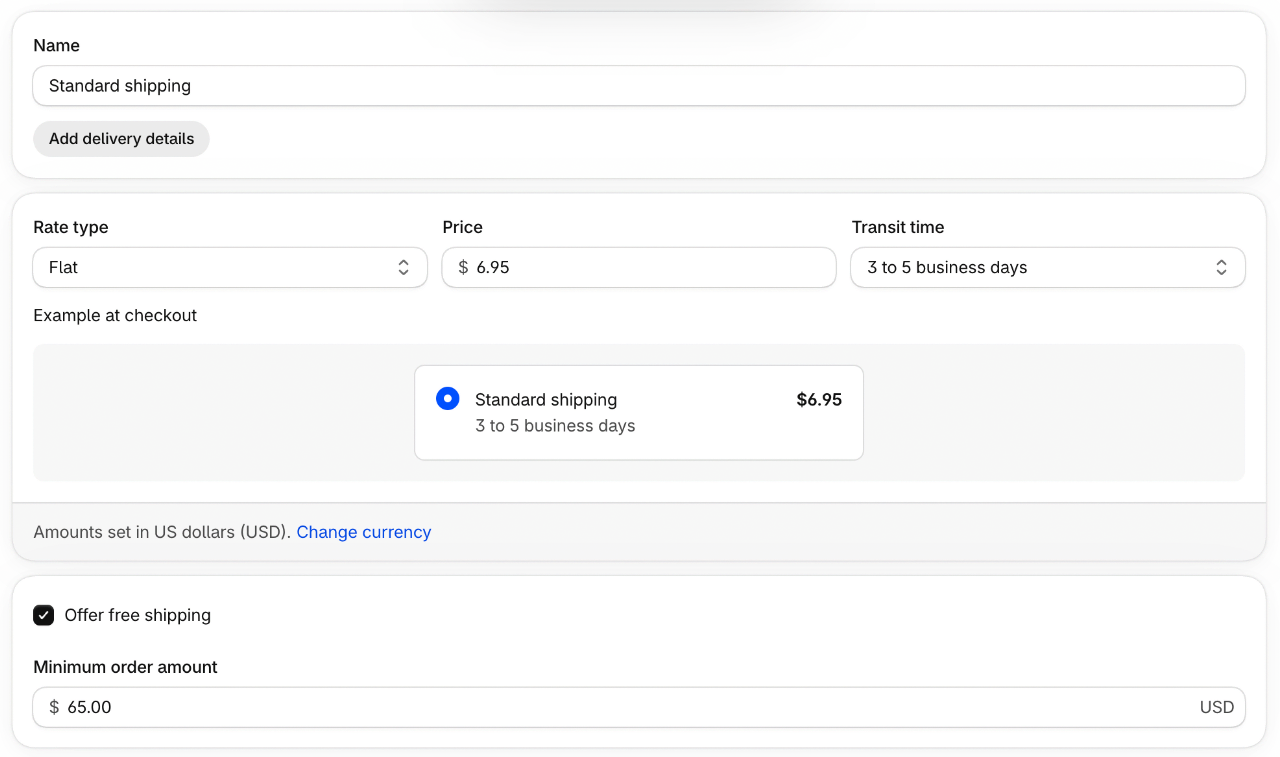
Step 3: add the progress bar
You have two options:
- A theme with the bar built in. Cama and Pops draw a free shipping progress bar in the cart and cart drawer from one theme setting: enter the threshold and the bar does the rest. No app, no extra script.
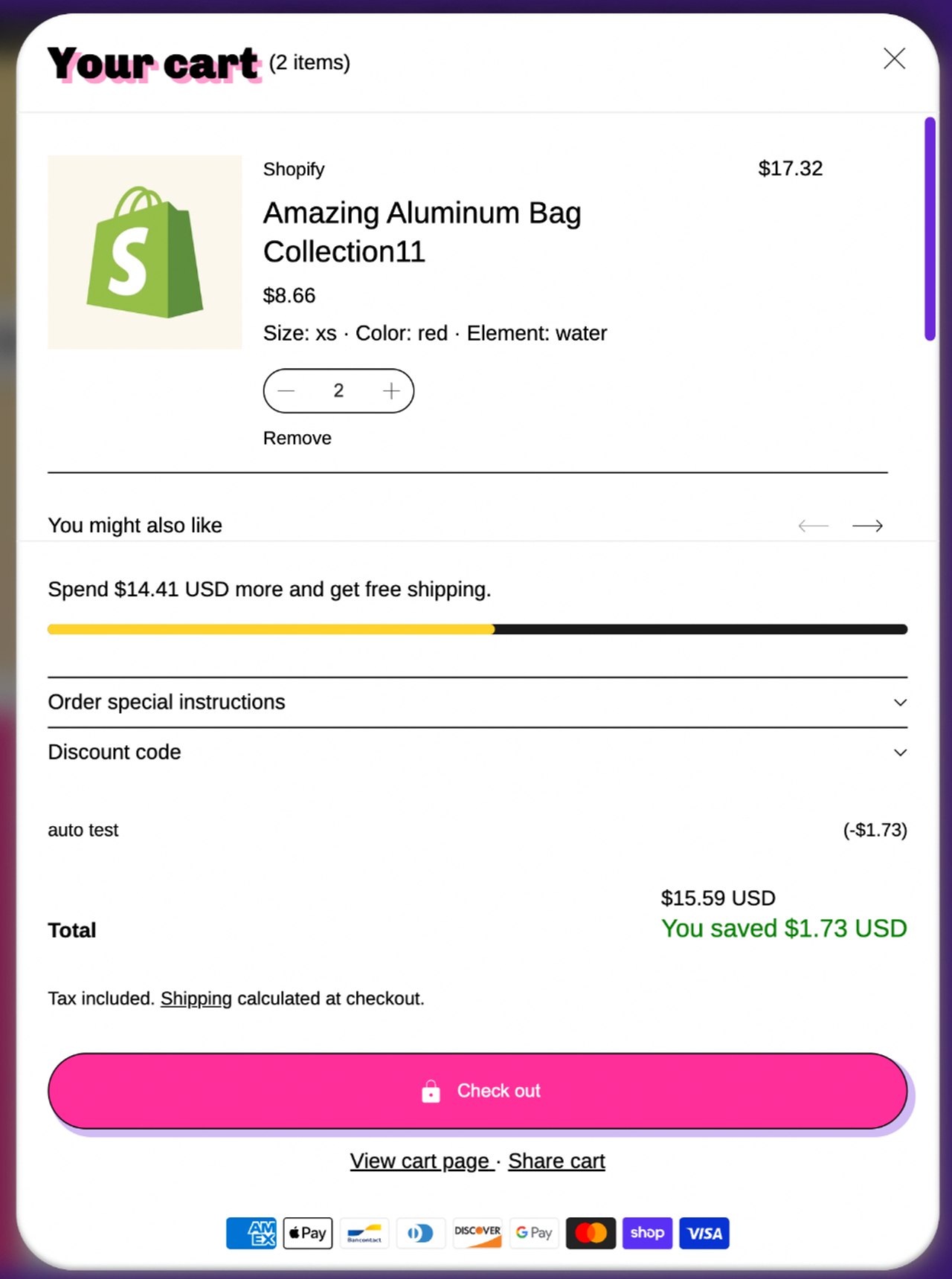
- An app. Free shipping bar apps add a bar to any theme, often with targeting by country or page. The cost is a monthly fee for some, and a script that loads on every page.
Whichever you choose, check that the bar sits where shoppers look: at the top of the cart drawer, and on the cart page above the checkout button.
What the bar should say
Cart state | Message |
|---|---|
Empty | Free shipping on orders over $75 |
Below threshold | You're $18 away from free shipping |
Close to it | Add one more item for free shipping |
Reached | You've unlocked free shipping |
- Use the exact amount left, not the threshold again. "$18 away" is a goal; "free over $75" is a rule to calculate.
- Celebrate the moment it is reached. A short, clear "unlocked" message, then get out of the way.
- Show the right currency. If you sell in several markets, check that the amount matches the shopper's currency and the rate set for that market.
Help shoppers close the gap
A bar that says "$18 away" works better when the cart offers an $18 answer. Add one relevant cart upsell priced near the usual gap, or complementary products on the product page. A volume discount on a second unit does the same job.
Mistakes to avoid
- A threshold nobody reaches. If it is twice your AOV, the bar mostly reminds shoppers they are paying for shipping.
- A bar that disagrees with checkout. If the bar says free shipping and checkout charges $6, you lose the order and the customer's trust.
- Hiding the bar on mobile. Most shoppers are on phones; check the cart drawer on a real one.
- Too many bars. One announcement bar and one cart bar are enough.
For more ways to grow the basket, see our guide to increasing average order value.
FAQ
What is a free shipping bar?
A message, usually with a progress bar, that shows how much more a shopper needs to spend to get free shipping. It updates as items are added to the cart.
Does Shopify have a built-in free shipping bar?
Shopify lets you offer free shipping above a minimum amount, but the bar itself comes from your theme or an app. Check your theme settings first.
What should my free shipping threshold be?
Start just above your current average order value, so most customers are one item away. Then check that the shipping cost you absorb is covered by the extra margin.
Does a free shipping bar replace the shipping rate?
No. The bar only displays a threshold. The free shipping itself must be set in Shopify, as a price-based rate or a free shipping discount, with the same amount.
Should the bar show in the announcement bar or the cart?
Both, with different jobs. The announcement bar states the offer; the cart shows the progress towards it.

Keep reading

16 Best Kombucha Shopify Store Examples (Desktop + Mobile)
16 real kombucha brands on Shopify, from Kyo and Health-Ade to GT's and Remedy: home pages, product pages, pack pickers and subscriptions on desktop and mobile, with the theme each store uses.

20 Best One Product Shopify Store Examples in 2026
20 real one product Shopify stores, from Henson Shaving to Tushy: what they sell, the theme they run on, what they do well and what to copy, plus how to build your own one-product store.

SEO vs PPC: Organic vs Paid Search on a Fixed Budget
SEO vs PPC for a Shopify store with a fixed budget: cost per click vs cost per page, click share data, when to move spend, and a worked $3,000 budget split.