
Shopify Dawn Theme: Review, Features, Image Sizes and Setup Guide

Summarize this article with AI


Dawn is Shopify's free reference theme and the most used theme on Shopify. Features, image sizes, Dawn vs Horizon, honest limits and how to update it safely.
Dawn is the most used theme on Shopify. It has been Shopify's free reference theme since 2021, it powers about one store in seven, and Shopify still updates it: version 16.2.0 shipped on 16 November 2026.
But Dawn is also five years old, Shopify now presents Horizon as its new design foundation, and only 35% of its Theme Store reviews are positive. So is Dawn still a good choice? We went through its code, its Theme Store listing, its latest reviews and live store data to answer the questions merchants actually ask: what Dawn does, which image sizes to use, how it compares with Horizon, and where it falls short.
Disclosure: Trafik Plus is a Shopify theme studio. We develop Pops, a paid theme built on theme blocks, so we compare it with Dawn further down. Everything else in this review comes from Shopify's own pages, the theme code and public data.
The short answer
- What it is: Shopify's free, minimalist reference theme, launched in June 2021(opens in a new tab) with Online Store 2.0, and the most installed theme on the platform.
- Price: free, with no paid tier. Version 16.2.0 shipped on 16 November 2026.
- Best for: stores that want a fast, clean, well-documented theme and are happy with a simple design, or developers who want a solid base to customise.
- Main strengths: speed (71.1% of Dawn stores pass Core Web Vitals), mega menu, quick add and bulk order, cart drawer, color swatches, stock counter and an open GitHub repository that accepts contributions.
- Main limits: 35% positive reviews (293 reviews), no nested theme blocks, no sticky add to cart, a plain look that often needs custom sections, and code edits that are lost when you update.
What is the Shopify Dawn theme?
Dawn is a free Online Store 2.0 theme made by Shopify. Shopify announced it at Unite in June 2021(opens in a new tab) as its first source-available reference theme, alongside Online Store 2.0 (sections on every page, app blocks, JSON templates). It replaced Debut as the default theme for new stores and became the model that most theme developers studied.

Its design brief is simple: a minimalist theme "that lets product images take center stage", in the words of its Theme Store listing(opens in a new tab). Its technical brief is just as clear: the README describes it as "HTML-first, JavaScript-only-as-needed". Pages are rendered by Liquid on the server, and JavaScript is only added for interactive parts such as the cart drawer or predictive search.
Dawn is also everywhere. According to ShopThemeDetector(opens in a new tab) (data updated 20 November 2026), Dawn runs on 15.1% of more than 3.5 million Shopify stores, which makes it the most used theme, about 1.8 times more than Horizon. Its share is slowly eroding though: from 14.5% of stores in February to 14.1% in October 2026, as new stores start on Horizon.
Dawn theme features
The Theme Store listing(opens in a new tab) lists more than 25 features. Here are the ones that matter most, checked against the theme code (version 16.2.0).
Navigation: mega menu and sticky header
In the Header section, the desktop menu can be a dropdown, a mega menu or a drawer. The mega menu shows your sub-collections in columns, with no images or featured products. The sticky header has four modes: off, on scroll up (the default), always, or always with a smaller logo.
Product page and cart
- Cart: three types to choose from, a cart drawer, a cart page or a notification pop-up (the default), with cart notes.
- Quick add: off by default; you can switch it to standard quick add or to bulk quick add, which lets shoppers set quantities for several variants at once.
- Stock counter: an inventory block on the product page shows stock levels, with a low-stock threshold.
- Pickup: in-store pickup availability, and since 16.2.0 the pickup drawer can list the physical stores that have the item in stock.
- Sticky product info: the product information column stays visible while the media scrolls. It is not a sticky add-to-cart bar.
- Pop-ups and tabs: collapsible tabs and pop-up text blocks, often used for a size chart or shipping information, plus complementary products.
Collections, swatches and search
Collection pages support filtering and sorting through Shopify's Search & Discovery app, color swatches on product cards and swatch filters, and a second image on hover. Predictive search shows products, collections and pages while the shopper types.
B2B and wholesale
Dawn includes a quick order list section and bulk quick add, both designed for B2B catalogs where buyers order many variants at once. This is unusual for a free theme.
Languages
The theme code ships with storefront translations for more than 40 languages, and the Custom Liquid section lets you add small pieces of code without editing theme files.
Dawn image sizes
Shopify does not publish an official image size table for Dawn. What the code does tell us is the largest width each section requests from Shopify's image CDN. From there, we recommend these sizes:
Image | Recommended size | Why |
|---|---|---|
Image banner (full width) | 3840 × 2160 px (16:9), at least 2560 px wide | Dawn requests banner images up to 3840 px wide for large and high-density screens. |
Slideshow | 3840 × 2160 px, same ratio for every slide | Same widths as the banner; mixed ratios make the slideshow jump or crop. |
Product images | 2048 × 2048 px (square), up to 4096 px for zoom | Product media is served up to 4096 px wide when zoom is enabled. |
Collection and product card images | 1200 × 1200 to 1600 × 1600 px | Cards never load more than 1066 px wide; extra pixels only add weight. |
Collage and multicolumn | 2000 px wide | These sections request up to 3200 px, but they rarely span the full screen. |
Logo | SVG, or PNG about 600 px wide | The logo width setting goes from 50 to 300 px; double it for sharp retina screens. |
Keep files under 500 KB where you can, and export in WebP or JPEG. Shopify converts and resizes images automatically, but a heavy source file still slows the first load. If speed matters, read our guide to Shopify speed optimization.
Dawn vs Horizon
Horizon launched with the Summer '25 Edition and Shopify calls it its new design foundation, which is why the community keeps asking whether Horizon is the new Dawn(opens in a new tab). Both are free and made by Shopify; the difference is architecture. Horizon is built on nested theme blocks, Dawn on classic sections with their own blocks.
Dawn | Horizon | |
|---|---|---|
Price | Free | Free |
Developer | Shopify | Shopify |
Latest version | 16.2.0 (16 Nov 2026) | 4.5.0 (10 Nov 2026) |
Positive reviews | 35% (293 reviews) | 36% (213 reviews) |
Share of Shopify stores | 15.1% | 8.4% |
Core Web Vitals pass rate | 71.1% | 57.5% |
Nested theme blocks | ❌ No | ✅ Yes |
AI block generation | ❌ No | ✅ Yes |
Mega menu | ✅ Yes | ✅ Yes |
Sticky add to cart | ❌ No | ✅ Yes |
Recently viewed products | ❌ No | ✅ Yes |
Accepts code contributions | ✅ Yes | ❌ No |
Sources: Dawn and Horizon Theme Store listings, theme code, and ShopThemeDetector(opens in a new tab) for store share and Core Web Vitals, 20 November 2026.
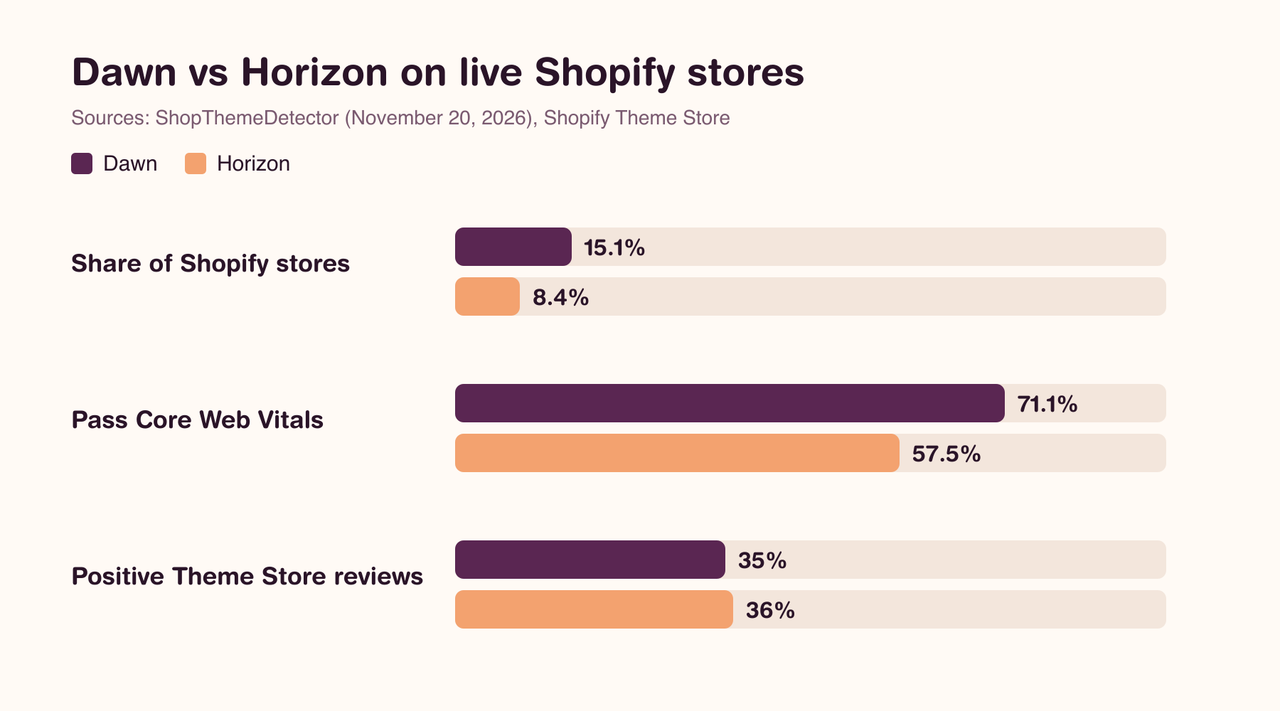
Our take: if you already run Dawn and it does the job, there is no urgency to switch. It is faster on real stores and still maintained. For a new store that wants layout freedom without code, start with Horizon, as we explain in our Horizon theme review. Switching later means rebuilding your pages, because sections and settings do not carry over between the two themes.
Dawn theme review: pros and limits
What Dawn does well
- Speed: ShopThemeDetector measured a 71.1% Core Web Vitals pass rate across 10,166 Dawn stores, with a median LCP of 1.6 s, an INP of 147 ms and no layout shift. On stores with six apps or fewer, the pass rate rises to 79.3%. Dawn is faster than 72% of themes.
- Free and still maintained by Shopify, with regular releases.
- A complete feature set for a free theme: mega menu, cart drawer, quick add and bulk order, swatches, stock counter, pickup availability.
- Clean, well-documented code that most Shopify developers know, which makes custom work cheaper.
Where Dawn falls short
Dawn's reviews are mixed: 35% positive, 25% neutral and 40% negative out of 293 reviews (104 positive, 73 neutral and 116 negative on the Theme Store(opens in a new tab), 20 November 2026). Recent reviews report:
- Theme updates that do not keep code edits, so customisations have to be redone (August and November 2026).
- A design that is too basic: one merchant with a PageSpeed score of 99 still had to code sections from scratch (August 2026).
- Responsive image issues that needed custom fixes (August 2026).
- Weak search and sorting for size-based catalogs such as jewelry (October 2026).
- Requests for more slider animations, more font options and a LinkedIn social icon (August and October 2026).
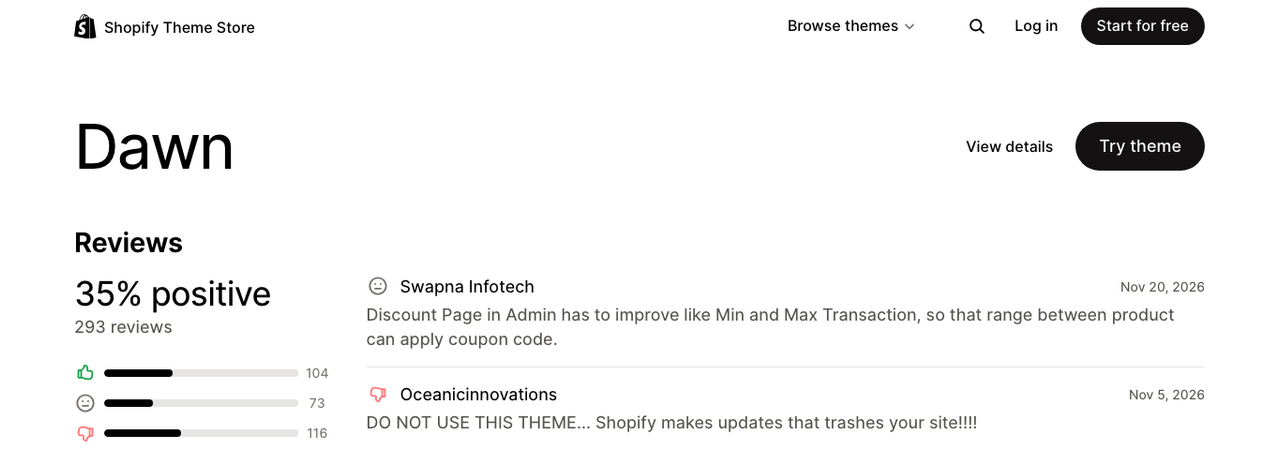
Many negative reviews are less about Dawn's code than about what it does not do: it is a starting point, not a finished design for a given industry. There is no build-a-box, no age verification pop-up, no nutrition table and no free shipping bar, so those needs mean apps or custom development.
Who uses Dawn? Store examples
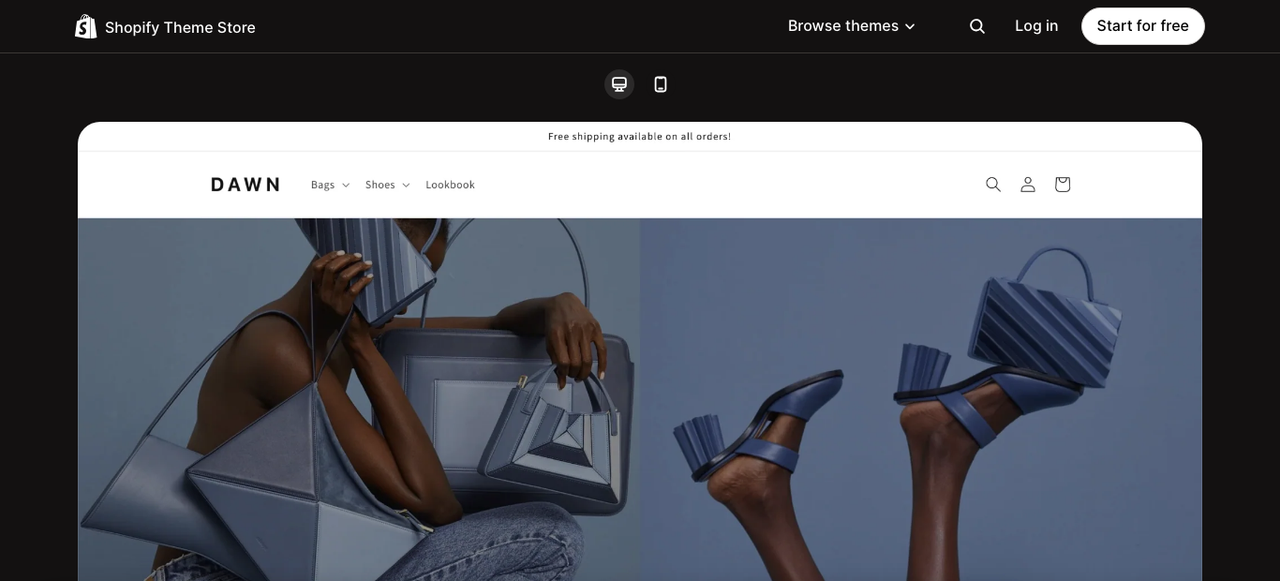
Dawn is used in every niche, but ShopThemeDetector(opens in a new tab) ranks it first in two categories: Subscription, and Apparel & Accessories. That matches its demo store, built for a fashion brand, and its clean product grid.
The apps most often installed on Dawn stores tell the same story: Judge.me for reviews (36.6% of Dawn stores), Klaviyo for email (29.4%), Loox for photo reviews (15.7%) and Recharge for subscriptions (12.6%). In other words, Dawn stores add social proof and retention through apps, because the theme stays minimal.
To see Dawn on real stores, browse the official demo store, then compare it with our list of the highest-converting Shopify themes.
Dawn vs premium themes
A paid theme makes sense when it replaces apps you would otherwise pay for every month, or when it fits your industry out of the box. Here is Dawn next to Pops, the theme we develop for food, beverage and lifestyle brands. Pops was in Shopify's Theme Store review at the time of writing.
Dawn | Pops | |
|---|---|---|
Price | Free | $400 one-time |
Developer | Shopify | Trafik Plus |
Theme blocks | ❌ No (section blocks only) | ✅ Yes |
Presets | 1 (Dawn) | 3 (Pops, Lueur, Scoop) |
Mega menu | ✅ Yes | ✅ Yes |
Sticky add to cart | ❌ No | ✅ Yes |
Quick add | ✅ Yes | ✅ Yes |
Color swatches | ✅ Yes | ✅ Yes |
Stock counter | ✅ Yes | ❌ No |
Build-a-box | ❌ No | ✅ Yes |
Nutrition table with Nutri-Score | ❌ No | ✅ Yes |
Age verification pop-up | ❌ No | ✅ Yes |
Free shipping bar in cart | ❌ No | ✅ Yes |
If none of those extras matter to you, Dawn is hard to beat for the price. If you want more layout freedom, see our list of Shopify themes using theme blocks. If you sell bundles, see how to create a build-a-box on Shopify, or compare more options in our Shopify theme comparison and our selection of the best Shopify themes.
How to install, customise and update Dawn
Install it
- In your Shopify admin, go to Online Store, then Themes.
- Open the Dawn page on the Theme Store(opens in a new tab), click Try theme, then add it to your theme library.
- Click Customize to set it up, and Publish only when the store is ready. Your current theme stays live until then.
Customise it without code
- Start with Theme settings: logo, colors and color schemes, typography, buttons, cart type and quick add apply everywhere.
- In the Header section, choose the menu type (dropdown, mega menu or drawer) and the sticky header behavior.
- Build pages with sections and their blocks. Use the Custom Liquid section for small embeds instead of editing files.
- Turn on the inventory block and pickup availability on the product page if you manage stock in physical stores.
Update Dawn without losing your changes
Shopify updates Dawn through the theme library. Settings, sections and content carry over; edits to theme files do not, which explains many of the negative reviews. To stay safe:
- Prefer settings, sections and blocks over code edits.
- Put custom code in new files (a new section or snippet) rather than editing Dawn's own files, and keep a list of every edit.
- Duplicate the theme before any change, and test each update on an unpublished copy before you publish it.
- Read the release notes on GitHub before updating.
For developers: Dawn on GitHub
Dawn's source code lives at Shopify/dawn on GitHub(opens in a new tab): more than 1,000 commits, 3.1k stars and 4.5k forks. Unlike Horizon, Dawn welcomes pull requests and has a contributing guide.
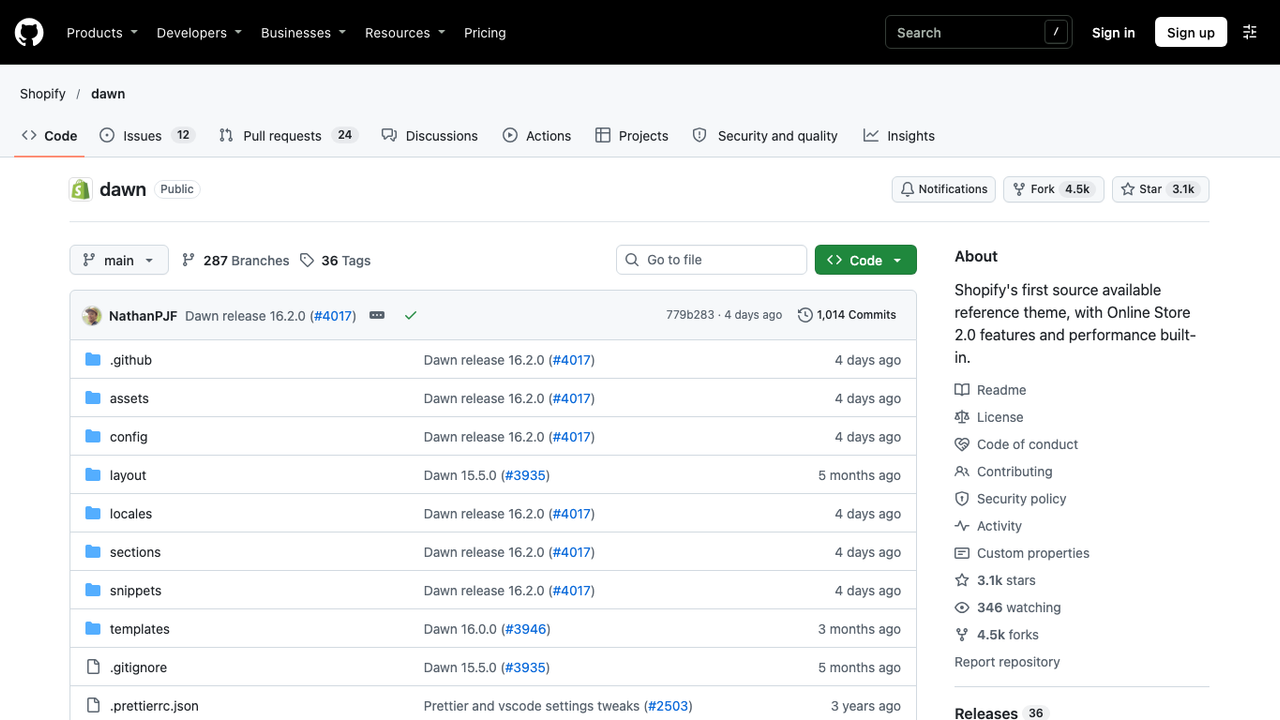
- The main branch can include features that are not released yet; the stable version is the one on the Theme Store.
- Themes built on Dawn can be submitted to the Theme Store, but only if they are substantively different from Dawn.
- To pull Shopify's changes into your fork, add the repository as an upstream remote (git remote add upstream https://github.com/Shopify/dawn.git), then fetch and merge from main.
- The Shopify CLI (shopify theme dev) gives you a local preview with hot reload while you work.
Because Dawn has no theme blocks, a custom element must be added as a section or as a block declared inside a specific section's schema. That is the main reason agencies starting a new custom theme in 2026 often pick Horizon's architecture instead.
Frequently asked questions
Is the Dawn theme free?
Yes. Dawn is free on the Shopify Theme Store, with no paid version or locked features. You only pay for your Shopify plan and any apps you add.
Is Dawn a good Shopify theme?
For speed and reliability, yes: it is the most used theme on Shopify and 71.1% of Dawn stores pass Core Web Vitals. Its design is plain, though, and only 35% of its reviews are positive, mostly because merchants need features it does not include.
What is the difference between Dawn and Horizon?
Both are free themes made by Shopify. Horizon (2025) is built on nested theme blocks and adds sticky add to cart, recently viewed products and AI block generation. Dawn (2021) uses classic sections, is used on more stores and passes Core Web Vitals more often. See our Horizon review for details.
What size should a Dawn image banner be?
Use 3840 × 2160 px (16:9), at least 2560 px wide. Dawn serves banner images up to 3840 px wide, and keeping the same ratio on mobile avoids awkward crops.
Does Dawn have a mega menu?
Yes. In the Header section, set the desktop menu type to Mega menu. It shows sub-collections in columns, without images or featured products.
Do I lose my changes when I update Dawn?
Your settings, sections and content are kept. Edits to theme code files are not, so you have to apply them again on the new version. Keep custom code in separate files and test each update on a copy.

Keep reading

Shopify Taste Theme: Review, Features, Image Sizes and Setup Guide
Taste is a free Shopify theme built on Dawn for specialty food, drinks and craft brands. Features, image sizes, Taste vs Dawn, honest limits and a safe setup guide.

Shopify Savor Theme: Review, Features, Image Sizes and Setup Guide
Savor is Shopify's free food and drink theme from the Horizon family. Features, image sizes, Savor vs Horizon, honest limits from store reviews and a safe setup guide.

Shopify Crave Theme: Review, Features, Image Sizes and Setup Guide
Crave is a free Shopify theme built on Dawn for food, snack and meal kit brands. Features, image sizes, Crave vs Dawn, honest limits and a safe setup guide.