
Shopify Taste Theme: Review, Features, Image Sizes and Setup Guide

Summarize this article with AI


Taste is a free Shopify theme built on Dawn for specialty food, drinks and craft brands. Features, image sizes, Taste vs Dawn, honest limits and a safe setup guide.
Taste is a free Shopify theme for specialty products and bold branding, with industrial fonts, thin strokes and a high-contrast palette. It is also the best-rated theme of this series.
But a free theme with 53% positive reviews on the Theme Store deserves a closer look before you build a store on it. We read Taste's code (version 16.2.0), its Theme Store listing and its most recent reviews to answer the questions merchants actually ask: what Taste does, which image sizes to use, how it compares with Dawn, and where it falls short.
Disclosure: Trafik Plus is a Shopify theme studio. We develop Pops, a paid theme built on theme blocks for food, drink and beauty brands, and we compare it with Taste further down. Every Taste fact below is sourced and dated.
The short answer
- What it is: a free theme by Shopify built on Dawn(opens in a new tab)'s code, with its own design preset.
- Price: free, with no paid tier. Version 16.2.0 shipped on 16 November 2026.
- Best for: specialty food, drinks and craft brands with a small to medium catalog and no theme budget.
- Main strengths: the best review score in this series (53%), the fastest stores (79.5% pass Core Web Vitals), in-store pickup, press coverage and product option blocks.
- Main limits: only 15 reviews, no nested theme blocks, no sticky add to cart and no LinkedIn icon in the social settings.
What is the Shopify Taste theme?
Taste is a free Online Store 2.0 theme designed by Shopify. Its Theme Store listing(opens in a new tab) sums it up as "Ideal for speciality products and bold branding" The listing describes a spacious design with bold headlines and industrial fonts, product sections with larger product cards, specialty product highlights and bespoke FAQs. Taste is small (0.3% of Shopify stores) but scores 53% positive reviews and the best Core Web Vitals pass rate of the themes we checked.
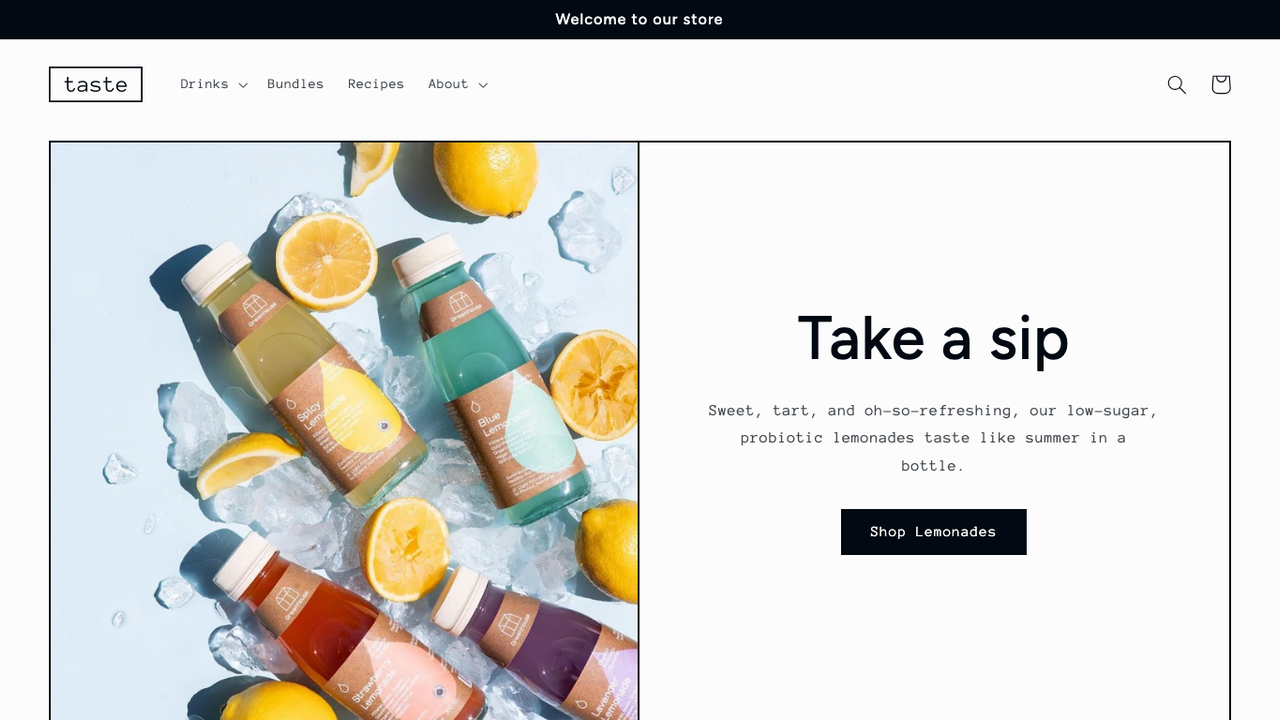
Under the design, Taste is Dawn. It shares Dawn's code and version numbers (16.2.0 at the time of writing), so what changes between Taste and Dawn is the preset: fonts, colors, spacing and default sections. That has two consequences: Taste gets Dawn's updates, and it does not use the newer theme blocks that Shopify's Horizon themes run on. See our list of Shopify themes using theme blocks if that matters to you.
According to ShopThemeDetector(opens in a new tab) (data updated 20 November 2026), Taste runs on 0.3% of Shopify stores, against 15.1% for Dawn.
Taste and the other Dawn-based themes
Shopify offers several free themes that run on Dawn's code with different presets. Refresh, Sense, Taste and Crave are four of them, and their scores differ more than their code does.
Theme | Positive reviews | Reviews | Version | Core Web Vitals pass rate |
|---|---|---|---|---|
Dawn | 35% | 293 | 16.2.0 | 71.1% |
Refresh | 38% | 60 | 16.2.0 | 69.2% |
Sense | 36% | 74 | 16.2.0 | 65.5% |
Taste | 53% | 15 | 16.2.0 | 79.5% |
Crave | 33% | 15 | 16.1.1 | 78.1% |
Sources: Shopify Theme Store and ShopThemeDetector(opens in a new tab), 20 November 2026. Crave still runs version 16.1.1 while the others have moved to 16.2.0, which shows that each preset is published on its own schedule.
Taste theme features
The Theme Store listing(opens in a new tab) lists 32 features. Here are the ones that matter most, checked against the theme code.
Specialty product highlights
Taste gives specialty products room to breathe: larger product cards, highlight sections for what makes the product unique, press coverage blocks and bespoke FAQ sections. Ingredients or nutritional information, usage information and product options are listed too, which suits drinks, coffee, sauces and craft goods.
Navigation: mega menu and sticky header
The header supports a mega menu and a sticky header, and collection pages have filtering, sorting and swatch filters.
Product page and cart
- Quick buy: a quick add button on product cards.
- Cart type: drawer, page or notification, set in Theme settings (Dawn's code offers all three).
- In-store pickup availability on the product page.
- Color swatches on product pages and swatch filters on collections.
- Cross-selling with recommended products and complementary products.
What Taste lacks compared with the Horizon themes: nested theme blocks, a sticky add to cart, quick view, recently viewed products and infinite scroll.
Taste image sizes
Shopify does not publish an official image size table for Taste. What the code does tell us is the largest width each image is served at, which is the same as Dawn's since the code is shared.
Image | Recommended size | Why |
|---|---|---|
Image banner | 3,840 × 2,160 px (16:9), at least 2,560 px wide | The banner serves widths up to 3,840 px |
Banner on mobile | Same image, subject centered | Dawn's banner has no separate mobile image, so the sides get cropped |
Slideshow | 3,840 × 2,160 px, same ratio for every slide | Slides serve widths up to 3,840 px |
Product images | 2,048 × 2,048 px (1:1), up to 4,096 px for zoom | The gallery serves up to 1,946 px, the zoom up to 4,096 px |
Collection images | 1,600 × 1,600 px (1:1) | Collection cards serve up to 3,000 px but rarely display that wide |
Logo | SVG or PNG, about 600 px wide | Displayed between 50 and 300 px wide (100 px by default) |
Keep files under 500 KB where you can, and export in WebP or JPEG. Shopify converts and resizes automatically, but a heavy original still slows the first load. Our Shopify speed optimisation guide covers the rest.
Taste vs Dawn
Dawn(opens in a new tab) is the theme Taste is built on, so the real question is whether Taste's design and default sections fit your brand better than Dawn's neutral look.
Taste | Dawn | |
|---|---|---|
Price | Free | Free |
Developer | Shopify | Shopify |
Latest version | 16.2.0 (16 Nov 2026) | 16.2.0 (16 Nov 2026) |
Positive reviews | 53% (15 reviews) | 35% (293 reviews) |
Share of Shopify stores | 0.3% | 15.1% |
Core Web Vitals pass rate | 79.5% | 71.1% |
Code base | Dawn | Dawn |
Default style | Spacious, high contrast, industrial fonts | Neutral, general retail |
Sources: Taste(opens in a new tab) and Dawn(opens in a new tab) Theme Store listings and ShopThemeDetector, 20 November 2026.
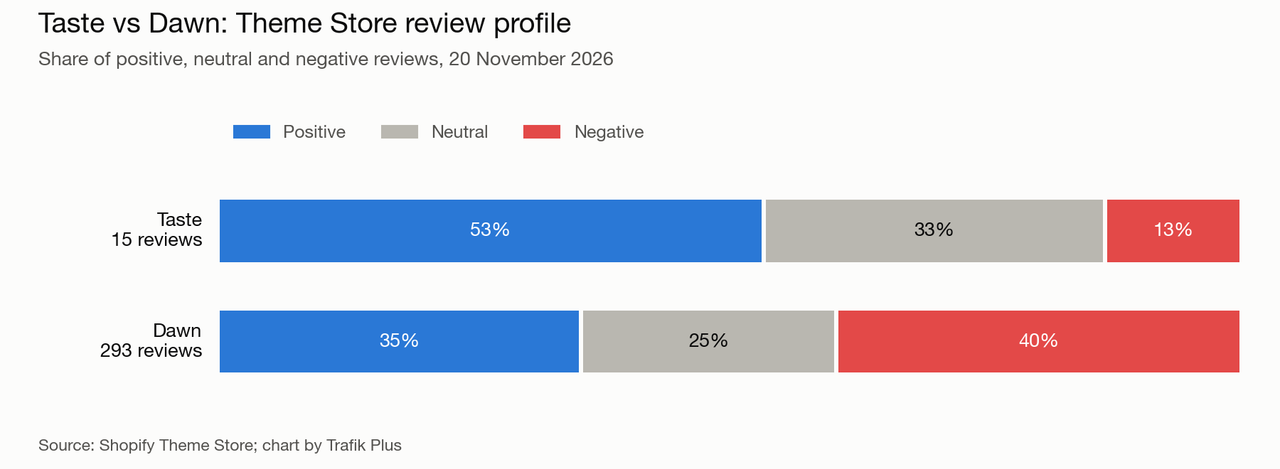
Our take: Taste holds up well against Dawn, with better reviews and faster stores. Pick it if its style fits your brand; you lose nothing in features.
Taste theme review: pros and limits
What Taste does well
- Free and maintained by Shopify, with Dawn's frequent updates (version 16.2.0).
- A distinctive default design (spacious, high contrast, industrial fonts) that saves hours of styling.
- Solid product page blocks for specialty food, drinks and craft brands.
- Lighter than the Horizon themes: 79.5% of Taste stores pass Core Web Vitals.
Where Taste falls short
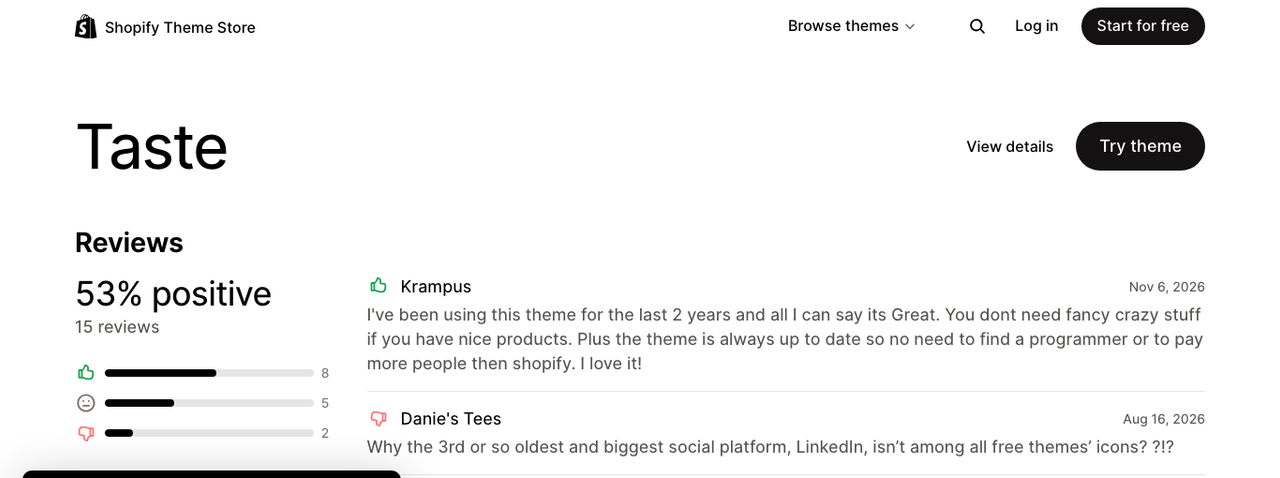
Taste is the best-rated theme in this series: 53% positive, 33% neutral and 13% negative, but out of only 15 reviews(opens in a new tab) (20 November 2026). A store owner who has used it for two years says it is always up to date (November 2026). The less positive reviews mention:
- No LinkedIn icon in the social media settings (August 2026).
- A buy button missing after setup, answered by the theme designer (December 2025).
- A good entry-level theme that a growing brand later replaced with a paid theme (December 2025).
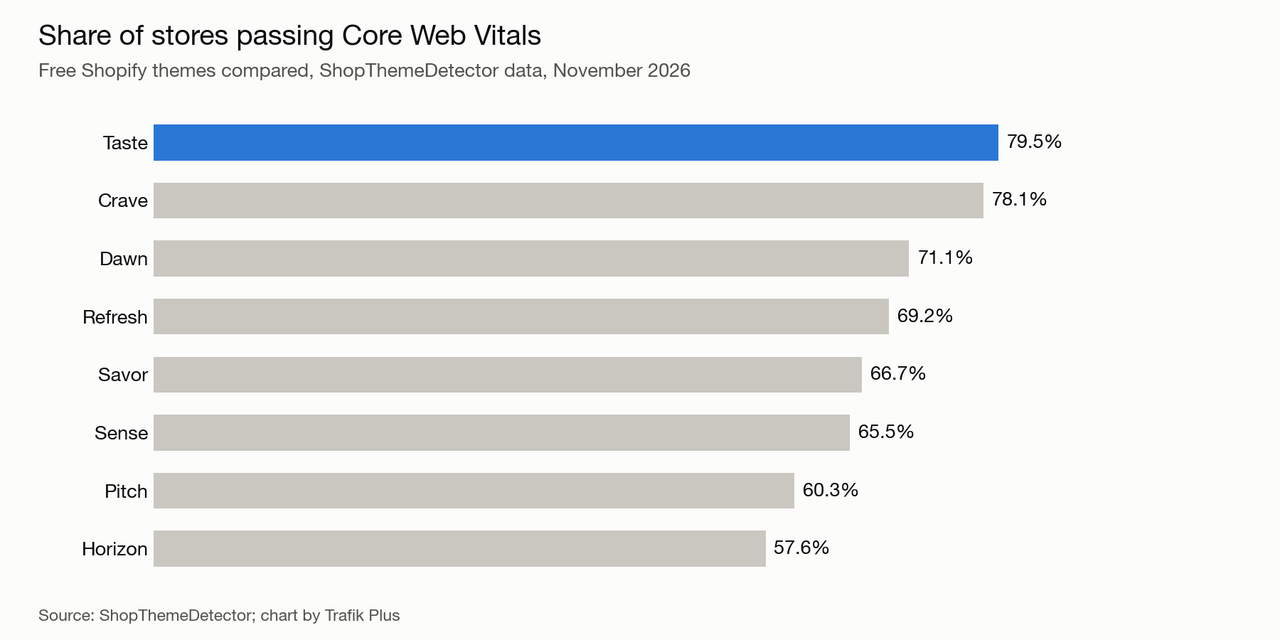
Performance is a strong point. ShopThemeDetector(opens in a new tab) measured a 79.5% Core Web Vitals pass rate across 137 Taste stores, with a median LCP of 1.4 s. Stores with few apps do better (83.3%), so the apps you add matter as much as the theme.
Taste works for specialty food and drink, but it has no build-a-box, no structured nutrition table with a Nutri-Score and no age verification pop-up, which matters for drinks, coffee subscriptions and gift boxes. If conversion features matter, see our list of the highest-converting Shopify themes.
Taste vs premium themes
A paid theme makes sense when it replaces apps you would otherwise pay for every month, or when it fits your industry better. Here is how Taste compares with Pops, the theme we develop. For specialty food and drink brands, Pops adds theme blocks, a build-a-box, a nutrition table with Nutri-Score and an age verification pop-up for alcohol, all of which Taste would need apps for.
Taste | Pops | |
|---|---|---|
Price | Free | $400 one-time |
Developer | Shopify | Trafik Plus |
Theme blocks | ❌ No | ✅ Yes |
Presets | 1 | 3 (Pops, Lueur, Scoop) |
Mega menu | ✅ Yes | ✅ Yes |
Sticky add to cart | ❌ No | ✅ Yes |
Quick add | ✅ Yes | ✅ Yes |
Color swatches | ✅ Yes | ✅ Yes |
In-store pickup | ✅ Yes | ✅ Yes |
Stock counter | ✅ Yes | ❌ No |
Build-a-box | ❌ No | ✅ Yes |
Nutrition table with Nutri-Score | ❌ No | ✅ Yes |
Age verification pop-up | ❌ No | ✅ Yes |
Free shipping bar in cart | ❌ No | ✅ Yes |
If none of those extras matter to you, Taste is the better deal. If you sell bundles or food products, see how a build-a-box Shopify theme works, browse food and drink store examples, or compare more options in our Shopify theme comparison and our selection of the best Shopify themes.
How to install and customise Taste
Install it
- In your Shopify admin, go to Online Store, then Themes.
- Open the Taste page on the Theme Store(opens in a new tab), click Try theme, then add it to your theme library.
- Click Customize to set it up, and Publish only when the store is ready. Your current theme stays live until then.
Customise it without code
- Start with Theme settings: logo, colors, typography and buttons apply everywhere.
- Build pages with sections and their blocks. Unlike Horizon themes, blocks cannot be nested, so use multicolumn and collage sections for layouts.
- Set up the mega menu and sticky header in the Header section.
- Fill in the product information blocks (ingredients, usage, shipping) before launch: they answer the questions that stop a purchase.
Keep Taste easy to update
Shopify ships Taste updates often. Every edit you make to the theme's core files makes those updates harder to apply, and custom code can be lost when you install a new version.
- Prefer settings, sections and blocks over code edits.
- Put custom code in new files or a Custom Liquid section rather than editing existing files.
- Duplicate the theme before any change and note every edit you make.
- Read the release notes before updating and test the update on an unpublished copy.
For developers: Taste on GitHub
Taste has no repository of its own. Its code is Dawn's, published at Shopify/dawn on GitHub(opens in a new tab); Taste adds its own settings and default templates on top.
- Dawn's repository is public and versioned, so you can read every change before updating.
- Dawn's code uses section blocks, not theme blocks: blocks are defined inside each section and cannot be reused elsewhere.
- For a new custom build, Shopify also offers its Skeleton(opens in a new tab) starter theme.
- To pull Shopify's changes into a custom fork, add the repository as an upstream remote and merge from main.
Frequently asked questions
Is the Shopify Taste theme free?
Yes. Taste is free on the Shopify Theme Store, with no paid version. It runs on Dawn's code with its own design preset.
Is Taste a good Shopify theme for food and drink?
Yes, for a small catalog. Taste has large product cards, specialty highlights, ingredients blocks and the fastest stores of the themes we checked. It lacks a build-a-box, a nutrition table and an age verification pop-up, so drinks and gift-box brands often need apps.
What image size should I use for a Taste banner?
Use 3,840 × 2,160 px (16:9), or at least 2,560 px wide. The banner uses the same image on mobile and crops the sides, so keep the subject centered.
Is Taste better than Dawn?
Taste and Dawn share the same code, so features are the same. Taste scores 53% positive reviews against 35% for Dawn, and 79.5% of its stores pass Core Web Vitals against 71.1%. Choose Taste if its default design fits your brand.
Does Taste support theme blocks?
No. Taste runs on Dawn's code, which uses section blocks. For nested theme blocks, look at the Horizon themes or a paid theme built on theme blocks such as Pops.
Is the Taste theme fast?
79.5% of Taste stores pass Core Web Vitals, with a median LCP of 1.4 s (ShopThemeDetector, November 2026). Speed depends on your images and apps as much as on the theme.

Keep reading

Shopify Dawn Theme: Review, Features, Image Sizes and Setup Guide
Dawn is Shopify's free reference theme and the most used theme on Shopify. Features, image sizes, Dawn vs Horizon, honest limits and how to update it safely.

Shopify Savor Theme: Review, Features, Image Sizes and Setup Guide
Savor is Shopify's free food and drink theme from the Horizon family. Features, image sizes, Savor vs Horizon, honest limits from store reviews and a safe setup guide.

Shopify Crave Theme: Review, Features, Image Sizes and Setup Guide
Crave is a free Shopify theme built on Dawn for food, snack and meal kit brands. Features, image sizes, Crave vs Dawn, honest limits and a safe setup guide.