
Shopify Speed Optimization: How to Speed Up Your Store and Keep It Fast

Summarize this article with AI


Why Shopify stores slow down, how to read the Web performance report, and 10 fixes to speed up your theme and keep it fast, from apps and images to Liquid.
A fast Shopify store is not something you set once. Most themes are quick on day one. Then an app adds a script, a campaign adds a hero video, marketing adds a pixel, and six months later the store is a second slower without anyone deciding it should be.
That second costs money. In a Deloitte study for Google(opens in a new tab), a 0.1-second improvement in mobile site speed raised retail conversion rates by 8.4%. And Google’s data(opens in a new tab) shows the probability of a bounce rises by 32% as load time goes from 1 to 3 seconds.
This guide covers how to measure your store’s speed in the current Shopify admin, why stores get slow, and 10 fixes to speed up your theme and keep it fast. Most of them come from Shopify’s own theme performance guidelines(opens in a new tab), written for the developers who build Theme Store themes.
What “fast” means for a Shopify store
Shopify measures speed with Google’s three Core Web Vitals. Each one has a threshold set by Google(opens in a new tab), and a page passes when at least 75% of visits meet it.
Metric | What it measures | Good | Poor |
|---|---|---|---|
Largest Contentful Paint (LCP) | Loading: when the main image or text block appears | 2.5 s or less | Over 4 s |
Interaction to Next Paint (INP) | Interactivity: how fast the page reacts to taps and clicks | 200 ms or less | Over 500 ms |
Cumulative Layout Shift (CLS) | Visual stability: how much the layout jumps while loading | 0.1 or less | Over 0.25 |
One change to know if you read older guides: INP replaced First Input Delay (FID) as the interactivity metric in March 2024(opens in a new tab). FID only measured the delay before the first tap. INP looks at every interaction during the visit, so heavy JavaScript that FID used to miss now shows up.
How to measure your Shopify store’s speed
The Web performance report in your admin
Shopify replaced its old speed score (a single Lighthouse number) with a Web performance dashboard(opens in a new tab) in January 2024. You find it in Analytics > Reports > Online store speed, and through a banner on the Online Store > Themes page.
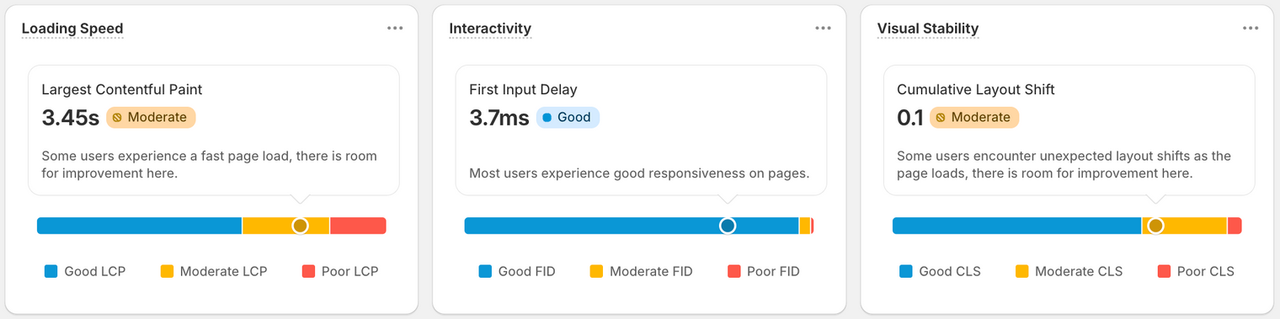
It uses data from real visitors, not a simulated test, and you can split it by page type, device and country. That makes it the best answer to “is my store slow for my customers?”. Shopify suggests waiting until you have at least 100 visitors a day before reading much into it.
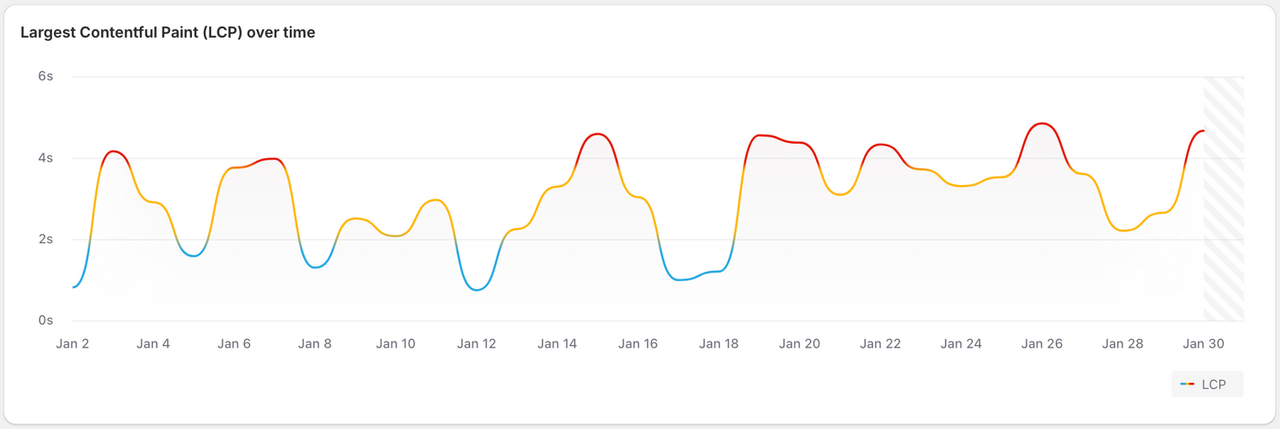
PageSpeed Insights and Lighthouse
PageSpeed Insights(opens in a new tab) shows two things. The top part is Google’s field data from Chrome users over a 28-day rolling window(opens in a new tab), which also works on competitors’ stores. The bottom part is a Lighthouse lab test: one simulated visit on a throttled phone.
Lab scores move from one run to the next, so take the median of three to five runs before you trust a drop. Shopify’s rule of thumb: use field data to find the problem, lab data to debug it, then field data again to confirm the fix.
Test the right pages. The homepage is rarely where shoppers land from ads or search. Run your tests on a product page and a collection page too.
Why Shopify stores get slow
Shopify handles the hosting side well. Every store gets a global CDN, HTTP/3, Brotli compression and other platform defaults(opens in a new tab). When a store is slow, the cause is almost always in what the theme loads:
- App scripts, including code left in the theme by apps you already uninstalled.
- Third-party tags: tracking pixels, chat widgets, review widgets, A/B testing snippets.
- A heavy hero: an autoplay video, a slider of large images, or a background image set in CSS.
- Images not served through Shopify’s image filters, so phones download desktop-sized files.
- Web fonts loaded from another domain.
- Popups that open on load and become the largest element on the page.
- Liquid that loops over large collections or reads metafields inside loops, which slows the server response as the catalog grows.
10 fixes to speed up your Shopify store
1. Start from a fast, up-to-date theme
To be listed on the Shopify Theme Store, a theme needs an average Lighthouse performance score of at least 60(opens in a new tab) across the home, product and collection pages. That is a floor, not a guarantee, but it rules out the worst code. Compare the demo stores of the themes you are considering in PageSpeed Insights before you buy. Our guide to choosing a Shopify theme covers what else to check.

Then keep it updated. Theme developers ship performance fixes, and a theme three major versions behind misses them.
2. Audit your apps, and what they leave behind
List every installed app and ask what it earns you. Remove the ones you no longer use, then check what they left:
- In the theme editor, open App embeds and switch off anything from an app you removed.
- In the code editor, search theme.liquid and the snippets folder for app names. Older apps injected code that stays after uninstalling.
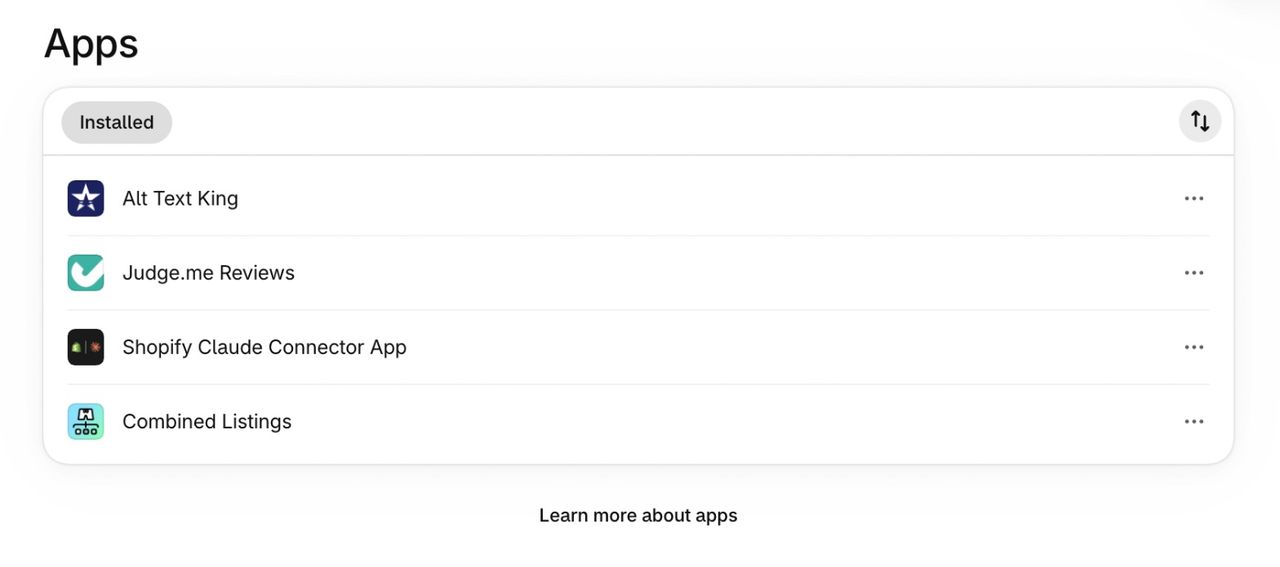
When you choose a new app, prefer one with the Built for Shopify badge. Those apps must not lower the storefront Lighthouse score by more than 10 points(opens in a new tab), and most use app blocks, which Shopify removes with the app.
3. Cut third-party scripts
Pixels and widgets load code from other servers, and each one competes with your own page for the phone’s processor. Make a list of every tag and its owner, then remove the ones nobody checks. For the rest:
- Load them with defer or async so they don’t block the page.
- Remove A/B testing “anti-flicker” snippets when no test is running: they hide the page until the testing script loads.
- Load chat and review widgets on interaction or lower on the page, not before the product image.
4. Fix the hero image (your LCP)
On most Shopify pages, the LCP element is the hero image or the main product image. Shopify’s guidelines(opens in a new tab) are specific:
- Use a real <img> tag, not a CSS background image, so the browser finds it early.
- Never lazy-load the LCP image, and give it fetchpriority="high".
- Don’t hide it behind a fade-in animation.
- Avoid autoplay videos and image sliders at the top of the page. A single still image almost always loads faster.
- Keep popups closed until the visitor scrolls or interacts, or they can become the LCP element(opens in a new tab) themselves.
5. Serve images the Shopify way
Use the image_url and image_tag Liquid filters rather than hard-coded image URLs. image_tag writes the srcset, width and height for you, so each device downloads a file at the right size and the layout doesn’t jump while images load. Lazy-load images below the fold only.
Compress large photos before uploading. Shopify resizes them on the fly, but a 6 MB original from a camera still wastes storage and time on the first request.
6. Host your fonts on Shopify
Fonts loaded from an outside service need an extra connection before the text can appear. Upload them to your theme’s assets(opens in a new tab) so they come from Shopify’s CDN, or use the theme’s system font option. Two weights per font family is usually enough.
7. Keep JavaScript light for good INP
INP gets worse when the browser is busy running scripts while a shopper taps “Add to cart”. Product information, prices and navigation should be in the HTML from Liquid, with JavaScript as an extra layer. Load the code for drawers, filters and quick view when the visitor first opens them, and reserve space for app widgets so content doesn’t jump when they appear.
8. Keep Liquid and menus lean
Slow Liquid shows up as a slow server response, before the browser has anything to draw. Avoid loops inside loops, read metafields outside loops, and limit how many products a section renders. The free Shopify Theme Inspector for Chrome(opens in a new tab) shows which lines take the longest.
Large menus count too. A theme that renders the mega menu once for desktop and again for mobile doubles that markup on every page. One responsive menu is lighter.
9. Be careful with “speed booster” apps
Some speed apps do useful work, like compressing images. Others promise a 90+ score in a day. Shopify warns(opens in a new tab) about services that detect testing tools and serve them a different page, or delay scripts until after the test, so the score jumps while real shoppers see no change, or a slower store. Shopify has removed most of them from the App Store, but the same tricks are sold by freelancers.
The warning signs: a gap of 20 points or more between tools, a page that looks broken in the PageSpeed Insights screenshot, or a lab score far better than your Web performance report. Judge any speed work on your real-visitor data.
10. Make speed part of your routine
Speed slips one change at a time, so check it the same way:
- Test new apps, sections and scripts on a duplicate theme first, and compare Lighthouse before and after.
- Developers can run shopify theme check from the Shopify CLI to flag parser-blocking scripts, remote assets and images without dimensions.
- Before big sales, freeze new apps and scripts. Our Black Friday checklist puts speed in the countdown.
Speed maintenance checklist
When | What to check |
|---|---|
Before installing an app | Is it Built for Shopify? Does it use app blocks or app embeds? Run Lighthouse before and after on a duplicate theme. |
After uninstalling an app | App embeds switched off, leftover snippets and script tags removed from the theme code. |
Every new section or campaign | Hero image under 300 KB, not lazy-loaded, no autoplay video or popup covering it on load. |
Every month | Web performance report: LCP, INP and CLS by page type and device. Note anything that moved from good to moderate. |
Every quarter | Full app and pixel inventory, theme update to the latest version, Theme Check run on the code. |
Six weeks before Black Friday | Freeze new apps and scripts, test the heaviest pages on a mid-range phone. |
FAQ
Why is my Shopify store so slow?
Usually because of what was added to it, not Shopify itself. The most common causes are app scripts (including code left behind by apps you uninstalled), tracking pixels, a heavy hero image, video or slider, images not served through Shopify’s image filters, and web fonts loaded from another domain.
What is a good Shopify speed score?
Shopify retired its single speed score in January 2024. Today, a good result is “good” on all three Core Web Vitals in the Web performance report: LCP of 2.5 seconds or less, INP of 200 ms or less and CLS of 0.1 or less. If you look at Lighthouse, Shopify requires an average of at least 60 for themes sold on its Theme Store.
How long does the Shopify speed report take to update?
The report shows daily values from real visitors, but those values are noisy, so judge a change over one to four weeks. Google’s public data in PageSpeed Insights uses a 28-day rolling window, so a fix takes up to four weeks to show there in full.
Do Shopify speed optimization apps work?
Some help with specific jobs, such as compressing images. Be wary of apps or freelancers promising an instant score of 90+: Shopify documents(opens in a new tab) services that serve a different page to testing tools, so the score rises while real shoppers get no faster.
Does page speed affect Shopify SEO?
Yes, a little. Google says(opens in a new tab) Core Web Vitals are used by its ranking systems, but relevance comes first, so speed will not save thin content. The bigger effect is on conversions and bounce rate.
How do I test the speed of my Shopify store?
Use the Web performance report in your Shopify admin for real-visitor data, PageSpeed Insights to compare with competitors, and Lighthouse in Chrome DevTools to debug a single page. Test a product page and a collection page, not only the homepage.

Keep reading

Cart Drawer vs Cart Page on Shopify: Which One Converts Better? (2026)
Cart drawer or cart page? What A/B tests and CRO research say about conversion, plus how native upsells change the answer.

Shopify Page Builder in 2026: Is It Worth It? 10 Apps Compared With Real Data
Is a Shopify page builder worth it? We priced 10 apps over three years and read 295 one- and two-star reviews to find out when a builder pays off, and when your theme is enough.

Shopify Canvas: What It Is and What It Means for Your Theme
Shopify Canvas is a new visual workspace where you design your store with Sidekick. Here is what it does, what it can't do yet, and what it means for your theme.