
Shopify Savor Theme: Review, Features, Image Sizes and Setup Guide

Summarize this article with AI


Savor is Shopify's free food and drink theme from the Horizon family. Features, image sizes, Savor vs Horizon, honest limits from store reviews and a safe setup guide.
Savor is Shopify's free theme for food and drink brands. It belongs to the Horizon family, so it runs on the same code as Shopify's flagship theme, with a design tuned for sauces, snacks, coffee, spices and anything else people eat or drink. Shopify sums it up as "a tasteful theme that brings spice and brightness to any brand."
It is also the lowest-rated theme of the Horizon family on the Theme Store, with 24% positive reviews. We read Savor's Theme Store listing, its demo store, its most recent reviews and real-world performance data to answer the questions food merchants actually ask: what Savor does, which image sizes to use, how it differs from Horizon, and where it falls short.
Disclosure: Trafik Plus is a Shopify theme studio. We develop Pops, a paid theme built for food, beverage and lifestyle brands, and we compare it with Savor further down. Every Savor fact below is sourced and dated.
The short answer
- What it is: a free Shopify theme for food and drink brands, part of the Horizon collection(opens in a new tab) of 10 themes that share one code base.
- Price: free, with no paid tier. Version 4.5.0 shipped on 10 November 2026, the same release as Horizon.
- Best for: small food and drink brands with a short catalog that want bold, appetizing visuals with zero theme budget.
- Main strengths: large product cards, edge-to-edge imagery, nested theme blocks, pre-order, quick buy, slide-out cart and a better Core Web Vitals pass rate than Horizon.
- Main limits: 24% positive reviews (63 reviews), a small install base, and no built-in tools for food-specific needs such as build-a-box, a nutrition table or age verification.
What is the Shopify Savor theme?
Savor is a free Online Store 2.0 theme designed by Shopify and listed in the Food and drink industry on the Theme Store(opens in a new tab). The listing promises "bright, appetizing displays" with "large, flexible product cards", plus "edge-to-edge imagery" and storytelling blocks to "appeal to the senses". The demo store(opens in a new tab) is a Japanese BBQ sauce brand, with a menu limited to Shop, About and Recipes.
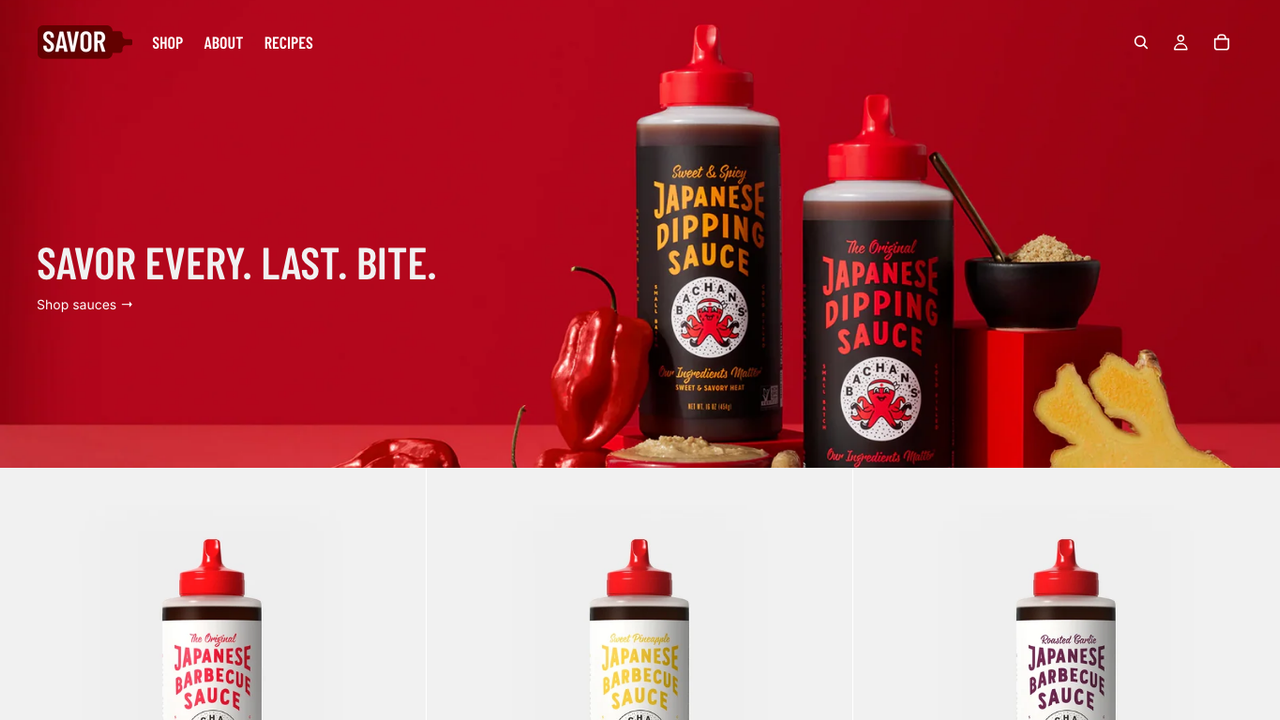
Under the design, Savor is Horizon. The listing labels it "From the Horizon collection", and both themes carry the same version number. That means Savor uses theme blocks: blocks defined once at the theme level, reusable in any section that accepts them, and nestable inside each other. Everything we wrote in our Shopify Horizon theme review about the architecture applies here, and we keep a list of Shopify themes using theme blocks if you want to compare.
Savor is a niche choice. According to ShopThemeDetector(opens in a new tab) (data updated 20 November 2026), it runs on 0.5% of the 3.5 million+ stores it tracks, which ranks it 33rd. Horizon runs on 8.5%. Savor stores also install fewer apps: 3.8 on average, against 5.86 across all Shopify stores.
Savor and the Horizon family
Shopify released Savor as one of 10 free Horizon themes(opens in a new tab): Horizon, Atelier, Dwell, Fabric, Heritage, Pitch, Ritual, Savor, Tinker and Vessel. They share the same settings and code, each with its own fonts, colors and default layouts. You can start on Savor and switch to another Horizon theme later without learning a new editor.
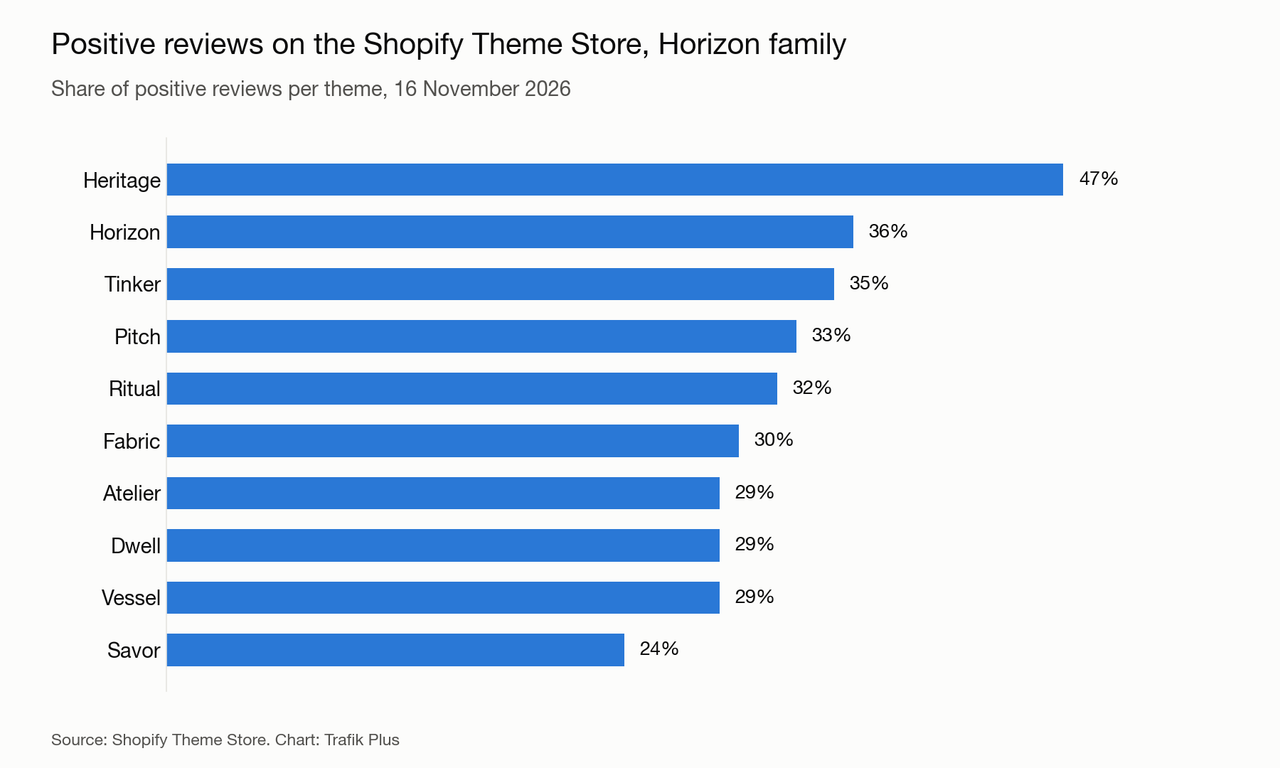
The low score is not about missing code, since every Horizon theme gets the same features. It reflects who installs Savor: many first-time food merchants who expect the demo to look identical once their own photos are in, and who run into the same bugs as Horizon users. We go through those reviews below.
Savor theme features
The Theme Store listing(opens in a new tab) lists more than 40 features. Here are the ones that matter most for a food or drink store.
A design built for food photos
Savor's defaults favor big visuals: full-width heroes, large product cards and image-led storytelling sections for recipes, origins or the founder's story. Bold colors and heavy headings set the tone, so strong product photography matters more here than in a neutral theme.
Theme blocks and layout freedom
Like Horizon, most sections accept groups, text, images, buttons, product cards and other blocks that you can stack and nest. You can build a recipe section with the featured sauce inside it, or a product page with a custom layout, without an app or a developer.
Product page and cart
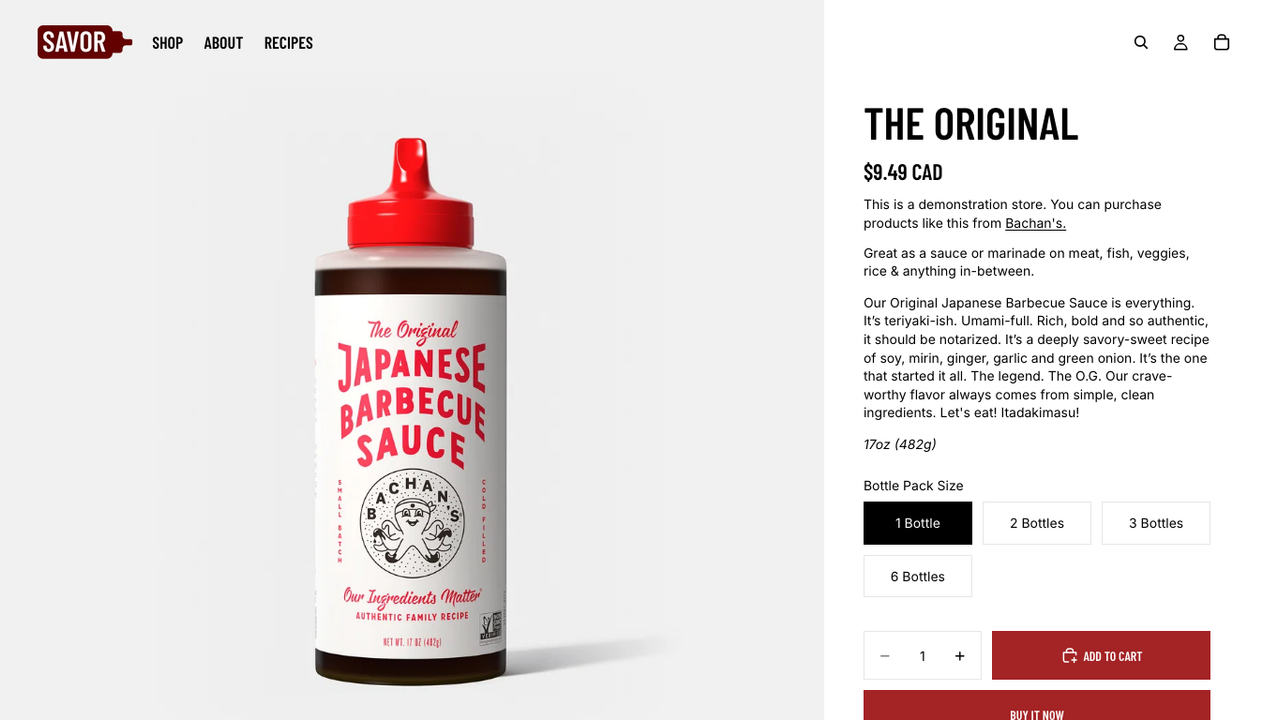
- Pre-order and in-store pickup: both are listed, useful for limited batches and local brands.
- Quick buy and quick view: shoppers add products from collection pages without opening the product page.
- Slide-out cart: the cart opens as a drawer, with cart notes.
- Stock counter: an inventory block can show low stock to create urgency.
- Ingredients or nutritional information: the listing mentions it, but there is no dedicated nutrition table. You add ingredients as text or collapsible content blocks, ideally fed by metafields.
- Color swatches, size chart and usage information blocks, plus recently viewed and recommended products.
Navigation and collections
The header supports a mega menu with in-menu promos and a sticky header. Collection pages offer filtering and sorting, swatch filters and infinite scroll. Filters on custom metafields need Shopify's free Search & Discovery app.
AI block generation
Because Savor runs on Horizon's code, the theme editor's Add block then Generate option works here too: describe a block in plain English and Sidekick writes a self-contained theme block. According to Shopify's help center(opens in a new tab), prompts need at least five words, the feature is not available on the Starter plan, and Shopify Support does not help with the code of AI-generated blocks.
Languages
The listing highlights the main EU languages (English, French, Italian, German and Spanish), and the shared Horizon code ships storefront translations for about 50 languages.
Savor image sizes
Shopify does not publish an image size table for Savor. Since it runs on the same code as Horizon 4.5.0, the limits are the same: responsive images up to 3,840 px wide on desktop for the hero and product media, and up to 1,600 px for mobile hero images. Food photos are full of texture, so undersized files look soft fast. Our recommendations:
Image | Recommended size | Why |
|---|---|---|
Hero / banner (desktop) | 3,840 × 2,160 px (16:9), at least 2,560 px wide | The hero serves widths up to 3,840 px |
Hero / banner (mobile) | 1,600 × 2,000 px (4:5) | Mobile hero widths stop at 1,600 px |
Slideshow | 3,840 × 2,160 px, same ratio for every slide | Mixed ratios make slides jump in height |
Product images | 2,048 × 2,048 px (1:1), up to 3,840 px for zoom | Product media serves widths up to 3,840 px |
Collection images | 1,600 × 1,600 px (1:1) | Cards are rarely wider than 1,200 px |
Logo | SVG or PNG, about 600 px wide | Displayed between 12 and 100 px high (36 px desktop, 28 px mobile by default) |
Shoot every product on the same background and with the same framing: Savor's large product cards make inconsistencies obvious. Keep files under 500 KB where you can and export in WebP or JPEG. Our Shopify speed optimisation guide covers the rest.
Savor vs Horizon
Same developer, same code, same version. The differences are design defaults, reviews and the kind of stores that use each theme.
Savor | Horizon | |
|---|---|---|
Price | Free | Free |
Developer | Shopify | Shopify |
Latest version | 4.5.0 (10 Nov 2026) | 4.5.0 (10 Nov 2026) |
Positive reviews | 24% (63 reviews) | 36% (214 reviews) |
Share of Shopify stores | 0.5% | 8.5% |
Core Web Vitals pass rate | 66.7% (230 stores) | 57.6% (3,484 stores) |
Nested theme blocks | ✅ Yes | ✅ Yes |
Pre-order | ✅ Yes | ✅ Yes |
Sources: Savor(opens in a new tab) and Horizon(opens in a new tab) Theme Store listings and reviews, and ShopThemeDetector for Savor(opens in a new tab) and Horizon(opens in a new tab), 20 November 2026.
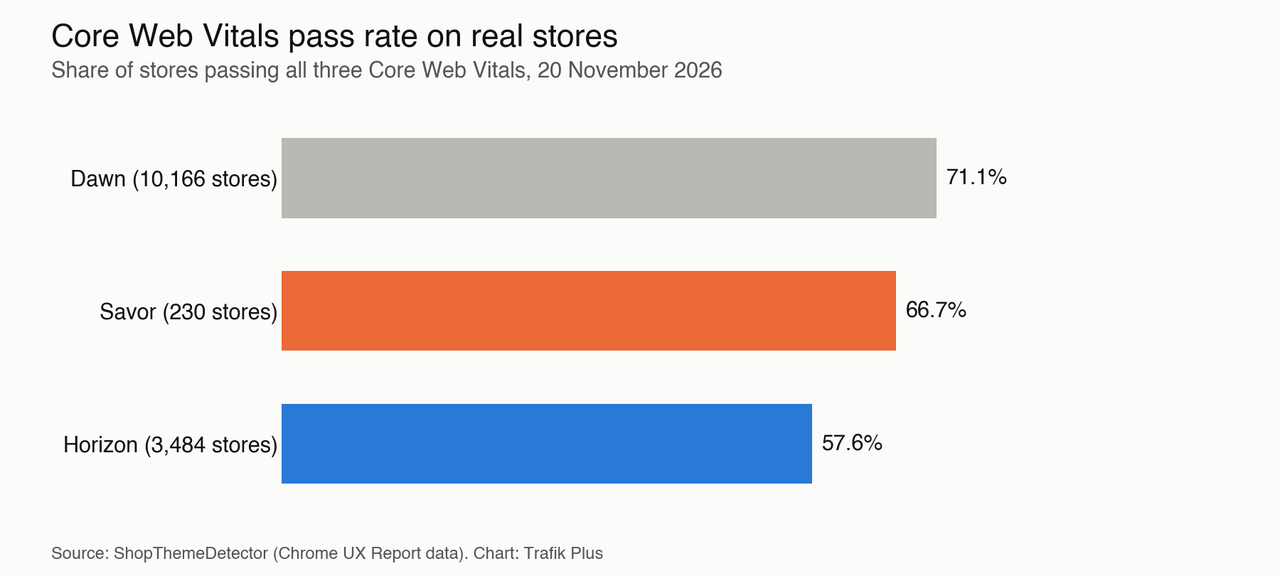
Savor does better on speed. ShopThemeDetector, which relies on Chrome UX Report field data, measured a 66.7% Core Web Vitals pass rate across 230 Savor stores, with a median LCP of 1.6 s, an INP of 167 ms and no layout shift. That beats Horizon's 57.6%, even if Dawn stays ahead at 71.1%. The lighter app stack of Savor stores probably helps as much as the theme itself.
Our take: if you sell food or drink and like Savor's look, pick it over Horizon, you lose nothing in features. If you prefer a calmer design, start on Horizon and borrow Savor's ideas. Either way, you are choosing a style, not a different theme.
Savor theme review: pros and limits
What Savor does well
- Free and maintained by Shopify, and updated at the same pace as Horizon.
- A design made for food and drink, with big visuals and storytelling sections that suit recipes and origin stories.
- Good real-world speed: two thirds of Savor stores pass Core Web Vitals.
- A complete feature list for a free theme: pre-order, pickup, quick buy, mega menu, swatches, stock counter, slide-out cart.
Where Savor falls short
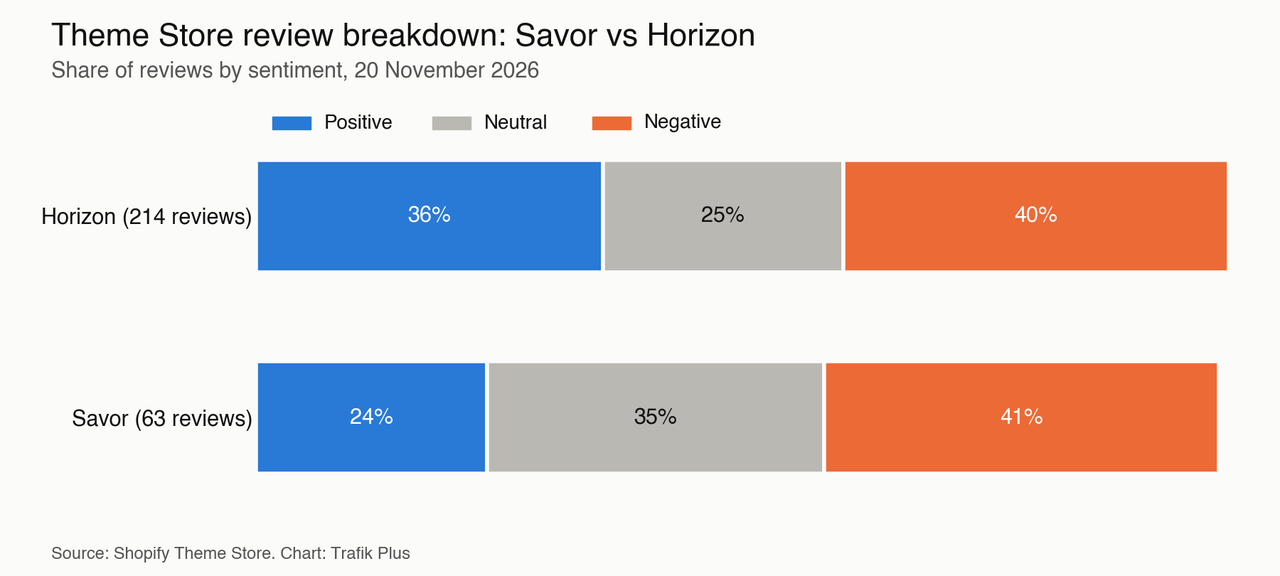
Savor's reviews(opens in a new tab) are the weakest of the Horizon family: 24% positive, 35% neutral and 41% negative out of 63 reviews (20 November 2026). Merchants report:
- A cart page that first appears empty (November 2026).
- A failed update from version 3.5.0 to 4.0.0 (June 2026).
- Pages not loading properly on iOS Safari, which Shopify said it was investigating (May 2026).
- A featured collection carousel showing the wrong image on iOS (April 2026).
- Mega menus collapsing, reported by several stores before Shopify fixed it (February 2026).
- No pagination on the blog page, confirmed as missing by Shopify (February 2026).
- No filters on metafields without the Search & Discovery app (December 2025).
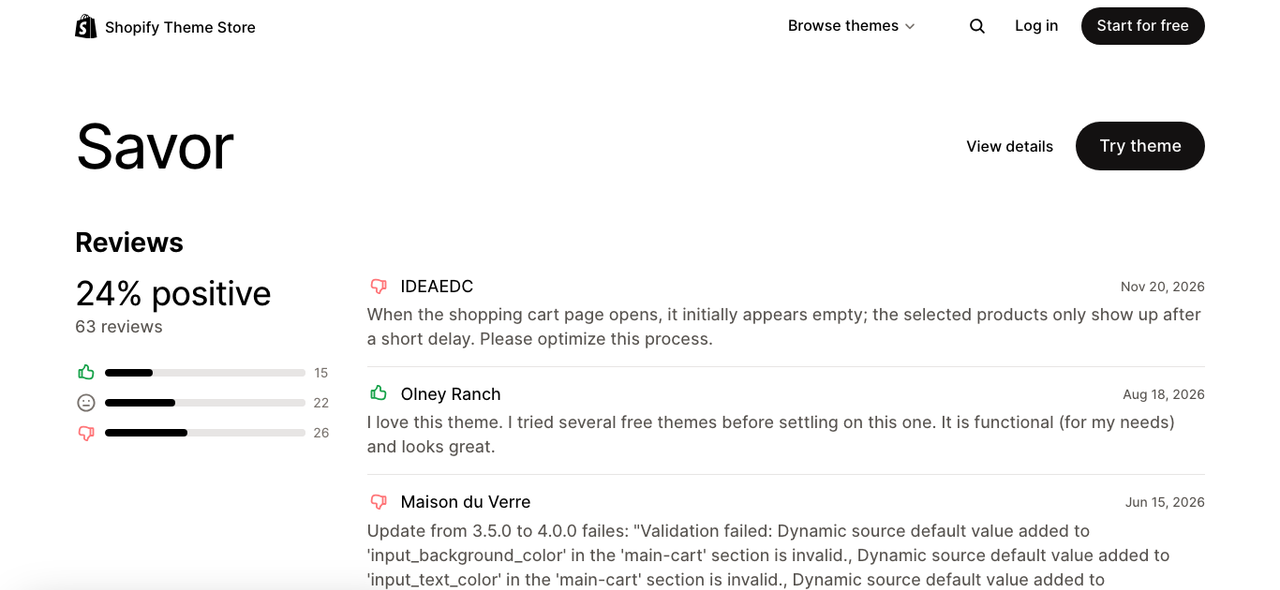
Positive reviews praise a "very good looking theme" with "a lot of customizations". The pattern is clear: the design wins people over, the bugs shared with Horizon cost it stars.
The bigger limit for a food brand is what Savor does not do. There is no build-a-box or mix-and-match bundle builder, no structured nutrition table, no age verification pop-up for alcohol, and no free shipping progress bar in the cart. Subscriptions need an app too: 8.2% of Savor stores run Recharge, according to ShopThemeDetector. For conversion-focused options, see our highest-converting Shopify themes.
Savor vs premium themes
A paid theme makes sense when it replaces apps you would otherwise pay for every month, or when it fits your industry out of the box. Here is Savor next to Pops, the theme we develop for food, beverage and lifestyle brands. Pops was in Shopify's Theme Store review at the time of writing.
Savor | Pops | |
|---|---|---|
Price | Free | $400 one-time |
Developer | Shopify | Trafik Plus |
Theme blocks | ✅ Yes | ✅ Yes |
Presets | 1 (+9 sibling themes) | 3 (Pops, Lueur, Scoop) |
Mega menu | ✅ Yes | ✅ Yes |
Quick add | ✅ Yes | ✅ Yes |
Pre-order | ✅ Yes | ✅ Yes |
Stock counter | ✅ Yes | ❌ No |
Recently viewed products | ✅ Yes | ❌ No |
Build-a-box | ❌ No | ✅ Yes |
Nutrition table with Nutri-Score | ❌ No | ✅ Yes |
Age verification pop-up | ❌ No | ✅ Yes |
Free shipping bar in cart | ❌ No | ✅ Yes |
Subscriptions (selling plans) on the product page | Not mentioned | ✅ Yes |
If you sell a handful of products and want to launch for free, Savor is the better deal. If you sell boxes, bundles, alcohol or products with nutrition facts, a specialised theme saves you several apps. See how a build-a-box Shopify theme works, browse our best Shopify themes for food brands and beverage themes, or compare more options in our Shopify theme comparison.
How to install and customise Savor
Install it
- In your Shopify admin, go to Online Store, then Themes.
- Open the Savor page on the Theme Store(opens in a new tab), click Try theme, then add it to your theme library.
- Click Customize to set it up, and Publish only when the store is ready. Your current theme stays live until then.
Customise it without code
- Start with Theme settings: logo, colors, typography and buttons apply everywhere. Savor's red default is loud, so replace it with your brand colors first.
- Replace every demo photo before judging the result: Savor's layout depends on strong, consistent food photography.
- Put ingredients, allergens and storage tips in product metafields, then display them with text or collapsible blocks.
- Use groups to build recipe and origin story sections, and link each recipe to the products it uses.
Keep Savor easy to update
Several bad reviews come from updates that broke a customised store. To stay upgradable:
- Prefer settings, sections and blocks over code edits.
- Put custom code in new files (a new block in the blocks folder, or a Custom Liquid block) rather than editing existing ones.
- Duplicate the theme before any change and note every edit you make.
- Test each update on an unpublished copy, on desktop and on an iPhone, before publishing it.
Savor for food and drink stores: what to add
Savor gives you the storefront. For a typical food or drink brand, plan for these extras: a reviews app (29.7% of Savor stores use Judge.me and 11.0% Loox), email marketing (13.7% use Klaviyo), and a subscription app if you sell consumables (8.2% use Recharge), according to ShopThemeDetector(opens in a new tab). Bundles need Shopify Bundles or an app; our guide to mix and match bundles covers the options. For inspiration, look at these food and drink Shopify store examples.
Developers should know that Savor has no public repository of its own. It shares its code base with Horizon, whose source is public at Shopify/horizon on GitHub(opens in a new tab). Custom theme blocks added to the blocks folder are the cleanest way to extend Savor without editing its sections.
Frequently asked questions
Is the Shopify Savor theme free?
Yes. Savor is free on the Shopify Theme Store, with no paid version, like the nine other themes of the Horizon family.
Is Savor the same as Horizon?
Savor runs on the same code and version as Horizon (4.5.0 in November 2026), with different design defaults for food and drink brands. Features are the same; fonts, colors and layouts differ.
Is Savor good for restaurants?
Savor is built for brands that sell food and drink products online, such as sauces, coffee or snacks. It has no table booking or restaurant ordering feature, so a restaurant would need an app for that.
What image size should I use for the Savor hero banner?
Use 3,840 × 2,160 px (16:9) on desktop, at least 2,560 px wide, and 1,600 × 2,000 px (4:5) for the mobile hero. Product images work best at 2,048 × 2,048 px.
Can Savor sell subscriptions?
Yes, with a subscription app. Savor does not create subscriptions itself; 8.2% of Savor stores use Recharge according to ShopThemeDetector (November 2026).
Does Savor have a nutrition table?
No. The listing mentions ingredients or nutritional information, but you add it as text or collapsible blocks. A structured nutrition table with Nutri-Score needs custom code or a specialised theme such as Pops.

Keep reading

Shopify Taste Theme: Review, Features, Image Sizes and Setup Guide
Taste is a free Shopify theme built on Dawn for specialty food, drinks and craft brands. Features, image sizes, Taste vs Dawn, honest limits and a safe setup guide.

Shopify Dawn Theme: Review, Features, Image Sizes and Setup Guide
Dawn is Shopify's free reference theme and the most used theme on Shopify. Features, image sizes, Dawn vs Horizon, honest limits and how to update it safely.

Shopify Crave Theme: Review, Features, Image Sizes and Setup Guide
Crave is a free Shopify theme built on Dawn for food, snack and meal kit brands. Features, image sizes, Crave vs Dawn, honest limits and a safe setup guide.