
Shopify Horizon Theme: Review, Features, Image Sizes and Setup Guide

Summarize this article with AI


Horizon is Shopify's free flagship theme built on theme blocks. Features, the 10 sibling themes, image sizes, Horizon vs Dawn, honest limits and a safe setup guide.
Horizon is Shopify's newest free theme, and already the second most used theme on Shopify. It is free, it is maintained by Shopify, and it is the first Shopify theme built entirely on theme blocks: blocks you can nest, move and reuse across sections without touching code.
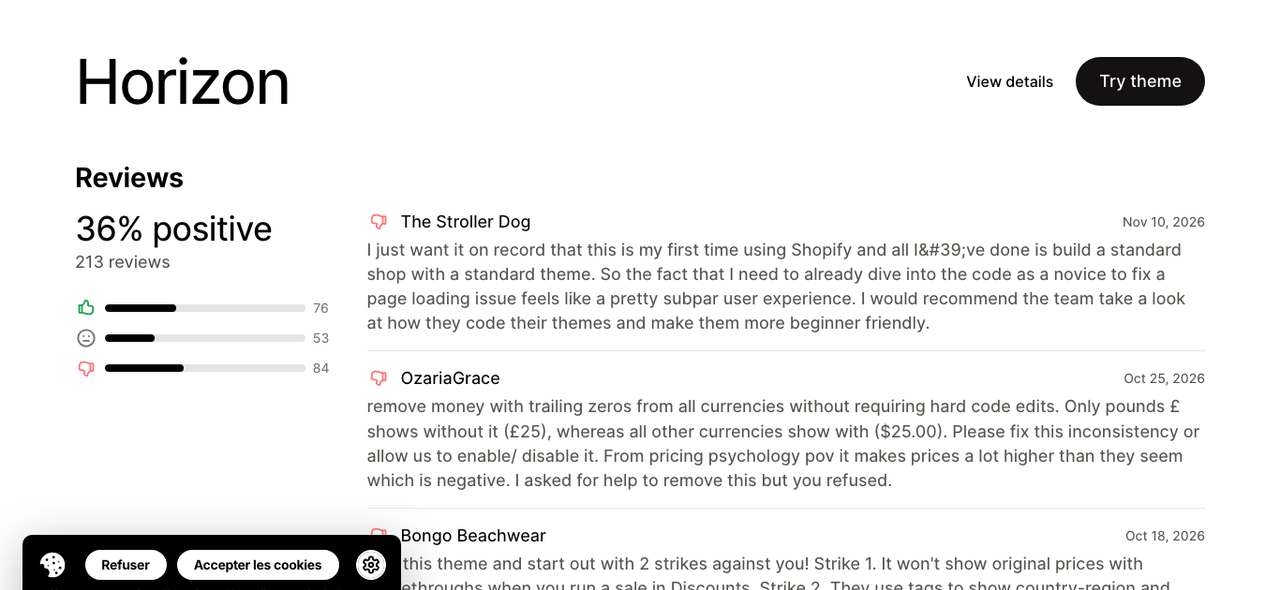
But a free theme with 36% positive reviews on the Theme Store deserves a closer look before you build a store on it. We read Horizon's code (version 4.5.0), its Theme Store listing and its most recent reviews to answer the questions merchants actually ask: what Horizon does, which image sizes to use, how it compares with Dawn, and where it falls short.
Disclosure: Trafik Plus is a Shopify theme studio. We develop Pops, a paid theme that also runs on theme blocks, and we compare it with Horizon further down. Every Horizon fact below is sourced and dated.
The short answer
- What it is: Shopify's free flagship theme, launched with the Summer '25 Edition(opens in a new tab) and the base of a family of 10 free themes.
- Price: free, with no paid tier. Version 4.5.0 shipped on 10 November 2026.
- Best for: new stores with a small to medium catalog that want a modern, flexible design with zero theme budget.
- Main strengths: nested theme blocks, mega menu, quick add, sticky add to cart, slide-out cart and AI block generation in the theme editor.
- Main limits: 36% positive reviews (213 reviews), complaints about prices during sales and menus, and no built-in tools for niche needs such as build-a-box or age verification.
What is the Shopify Horizon theme?
Horizon is a free Online Store 2.0 theme designed by Shopify. Shopify presented it as "our new design foundation, harnessing the power of theme blocks for total flexibility" in its Summer '25 Edition(opens in a new tab). The source code is public on GitHub(opens in a new tab), where the README calls it "the flagship of a new generation of first party Shopify themes".
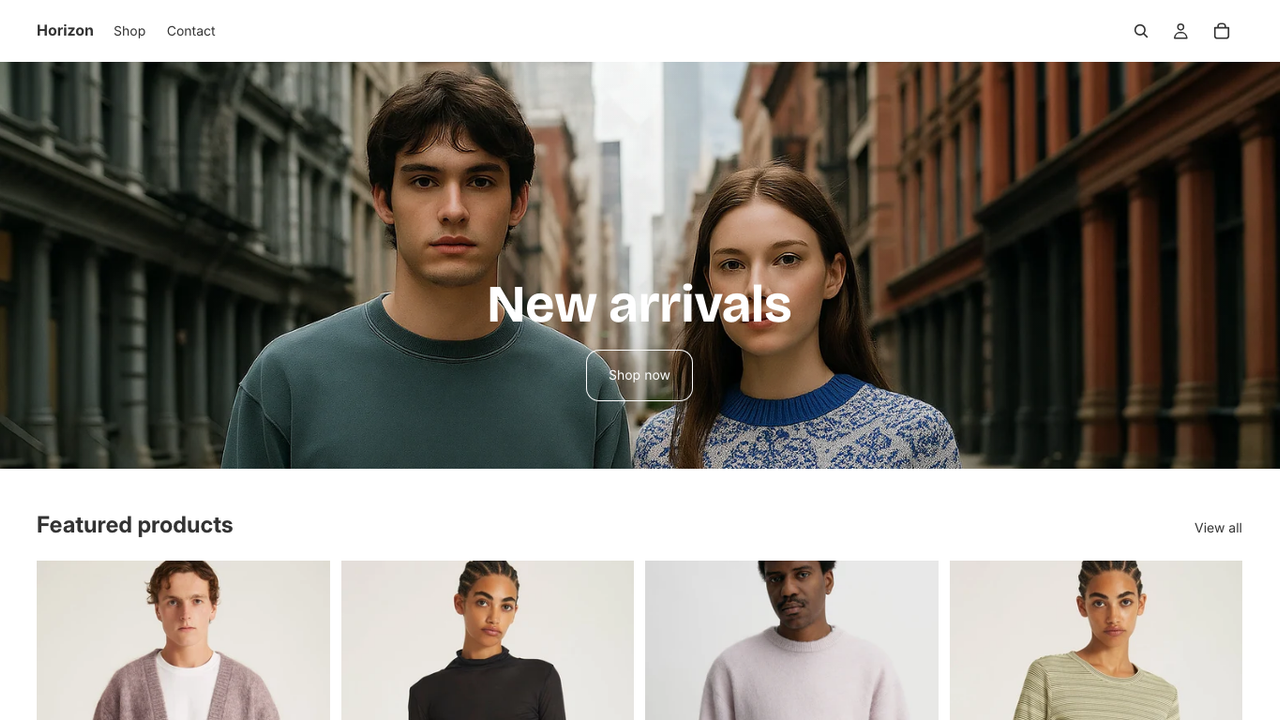
What makes Horizon different from Dawn is its architecture. In older themes, each section defines its own blocks, and a block only exists inside that section. Horizon uses theme blocks: blocks defined once at the theme level, reusable in any section that accepts them, and nestable inside each other. Shopify's documentation allows up to eight levels of nested blocks(opens in a new tab), 25 sections per template and 1,250 blocks per template. If you want the full picture of this architecture, we keep a list of Shopify themes using theme blocks.
Horizon is also popular. According to ShopThemeDetector(opens in a new tab) (data updated 16 November 2026), Horizon runs on 8.4% of the 3.5 million+ stores it tracks, second only to Dawn at 15.1%.
The 10 Horizon themes
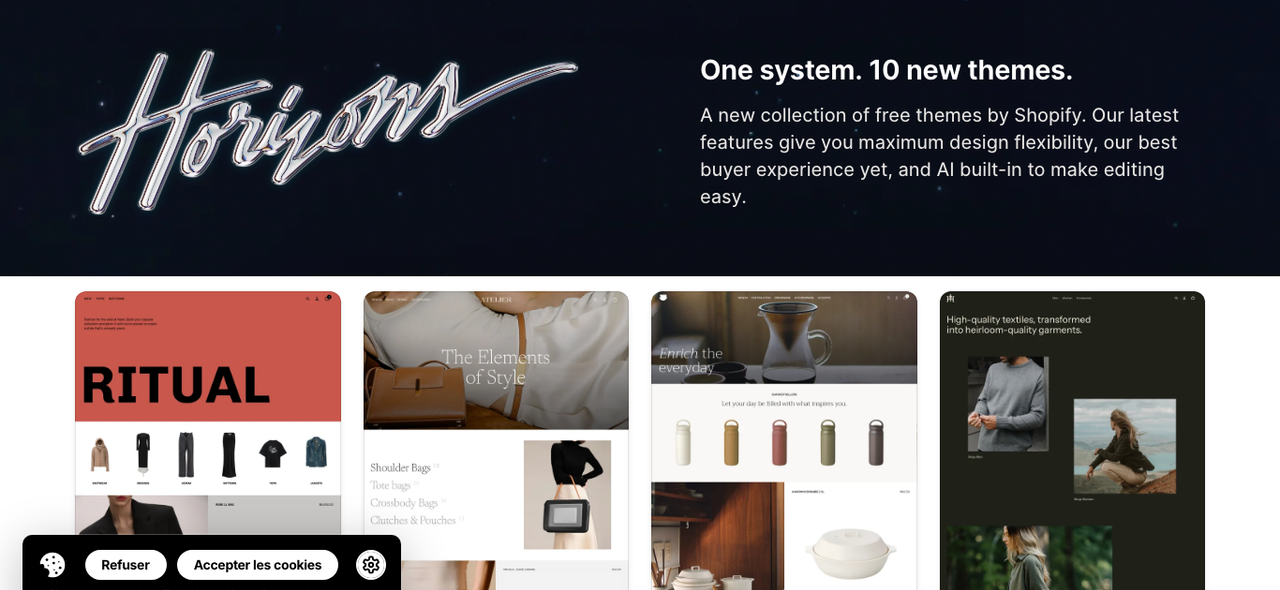
Horizon is not just one theme. Shopify released a collection of 10 free themes(opens in a new tab) that share the same code base and settings, each with its own design. Switching between them keeps the same logic, so what you learn on Horizon applies to all of them.
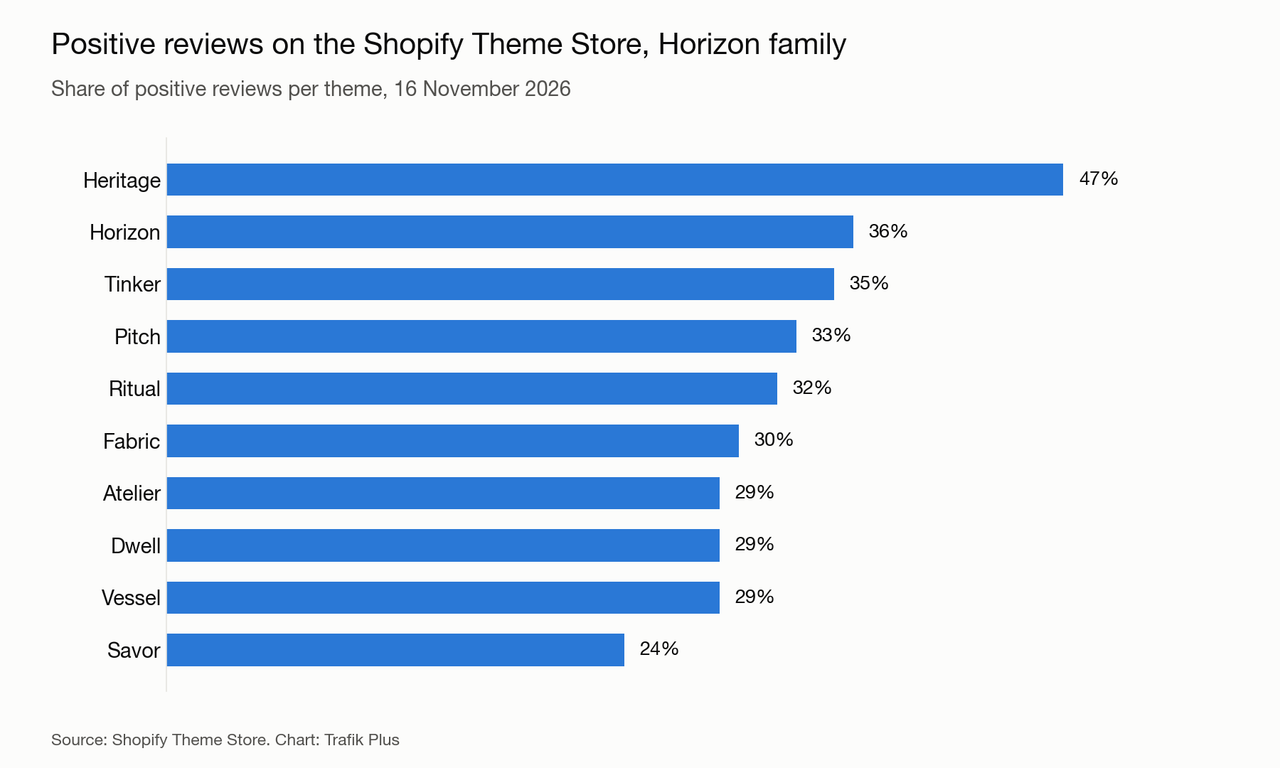
Theme | Price | Positive reviews |
|---|---|---|
Horizon | Free | 36% |
Heritage | Free | 47% |
Tinker | Free | 35% |
Pitch | Free | 33% |
Ritual | Free | 32% |
Fabric | Free | 30% |
Atelier | Free | 29% |
Dwell | Free | 29% |
Vessel | Free | 29% |
Savor | Free | 24% |
Source: Shopify Theme Store, Horizon themes collection, 16 November 2026. Heritage is the best-rated of the family; Savor the lowest.
Horizon theme features
The Theme Store listing(opens in a new tab) lists more than 40 features. Here are the ones that matter most, checked against the theme code where possible.
Theme blocks and layout freedom
Most sections accept groups, text, images, buttons, product cards and other blocks that you can stack and nest. In practice, you can build a hero with a product card inside it, or a product page with a custom layout, without an app or a developer.
Navigation: mega menu and sticky header
The header menu block supports a mega menu that can show featured products or featured collections next to your links. The sticky header has two modes: always visible, or visible when the visitor scrolls up.
Product page and cart
- Sticky add to cart: a setting in the product information section, on by default.
- Quick add and quick view: shoppers add products from collection pages without opening the product page.
- Slide-out cart: the cart opens as a drawer, with cart notes and discount codes.
- Color swatches: variant swatches with adjustable width, height and corner radius, plus swatch filters on collections.
- Stock counter and pickup: an inventory block shows stock, and version 4.5.0 can list physical stores that have the product in stock.
- Combined listings: listed for Shopify Plus stores, to show several products as one with options.
AI block generation
In the theme editor, Add block then Generate lets you describe a block in plain English; Sidekick writes a self-contained theme block and saves it in the theme's blocks folder. According to Shopify's help center(opens in a new tab), prompts need at least five words, the feature is not available on the Starter plan, and Shopify Support does not help with the code of AI-generated blocks.
Languages
The theme code ships with storefront translations for about 50 languages, and the listing highlights the main EU languages (English, French, Italian, German, Spanish).
Horizon image sizes
Shopify does not publish an official image size table for Horizon. What the code does tell us is the largest width each image can be served at. Horizon generates responsive images up to 3,840 px wide on desktop for the hero and product media, and up to 1,600 px for mobile hero images. Uploading smaller files means a blurry image on large screens; uploading much larger files just slows down your admin. Our recommendations, based on Horizon 4.5.0:
Image | Recommended size | Why |
|---|---|---|
Hero / banner (desktop) | 3,840 × 2,160 px (16:9), at least 2,560 px wide | The hero serves widths up to 3,840 px |
Hero / banner (mobile) | 1,600 × 2,000 px (4:5) | Mobile hero widths stop at 1,600 px |
Slideshow | 3,840 × 2,160 px, same ratio for every slide | Mixed ratios make slides jump in height |
Product images | 2,048 × 2,048 px (1:1), up to 3,840 px for zoom | Product media serves widths up to 3,840 px |
Collection images | 1,600 × 1,600 px (1:1) | Cards are rarely wider than 1,200 px |
Logo | SVG or PNG, about 600 px wide | Displayed between 12 and 100 px high (36 px desktop, 28 px mobile by default) |
Keep files under 500 KB where you can, and export in WebP or JPEG. Shopify converts and resizes automatically, but it cannot fix a heavy or low-resolution source. Our Shopify speed optimisation guide covers the rest.
Horizon vs Dawn
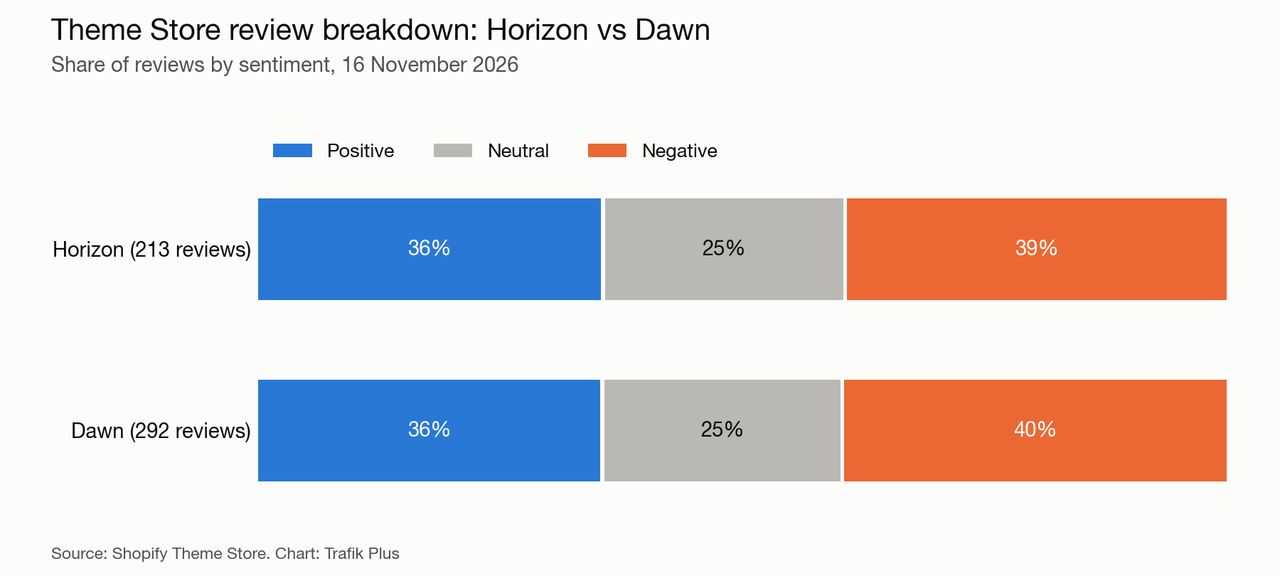
Dawn was Shopify's reference theme from 2021 and is still listed and maintained (version 16.1.1, 2 November 2026). Both are free and made by Shopify, and both have the same 36% positive score. The difference is architecture and features.
Horizon | Dawn | |
|---|---|---|
Price | Free | Free |
Developer | Shopify | Shopify |
Latest version | 4.5.0 (10 Nov 2026) | 16.1.1 (2 Nov 2026) |
Positive reviews | 36% (213 reviews) | 36% (292 reviews) |
Share of Shopify stores | 8.4% | 15.1% |
Nested theme blocks | ✅ Yes | ❌ No |
Mega menu | ✅ Yes | ✅ Yes |
Sticky add to cart | ✅ Yes | ❌ No |
Recently viewed products | ✅ Yes | ❌ No |
Infinite scroll on collections | ✅ Yes | ❌ No |
Sources: Horizon(opens in a new tab) and Dawn(opens in a new tab) Theme Store listings, theme code, and ShopThemeDetector for store share, 16 November 2026.
Our take: for a new store, start with Horizon. Dawn remains a good choice if you already run it and are happy with it, because migrating means rebuilding your templates rather than updating them.
Horizon theme review: pros and limits
What Horizon does well
- Free and maintained by Shopify, with frequent updates: version 4.5.0 alone added store stock availability, accessibility fixes and speed work.
- Layout freedom that used to require a paid theme or a page builder app, thanks to nested blocks.
- A solid feature list for a free theme: mega menu, quick add, sticky add to cart, swatches, slide-out cart.
- Ten designs on one code base, so changing style later does not mean learning a new theme.
Where Horizon falls short
Horizon's reviews(opens in a new tab) are split: 36% positive, 25% neutral and 39% negative out of 213 reviews (16 November 2026). Recent negative reviews report:
- Original prices not shown with a strikethrough when a sale runs through Shopify Discounts (October 2026).
- Submenus in the main menu closing as soon as the cursor moves (October 2026).
- Trailing zeros on prices ("$25.00") with no setting to remove them (October 2026).
- Small layout issues that needed code edits, which is hard for first-time merchants (November 2026).
Performance is mixed too. ShopThemeDetector(opens in a new tab) measured a 57.5% Core Web Vitals pass rate across 3,403 Horizon stores, below Dawn. Lots of nested blocks and apps add weight, so keep an eye on it.
Finally, Horizon covers general retail, not niche needs. There is no build-a-box, no age verification pop-up and no free shipping progress bar in the cart. You would need apps for those, or a theme built for your vertical, such as one of the highest-converting Shopify themes.
Horizon vs premium themes
A paid theme makes sense when it replaces apps you would otherwise pay for every month, or when it fits your industry out of the box. Here is Horizon next to Pops, the theme we develop for food, beverage and lifestyle brands. Pops was in Shopify's Theme Store review at the time of writing.
Horizon | Pops | |
|---|---|---|
Price | Free | $400 one-time |
Developer | Shopify | Trafik Plus |
Theme blocks | ✅ Yes | ✅ Yes |
Presets | 1 (+9 sibling themes) | 3 (Pops, Lueur, Scoop) |
Mega menu | ✅ Yes | ✅ Yes |
Sticky add to cart | ✅ Yes | ✅ Yes |
Quick add | ✅ Yes | ✅ Yes |
Color swatches | ✅ Yes | ✅ Yes |
Stock counter | ✅ Yes | ❌ No |
Build-a-box | ❌ No | ✅ Yes |
Nutrition table with Nutri-Score | ❌ No | ✅ Yes |
Age verification pop-up | ❌ No | ✅ Yes |
Free shipping bar in cart | ❌ No | ✅ Yes |
If none of those extras matter to you, Horizon is the better deal. If you sell bundles or food products, see how a build-a-box Shopify theme works, or compare more options in our Shopify theme comparison and our selection of the best Shopify themes.
How to install and customise Horizon
Install it
- In your Shopify admin, go to Online Store, then Themes.
- Open the Horizon page on the Theme Store(opens in a new tab), click Try theme, then add it to your theme library.
- Click Customize to set it up, and Publish only when the store is ready. Your current theme stays live until then.
Customise it without code
- Start with Theme settings: logo, colors, typography and buttons apply everywhere.
- Build pages with sections, then add and nest blocks inside them. Groups are the key block to create columns and layouts.
- Use the mega menu and sticky header settings in the Header section.
- Generate a custom block with AI only for small, self-contained elements, and test it on mobile.
Keep Horizon easy to update
Shopify ships Horizon updates often. Every edit you make to the theme's core files makes those updates harder to apply. To stay upgradable:
- Prefer settings, sections and blocks over code edits.
- Put custom code in new files (a new block in the blocks folder, or a Custom Liquid block) rather than editing existing ones.
- Duplicate the theme before any change and note every edit you make.
- Read the release notes before updating and test the update on an unpublished copy.
For developers: Horizon on GitHub
Horizon's source code lives at Shopify/horizon on GitHub(opens in a new tab). The repository has no tagged releases; version history is in the release-notes.md file. A few points from the README worth knowing:
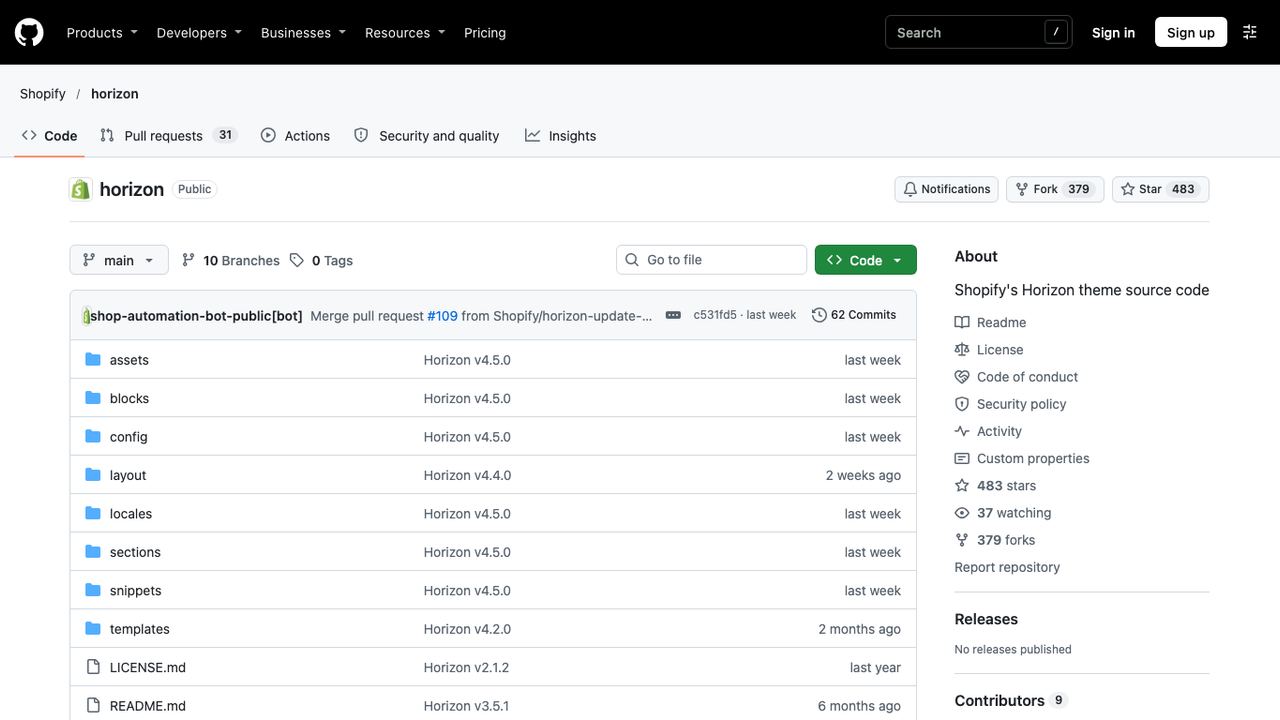
- The main branch can include code for features that are not yet released.
- Shopify does not accept contributions to Horizon.
- Themes based on Horizon cannot be submitted to the Theme Store. Shopify points theme developers to its Skeleton theme instead.
- To pull Shopify's changes into a custom fork, add the repository as an upstream remote and merge from main.
A custom theme block is a Liquid file in the blocks folder with its own schema. Because it is defined at theme level, it becomes available in every section that accepts theme blocks, which is the cleanest way to extend Horizon without editing its sections.
Frequently asked questions
Is the Shopify Horizon theme free?
Yes. Horizon and the nine other themes in the Horizon family (Atelier, Dwell, Fabric, Heritage, Pitch, Ritual, Savor, Tinker and Vessel) are free on the Shopify Theme Store, with no paid version.
Is Horizon better than Dawn?
For a new store, yes in most cases. Horizon has nested theme blocks, a sticky add to cart, recently viewed products and infinite scroll, which Dawn lacks. Both have the same 36% positive review score, and Dawn remains fine for stores already built on it.
What image size should I use for a Horizon banner?
Use 3,840 × 2,160 px (16:9) for the desktop hero, or at least 2,560 px wide, and 1,600 × 2,000 px for the mobile version. Horizon serves hero images up to 3,840 px wide on desktop and 1,600 px on mobile.
Does the Horizon theme have a mega menu?
Yes. The header menu block supports a mega menu that can display featured products or featured collections next to your navigation links.
Can I still update Horizon after editing its code?
Updates are easier to apply when you have not edited the theme's existing files. Keep custom code in new blocks or Custom Liquid blocks, duplicate the theme before each change, and test updates on an unpublished copy.
Is Horizon good for large catalogs?
Horizon handles product filtering, sorting, swatch filters and enhanced search. For very large catalogs or products with many variants, test collection pages and speed carefully, as some store owners report needing extra apps or code.

Keep reading

Local Shopify Theme Review: Pops vs Local for Food, Drink and Local Retail (2026)
Local by Krown Themes or Pops by Trafik Plus? Local retail, in-store pickup, bundles, animations and price: our review and full comparison.

Best Shopify Themes for a Single Product Store: 7 Picks Compared
The best Shopify themes for a one-product store, from Cama to Horizon: prices, Theme Store reviews and the sections that sell a single product.

Best Shopify themes for food brands (2026)
Which Shopify theme suits a food or CPG brand in 2026? Our 6 picks, from Pops and Local to Shapes, Focal, Savor and Crave, with prices and food-specific features.