
Local Shopify Theme Review: Pops vs Local for Food, Drink and Local Retail (2026)

Summarize this article with AI


Local by Krown Themes or Pops by Trafik Plus? Local retail, in-store pickup, bundles, animations and price: our review and full comparison.
The Local Shopify theme and Pops target the same merchants: brands that sell something you eat, drink or put on your skin. But they don’t start from the same place. Local, by Krown Themes, is built for businesses that also have one or more physical shops: grocers, coffee roasters, bakeries, wine shops. Pops, by Trafik Plus, is built for DTC and CPG brands that mostly sell online and want a colourful, animated store.
The verdict is clear. Local is the better choice if you have physical stores: a store selector, pickup availability, a map of your shops and an events calendar are built in, and Pops has none of them. Pops is the better choice if you sell online and focus on average order value and brand image: a bundle builder, a shareable cart link, physics effects, stories and pages built entirely from blocks.
Disclosure: we develop Pops. Pops facts come from its documentation(opens in a new tab) and its code. Local facts come from its Theme Store listing(opens in a new tab), its release notes(opens in a new tab) and the Krown Themes documentation(opens in a new tab), as of 11 November 2026. Where Local is the better choice, we say so.
The short answer
- Pick Local if you have one or more physical stores and want to show stock by store, your addresses on a map and your workshops or tastings, or if you want a theme you can buy today, with 97 reviews, for $20 less.
- Pick Pops if you mostly sell online and want boxes and bundles without an app, a shareable cart link, a store that moves and pages built entirely from blocks.
The full comparison table is at the end of this article.
Local and Pops at a glance
Local
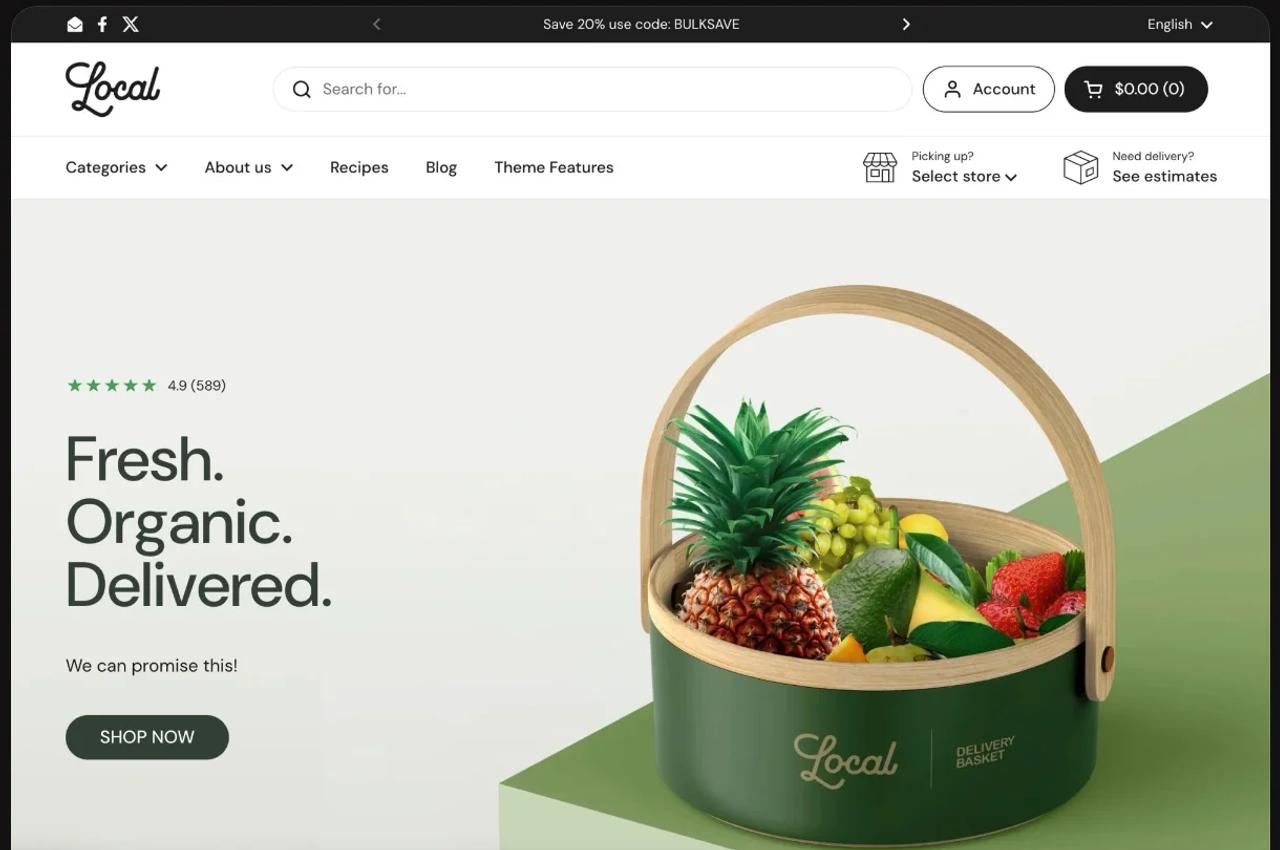
Local(opens in a new tab) launched on 8 August 2022 and is now on version 4.3.0, released on 6 November 2026. It costs $380 as a one-time payment, holds a 98% positive rating from 97 reviews and ships five presets: Local (fine food and fresh produce), Caffeine (coffee), Soleway, Lively and Thrive (wellness). Its listing calls it “the best Shopify theme for food, beverage, and local retail”, with more than 30 sections, product icons, cross-selling, quick buy, an age verification popup and nutritional information.
Pops
Pops is built for DTC and CPG brands and ships three presets: Pops (energy drinks), Lueur (makeup and skincare) and Scoop (high-protein cereal). Pops is in review by the Shopify Theme Store team, so it has no reviews yet. It will cost $400 as a one-time payment. It already has public documentation(opens in a new tab) in English and French.
Local Shopify theme review: pros and cons
Here is our take on each theme, before the detail.
Local: pros
- Proven: on the Theme Store since 2022, with a 98% positive rating from 97 reviews and an update every one to two months in 2026.
- Built for local retail: a store selector linked to your Shopify locations, pickup availability on product pages and product cards, and a Google map of your shops.
- An events calendar with ticket sales, since version 4.2.
- Product comparison, a nutrition table, Nutri-Score and attribute gauges.
- Storefront text translated into 33 languages, including French.
- $380: the cheaper of the two.
Local: cons
- No bundle builder or shareable cart link, so you will need apps for those.
- A restrained design: few visual effects beyond image animations and scrolling text.
- Theme blocks only work in four Flex sections and the table; the rest of the theme uses blocks specific to each section.
- Documentation in English only.
Pops: pros
- A built-in bundle builder, cart upsells, a countdown timer and a shareable cart link.
- Motion that stands out: falling products, cursor trails, stories and animated headings.
- Pages built from Shopify theme blocks throughout, with a nutrition table and Nutri-Score label on product pages.
- Documentation and support in English and French.
Pops: cons
- No reviews yet: Pops itself is still in review by the Shopify Theme Store team, though Trafik Plus has been a Theme Store partner since 2022.
- No store selector, store map or events calendar.
- No breadcrumbs, size chart or product comparison.
- $400: $20 more than Local.
Selling in store and online: where Local makes the difference
This is what Local was built for, and Pops has no equivalent.
- Store selector. The store selector(opens in a new tab) lists your shops in a popup. Each shop is linked to a Shopify location that offers pickup. Shoppers choose theirs, the header shows it with today’s closing time, and product pages and product cards show whether the product is in stock at that store.
- Store map. A Google map in the selector and in a Stores map section(opens in a new tab), with six map styles, custom markers and a directions button.
- Events calendar. Since version 4.2, the events calendar(opens in a new tab) turns your blog posts into events: one page per event with date, time and duration, an add-to-calendar button for Google Calendar, Apple Calendar or Outlook, and ticket sales through a linked product. Handy for workshops, tastings and pop-up stores.
Two limits worth knowing, which Krown documents itself in its FAQ(opens in a new tab): the availability shown is for information only (shoppers still choose pickup or delivery at checkout), and the chosen store is saved in the browser, not in the customer account.
Pops supports Shopify’s in-store pickup on the product page, but has no store selector, map or events. If you have physical stores, this is the deciding argument in favour of Local.
Design and creative effects
Here, the roles are reversed.
Local focuses on clarity. Its presets are clean and easy to read, with customisable product cards (shadows, borders, colours), a before/after image comparison, images with clickable hotspots, scrolling text and images, and image animations you can turn off. It is a theme that puts products and information first, not effects.
Pops works with motion. Its theme blocks(opens in a new tab) include falling content, where products drop and pile up with real physics, a trail effect of images that follows the cursor, floating media (including Lottie animations), rotating circle text and wavy scrolling text. A section divider block cuts the edge of a section into a wave, curve, zigzag, scallop or torn paper. Headings can animate letter by letter, word by word or line by line, and the general settings(opens in a new tab) add page noise, a page frame and a neumorphism style.
Pops also has Instagram-style stories(opens in a new tab) and a product page that takes on each variant’s colour with one metafield per variant(opens in a new tab). Local answers with a UGC-style shoppable video section, added in version 4.0.
Page building
Local follows the classic Online Store 2.0 model: 37 sections, offered in 45 presets, each with its own blocks. Since version 2.7, four Flex sections (slideshow, grid, cards and columns) accept 11 theme blocks you can arrange freely: heading, text, button, image, quick buy, star rating, content group, custom Liquid. Elsewhere, blocks stay specific to their section, as the Krown documentation(opens in a new tab) explains.
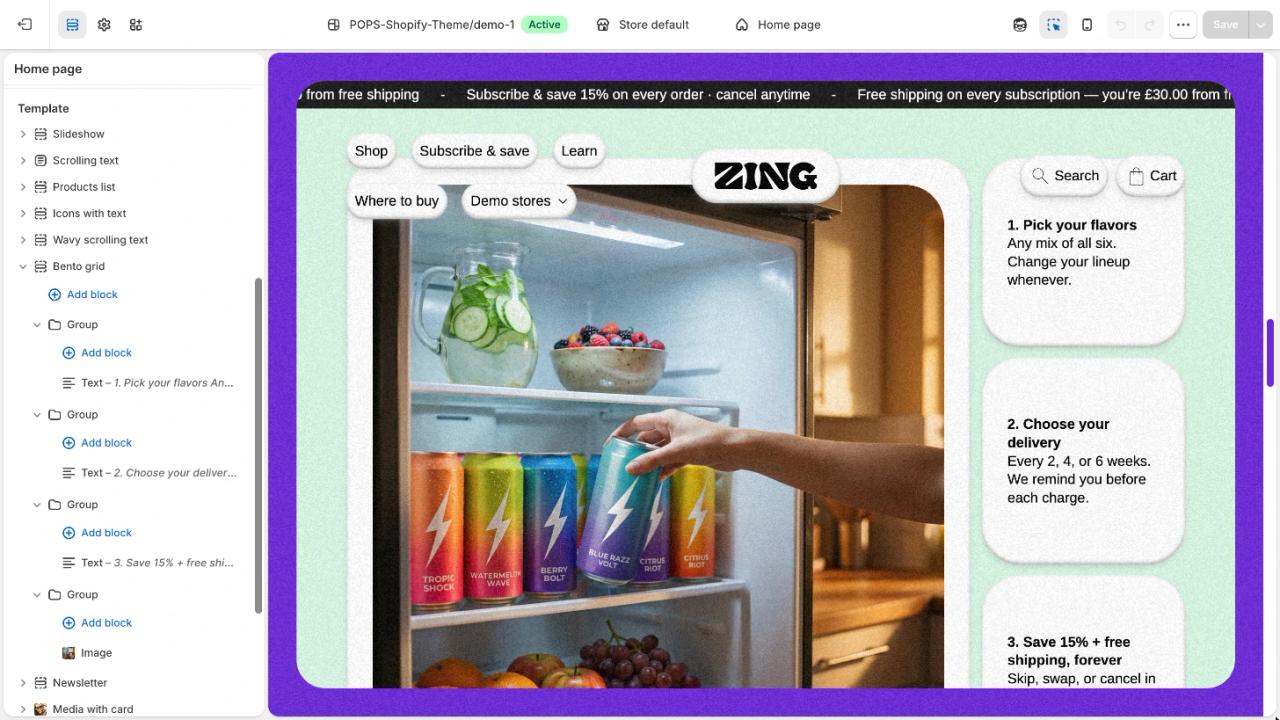
Pops is built on Shopify theme blocks from end to end. Its Section(opens in a new tab) takes any theme or app block and lays them out in a column, a row or a grid, with separate desktop and mobile settings. You can nest a countdown, a Trustpilot rating, a carousel and a button in one section without code.
If you prefer picking from lots of ready-made sections, Local has more of them. If you want the freedom of a page builder everywhere in the theme editor, Pops gives you more.
Product pages
Both themes can show a food label. Local has a nutritional information block linked to metafields, a Nutri-Score block, attribute gauges and charts (intensity, roast, sugar…), icon lists and, since version 4.1.2, Shopify’s product compliance notices (Proposition 65, choking hazards). It also offers product tabs, a size chart, a sticky add to cart, sibling products to switch from one flavour to another, swatches from metaobjects, a discount code block and a side-by-side product comparison from the collection page.
The Pops product information section(opens in a new tab) has a carousel or stacked gallery, zoom, 3D models, and pills or dropdowns with colour and image swatches. Its Table block has a nutrition table mode and can show the Nutri-Score label. A sticky add-to-cart bar follows the shopper, a product metafield turns the button into Pre-order, and the variant picker supports combined listings and up to 2,048 variants. Badges come from a metaobject and can be scheduled with start and end dates(opens in a new tab).
On pre-orders, Pops has the edge: in Local, the “pre-order” option only changes the button label, for the whole product template.
Merchandising and order value
Here Pops does more without apps.
- Build a box. A bundle builder section(opens in a new tab) where shoppers fill a box from a collection of up to 24 products, with minimum and maximum quantities, four discount tiers and a progress bar. Our guide to build a box on Shopify explains how to set it up. Local has no bundle builder: it shows Shopify bundles in the cart, but you will need an app to create them.
- Shareable cart link. Shoppers copy or share their cart(opens in a new tab), useful for creators, gifting and support. Local has none.
- Cart upsells. Both have them: a carousel in the cart page and drawer(opens in a new tab) in Pops, recommendations with quick buy in the cart in Local.
- Countdown timer. Both have one: a countdown block(opens in a new tab) in Pops, a countdown banner section in Local.
Local keeps a few extras in the cart: gift wrapping, a terms and conditions checkbox before checkout, a discount code field in the cart and an exit-intent popup on desktop. Both themes have a free shipping bar, quick buy, product recommendations and an age verification popup.
Discovery: search, filters and navigation
Both themes cover the basics: predictive search, filtering and sorting with price range and swatch filters, a mega menu and a sticky header. Local adds breadcrumbs, two promos in the mega menu, sidebar filters even on the search page and, since version 4.1.2, search by SKU, barcode and tags. Pops opens search in a drawer(opens in a new tab) on every page and loads long collections with a View more button.
Selling in several languages
Local ships storefront text in 33 languages, including French, German, Spanish and Italian, and supports right-to-left languages like Arabic and Hebrew. Pops ships English storefront text that you edit or translate in Shopify, has country and language selectors, and is built with logical CSS properties, so it works right to left too. On this point, Local saves you time.
For developers
Pops is written in vanilla JavaScript web components, uses GSAP for motion and exposes a JavaScript events API(opens in a new tab) for cart, variant, drawer, filter and search events. Local has supported Shopify’s standard customer events since version 4.1.2 and documents its custom code settings, but Krown states that its support team does not write or fix custom code.
Price, availability and support
Local costs $380, one time, with free updates through the Theme Store. Pops will cost $400, one time, also with free updates. So Local is $20 cheaper. As with any Theme Store theme, you can try it for free and only pay when you publish it.
Both come from established Theme Store partners: Krown Themes, a Romanian studio based in Cluj-Napoca, and Trafik Plus, a Shopify Theme Store partner since 2022. The difference is the listing itself. Local has four years of updates and 97 reviews; Pops is new, so it has no reviews yet, and you get support straight from the team that built it, in English and French.
Best Shopify theme for food and drink products: which one should you choose?
Choose Local if you are a grocer, coffee roaster, bakery, wine shop or any brand with physical stores: the store selector, store map and events calendar don’t exist in any of the themes we develop. Choose it too if you want a proven theme translated into 33 languages, with 97 reviews, for $20 less.
Choose Pops if you sell drinks, snacks, supplements or beauty products mostly online, and want boxes and bundles without an app, a shareable cart link, pages built from blocks and a store that moves. It fits brands that run drops, sell multipacks and want to stand out with traffic from social media.
Still choosing? Our Pops vs Shapes comparison puts Pops against another colourful food theme, our top 5 Shopify themes for beverage brands widens the choice, and our Shopify themes page presents the themes we develop.
How we compared
We develop Pops. Pops features come from its documentation(opens in a new tab) and version 1.0.0 of its code. Local features come from its Theme Store listing(opens in a new tab), its release notes(opens in a new tab) up to version 4.3.0 and the Krown Themes documentation(opens in a new tab), checked on 11 November 2026. When a feature does not appear in any of these sources, the table says “Not mentioned” rather than assuming it is missing. Prices are in US dollars.
Pops vs Local: full comparison table
Feature | Pops | Local |
|---|---|---|
Developer | Trafik Plus (France) | Krown Themes (Romania) |
Price | $400 one-time | $380 one-time |
Theme Store reviews | None (in review) | 98% positive from 97 reviews |
Presets | 3 (Pops, Lueur, Scoop) | 5 (Local, Caffeine, Soleway, Lively, Thrive) |
Documentation language | English and French | English |
Translated storefront text | English (translate in Shopify) | ✅ 33 languages |
Right-to-left languages | ✅ Yes | ✅ Yes |
Theme blocks everywhere | ✅ Yes | ❌ 4 Flex sections and the table |
Store selector | ❌ No | ✅ Yes |
In-store pickup on the product page | ✅ Yes | ✅ Yes, and on product cards |
Store map | ❌ No | ✅ Google Maps |
Events calendar and ticketing | ❌ No | ✅ Yes |
Product comparison | ❌ No | ✅ Yes |
Nutrition table | ✅ Yes | ✅ Yes |
Nutri-Score | ✅ Yes | ✅ Yes |
Sticky add to cart | ✅ Yes | ✅ Yes |
Pre-order | ✅ Per product (metafield) | Button label only |
Combined listings | ✅ Up to 2,048 variants | ✅ Up to 2,000 variants |
Custom product badges | ✅ Metaobject, schedulable | ✅ 3 maximum |
Size chart | ❌ No (Accordion blocks) | ✅ Yes |
Breadcrumbs | ❌ No | ✅ Yes |
Bundle builder (Build a box) | ✅ Yes | ❌ No |
Shareable cart link | ✅ Yes | ❌ No |
Cart upsell | ✅ Yes | ✅ Yes |
Countdown timer | ✅ Yes | ✅ Yes |
Free shipping bar | ✅ Yes | ✅ Yes |
Gift wrapping | ❌ No | ✅ Yes |
Age verification popup | ✅ Yes | ✅ Yes |
Exit-intent popup | ❌ No | ✅ Desktop only |
Instagram-style stories | ✅ Yes | ❌ No |
Shoppable videos | ❌ No | ✅ Yes |
Physics effects and cursor trail | ✅ Yes | ❌ No |
Section dividers (wave, zigzag…) | ✅ Yes | ❌ No |
Page colour per variant | ✅ Yes | ❌ No |
Recently viewed products | ❌ No | ❌ Not mentioned |
JavaScript events API | ✅ Yes | Shopify customer events |
FAQ
Is Local a good Shopify theme?
Yes, especially if you have physical stores. Local has been on the Theme Store since 2022, is on version 4.3.0 and holds a 98% positive rating from 97 reviews. Its strength is local retail: a store selector, pickup availability, a store map and an events calendar.
How much does the Local Shopify theme cost?
Local costs $380 as a one-time payment, with free updates through the Shopify Theme Store. Pops will cost $400, also as a one-time payment. You can try each theme for free and only pay when you publish it.
Can I download the Local Shopify theme for free, or try a demo?
Local is not free: it costs $380 as a one-time payment. You can, however, add it to your store from the Shopify Theme Store(opens in a new tab) and try it for free until you publish it. The listing has a live demo for each of its five presets, and Krown Themes publishes the Local theme documentation(opens in a new tab) online. Avoid “free download” sites: they distribute unlicensed copies that get no updates or support.
What is the main difference between Pops and Local?
Local is built for businesses with physical stores that want to connect their online store to their shops. Pops is built for brands that mostly sell online and focus on average order value and brand image: bundles, a shareable cart link, animations and pages built from blocks.
Which theme should I choose for a grocery store, bakery or coffee roaster?
Local, if you have one or more shops. The store selector shows stock at the chosen store, the map guides your customers and the events calendar sells your workshops and tastings. The Caffeine preset is even dedicated to coffee.
Which theme should I choose for a drink or snack brand that sells online?
Pops. Its box builder, cart upsell, shareable cart link and animations are designed for DTC brands that sell multipacks and drops, often to traffic from social media.
Does Local show stock by store?
Yes. Shoppers choose their store in the selector, and product pages and product cards show whether the product is available for pickup at that store. The information is only indicative: shoppers choose pickup or delivery at checkout, and the chosen store is saved in the browser.
Can Pops or Local create bundles without an app?
Pops can: its Build a box section lets shoppers put together a box with discount tiers. Local shows Shopify bundles in the cart but has no builder, so you will need an app to create them.
Do both themes show nutritional information and the Nutri-Score?
Yes. Local has a nutritional information block and a Nutri-Score block linked to metafields. Pops has a Table block with a nutrition table mode and the Nutri-Score label.
Which languages do Local and Pops support?
Local ships storefront text in 33 languages, including French, but its documentation is in English only. Pops ships English storefront text that you translate in Shopify, and its documentation and support are in English and French.
Is Pops available on the Shopify Theme Store?
Not yet: Pops is in review by the Shopify Theme Store team. Trafik Plus has been a Theme Store partner since 2022, and the Pops documentation is already public.

Keep reading

Shopify Horizon Theme: Review, Features, Image Sizes and Setup Guide
Horizon is Shopify's free flagship theme built on theme blocks. Features, the 10 sibling themes, image sizes, Horizon vs Dawn, honest limits and a safe setup guide.

Best Shopify Themes for a Single Product Store: 7 Picks Compared
The best Shopify themes for a one-product store, from Cama to Horizon: prices, Theme Store reviews and the sections that sell a single product.

Best Shopify themes for food brands (2026)
Which Shopify theme suits a food or CPG brand in 2026? Our 6 picks, from Pops and Local to Shapes, Focal, Savor and Crave, with prices and food-specific features.