
How to Reduce Cart Abandonment on Shopify: 12 On-Site Fixes

Summarize this article with AI


Seven in ten carts are abandoned. Here is how to measure your rate in Shopify, why shoppers leave, and 12 cart and checkout fixes that keep more of them.
To reduce cart abandonment, fix what makes shoppers leave between "Add to cart" and "Pay now": surprise costs, slow or unclear delivery, forced accounts, long forms, missing payment methods and a slow or buggy store. Baymard Institute puts the average documented shopping cart abandonment rate at 70.22%(opens in a new tab), so roughly seven in ten carts never become orders, and many of those exits are caused by the store, not the shopper.
This guide covers the on-site side: how to measure your rate in Shopify, why shoppers abandon, and 12 cart and checkout fixes, most of them settings you can change today without spending another dollar on ads.
What is cart abandonment (and how to calculate it)
Cart abandonment is when a shopper adds at least one product to the cart and leaves without completing the order. The cart abandonment rate formula is:
Cart abandonment rate = (1 − completed orders ÷ carts created) × 100
Two related numbers are worth separating, because they have different causes:
- Cart abandonment: the shopper adds to cart but never clicks through to checkout. Usually a cost, trust or "just browsing" problem.
- Checkout abandonment: the shopper starts checkout and leaves before paying. Usually a form, account, payment or delivery problem.
In Shopify, go to Analytics > Reports and open the Conversion rate breakdown report(opens in a new tab). Its funnel shows all sessions, sessions with cart additions, sessions that reached checkout and sessions that completed checkout. Shopify counts sessions rather than carts, so treat the result as a close proxy: 1 − (sessions that completed checkout ÷ sessions with cart additions). The individual checkouts people left are listed under Orders > Abandoned checkouts.
Why shoppers abandon carts: the Baymard data
Baymard's latest survey of 1,083 US adults who shopped online in the past three months asked why they abandoned an order. 42% said they were just browsing or not ready to buy(opens in a new tab): you can't fix that on-site, and it is the job of follow-up. The rest is fixable.
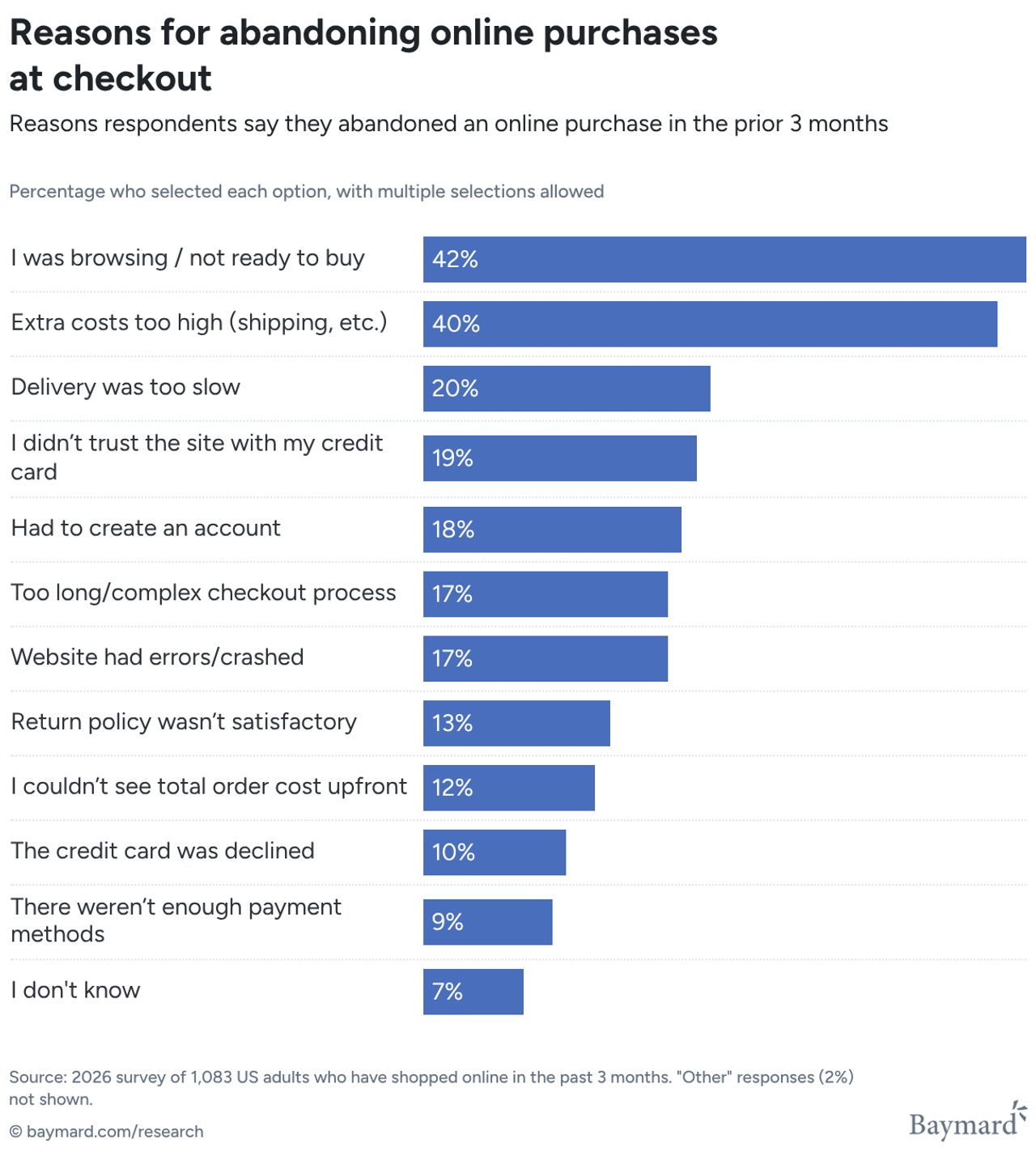
Map each reason to the fix that addresses it:
Reason for abandoning (Baymard) | Share | On-site fix |
|---|---|---|
Extra costs too high (shipping, tax, fees) | 40% | 1, 2 |
Delivery was too slow | 20% | 3 |
Didn’t trust the site with card details | 19% | 5, 11 |
Had to create an account | 18% | 8 |
Too long or complicated checkout | 17% | 9, 10 |
Website had errors or crashed | 17% | 12 |
Returns policy wasn’t satisfactory | 13% | 4 |
Couldn’t see the total cost up front | 12% | 1, 7 |
Card was declined | 10% | 11 |
Not enough payment methods | 9% | 11 |
What a lower abandonment rate is worth: a worked example
Take a store with 10,000 sessions a month, a $60 average order value and this funnel:
- 800 sessions with cart additions (8%)
- 400 sessions that reached checkout
- 200 completed orders, so a 2% conversion rate and $12,000 in revenue
Cart abandonment is 1 − 200 ÷ 800 = 75%. Checkout abandonment is 1 − 200 ÷ 400 = 50%.
Now say the cart fixes below move 55% of carts to checkout instead of 50% (440 sessions), and the checkout fixes lift completion from 50% to 55%. That gives 440 × 0.55 = 242 orders, or 242 × $60 = $14,520. Same traffic, same ad budget: +$2,520 a month (+21%), about $30,000 a year. Cart abandonment falls from 75% to 1 − 242 ÷ 800 = 69.75%.
Baymard estimates(opens in a new tab) that the average large ecommerce site could gain a 35.26% increase in conversion rate through better checkout design alone, so a five-point gain at each step is a conservative target.
Cart fixes: before the shopper reaches checkout
1. Show the full cost before checkout
Extra costs are the number one reason: 40% of shoppers who abandoned said shipping, taxes or fees were too high, and 12% couldn't see the total order cost up front(opens in a new tab). Shoppers often treat checkout as the place to find out the real price, then leave.
Show shipping cost (or "Free shipping") on the product page and in the cart, state whether taxes and duties are included, and avoid fees that only appear on the last step. If you sell internationally, show prices in the local currency so the total doesn't change at checkout.
2. Make free shipping reachable, and show progress toward it
A free shipping threshold turns the biggest objection into a reason to add one more item. A progress bar in the cart ("You're $12 away from free shipping") makes it concrete. Our guide to the Shopify free shipping bar covers how to pick the threshold so it raises order value instead of eating your margin.
Give shoppers an easy way to cross the line: volume discounts ("2 for −10%"), bundles or a free gift at a cart value tier. Snap Bundle(opens in a new tab) does this inside the product page and cart; it is free while bundle revenue stays under $500 a month, then $12.99 a month, with no order cap.
3. Promise a delivery date, not "standard shipping"
20% of shoppers abandoned because delivery was too slow(opens in a new tab). Sometimes it is slow; often it is just vague. In Settings > Shipping and delivery, name your rates with transit times ("Standard, 3–5 business days") so they show at checkout, and show an estimated delivery window on the product page and in the cart. If you offer an express rate, show it early for shoppers buying for a date.
4. Put your returns policy in the cart
13% abandoned over an unsatisfactory returns policy(opens in a new tab). If you offer 30-day returns or free exchanges, say so in one line under the checkout button, with a link to the full policy (Settings > Policies). The doubt "what if it doesn't fit?" is cheaper to answer in the cart than in an email after the shopper has left.
5. Add trust signals where the money is
19% didn't trust the site with their credit card(opens in a new tab). Near the checkout button, show what reassures a first-time buyer: your review rating (a Trustpilot rating block or product review stars), accepted payment icons, a real contact option and the returns line above. Keep it short; three or four signals beat a wall of badges.
6. Choose the right cart type and keep it editable
The cart should let shoppers change quantity, remove items, apply a code and go to checkout without hunting. Whether a slide-out drawer or a full cart page works better depends on your catalog and average cart size; we compared both in cart drawer vs cart page. Whichever you pick, recommendations in the cart should help (a matching accessory, a refill), not push the checkout button below the fold. Ideas for both are in our Black Friday cart optimization guide, which applies the rest of the year too.
7. Handle discount codes in the cart
A visible "Discount code" field at checkout sends some shoppers to search for codes, and some never come back. Two fixes: apply your current offer automatically (Shopify automatic discounts, or tiers applied in the cart), and let people who already have a code enter it in the cart, before checkout, with a cart discount code field so they see the final price straight away.
Checkout fixes: Shopify settings to change today
8. Keep guest checkout on
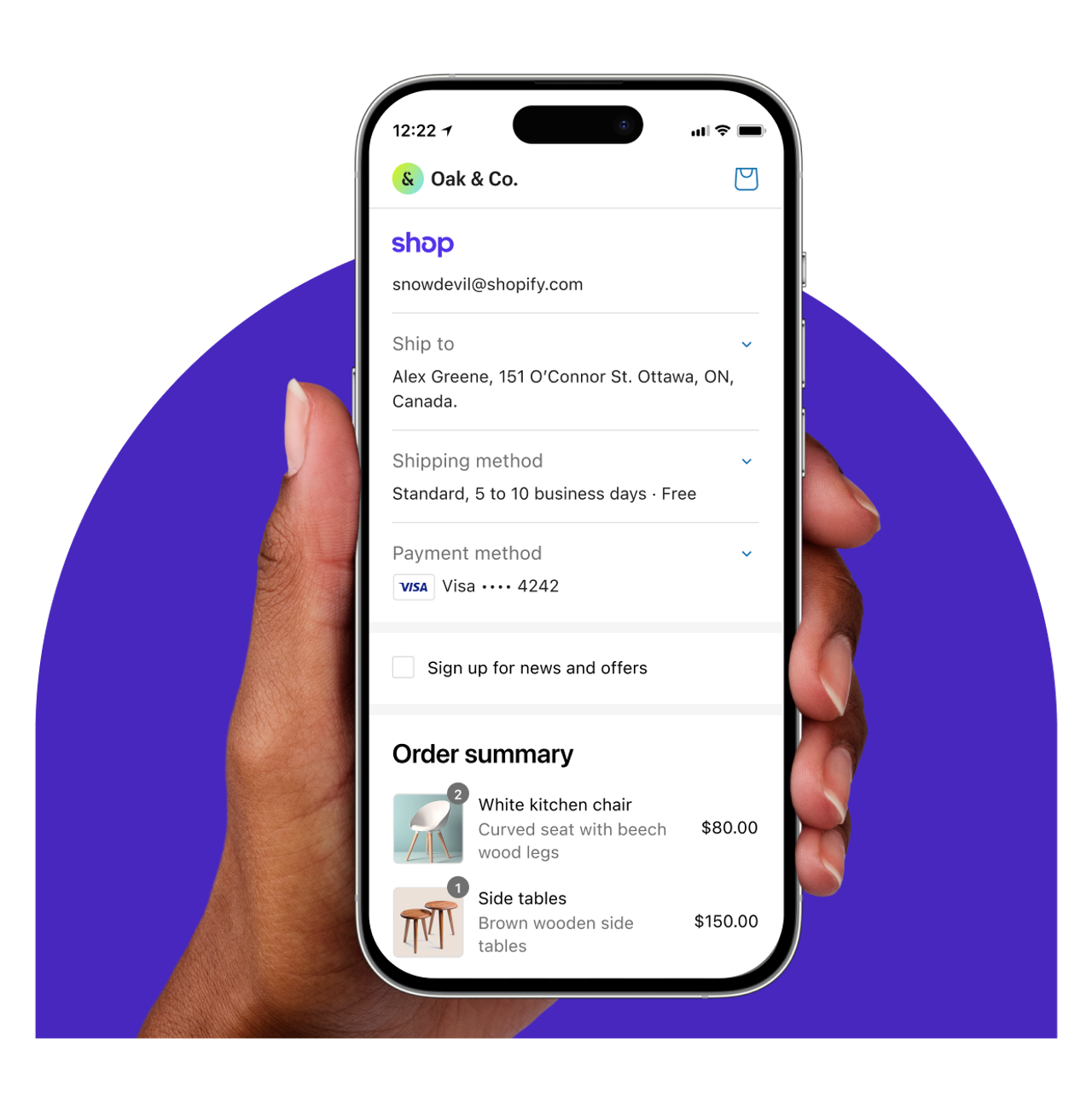
18% abandoned because the site wanted them to create an account(opens in a new tab), and Baymard notes(opens in a new tab) that many users refuse to create an account just to buy. In Settings > Checkout, under Customer contact method, leave Require customers to sign in to their account before checkout turned off. Shopify's help center(opens in a new tab) adds another cost: with that setting on, accelerated checkout buttons such as Apple Pay are hidden in the online store cart. If you want accounts, offer sign-in as an option and invite guests to save their details after the order.
9. Cut checkout form fields
17% abandoned because checkout was too long or complicated(opens in a new tab). Baymard's benchmark found(opens in a new tab) that the average US checkout shows 23.48 form elements by default, when 12 to 14 are enough. In Settings > Checkout > Customer information (options documented here(opens in a new tab)):
- Company name: set to Don't include if you only sell to consumers.
- Address line 2: keep it Optional. Shopify warns that Required or Don't include can stop some customers from completing their purchase.
- Shipping address phone number: keep it Optional unless your carrier or payment provider needs it.
- Full name: Require first and last name is the default; Only require last name removes a field if your fulfillment doesn't need both.
Then, in the checkout and accounts editor, keep address autocompletion(opens in a new tab) on so addresses fill from suggestions, which is faster and gives fewer delivery errors.
10. Stay on one-page checkout unless you have a reason
Shopify's checkout is one-page by default(opens in a new tab), with a three-page option in the checkout and accounts editor (Settings > Checkout > Customize). One page shows shoppers how little is left to fill in. If you switched to three pages for a past app or habit, switch back and compare the "Sessions that completed checkout" rate over a few weeks.
11. Offer the payment methods your shoppers expect, including express
9% abandoned because there weren't enough payment methods, and 10% because their card was declined(opens in a new tab). In Settings > Payments, turn on the wallets your audience uses: Shop Pay, Apple Pay, Google Pay and PayPal cover most of them, and a buy-now-pay-later option helps on higher-priced items.
Show the express buttons in the cart as well as at checkout, so returning shoppers can pay in a few taps. Shopify reports(opens in a new tab) that Shop Pay converts as much as 50% better than guest checkout. Check that your theme's cart shows these buttons, and remember fix 8: requiring sign-in hides them.
12. Remove errors and slow pages
17% abandoned because the website had errors or crashed(opens in a new tab). Place a test order on a phone every month, with a discount code and on the shipping rates you sell most, and look for broken cart updates, app conflicts and pop-ups that cover the checkout button.
Speed matters at the same step: in the Milliseconds Make Millions study(opens in a new tab), a 0.1-second improvement across four mobile speed metrics raised progression from product page to add-to-basket by 9.1% for retail sites. Our Shopify speed optimization guide covers the apps, images and scripts that slow a store down.
What about abandoned cart emails?
On-site fixes reduce how many carts are abandoned; recovery emails win back part of the ones that still are. Shopify can send an abandoned checkout email automatically, and the setup, timing and subject lines are covered in our guide to Shopify abandoned cart emails. Do both: every cart you keep on-site is one you don't have to win back with a discount.
Start with the cost and the checkout settings
The fastest wins are the cheapest: show the full cost in the cart, keep guest checkout and trim the form fields. Then make free shipping easy to reach with bundles or quantity breaks, for example with Snap Bundle(opens in a new tab), so the extra cost that drives most abandonment becomes a reason to add one more item.
FAQ
What is a good cart abandonment rate?
There is no universal target, but Baymard's average across 50 studies is 70.22%(opens in a new tab). If your rate is well above that, start with costs and checkout settings; if it is below, compare your own month-to-month trend rather than an industry figure.
How do I calculate my cart abandonment rate on Shopify?
Divide completed orders by carts created, subtract from 1 and multiply by 100. In Shopify, use the Conversion rate breakdown report: 1 − (sessions that completed checkout ÷ sessions with cart additions).
What is the main reason for cart abandonment?
Apart from shoppers who were just browsing, extra costs: 40% of shoppers who abandoned cited shipping, taxes or fees that were too high(opens in a new tab). Showing the full cost in the cart and offering a reachable free shipping threshold are the first fixes to make.
What is the difference between cart abandonment and checkout abandonment?
Cart abandonment counts shoppers who added to cart and never ordered; checkout abandonment only counts those who started checkout and left before paying. The first points to cost and trust issues, the second to forms, accounts, payment and delivery options.
Do abandoned cart emails reduce cart abandonment?
They recover some abandoned carts rather than prevent them. Use them alongside the on-site fixes; see our guide to Shopify abandoned cart emails.

Keep reading

Shopify Search Optimization: Turn Searchers Into Buyers
How Shopify search works, how to set up the free Search & Discovery app, fix zero-result queries and decide when a paid search app is worth it.

SEO vs PPC: Organic vs Paid Search on a Fixed Budget
SEO vs PPC for a Shopify store with a fixed budget: cost per click vs cost per page, click share data, when to move spend, and a worked $3,000 budget split.

How to Increase ROAS From Your Store, Not Your Ad Account
ROAS = conversion rate × AOV ÷ CPC. Here is how to raise the store side of that formula, landing pages, bundles, checkout, email and LTV, with worked numbers.