
How to Create a Shopify Store: A Step-by-Step Guide

Summarize this article with AI


A beginner’s guide to the Shopify admin, first-year costs, catalog, storefront and checkout, with a practical checklist for opening day.
You can build a Shopify store with a free theme, a handful of product photos and one item ready to sell. To open it to customers, you also need a way to take payment, a delivery option that works for their address and a plan for fulfilling the order. This step-by-step guide covers the storefront your customers see and the settings that make each order work.
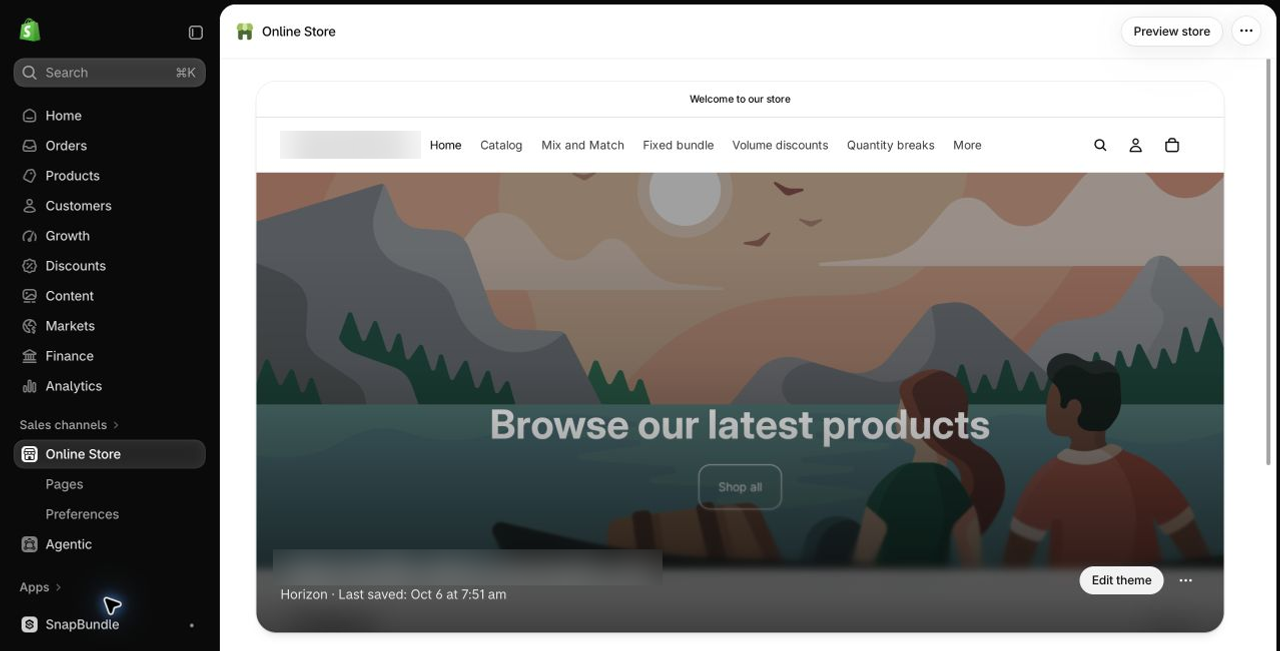
Start with the budget if you have yet to sign up. If you already have an account, use the catalog, storefront or checkout sections to pick up where you are. The two admin screenshots show a real development store, including where to add a product and where to open the theme editor.
Store launch checklist
0 of 9 tasks done
What Shopify handles for you
The subscription includes hosting, platform updates and a secure checkout. You manage the catalog in the admin and its presentation in the theme. Apps can add reviews, loyalty programs or bundles when the built-in tools and theme do not cover those needs.
What does a Shopify store cost to launch?
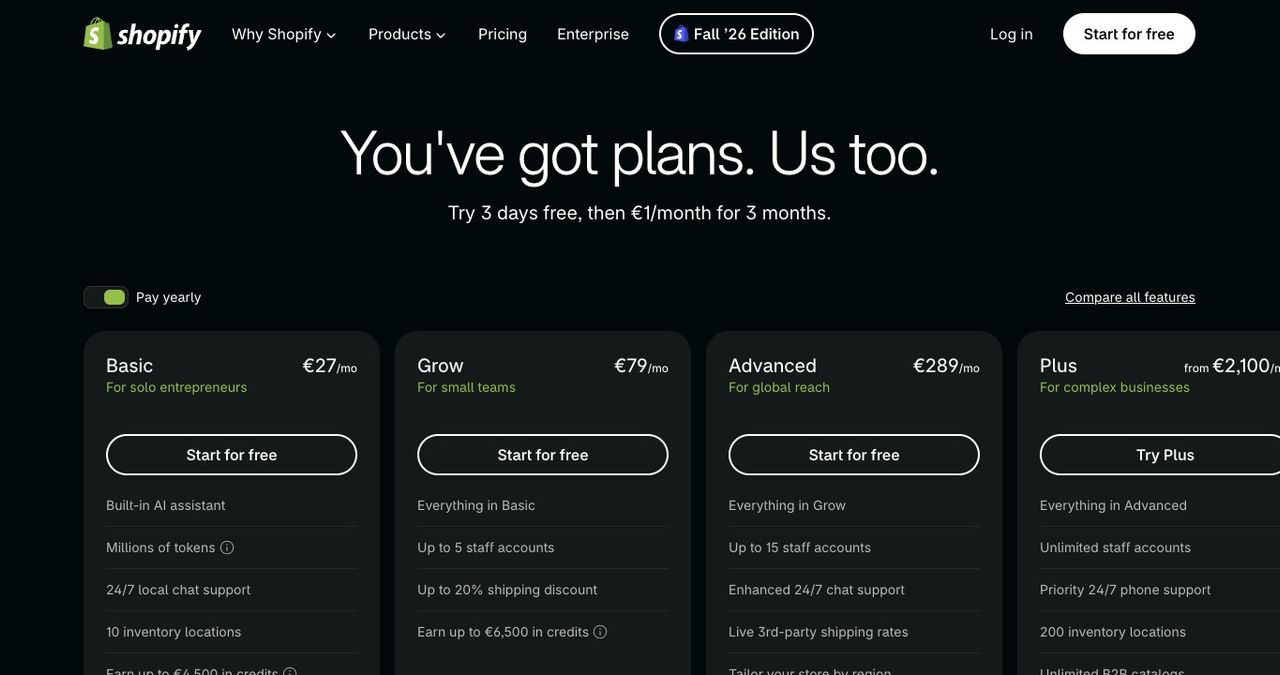
The subscription pays for the platform. Your first-year budget also depends on the domain, theme, any apps you keep and the cost of taking each payment. Check the pricing page for your country(opens in a new tab) with the billing interval you intend to use. Annual billing usually shows a monthly equivalent even though the subscription is paid up front.
Plan in France | Billed monthly | Monthly equivalent, billed yearly | Standard online card¹ | Typical use |
|---|---|---|---|---|
Basic | €36 | €27 | 1.5% + €0.25 | Solo operator |
Grow | €105 | €79 | 1.3% + €0.25 | Up to 5 staff accounts |
Advanced | €384 | €289 | 1.1% + €0.25 | Up to 15 staff accounts |
Plus | Contract pricing | Contract pricing | 1% + €0.25 | From €2,100/month depending on term |
¹ French Shopify Payments rates for standard online cards, checked in November 2026. Other cards, payment methods and countries have different rates. Basic includes discount codes and gift cards. In this French example, annual billing makes Grow €52 per month more expensive than Basic. A 0.2 percentage point saving alone would cover €52 at about €26,000 in standard card sales per month.
A first-year budget you can adjust
The pricing screenshot shows euros. As a worked regional example, French Basic pricing in November 2026 was €36 paid monthly or €27 per month billed annually. That is €432 or €324 over a full year before introductory offers. For comparison, Shopify UK(opens in a new tab) lists Basic at £25 paid monthly or £19 per month billed annually. Choose your store’s billing country before comparing costs.
First-year item | Example assumption | Annual amount |
|---|---|---|
Basic subscription | €27 monthly equivalent, billed annually | €324 |
Custom domain | Illustrative registration price | €15 |
Theme and apps | Free theme and built-in features | €0 |
Illustrative fixed total | Before tax where applicable and per-order expenses | €339 |
A €10-per-month app would take that example to €459. For payment processing, calculate the percentage charge and the fixed charge on the full amount paid. At an illustrative 1.5% plus €0.25, a €50 payment costs €1 to process. If you use an external gateway, check whether an additional Shopify transaction fee applies. Inventory, postage, packaging and returns belong in your product margins as well.
Allow for domain renewal, any legal review and customer acquisition. Starting from the €339 example, a €350 theme allowance and two €10 monthly apps bring fixed costs to €929 before marketing. Substitute your actual quotes, converting theme prices into your billing currency.
Create your account and find your way around Shopify
Before signing up, gather a photo, selling price, stock count and shipping quote for one item. These give you enough to follow the first listing through to an order you know you can fulfill.
Registering a business in France
If you sell commercially from France on your own, one option is an entreprise individuelle (sole proprietorship), potentially under the micro-entreprise regime if eligible. Two single-owner company forms are the SASU (société par actions simplifiée unipersonnelle) and the EURL (entreprise unipersonnelle à responsabilité limitée). Compare formation costs, ongoing paperwork and the owner’s social insurance arrangements in the French government guide to legal forms(opens in a new tab). Outside France, follow your local registration rules.
Register through the French business formalities portal(opens in a new tab). The nine-digit SIREN identifies the business and the fourteen-digit SIRET identifies an establishment. Keep the registered name and address handy for payment verification, invoices and seller disclosures.
Prepare the account and brand
Define who will buy the first product. Check domain availability before printing the store name on packaging. A legible logo, two or three colors and photos of the main product formats give you enough material to try a theme.
On Shopify(opens in a new tab), sign up with an email address you expect to keep. Enter the actual country where the business operates. In Settings, check your business details, store currency, time zone, customer contact address and fulfillment location. Secure the owner account with two-step authentication. Give staff their own accounts when your plan supports them.
Shopify assigns a myshopify.com address. You can work on the catalog while you settle on a public domain. Keep the storefront password enabled while building. Open the storefront preview in a second tab so you can see the difference between saving an admin setting and making a change visible to shoppers.
Area in the admin | What you do there |
|---|---|
Products | Create product records and variants, organize collections and manage inventory. |
Online Store | Edit the theme, create pages and manage storefront preferences. |
Content → Menus | Build the header and footer navigation. |
Settings | Connect a domain and configure payments, tax, shipping and notifications. |
Orders | Check payment status, pick the right items and record fulfillment. |
Build a catalog people can browse and buy from
Create a complete product listing
Open Products and select Add product. Choose a title a customer could recognize on a receipt. “Blue stoneware mug, 300 ml” tells the buyer more than a collection name alone. Include the dimensions, materials, care instructions and what ships in the box. Add one overall photo, one detail shot and one image that shows scale. Our product photography guide covers how to plan those shots.
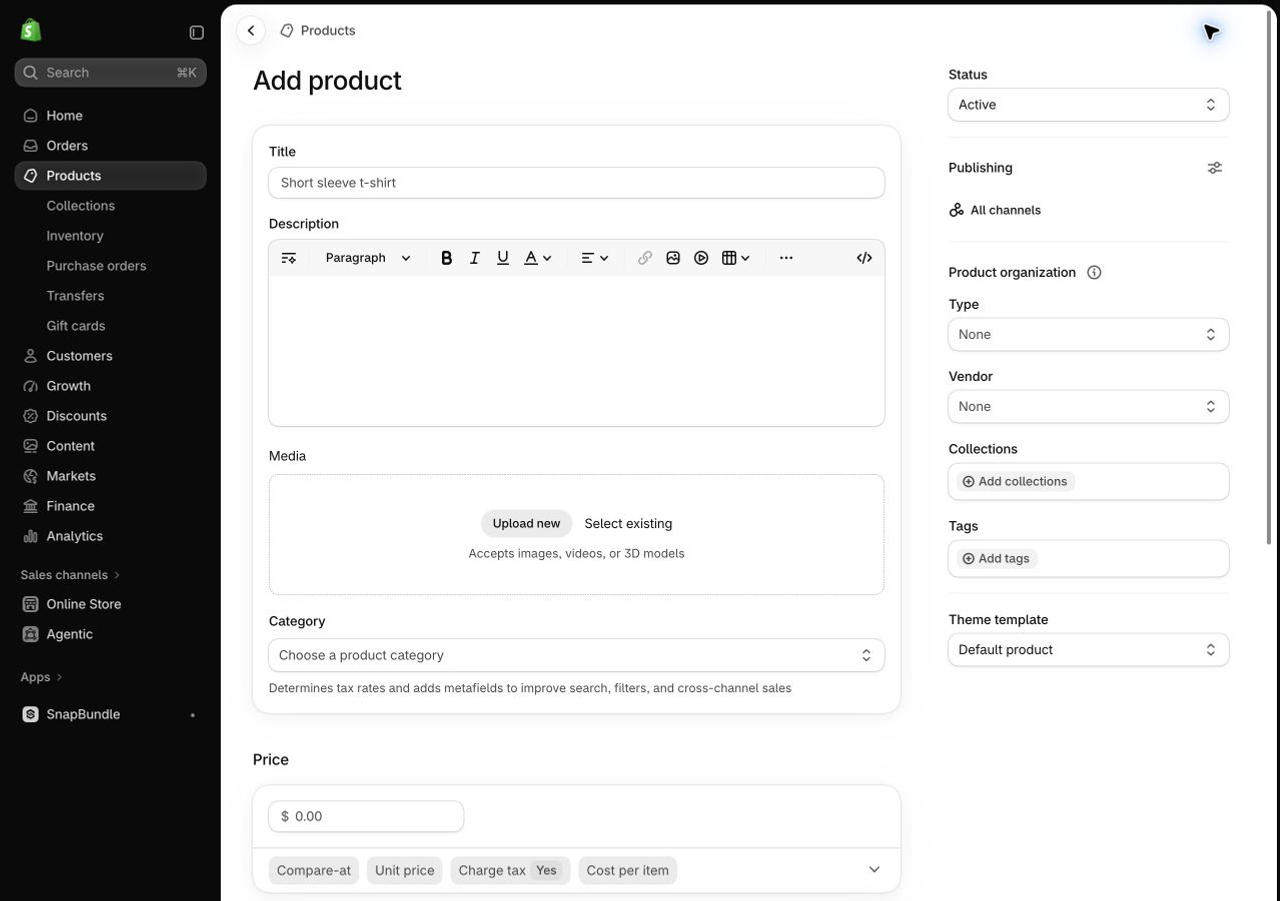
Enter the selling price and optionally your cost per item. Create a variant for each combination a shopper can order. A medium blue shirt and a large blue shirt may share a photo but need separate stock counts. Assign inventory to the location that will fulfill the order. For physical goods, enter shipping details and weight. For a download, turn off physical shipping and arrange file delivery. Save, check product status and make the listing available to the Online Store channel when ready.
Assign a SKU to each variant your fulfillment team needs to distinguish. For a sale, the compare-at price can display a crossed-out reference price. Check the reference-price rules in the markets where you advertise the discount.
Connect products, collections and menus
Manual collections work well for small, deliberately curated groups such as “Gifts under $50.” Automated collections can use conditions as the catalog grows. Once a collection exists, link to it under Content → Menus. Creating the collection alone does not add a header link. How to create a collection in Shopify.
For a one-product store, a direct link from the homepage to the product can be enough. For a larger range, start on a product page on your phone and try to find a related item. If every route takes you back to the homepage, add a relevant collection link. Preview a sold-out variant too. Customers should be able to tell which choice is still available.
Design the storefront and connect your domain
Open Online Store and select Edit theme. The screenshot shows that button on the Horizon preview. Set the logo, colors, typography and header first. Then switch the theme editor from the homepage to the product template. A change to a shared template can affect every product that uses it, so preview at least two different products before saving a major layout change.
On the homepage, tell a first-time visitor what you sell and give them a clear route to browse it. On the product template, check the photos, variant selector and Add to cart button at phone width. In the footer, include contact, shipping, returns and privacy links. Send yourself a message from the contact page to confirm someone will receive customer questions.
Compare themes with your own products
Theme | What to try in the preview | A good reason to try it |
|---|---|---|
Horizon by Shopify | Free theme. Check your product gallery, variants and mobile layout. | You want to launch a small catalog on a tight budget. |
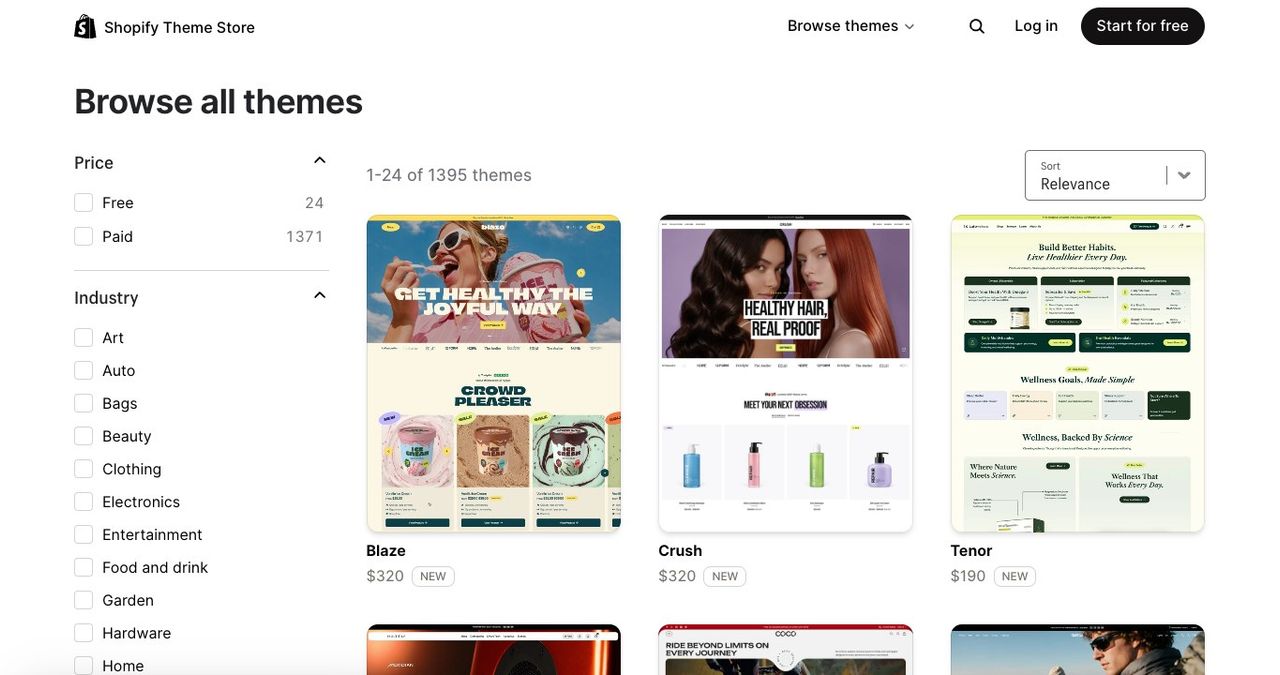
Prestige by Maestrooo | Listed at US$400. Its listing includes quick buy and a slide-out cart. | Your brand relies on photography and editorial collections. |
Pops by Trafik Plus | Build-a-box section: Yes. Age-verification pop-up: Yes. | You sell configurable gift boxes or need an age prompt on entry. |
We develop Pops at Trafik Plus. When comparing it with another theme, give both the same job. For a gift shop, try building a box and checking its contents in the cart. For a clothing store, try choosing a size from a collection page. Use your own photographs for the comparison. See the Prestige listing(opens in a new tab) and our Shopify theme comparison.
For a catalog with hundreds of SKUs, test filters and the mega menu using real categories. For a hero product, check how much room its template gives photography and explanations. Horizon supports theme blocks. Pops, designed for categories including food, drinks and beauty, also includes a cart drawer with product suggestions. Try these features before paying for an app subscription.
Under Settings → Domains, buy a domain or connect the one you already own. If the domain is registered elsewhere, follow the DNS values Shopify gives you and preserve the records used for email. Once the domain is connected and its certificate is ready, set it as primary. Open the HTTPS address on a phone and check that both the storefront and your business email still work.
Set the terms of a real order
Payments, taxes and receipts
In Settings → Payments, choose a provider available to your business. Complete identity and bank verification if required. Confirm the payout account, the payment methods offered to buyers and the statement descriptor customers will see. A customer can pay in one currency while your provider settles in another. Check conversion fees before offering additional currencies.
For a registered French business, have the SIRET, requested identity documents and an eligible IBAN for euro SEPA payouts ready. Shopify lists the information required for each business type in its French payment verification guide(opens in a new tab).
Check whether Apple Pay or Google Pay appears on a supported device. Offer PayPal if your customers use it. French Basic pricing lists a 2% Shopify fee on applicable third-party transactions, in addition to the provider’s rate. Transactions processed through Shopify Payments follow its own fee schedule.
In Settings → Taxes and duties, review the places where you are registered or required to collect. Check whether prices should display tax-inclusive or tax-exclusive for the market. Compare checkout for two representative addresses. For business customers, verify that the invoice carries the information applicable in your jurisdiction. An order confirmation is useful for fulfillment but may not satisfy invoicing requirements. Shopify invoicing guide.
If your French business is covered by the franchise en base de TVA, you invoice without collecting VAT. French government guidance gives the invoice wording “TVA non applicable, article 293 B du CGI.” Verify that the exemption applies to you, then check an invoice generated with those settings. French VAT exemption guidance(opens in a new tab).
Shipping rules and delivery promises
Under Settings → Shipping and delivery, connect the product to the right shipping profile, fulfillment location and destination zone. A flat rate per zone is straightforward for a small range. For a weight-based rate, account for packaging. For a free-shipping threshold, explain where it applies and whether the basket qualifies after discounts.
Test one item, a mixed cart, a cart just below the threshold and one exactly at it. Use an address inside the zone and one outside. If two items produce a surprisingly high rate, check whether they ship from different locations or profiles. State dispatch time separately from carrier transit time so customers know when the delivery clock starts.
If customers can collect from a shop or workshop, set up local pickup. Give the address, opening hours and instructions for waiting for the ready-for-pickup notification.
Policies buyers can act on
Publish the seller’s identity and contact details, shipping terms, return window, return costs, refund process and privacy information for the markets you serve. Adapt the starting text under Settings → Policies to what your business can actually deliver. Check consent requirements before enabling marketing trackers.
If you sell to consumers in France, check the rules for pre-contract information, consumer mediation, statutory guarantees and withdrawal rights. For many goods sold at a distance the withdrawal period is 14 days from receipt, with exceptions. Explain how the buyer exercises the right, including any required online functionality. French government e-commerce guidance(opens in a new tab).
For a French store, check the seller name, address, contact details, required registration numbers and hosting provider details in the legal notice. Explain in the privacy policy how people can exercise their GDPR rights. Check that buyers can read and accept the sales terms before placing an order, including when using accelerated checkout. See our guide to a terms and conditions checkbox.
Open for business and make the first visit count
Run the launch checks from a shopper’s phone
- Choose a paid plan before testing a payment gateway. Enable Shopify Payments test mode or Shopify’s test gateway and use the supported test payment details.
- Add a specific variant and check out to a supported address. Check tax, shipping and the final amount. Also try the provider’s declined-payment scenario so you know what a customer sees when payment fails.
- Find the order under Orders. Match the variant, quantity, address and payment status to the order you placed. Check the remaining stock and confirmation email. Avoid buying a real shipping label for this rehearsal.
- Turn off test mode and confirm live payments are active. Remove password protection under Online Store → Preferences. Open the public domain in a private window and follow a product link to checkout. Shopify’s test-order instructions(opens in a new tab).
In Settings → Notifications, send yourself previews of the order and shipping emails. Check the sender, language, logo and tracking link. Have someone try the purchase in another browser without coaching. If you also make a small live purchase, allow for cancellation or refund and any processing fees.
Search visibility and the first week of sales
Set the homepage search title and description under Online Store → Preferences. Edit the search listing on each major collection and product page. Use the category terms your customers actually use. Add descriptive alternative text to meaningful product images and check store speed on mobile. After launch, verify the domain in Google Search Console and submit /sitemap.xml. If you moved from another platform, redirect important old URLs to their closest equivalents.
Use short, descriptive URLs and leave the year out of evergreen page addresses. Compress large images before uploading. Shopify generates /sitemap.xml and /robots.txt. If a page is slow to appear in search, inspect its URL in Search Console to check crawling and indexing.
Start with one source of interested buyers, such as an existing subscriber list, and send people to the product or collection mentioned in the message. Review visits, cart additions, reached checkouts and completed orders separately. Product visits with few cart additions call for a look at the offer, availability and photos. Drop-off at shipping calls for another address and rate test. Once the basics work, consider follow-up emails for eligible customers.
Launch on a social channel your buyers already use. Offer an email signup and send a welcome message. After delivery, invite buyers to review what they received. For paid advertising, cap the first test and compare the margin on attributed orders with the ad spend. Our guide to ROAS explains the calculation.
To increase average order value, try a bundle of complementary items or a quantity discount. Measure margin after the discount and shipping. Our guide to Shopify sales apps covers the options.
Common mistakes before the first sale
Supplier copy often leaves a buyer’s most important question unanswered. Add a measurement, photo or use detail you checked yourself. Before installing an app, test the theme’s equivalent feature and check mobile speed afterward.
Frequently asked questions
Can I build a Shopify store for free?
You can build during the trial and use a free theme. Budget for a suitable plan to test a payment gateway and operate a full online storefront with checkout.
How much money do I need before my first order?
Start with the amount due for the plan, any custom domain and the inventory or supplies you need up front. Separate those costs from fees on each payment. Use local pricing and the renewal rate for your budget.
How long does setup take?
A small catalog with finished photos and copy can be assembled quickly. Preparing product information, confirming shipping rates, verifying payments and connecting the domain often determine the opening date.
Do I need to code or hire a developer?
The theme editor handles sections, templates and global styling without code. Identify a specific limitation in the preview before commissioning custom work.
Why is my collection empty on the storefront?
Check whether the collection is manual or automated. Add the products or review the matching conditions, then check Online Store availability for the collection and its products.
Can I keep the domain I already own?
Yes. Connect it in Settings → Domains, preserve the records used for email and select it as primary once ready. If it previously served another store, map important old URLs to their replacements.
How can I tell the store is really open?
From a private window, open the primary domain, select an available variant and reach checkout. A public buyer should get past the storefront without a password, see a delivery option and have access to a live payment method.
Do I need a registered business to sell on Shopify?
Registration depends on the country and activity. For regular commercial sales from France, register the business. A sole founder can operate an entreprise individuelle, potentially under the micro-entreprise regime, or form a SASU or EURL.
Which Shopify plan should a beginner choose?
Basic is generally sufficient for a solo online store. Compare Grow when you need staff accounts or when lower processing rates can cover the subscription difference.
Can I dropship with Shopify?
Yes. A supplier app can forward orders for fulfillment. You remain the seller responsible to the buyer, so verify delivery estimates, returns, guarantees and applicable withdrawal rights.
How do I get my Shopify store found on Google?
Remove the storefront password, submit the sitemap to Search Console and inspect a product URL. Original product descriptions and links between collections and products help shoppers and search engines navigate the catalog.
Keep reading

15 Best Energy Drink Brands on Shopify: Store Examples (Desktop + Mobile)
15 energy drink brands on Shopify, from Alani Nu and Ghost to PRIME and Journée: home pages, product pages, flavour pickers and subscriptions on desktop and mobile, with each store's theme.

Shopify vs BeatStars: Where to Sell Beats Online
BeatStars brings buyers, Shopify builds your brand. We compare BeatStars pricing, the 12% buyer fee, Pro Page and selling beat licenses on Shopify, with real costs.

Product Photos That Convert: Build a High-Converting Product Page Gallery
Product photos decide whether a visit converts. What each slot of your product page gallery should show, when to add text, scale, video, image sizes and a checklist.