
Shopify Invoice: How to Create, Send and Automate Invoices (2026)

Summarize this article with AI


Shopify does not create real invoices by default. How to create an invoice in Shopify, what it must include, the best invoice apps, e-invoicing rules and where to find your Shopify bills.
A customer asks for an invoice and you open your Shopify admin, only to find there isn’t one. The order confirmation email is not an invoice, and the "Send invoice" button only collects payment for a draft order.
This guide covers both meanings of "Shopify invoice": the invoices you send your customers (how to create, print, send and automate them, and what they must include) and the bills Shopify sends you for your plan and apps.
Does Shopify create invoices?
Not real ones out of the box. Here is what each built-in option actually does:
Shopify feature | What it is | Is it an invoice? |
|---|---|---|
Order confirmation email | Sent after checkout with items, taxes and total | No: no invoice number, no seller tax details |
Draft order "Send invoice" | An email with a checkout link the customer pays through | No: it is a payment request |
Shopify Order Printer | Free app that prints invoices, packing slips and pick lists from orders | Yes, once you add your legal details to the template |
Invoice app (Sufio, Order Printer Pro…) | Creates, numbers and emails invoices automatically | Yes, with sequential numbering and credit notes |
The draft order invoice is the most confusing one. According to the Shopify Help Center(opens in a new tab), the customer receives a link to checkout, and the draft becomes an order marked as paid once they pay. It is a good way to sell over the phone or by DM, but the email is a payment request, not a tax invoice.
How to create an invoice in Shopify
Option 1: Shopify Order Printer (free)
Shopify’s own app prints invoices, packing slips and pick lists from your orders, and the invoice template is edited in HTML, CSS and Liquid (documentation(opens in a new tab)).
- Install Shopify Order Printer from the Shopify App Store.
- Open the Invoice template and add what is missing: legal company name, registration number, VAT or tax ID, payment terms.
- In Orders, select one or more orders (up to 50 at once) and print them with Order Printer.
- In the browser print dialog, choose Save as PDF to get a file you can email to the customer.
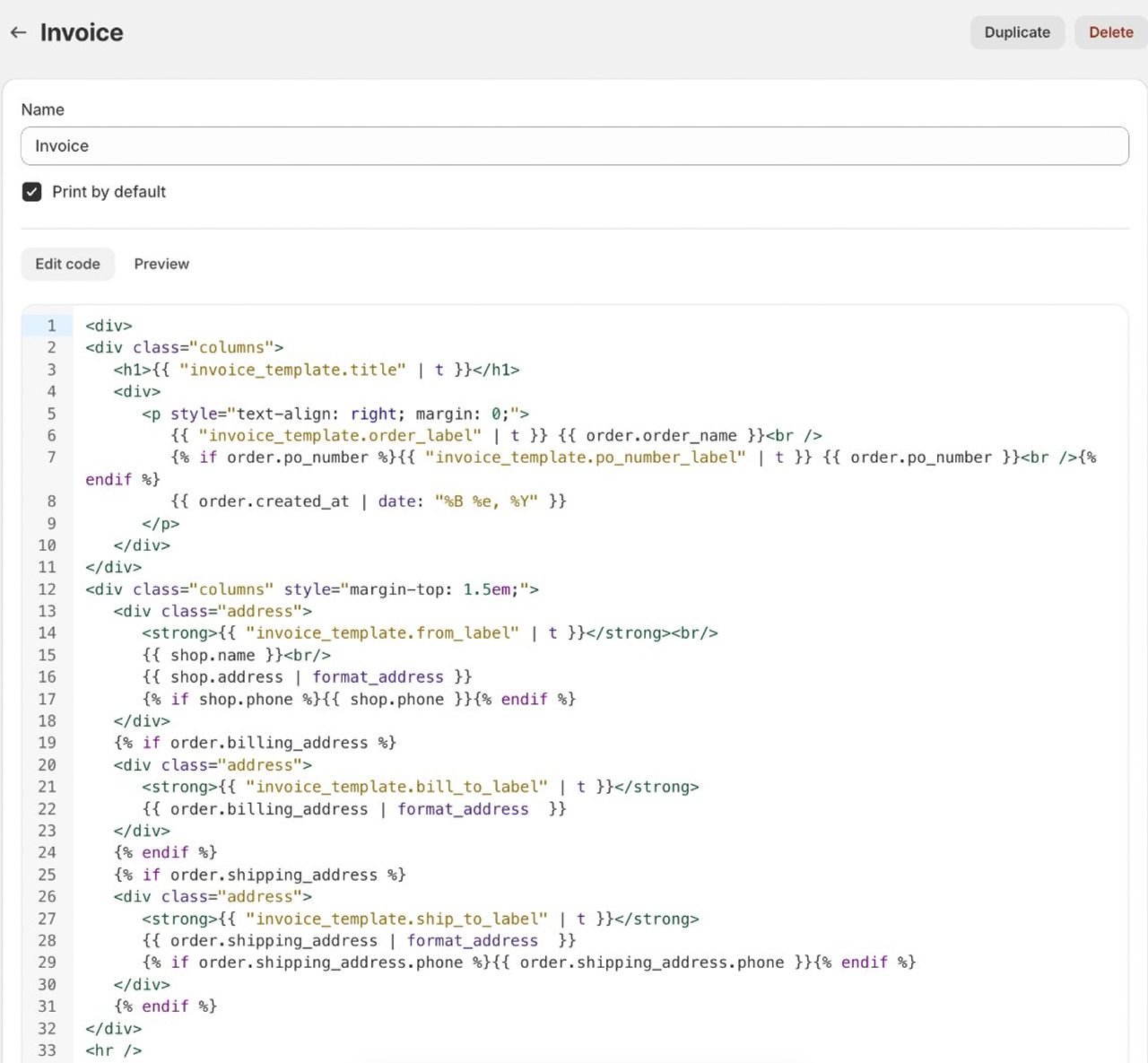

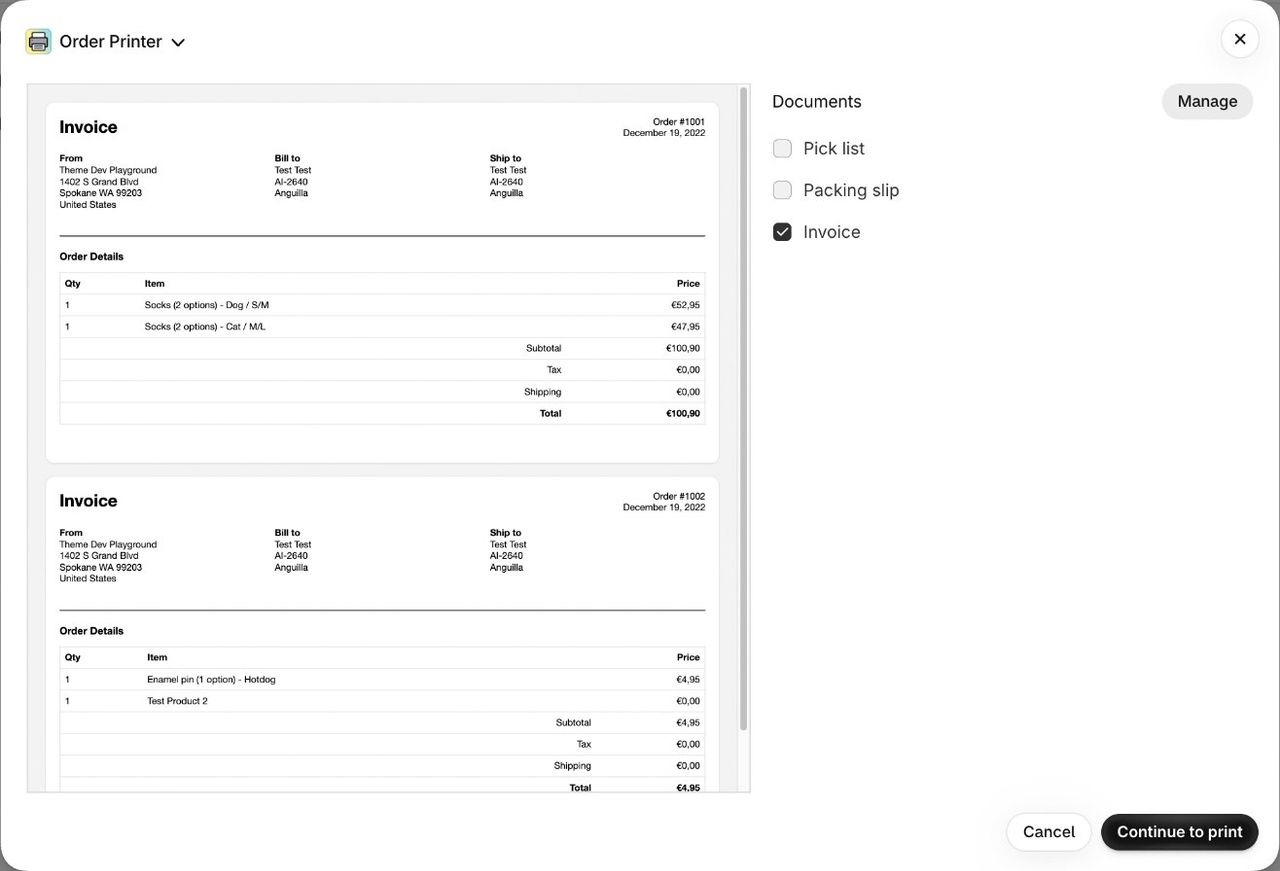
That works for a handful of invoices a month. It has two limits: the numbering is your order numbering, and every step is manual. The app is rated 3.6/5 from 379 reviews.
Option 2: an automatic invoice app
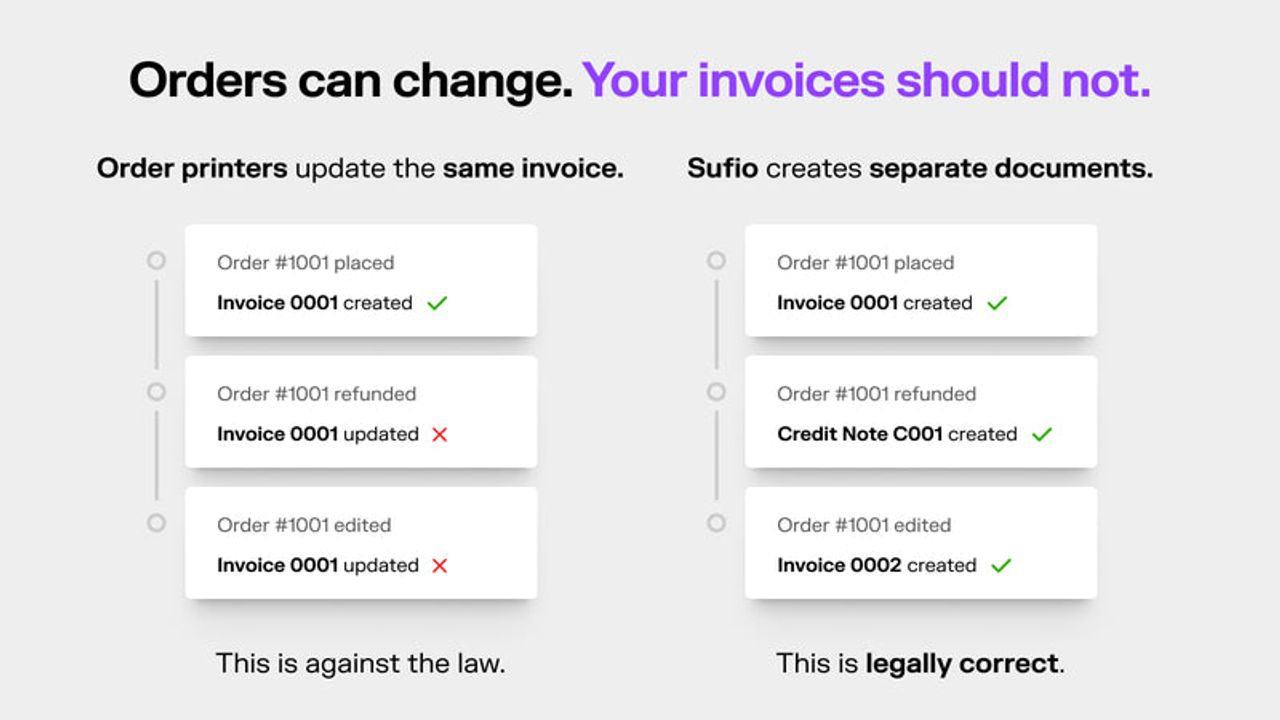
An invoicing app creates the invoice when the order is paid, gives it its own invoice number, and sends it to the customer as an attachment or a download link in the order confirmation. When an order is refunded, it issues a credit note instead of editing the original invoice.
Choose this as soon as you have more than a few orders a day, business customers, or sales across several EU countries.
How to print or send a Shopify invoice
With Order Printer, you print from the order and email the PDF yourself. With an invoicing app, the customer downloads the invoice from the confirmation email or their customer account, and you can resend it from the app.
What a Shopify invoice must include
There is no single invoice rule: what an invoice must show depends on the country your business is registered in. Here is what the United States, the United Kingdom and Australia ask for.
United States
No federal law sets out what an invoice must contain, and sales tax is run by each state. A solid invoice still shows:
- An invoice number and the issue date
- Your business name and address
- The customer’s name and address
- Each item with quantity and price, plus shipping and discounts
- Any sales tax charged, shown separately, for the states where you are registered to collect it
Keep invoices with your tax records: the IRS generally asks you to keep records for 3 years after you file(opens in a new tab), and up to 7 years in some cases.
United Kingdom
GOV.UK lists what every invoice must include(opens in a new tab): a unique invoice number, your business name, address and contact details, the customer’s name and address, a description of what you are charging for, the supply date, the invoice date, the amounts charged and the total owed.
If you are VAT registered and sell to another VAT-registered business, you must issue a full VAT invoice. It adds your VAT registration number, the VAT rate and the amount before VAT for each line, and the total VAT in sterling (VAT Notice 700, section 16(opens in a new tab)). For a sale of £250 or less, you can issue a simplified VAT invoice if the customer agrees. Limited companies keep their accounting records for 6 years from the end of the financial year(opens in a new tab).
Australia
If you are registered for GST, you must give a customer a tax invoice within 28 days when they ask for one, unless the sale is A$82.50 or less including GST, according to the ATO(opens in a new tab). A tax invoice must show that it is intended as a tax invoice, your identity and ABN, the issue date, a description of each item with quantity and price, and the GST amount. For a sale of A$1,000 or more, it must also show the buyer’s identity or ABN.
What basic tools get wrong
Two things break with basic tools. In the UK and many other countries, invoice numbers must follow a unique sequence, and an issued invoice should not be edited: a refund gets a credit note. Order Printer reprints the document with whatever the order says today, which amounts to rewriting the original invoice.
Invoicing is a legal requirement Shopify leaves to you, like the terms and conditions checkbox at checkout.
Best Shopify invoice generator apps
Ratings and prices are as listed on the Shopify App Store on October 15, 2026.
App | Price | Rating | Best for |
|---|---|---|---|
Shopify Order Printer | Free | 3.6/5 (379 reviews) | Printing a few invoices by hand if you can edit an HTML/Liquid template |
Order Printer Pro: PDF Invoice | Free to install, paid plans at $10 and $20/month | 4.9/5 (2,982 reviews) | PDF invoices, quotes and shipping documents, with tax and translations |
Sufio: Professional Invoices | From $7/month (14-day trial) | 4.9/5 (468 reviews) | Automatic invoices with sequential numbering, credit notes, Factur-X and Peppol e-invoicing |
Billoop | $4.99/month (7-day trial) | No reviews yet | Factur-X and UBL e-invoices for EU merchants |
- Shopify Order Printer: free, but a printing tool rather than an invoicing system.
- Order Printer Pro(opens in a new tab): the most installed app on the list, with a free plan to start.
- Sufio(opens in a new tab): sequential numbering, credit notes, locked documents and e-invoicing formats. The most complete option for EU merchants.
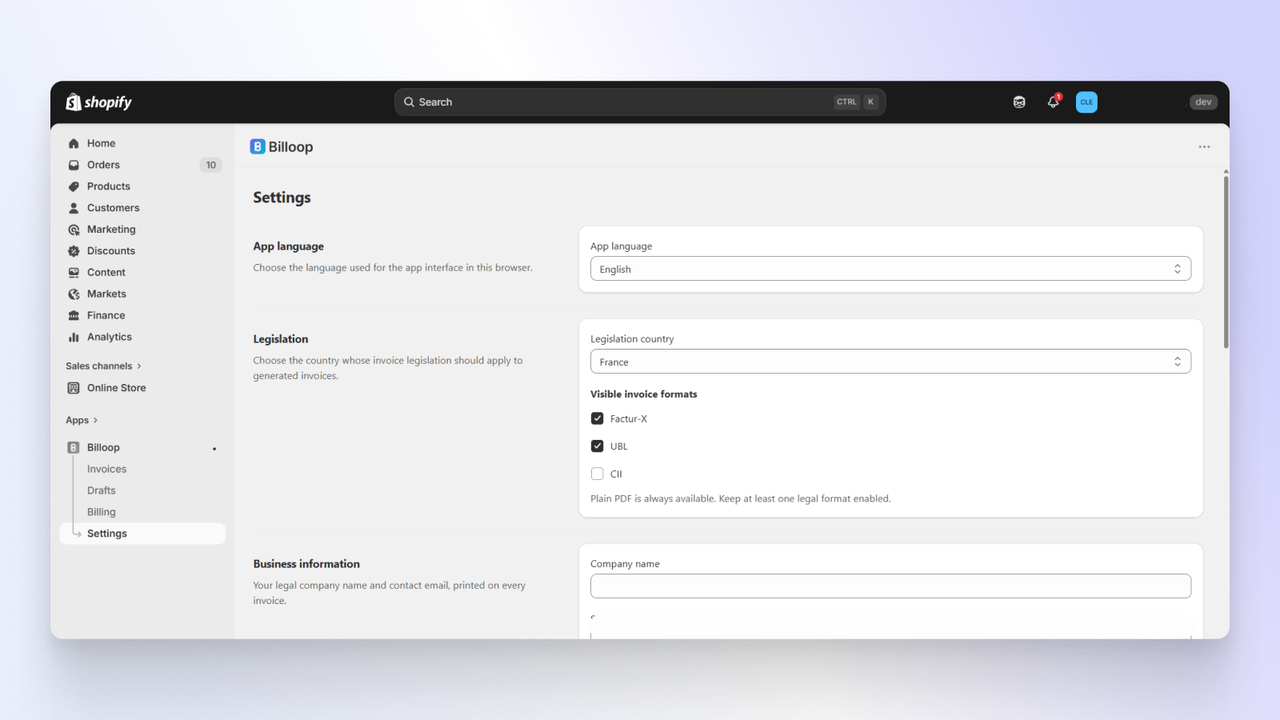
- Billoop(opens in a new tab): newer and cheaper, focused on Factur-X and UBL e-invoices.
Invoice volume spikes during sales, so set up automation before Black Friday. It is on our Shopify Black Friday checklist.
Shopify and e-invoicing
Several EU countries are moving to mandatory e-invoicing, where invoices are sent as structured files (Factur-X, UBL, Peppol) through an approved platform rather than as PDFs. France is a good example of the timeline, as published by Service Public Entreprendre(opens in a new tab):
- September 1, 2026: every VAT-registered French business must be able to receive e-invoices. Large and mid-size companies must also issue them.
- September 1, 2027: small businesses and micro-enterprises must issue e-invoices for B2B sales and report their consumer sales data (e-reporting).
Shopify is not an approved e-invoicing platform. To comply, connect your store to one, usually through an invoice app that outputs Factur-X or UBL, or through your accounting software.
Where to find your Shopify bills
The other kind of "Shopify invoice" is the bill Shopify sends you for your plan, apps and fees. To find it:
- In your Shopify admin, go to Settings > Billing.
- In the past bills section, click a bill to see its details.
- Export it for your records or your accountant.
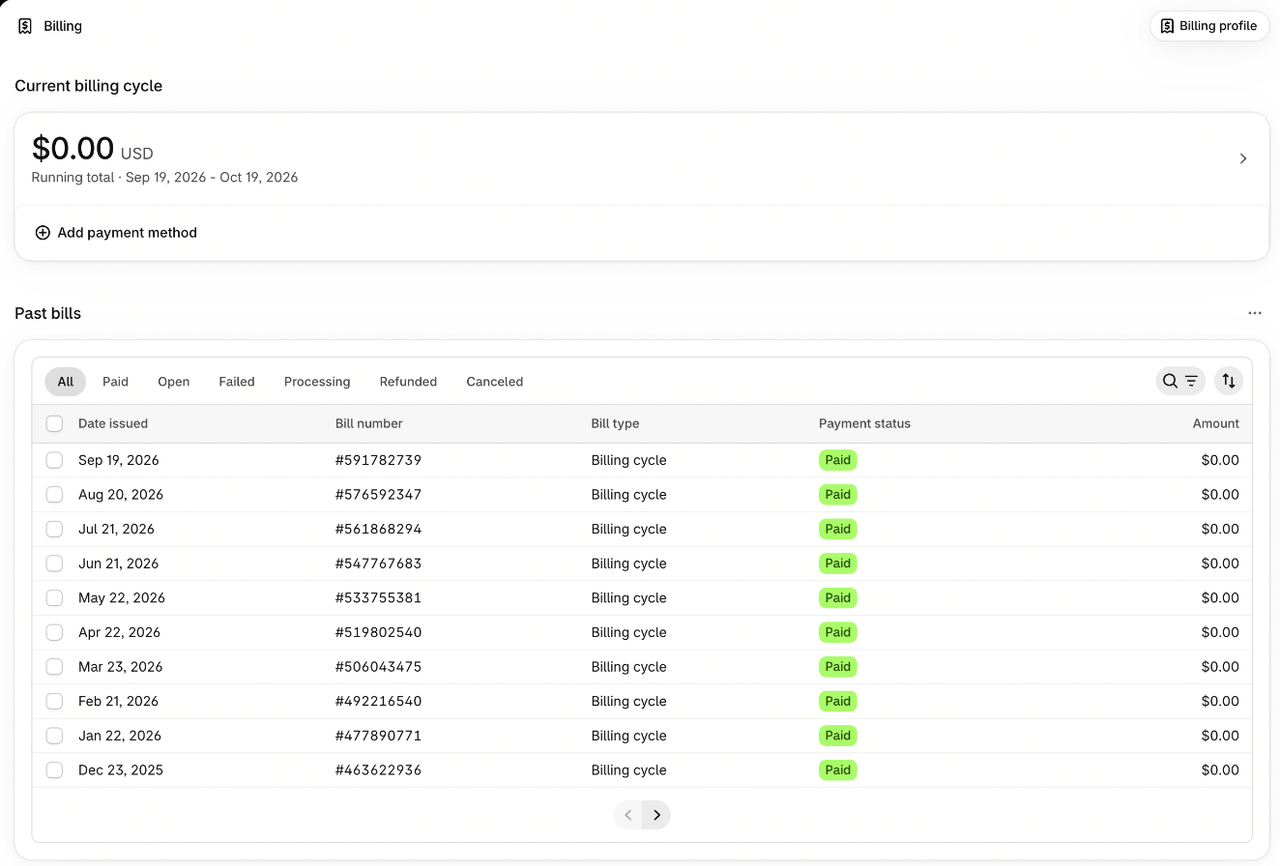
Shopify also emails each bill to the store owner and to staff allowed to view billing. Your billing profile, on the same page, holds the billing address and tax information printed on these bills.
What is the Shopify billing threshold?
Shopify doesn’t only bill you once a month. App charges, transaction fees and shipping labels add up during the billing cycle, and a bill is issued as soon as they reach your account’s billing threshold. Your progress toward it appears in the current billing cycle on the Billing page. That is why you can get several Shopify bills in the same month.
To compare what each plan costs once fees are included, see which Shopify plan to choose.
Frequently asked questions
Does Shopify generate invoices automatically?
No. Shopify sends an order confirmation, which is not an invoice: it has no invoice number and none of your tax details. For automatic invoices, install an invoice app such as Sufio, Order Printer Pro or Billoop.
How do I create an invoice in Shopify for free?
Install Shopify Order Printer, add your business and tax details to the Invoice template, then print the invoice from the order and save it as a PDF.
Can I send an invoice through Shopify?
Yes, from a draft order: Orders > Drafts, then Send invoice. The customer gets a checkout link to pay. It is a payment request, not a tax invoice, so send a proper invoice once the order is paid.
Where do I find my Shopify bills?
In the admin, go to Settings > Billing and open the past bills section. Each bill can be opened and exported, and Shopify also emails it to the store owner.
Can I use the Shopify order number as the invoice number?
It is risky. Most tax authorities require a continuous invoice sequence and do not allow an issued invoice to be changed: a refund gets a credit note. An invoicing app keeps its own numbering and issues credit notes.
Is Shopify ready for e-invoicing?
Shopify is not an e-invoicing platform. In countries with mandatory e-invoicing, such as France, you connect your store to an approved platform, usually through an invoice app that outputs Factur-X, UBL or Peppol.

Keep reading

12 Black Friday Sale Ideas That Protect Your Margin (Shopify Examples)
A flat 30% off is the easiest Black Friday offer and often the least profitable. Here are 12 offer ideas for Shopify stores that move more units without giving away the margin.

How to Add a Terms and Conditions Checkbox to Your Shopify Cart (2026)
Add a required “I agree to the terms” checkbox to your Shopify cart page and drawer, save it on every order, and close the Shop Pay and Buy it now loopholes.

Shopify Post-Purchase Upsells: How One-Click Offers Work (+ 7 Examples)
A post-purchase upsell is a one-click offer shown after payment. It cannot cost you the order. Here is how it works on Shopify, what to offer and how to measure it.