
Shopify Email Flows: 7 Automations That Earn Without Ad Spend

Summarize this article with AI


The seven Shopify email flows that turn traffic you already paid for into revenue: timing, content and setup in Shopify Messaging and Klaviyo, with 2026 benchmarks.
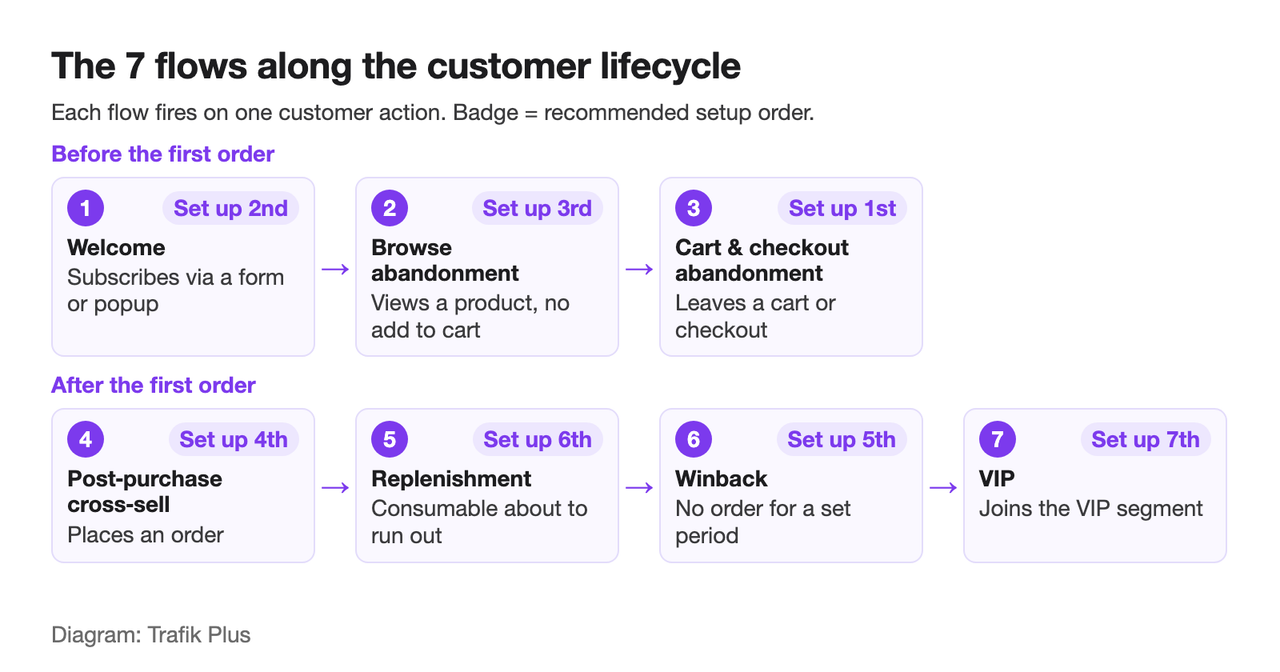
Shopify email flows are automated emails that fire when a shopper or customer does something (subscribes, views a product, leaves a cart, places an order, goes quiet) and keep running without you sending anything. Because they only reach people already on your list or in your store, every sale they make comes from traffic you have already paid for. Set up seven of them (welcome, browse abandonment, cart abandonment, post-purchase cross-sell, replenishment, winback and VIP) and you have a revenue layer that grows with your list, not with your ad budget.
This guide gives the timing, the content and the setup for each flow in Shopify Messaging(opens in a new tab) (Shopify's built-in email app, formerly Shopify Email) and in Klaviyo, plus the 2026 benchmark numbers to judge them by.
Why flows earn more per email than campaigns
A campaign goes to your whole list on a date you pick. A flow goes to one person at the moment they showed intent. That timing is why flows carry so much revenue per recipient. Klaviyo's 2026 benchmark, built on more than 110,000 Klaviyo customers(opens in a new tab), puts average email revenue per recipient (RPR) at $6.77 for abandoned cart flows and $5.75 for welcome series, with the top 10% of brands at $13.70 and $13.27.
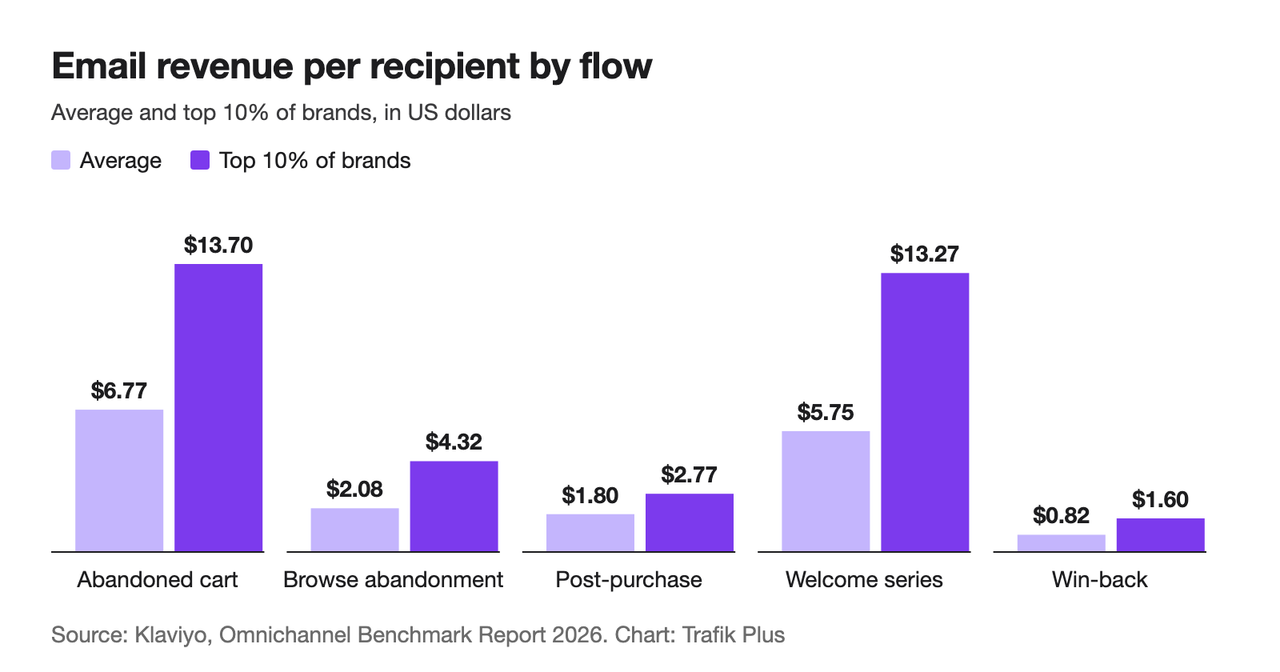
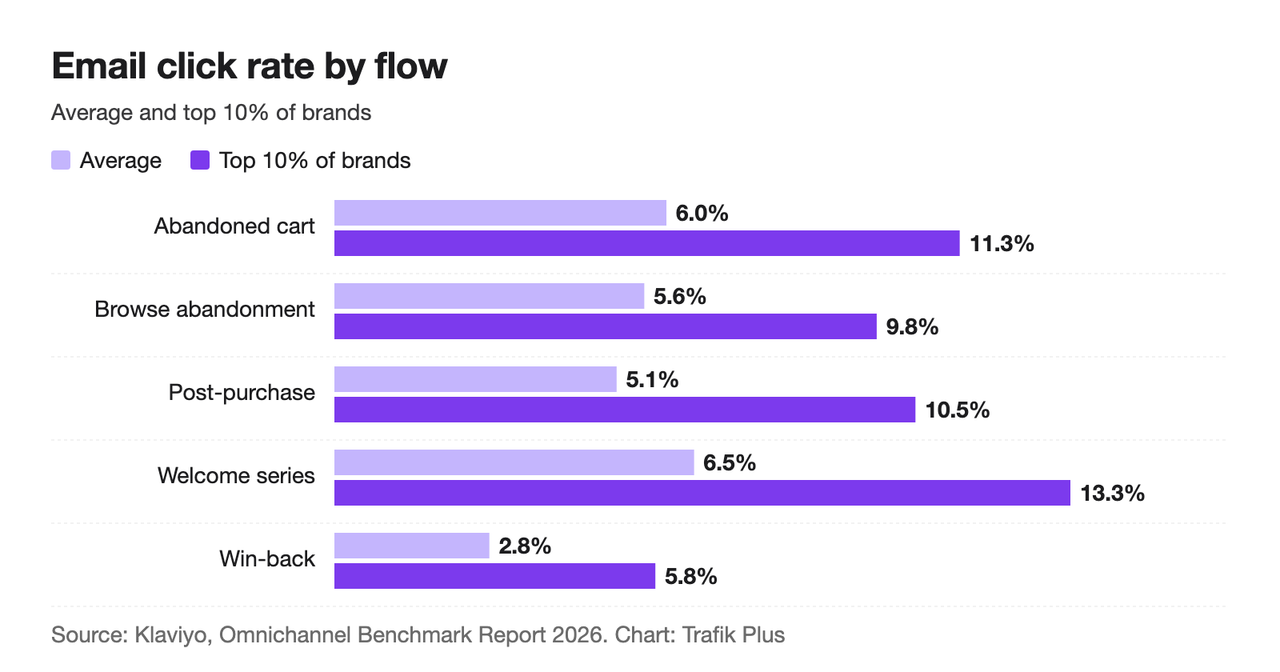
The same report gives the full picture across the five flows it measured:
Email flow | Avg revenue per recipient | Top 10% RPR | Avg click rate | Top 10% click rate |
|---|---|---|---|---|
Abandoned cart | $6.77 | $13.70 | 6.0% | 11.3% |
Welcome series | $5.75 | $13.27 | 6.5% | 13.3% |
Browse abandonment | $2.08 | $4.32 | 5.6% | 9.8% |
Post-purchase | $1.80 | $2.77 | 5.1% | 10.5% |
Win-back | $0.82 | $1.60 | 2.8% | 5.8% |
Two things stand out. Welcome series nearly match cart abandonment, so the flow most stores set up last deserves to be set up first. And winback earns the least per recipient, which is normal: it goes to people who already stopped buying. It is still revenue you would not get otherwise.
Shopify Messaging or Klaviyo: where to build your flows
Both tools sync with your Shopify customers and orders. The choice comes down to how far you want to go.
Shopify Messaging | Klaviyo | |
|---|---|---|
Where | Apps > Messaging > Automations in the Shopify admin | Flows > Create flow in Klaviyo |
Templates | Abandoned browse, cart, checkout, welcome, thank-you, first-purchase upsell, winback, birthday, VIP | Flow library with templates for every flow in this guide |
Custom logic | Through the Shopify Flow app | Built in: splits, filters, list/segment/metric/date/price-drop triggers |
Channels | Email; SMS and WhatsApp for abandonment flows | Email and SMS |
Cost | 10,000 free emails/month, then $1 per 1,000 | Free up to 250 profiles, then by profile count |
Start with Shopify Messaging if you have under a few thousand subscribers and no flows at all; the templates below get you live in an afternoon. Move to Klaviyo when you need predictive timing, deep segmentation or SMS and email in one flow builder. Whichever you pick, run each flow in one tool only. Shopify warns that two active welcome automations send customers twice as many emails(opens in a new tab).
1. Welcome flow: turn new subscribers into first orders
Trigger: a visitor subscribes through a sign-up form or popup.
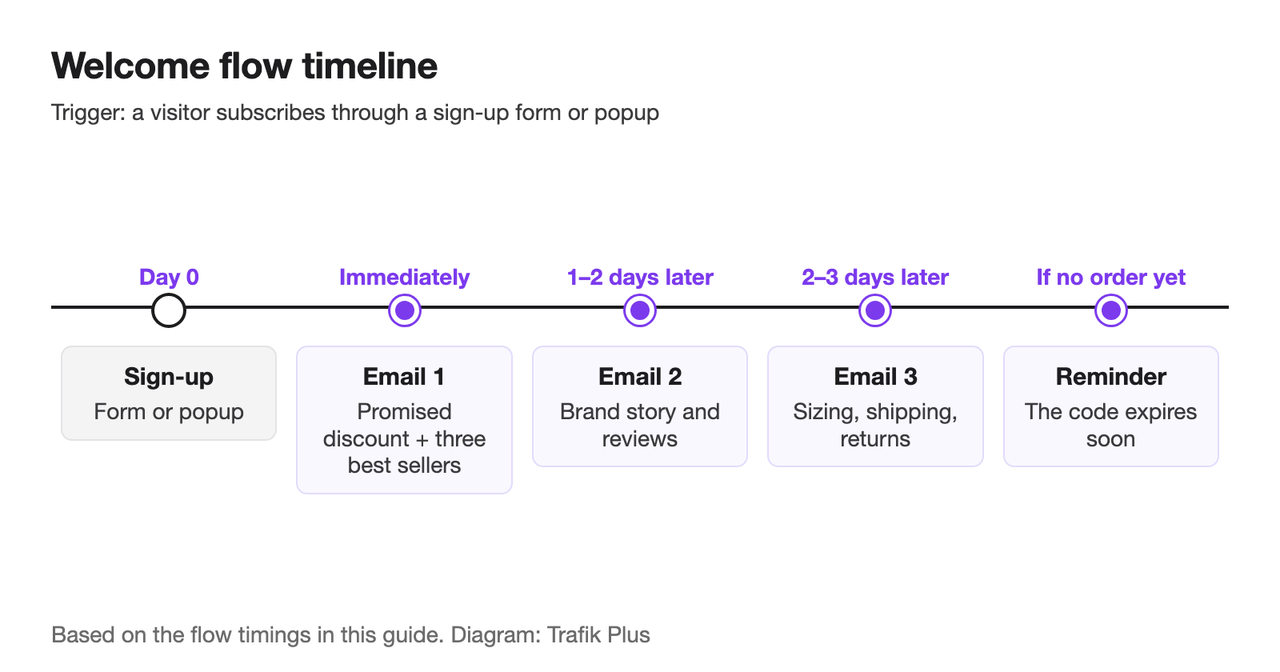
Timing: email 1 immediately, email 2 one to two days later, email 3 two to three days after that, then a reminder if no order has been placed.
Content:
- Email 1 delivers whatever the form promised (a discount code, free shipping, a guide) and shows your three best sellers.
- Email 2 tells the brand story: who makes the product, why it is different, what reviews say.
- Email 3 answers the objections that stop a first order (sizing, shipping times, returns).
- Reminder: the code expires soon, with a direct link back to the products they viewed.
Setup in Shopify Messaging: go to Apps > Messaging > Automations > Create automation and pick Welcome new subscribers with a discount series. Shopify's template sends a discount email, then two brand-building emails, then a discount reminder if no purchase is made(opens in a new tab). The trigger only fires for sign-ups from a form on your online store, so the form matters as much as the emails. A built-in newsletter popup in your theme feeds this flow without another app.
Setup in Klaviyo: **Flows > Create flow**(opens in a new tab) opens the flow library; search the library for "welcome series", and use a List trigger on the list your form adds people to. Split on "Placed Order zero times since starting this flow" before every email after the first, so buyers stop getting the discount.
2. Browse abandonment: follow up on product views
Trigger: a known visitor (subscribed and identified) views at least one product but does not add it to cart.
Timing: one email two to four hours after the visit; a second, optional email about 24 hours later.
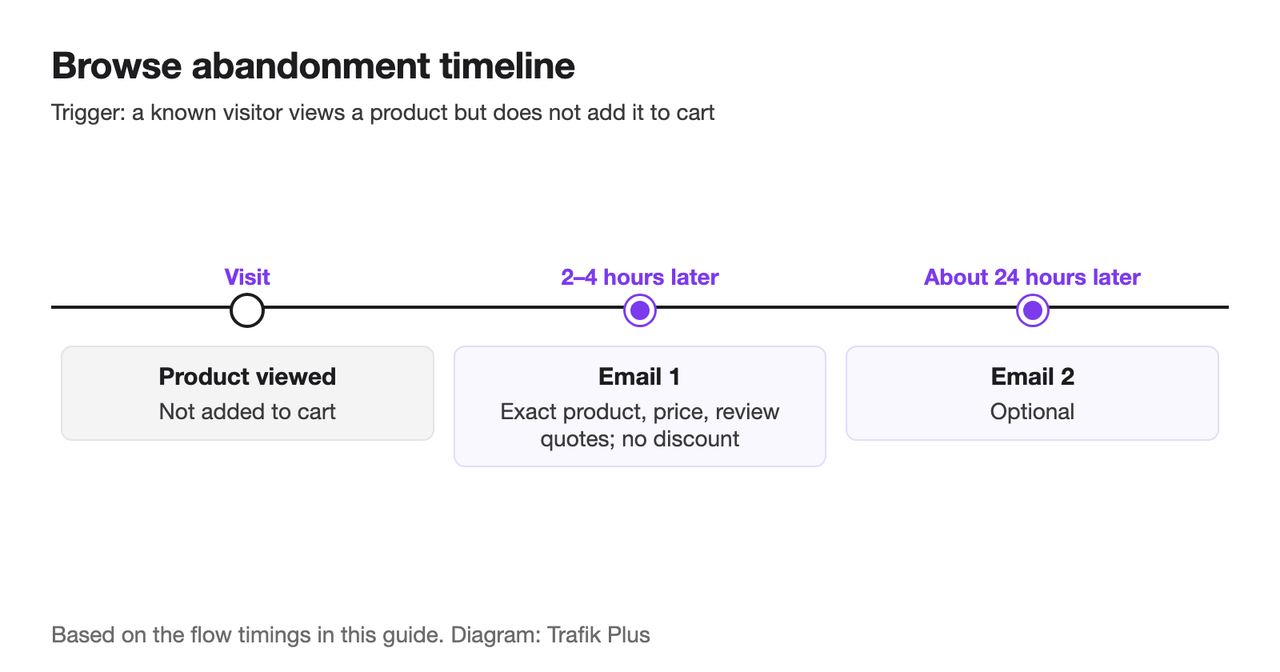
Content: lead with the exact product they viewed, its price and two or three review quotes. Add similar products below. Skip the discount: intent is lower than in a cart, and you do not want to train shoppers to browse and wait for a code. In Klaviyo's 2026 data(opens in a new tab), browse abandonment averages $2.08 per recipient with a 5.6% click rate.
Setup: in Shopify Messaging, use the Convert abandoned product browse template, which targets customers who view at least one product but don't add it to their cart or make a purchase(opens in a new tab). It is available by email, SMS and WhatsApp. In Klaviyo, the browse abandonment template uses the Viewed Product metric from the Shopify integration; add a filter that excludes anyone who started checkout since entering the flow, so a shopper never gets the browse email and the cart email for the same visit.
3. Cart and checkout abandonment: the highest earner
This is the flow every store already knows, and the one with the highest average RPR in Klaviyo's benchmark ($6.77)(opens in a new tab). We cover the sequence, subject lines and discount strategy in depth in our guide to Shopify abandoned cart emails, so here is only what matters for your flow setup:
- Shopify Messaging has two separate templates: Recover abandoned cart (items added, checkout never started) and Recover abandoned checkout (checkout started, order not completed). Turn on both.
- Abandoned checkout emails don't count toward your monthly Shopify Messaging email allowance(opens in a new tab), and you can switch their recipients from subscribers only to All customers, which no other automation allows.
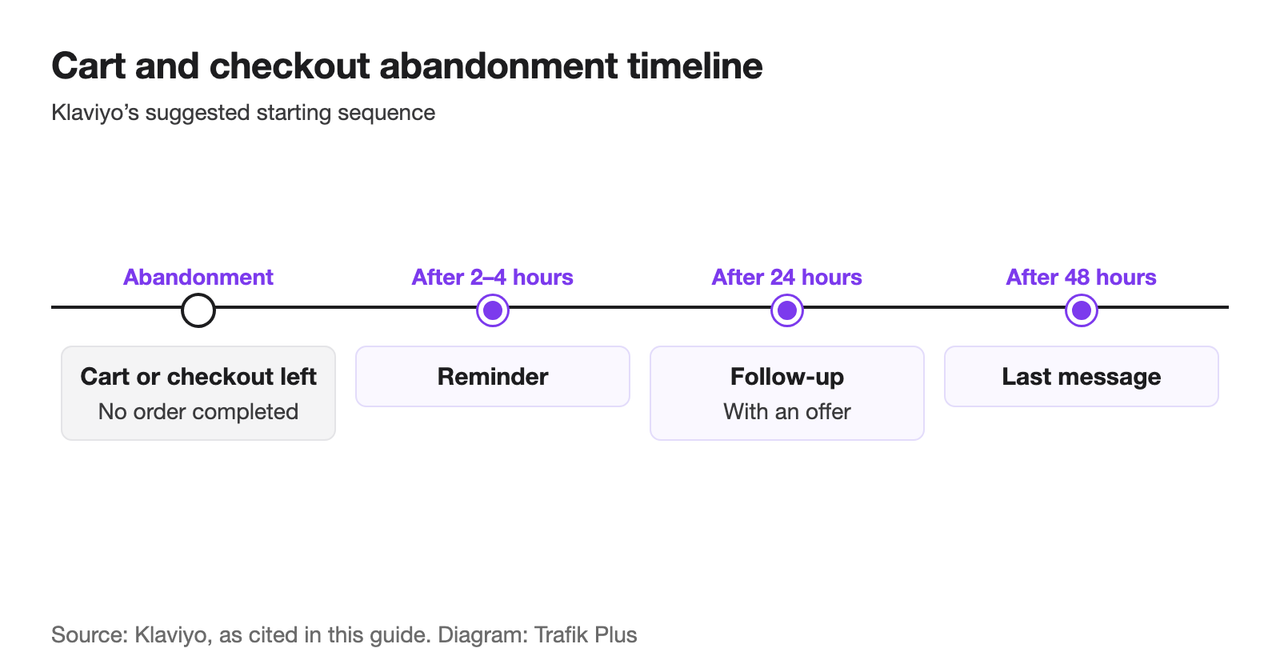
- Klaviyo's suggested starting sequence is a reminder after 2 to 4 hours, a follow-up with an offer after 24 hours, and a last message after 48 hours(opens in a new tab).
4. Post-purchase cross-sell: earn the second order
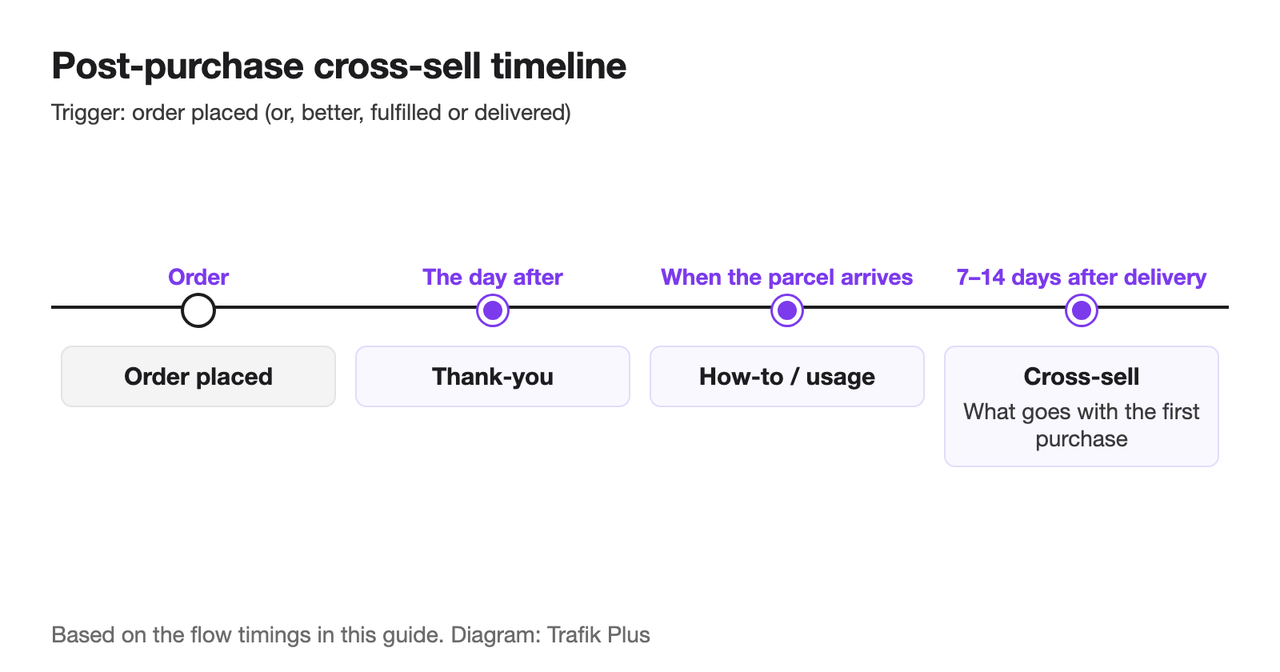
Trigger: order placed (or, better, order fulfilled or delivered).
Timing: a thank-you email the day after the order, a how-to or usage email when the parcel arrives, then a cross-sell email 7 to 14 days after delivery.
Content: the cross-sell email should recommend what goes *with* the first purchase, not more of the same. Serum after cleanser, a case after a phone, filters after a coffee machine. If you are unsure which products pair, your order data already knows: look at what your repeat customers bought second. Our article on upselling versus cross-selling explains when each works.
A pre-built bundle is often the best thing to link to here: one click, one price, a reason to add more than one item. If you sell bundles or quantity tiers with Snap Bundle(opens in a new tab), link the email straight to the bundle page. The app is free while bundle revenue stays under $500 a month, then $12.99 a month with no order cap.
Setup in Shopify Messaging: Upsell customers after their first purchase sends a marketing message after a customer's first purchase(opens in a new tab), and Thank customers after they purchase covers the first and second orders. In Klaviyo, start from the post-purchase template on the Placed Order or Fulfilled Order metric and add a split by product category so each buyer gets relevant recommendations.
Post-purchase emails are a different lever from the one-click offer shown right after checkout. That one is covered in our guide to Shopify post-purchase upsells; the two work well together.
5. Replenishment: remind before they run out
Trigger: order placed for a consumable product (supplements, coffee, skincare, pet food, filters).
Timing: a few days before the product runs out. For a 30-day supply, send on day 22 to 25. Run a second reminder a week later if they have not reordered.
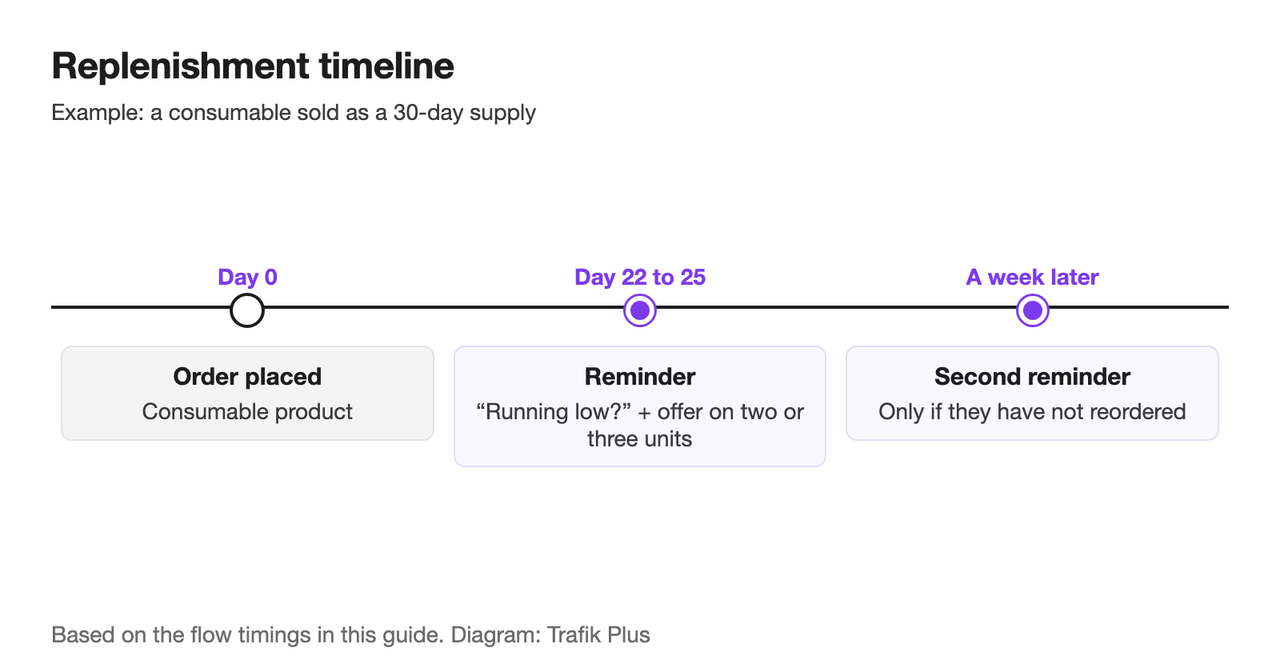
Content: "Running low?" with a one-click link back to the exact product, the size they bought, and an offer to buy two or three units at a better price per unit. A quantity break turns a reminder into a larger order, which is the cheapest average order value gain you will find. If customers reorder on a strict cycle, a subscription may serve them better; see how to increase sales with subscriptions.
Setup: Shopify Messaging has no replenishment template, so build it in the Shopify Flow app(opens in a new tab) (Shopify's own note: custom marketing automations go through Flow(opens in a new tab)), or edit the wait step of a post-purchase automation and limit it to the product concerned. In Klaviyo, use a Placed Order trigger filtered on the product with a time delay matching its usage. Once you have enough order history, Klaviyo's predicted "expected date of next order" can time the email per customer instead. Its predictive analytics need at least 500 customers who have placed an order, 180 days of order history, orders in the last 30 days, and some customers with three or more orders(opens in a new tab).
6. Winback: bring lapsed customers back
Trigger: no order for a set period after the last one.
Timing: set the gap from your own data. Take the typical time between first and second orders in your store and add 50% or so. For a store where most reorders happen within 60 days, start the winback at 90. A three-email sequence works: a "we miss you" with new products, a stronger incentive a week later, then a last-chance email.
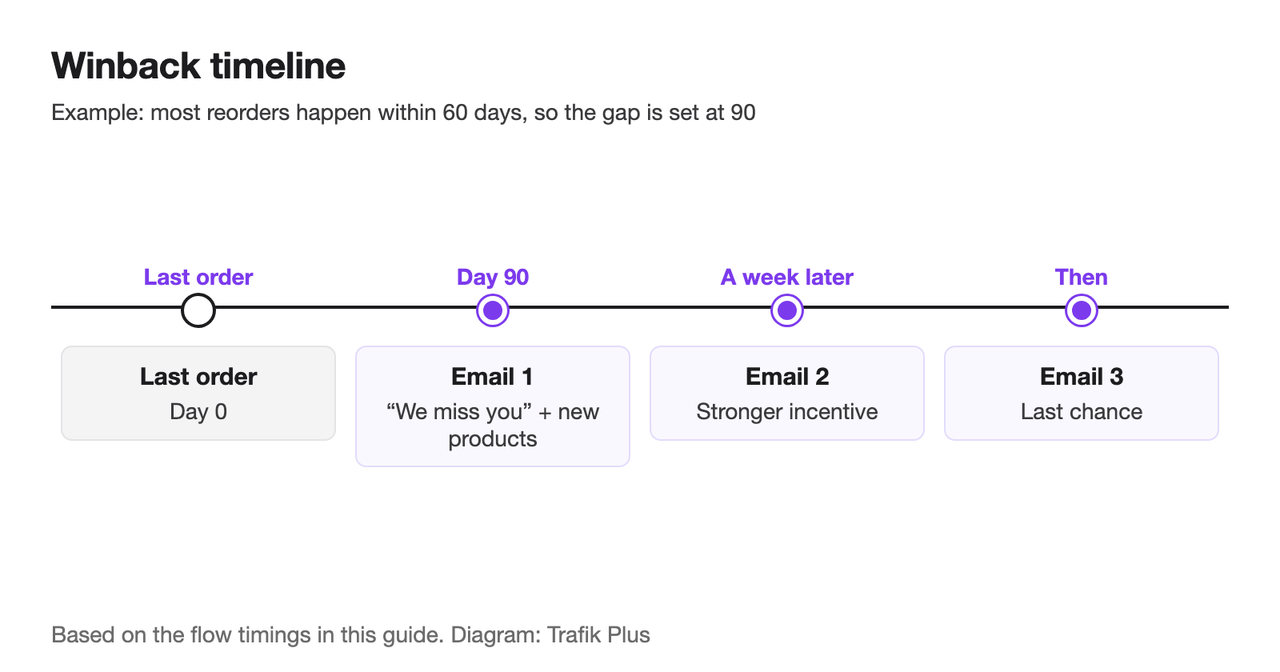
Content: show what changed since their last order (new products, new reviews, better shipping). Save the discount for email two. In Klaviyo's benchmark(opens in a new tab), winback averages $0.82 per recipient and a 2.8% click rate, so judge it on total recovered revenue, not per-email performance.
Setup: in Shopify Messaging, Win back customers sends a message after a specified amount of time has passed since the customer's last order(opens in a new tab); edit the wait to match your cycle. In Klaviyo, search the flow library for "winback" and use the Placed Order trigger with a long time delay and a filter that exits anyone who orders in the meantime.
7. VIP flow: reward the customers who carry your revenue
Trigger: a customer joins your VIP segment.
Timing: once, as soon as they qualify, then on milestones (anniversary of first order, birthday).
Content: a thank-you, early access to the next drop, a gift with the next order, or a permanent perk. A free gift tied to a quantity tier works well here because it rewards a larger basket instead of cutting your margin on a small one.
Setup: Shopify Messaging's Welcome VIP customers template uses a segment that, by default, a customer joins after their third order and at least $1,000 USD spent, or when tagged VIP(opens in a new tab). Lower the spend threshold if your average order is small. Celebrate customer birthday handles birthdays once you collect them. In Klaviyo, build a segment on placed-order count and revenue, then use a Segment trigger.
What seven flows can add up to: a worked example
Take a store with steady traffic and a growing list. Each month, 800 people subscribe, 2,000 identified visitors view products without adding to cart, 1,000 leave a cart, 600 customers place a first order and 1,500 customers pass the winback threshold. Multiply each audience by Klaviyo's average RPR:
Flow | Recipients / month | Avg RPR (Klaviyo 2026) | Revenue / month |
|---|---|---|---|
Welcome series | 800 | $5.75 | $4,600 |
Browse abandonment | 2,000 | $2.08 | $4,160 |
Abandoned cart | 1,000 | $6.77 | $6,770 |
Post-purchase | 600 | $1.80 | $1,080 |
Win-back | 1,500 | $0.82 | $1,230 |
Total | 5,900 | $17,840 |
That is roughly $17,800 a month from people the store already reached, with no extra ad spend. Your numbers will differ: the RPR figures are averages across Klaviyo customers, and the recipient counts depend on your traffic and list. The method is what to copy: count the recipients for each flow, multiply by a realistic RPR, and start with the flows that come out on top.
Cost on the Shopify Messaging side stays small. Every store on Basic, Grow, Advanced or Plus gets 10,000 free emails a month, then $1 USD per 1,000 emails up to 300,000(opens in a new tab), and abandoned checkout emails are free. Klaviyo's free plan covers up to 250 profiles and 500 emails a month(opens in a new tab); beyond that, pricing scales with profile count.
Set up order and checks before you turn flows on
If you are starting from zero, this order puts the biggest earners live first:
- Cart and checkout abandonment (two templates, same afternoon).
- Welcome series, together with a sign-up form or popup.
- Browse abandonment.
- Post-purchase thank-you and cross-sell.
- Winback, once you know your reorder cycle.
- Replenishment, for consumables.
- VIP, once you have repeat customers to reward.
Before turning anything on, check the requirements. Shopify Messaging automations need the Basic plan or higher, the Shopify Flow app installed for full functionality, and staff with both Marketing and Flow app permissions(opens in a new tab). They send only to customers subscribed to marketing by default. Send a test of every email, check that discount codes are live, and set exclusions so one shopper is never in three flows on the same day.
Then let the data steer. As Tim Akers of Akers Digital told Klaviyo: “Test, test, test. The ability to A/B test flows is critical. Test out different offers and the timing of the sequence to see what version works best for your brand.”(opens in a new tab)
Flows are the cheapest way to earn more from the traffic you already pay for: build the welcome and abandonment flows this week, then link your post-purchase and replenishment emails to bundles or quantity breaks so each returning customer buys a little more.
FAQ
What are email flows?
Email flows are automated sequences triggered by a shopper’s action or a date: subscribing, viewing a product, abandoning a cart, placing an order, or not ordering for a while. You build them once and they send to each person at the right moment, unlike campaigns, which go to a whole list at once.
Does Shopify do email marketing?
Yes. Shopify Messaging, Shopify’s own app, sends campaigns and automations from Apps > Messaging in the admin. It is available on the Basic, Grow, Advanced and Plus plans with 10,000 free emails a month(opens in a new tab).
Shopify email marketing vs Klaviyo: which should I use?
Shopify Messaging is enough to run the core flows (welcome, abandonment, post-purchase, winback, VIP) with no extra subscription. Klaviyo adds deeper segmentation, predictive timing and a richer flow builder, which pays off once your list and order volume grow. Run each flow in one tool only.
How many emails should a welcome flow have?
Three to four is a good start: the promised offer right away, a brand story email, an objection-handling email, and a reminder before the code expires. Stop the sequence as soon as the subscriber places an order.
Why is my Shopify email automation not working?
Check the requirements(opens in a new tab): Basic plan or higher, the Shopify Flow app installed, and staff with Marketing and Flow app permissions. Automations also only reach customers subscribed to marketing by default, and welcome automations only fire for sign-ups from a form on your online store.

Keep reading

SEO vs PPC: Organic vs Paid Search on a Fixed Budget
SEO vs PPC for a Shopify store with a fixed budget: cost per click vs cost per page, click share data, when to move spend, and a worked $3,000 budget split.

What Is a Shopify CRO Agency? What CRO Means, What It Costs, and Whether You Need One (2026)
What conversion rate optimization (CRO) is, what a Shopify CRO agency actually does, what it costs, the benefits for your store, and the quick wins to try before hiring one.

Shopify SEO: The Guide to Free Traffic That Replaces Paid Clicks
Shopify SEO step by step: site structure, collection and product pages, duplicate URLs, admin SEO fields, structured data, Core Web Vitals, blog and Search Console.