
Shopify SEO: The Guide to Free Traffic That Replaces Paid Clicks

Summarize this article with AI


Shopify SEO step by step: site structure, collection and product pages, duplicate URLs, admin SEO fields, structured data, Core Web Vitals, blog and Search Console.
Shopify SEO is the work of getting your collection pages, product pages and blog posts to rank in Google, so search sends you buyers you don't pay for per click. Shopify already handles the technical base: it generates canonical tags, sitemap.xml and robots.txt, turns on SSL, and themes output product structured data(opens in a new tab). What it can't do for you is decide which pages target which searches, write those pages, keep duplicate URLs out of your internal links, keep the theme fast, and watch the results in Google Search Console.
This guide covers each of those jobs in the order they pay back, with the exact Shopify admin paths. It's written for a store that already has traffic and an ad budget, and wants part of that traffic to stop costing money every month. (Whether to move budget from ads to SEO at all is its own question, which we cover in our organic vs paid search guide.)
Why Shopify SEO is worth it: the math
A ranking page keeps bringing visits after the work is done. An ad stops the day the budget does. Here is a simple way to put a number on it, with example figures you can swap for your own:
Example collection page | Value |
|---|---|
Organic visits per month | 1,500 |
Average cost per click for the same searches | $1.20 |
What those visits would cost in ads (1,500 × $1.20) | $1,800 / month |
Conversion rate | 2% |
Orders (1,500 × 2%) | 30 |
Average order value | $60 |
Revenue (30 × $60) | $1,800 / month |
Those 30 orders on ads would cost $60 each to acquire, which is the entire order value. From organic search, the media cost is zero. Ten collection pages like this one are worth $18,000 a month in clicks you don't have to buy. That's why the guide starts with collections: they are the pages with the most commercial searches behind them.
Is Shopify good for SEO? What it does for you
Yes. Shopify's built-in setup is solid, and most ranking problems on Shopify come from content and theme decisions, not the platform. According to Shopify's SEO overview(opens in a new tab), every store gets:
- Auto-generated canonical tags, to keep duplicate content out of search results.
- A sitemap.xml and a robots.txt, generated and updated automatically.
- Title tags generated by the theme, and SSL on by default.
- Product schema markup output by Shopify's themes, which makes product rich results possible.
The default robots.txt(opens in a new tab) also blocks the URLs that would otherwise flood Google with near-copies: sorted collection pages (`/collections/*sort_by*`) and tag-filtered ones (`/collections/*+*`). The live file on Shopify stores also blocks `/search`, the cart and checkout. You can edit it through a `robots.txt.liquid` template, but Shopify warns that "incorrect use of the feature can result in loss of all traffic". Leave it alone unless you have a specific reason.
What Shopify does not do: choose your keywords, write your titles and descriptions, structure your menus, or stop your theme from linking to duplicate URLs. That's the rest of this guide.
1. Site structure: Home > Collections > Products
Shopify recommends a hierarchy that goes from the homepage to collections to products(opens in a new tab), with internal links between related pages and short, hyphenated URLs such as `/collections/organic-skincare`. Its site structure guide(opens in a new tab) adds two rules worth following:
- Every page should be reachable from your menus, and no more than 3 clicks from the homepage where possible.
- Menu labels should describe what's behind them and match the title of the page they link to.
In practice, that means one collection per thing people search for. If shoppers search "linen duvet cover" and "linen sheets", you want two collections with those names, not one called "Bedroom". Our guide on how to create a collection in Shopify walks through the setup, and a mega menu keeps a large catalog within 2 clicks without cramming the header.
2. Collection pages: your best SEO pages
Collection pages match the searches with the most buying intent: "linen bedding", "vegan protein powder", "men's running shoes". A product page targets one item. A collection page targets the whole category, which is where most of the search volume is.
To make a collection rank:
- Pick one keyword per collection and put it in the collection title, which most themes render as the H1.
- Write a short description: 50 to 150 words that say what's in the collection and who it's for. Many themes show it above the grid; some can move it below the products.
- Edit the search engine listing. Go to Products > Collections, open the collection, and click the pencil icon in Search engine listing. Shopify notes that titles over 70 characters and descriptions over 320 characters might get cut off(opens in a new tab) in the preview.
- Set the URL handle once. Shopify warns not to edit a collection handle too often(opens in a new tab) or the collection might drop out of search results.
Filters help shoppers and don't hurt SEO on their own: Shopify's default robots.txt keeps sorted and combined-filter URLs out of the crawl, so the unfiltered collection stays the page that ranks. You set the filters themselves in the free Search & Discovery app(opens in a new tab).
3. Product pages
Product pages rank for specific searches: a model name, a material plus a product type, a brand plus a size. Three things matter most:
- Original descriptions. Shopify specifically advises against copying the manufacturer's text(opens in a new tab), because the same copy already exists on other sites. Rewrite it with the details your customers ask about.
- The title tag and meta description. In Products, open the product and click the pencil icon in the Search engine listing section to set the page title, meta description and URL handle(opens in a new tab).
- Image alt text. Click the image on the product page, then Edit alt text. Describe what the image shows, using the words of the page(opens in a new tab). Rename image files before uploading: Shopify can't change file names(opens in a new tab) after the fact.
Organic visitors on a product page are often first-time buyers comparing options. The same page should also earn more per visit: complementary products under the buy button, or a volume discount ("buy 2, save 10%"). Snap Bundle(opens in a new tab) adds volume discounts, bundles and free gifts to product pages; it's free while bundle revenue stays under $500 a month, then $12.99 a month with no order cap.
When a product is discontinued, don't just delete it. A URL redirect only works on a URL that returns a 404(opens in a new tab), so set the product to Draft (or delete it), then redirect its URL to the closest product or collection in Content > Menus > View URL redirects.
4. Duplicate URLs: /collections/x/products/y and canonicals
This is the Shopify-specific issue most guides skip. Every product is reachable at two kinds of URL:
- `/products/linen-duvet-cover` (the standard URL)
- `/collections/bedding/products/linen-duvet-cover` (a "collection-aware" URL, one per collection the product sits in)
The second kind is created by the Liquid `within` filter(opens in a new tab), and Shopify's own documentation warns that because both URLs show the same content, "you should consider the SEO implications of using the within filter". The canonical tag on the collection-aware version points back to `/products/linen-duvet-cover`, so Google usually picks the right one.
The problem is your internal links. Google's guidance is explicit: "When linking within your site, link to the canonical URL rather than a duplicate URL."(opens in a new tab) If your collection grid links every product through `/collections/.../products/...`, thousands of internal links point at duplicates, and Google has to reconcile them.
How to check: open a collection page, right-click a product card and copy the link. If it contains `/collections/`, your theme uses `within`. Dawn, Shopify's reference theme, links cards straight to the product URL(opens in a new tab). On another theme, a developer can remove `| within: collection` from the product card snippet in a few minutes. Back up the theme first.
5. The SEO fields in your Shopify admin
Each page type has its own search engine listing (title tag, meta description, URL handle). Here is where to find each one:
Page type | Where to edit the title tag and meta description |
|---|---|
Homepage | Online Store > Preferences, in the "Social sharing image and SEO" section |
Product | Products > [product] > Search engine listing (pencil icon) |
Collection | Products > Collections > [collection] > Search engine listing (pencil icon) |
Page (About, FAQ…) | Online Store > Pages > [page] > Search engine listing preview > Edit website SEO |
Blog post | Online Store > Blog posts > [post] > Search engine listing |
Shopify suggests keeping titles to 60 characters or fewer(opens in a new tab) (the field accepts 70) and meta descriptions around 160. Put the main keyword near the start of the title, and write the description as a reason to click: what's on the page, plus one concrete detail like a price range, free shipping threshold or return policy.
If you change a URL handle on a page that already ranks, check Content > Menus > View URL redirects to make sure the old URL redirects to the new one, and create the redirect(opens in a new tab) if it doesn't. Without it, the old URL returns a 404 and its rankings are lost.
6. Structured data: what still produces rich results
Structured data tells Google what a page is in machine-readable form. On Shopify, themes output it with the `structured_data` filter(opens in a new tab): a product becomes a schema.org `Product` (or `ProductGroup` when it has variants), and a blog article becomes an `Article`. Dawn includes both.
For an online store, Product markup is the one that matters. It can earn product snippets(opens in a new tab) (rating, price and availability under your result) and, with shipping and return details, merchant listings(opens in a new tab).
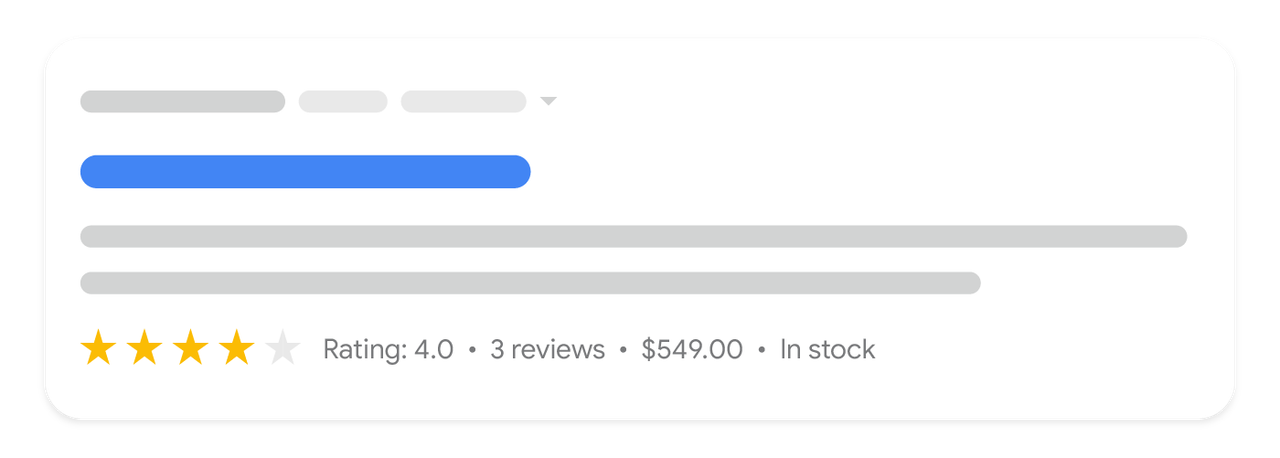
The star rating needs review data in the markup. If you use a reviews app, check that it adds the aggregate rating to the product's JSON-LD, then test a product URL in Google's Rich Results Test(opens in a new tab).
Two types to stop spending time on:
- FAQ markup. Google stopped showing FAQ rich results in Search on May 7, 2026(opens in a new tab), after limiting them to government and health sites in 2023. Keep FAQ sections where they help shoppers, but don't buy an app for FAQ schema expecting extra space in Google.
- HowTo markup. How-to rich results were deprecated in 2023(opens in a new tab) and no longer appear.
7. Speed and Core Web Vitals
Google measures page experience with three Core Web Vitals. A page passes when at least 75% of visits(opens in a new tab) meet each threshold:
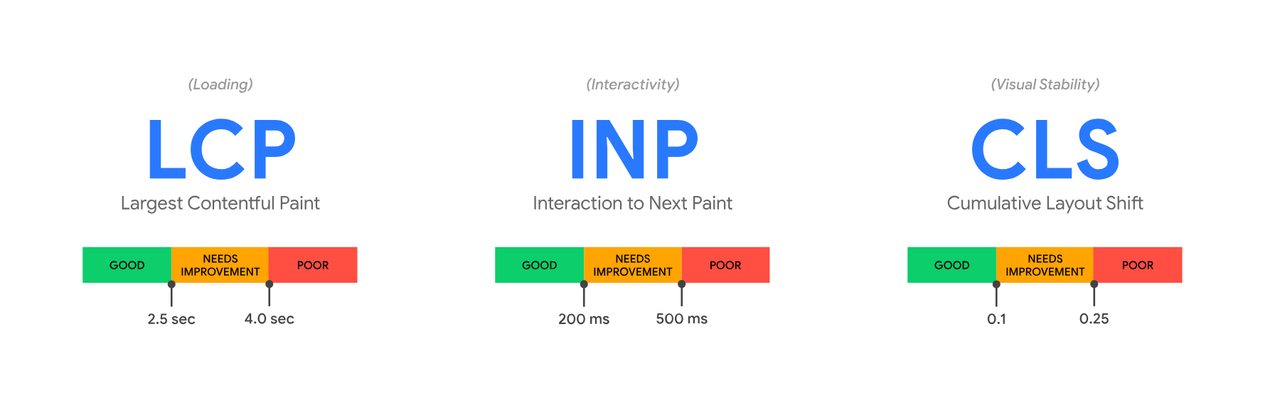
- LCP (Largest Contentful Paint), loading: 2.5 seconds or less.
- INP (Interaction to Next Paint), responsiveness: 200 milliseconds or less.
- CLS (Cumulative Layout Shift), visual stability: 0.1 or less.
If you read an older guide, note that INP replaced First Input Delay (FID)(opens in a new tab) as a Core Web Vital in March 2024. INP counts every tap and click during the visit, so heavy app scripts that FID ignored now show up.
On Shopify, slow stores almost always come from what the theme loads: app scripts, tracking tags, an autoplay hero video, oversized images. Our guide to Shopify speed optimization covers the admin's Web performance report and 10 fixes. If the theme itself is the bottleneck, our guide to choosing a Shopify theme explains what to check before switching.
8. Shopify blog SEO: content that sells
A blog lets you rank for searches that are too early for a product page: "how to wash linen sheets", "best protein powder for runners", "what size duvet for a queen bed". Shopify's SEO overview(opens in a new tab) points to content as the long-term lever when your domain is new and has few links.
What makes a store blog post earn money rather than just traffic:
- Pick questions your buyers ask before buying. Your customer service inbox and Search Console queries are better sources than a generic keyword tool.
- Link to the collection or product the post is about, in the text, with descriptive anchor text.
- Edit the post's search engine listing in Online Store > Blog posts, the same way as a product.
- Answer early. Give the answer in the first lines, then the detail. People who find what they came for are the ones who click through to the product.
9. Internal linking
Internal links tell Google which pages matter and how they relate. Shopify's site structure guide(opens in a new tab) asks for descriptive link text: "Check out this red hat", not "Click here to see the red hat". Google's own link guidelines(opens in a new tab) say the same about anchor text.
Where to add links on a Shopify store:
- Menus and footer to every collection that targets a keyword.
- Collection descriptions to closely related collections ("Linen sheets" links to "Linen duvet covers").
- Product pages to the parent collection and to products bought together.
- Blog posts to the collection or product they discuss.
- Bundle and gift pages to the products inside them. A build-a-box page can rank for "gift set" searches and links to each product it contains.
Every one of these links should use the `/products/` or `/collections/` URL, not a collection-aware product URL (see section 4).
10. Google Search Console: measure what you earn
Search Console is free and is the only place that shows which Google searches bring visitors to your store. Shopify's sitemap guide(opens in a new tab) gives the setup:
- Add your domain as a URL-prefix property in Google Search Console(opens in a new tab).
- Copy Google's HTML verification meta tag, paste it into `theme.liquid` (in the theme code editor), and click Verify.
- Under Indexing > Sitemaps, enter `sitemap.xml` and submit.
Shopify notes that Google usually indexes changes within 48 to 72 hours(opens in a new tab), that you can't force a re-crawl, and that trial stores and password-protected stores aren't indexed(opens in a new tab).
Then use it every month:
- Performance report: sort pages by impressions and look for queries where you rank in positions 5 to 15. A better title, a fuller description or a few internal links can move those pages onto page one.
- Pages report: check why pages aren't indexed. "Alternate page with proper canonical tag" on collection-aware URLs is normal; "Not found (404)" on old product URLs means a missing redirect.
- URL inspection: see how Google renders a page, which Shopify recommends for checking a missing title or H1(opens in a new tab).
A 30-day Shopify SEO checklist
- Connect Search Console and submit sitemap.xml.
- List your top 10 collections and give each one keyword.
- Rewrite those 10 collection titles, descriptions and search engine listings.
- Check whether product cards link through `/collections/.../products/`, and fix the theme if they do.
- Rewrite the descriptions and listings of your 20 best-selling products; add alt text.
- Redirect discontinued product URLs to the closest product or collection.
- Test 3 product URLs in the Rich Results Test; fix missing price, availability or rating.
- Check Core Web Vitals on a product and a collection page.
- Publish 2 blog posts that answer pre-purchase questions and link to a collection.
- After 4 weeks, review queries in positions 5 to 15 and improve those pages first.
SEO brings visitors you don't pay for per click, and the page they land on decides what each visit is worth. Pair your ranking product and collection pages with offers that raise the average order value, such as volume discounts or bundles with Snap Bundle(opens in a new tab), and the same free traffic earns more.
Still deciding how much budget SEO should get compared with ads? Read SEO vs PPC: organic vs paid search on a fixed budget.
FAQ
Is Shopify good for SEO?
Yes. Shopify generates canonical tags, sitemap.xml and robots.txt automatically, enables SSL and outputs product structured data through its themes. Most ranking problems on Shopify come from thin collection and product content, duplicate internal links and slow themes, not the platform.
How do I improve SEO on my Shopify store?
Start with collection pages: one keyword per collection, a short description, and an edited search engine listing. Then rewrite your best-selling product pages, fix internal links that point to /collections/.../products/ URLs, and connect Google Search Console to see which queries to work on next.
Where do I edit the SEO title and meta description in Shopify?
On a product or collection, click the pencil icon in the Search engine listing section. For pages, use Edit website SEO; for the homepage, go to Online Store > Preferences. Shopify recommends titles of 60 characters or fewer.
Do I need an SEO app for Shopify?
Not to start. The canonical tags, sitemap, robots.txt and product structured data are built in. An app can help audit many pages or add review markup, but avoid paying for FAQ or HowTo schema: Google no longer shows those rich results.
How long does Shopify SEO take to work?
Google usually indexes changes within 48 to 72 hours, according to Shopify, but rankings take longer. Expect to judge a collection or product page after several weeks of data in Search Console, not days.
Does Shopify create duplicate content?
Products can be reached at /products/ and at collection-aware /collections/.../products/ URLs. Shopify adds a canonical tag pointing to the /products/ URL, but your theme should also link to that URL directly, as Google recommends.

Keep reading

SEO vs PPC: Organic vs Paid Search on a Fixed Budget
SEO vs PPC for a Shopify store with a fixed budget: cost per click vs cost per page, click share data, when to move spend, and a worked $3,000 budget split.

Shopify Email Flows: 7 Automations That Earn Without Ad Spend
The seven Shopify email flows that turn traffic you already paid for into revenue: timing, content and setup in Shopify Messaging and Klaviyo, with 2026 benchmarks.

What Is a Shopify CRO Agency? What CRO Means, What It Costs, and Whether You Need One (2026)
What conversion rate optimization (CRO) is, what a Shopify CRO agency actually does, what it costs, the benefits for your store, and the quick wins to try before hiring one.