
What Is Shop Pay and Is It Safe? A Guide for Shoppers and Merchants

Summarize this article with AI


Shop Pay is Shopify's one-tap checkout. Here is how it works, how safe it is, how to spot Shop Pay scams, and what merchants should know before turning it on or off.
Shop Pay is the purple button you see at the checkout of millions of Shopify stores. Tap it, confirm a six-digit code, and your email, address and card fill in by themselves. It is fast, which is exactly why many shoppers stop and ask: what is Shop Pay, who holds my card details, and is Shop Pay safe?
This guide answers both sides of the question. For shoppers: how Shop Pay works, what data it keeps and how to spot the scams that borrow its name. For merchants: what Shop Pay costs, what Shopify claims it does for conversion, where it is available (including France and the EU) and how to turn it on or off. Every fact is linked to Shopify's own documentation, checked in November 2026.
Disclosure: Trafik Plus is a Shopify agency. We develop Shopify themes, including our own theme Pops, and we set up checkouts for merchants every week. We have no commercial link with Shop Pay.
The short answer
- What it is: Shopify's accelerated checkout. It saves your email, payment method and shipping and billing details so you can check out in a few taps on any store that offers it (Shopify Help Center(opens in a new tab)).
- Is it safe? Yes, by industry standards. Saved cards are encrypted by Shop Pay, stores never see your full card number, and each new device or browser needs a verification code (Shop Help Center(opens in a new tab)).
- Is it legit? Yes. Shop Pay is built and run by Shopify. Most "Shop Pay scams" are fake emails, texts or stores that use the name, not breaches of Shop Pay itself.
- For merchants: it is included with Shopify Payments at no extra fee, and Shopify says it lifts conversion by up to 50% compared with guest checkout (Shopify(opens in a new tab)).
What is Shop Pay?
Shopify defines Shop Pay as "an accelerated checkout option" for shoppers on Shopify stores and on Shop, its shopping app (Shopify Help Center(opens in a new tab)). Instead of typing your details on every store, you save them once. According to the Shop Help Center(opens in a new tab), Shop Pay can store your email, up to 20 shipping addresses, up to 10 cards with their billing addresses, and your mobile number.
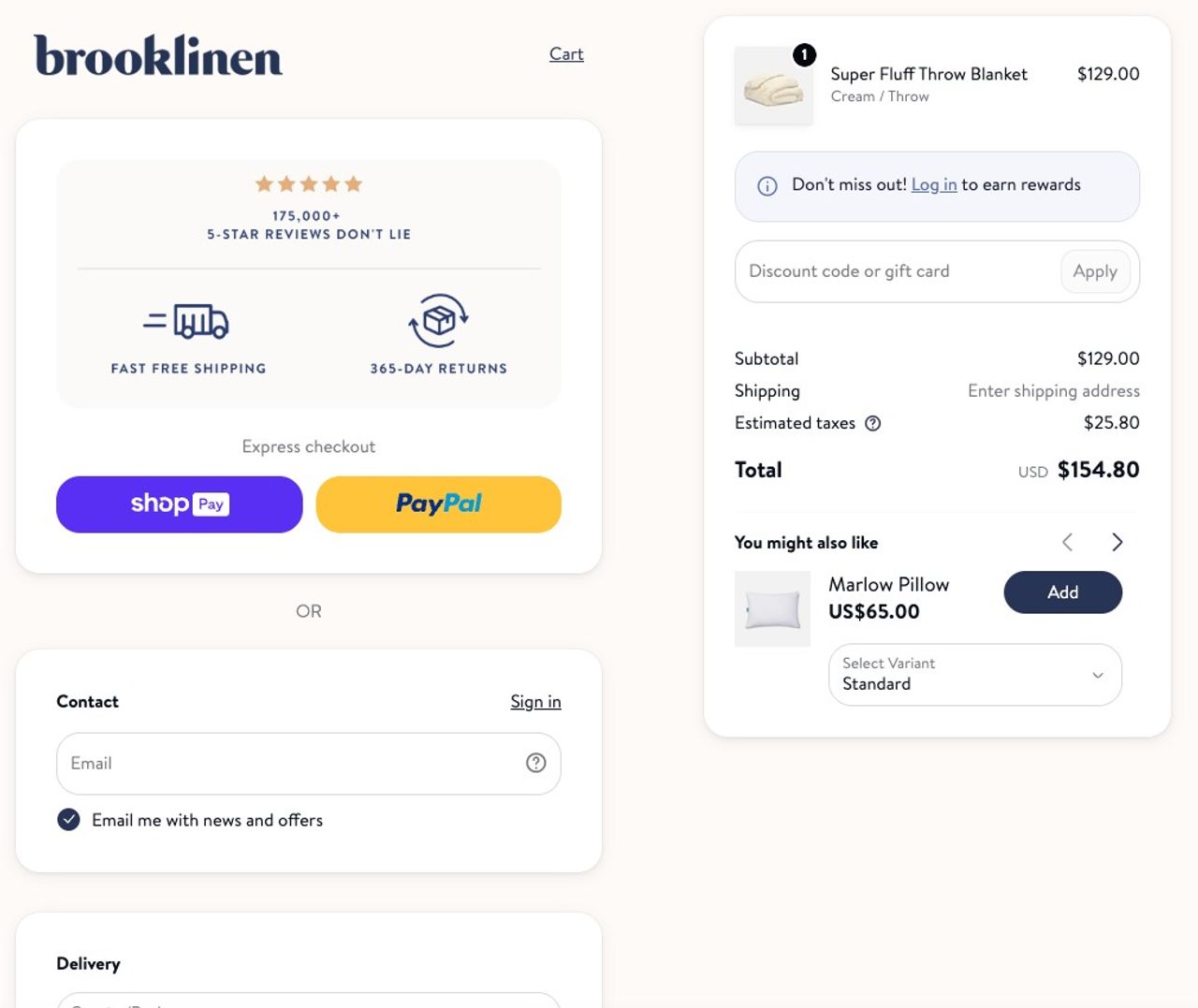
Shop Pay sits inside a small family of Shopify products whose names are easy to mix up:
Name | What it is | Who uses it |
|---|---|---|
Shop Pay | Accelerated checkout that saves your details | Shoppers, at checkout |
Shop app | Shopify's shopping app for tracking orders and browsing stores | Shoppers, on mobile |
Shopify Payments | Shopify's payment processor for merchants | Merchants; Shop Pay requires it |
Shop Pay Installments | Pay over time, powered by Affirm | Shoppers in the US, Canada, UK and Australia (early access) |
So when you see a "SHOP PAY" or "Shopify" line on a bank statement, it usually means you paid a Shopify store, not that Shopify sold you something.
How does Shop Pay work?
For shoppers
- At checkout on a store that offers Shop Pay, enter your email or tap the Shop Pay button, or create an account by entering your mobile number (Shop Help Center(opens in a new tab)).
- Verify yourself with a Shop passkey or a six-digit code sent by text or email. Shop app users can approve the request in the app (Shopify Help Center(opens in a new tab)).
- Shop Pay fills in your saved address and the last card you used. Choose "Pay another way" to switch methods.
- Place the order. Your shipping and billing details are shared with the store only at this point.
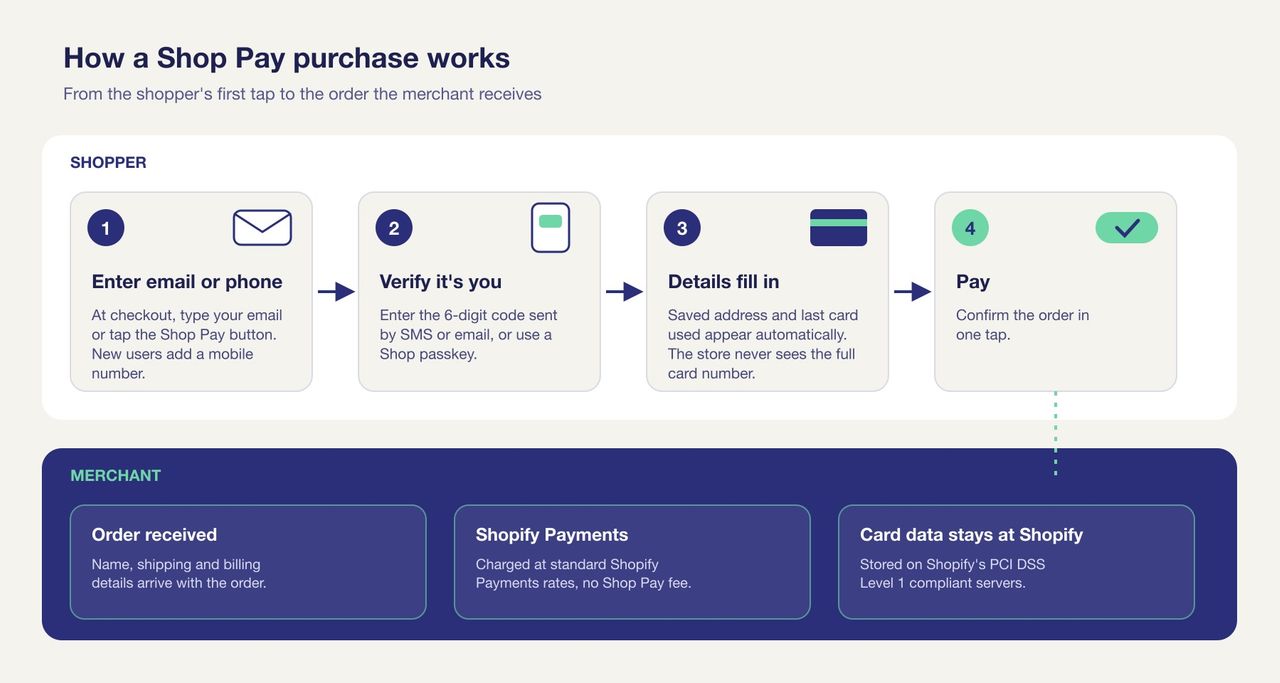
Once you have opted in, your details work on any Shopify checkout where the merchant has turned Shop Pay on. On a device it already knows, Shop Pay can recognise you without a new code.
For merchants
Shop Pay is part of Shopify Payments, so you need Shopify Payments to offer it. Transactions are billed at your normal Shopify Payments rates, with no separate Shop Pay fee (Shopify Help Center(opens in a new tab)). Customer details are stored on Shopify's PCI-compliant servers and passed to your store only when an order is placed.
When Shop Pay is active and your store is eligible, Shopify also turns on Sell with Shop (your products appear in the Shop app) and Sign in with Shop (one-tap login for customers with a Shop account). In physical stores, Shopify POS can show a QR code that customers scan to pay with Shop Pay.
Shop Pay Installments: pay later, where available
Shop Pay Installments is Shopify's buy now, pay later option. Affirm collects the payments: depending on the plan, shoppers pay in interest-free instalments or over several months at 0% to 36% APR, with no late fees (Shopify Help Center(opens in a new tab)). Monthly plans must be paid by debit card.
It is only open to merchants with a business in the United States, Canada, the United Kingdom or, in early access, Australia, with both Shopify Payments and Shop Pay active. Eligible orders run from $35 to $30,000 in the US and Canada, £50 to £30,000 in the UK and A$50 to A$30,000 in Australia (Shopify Help Center(opens in a new tab)). Merchants pay a separate Installments fee, which is not returned on refunds.
Shop Pay Installments is not available to French or other EU merchants. Stores in those markets usually offer split payments through apps such as Klarna, Alma or Scalapay instead.
Is Shop Pay safe?
Short version: Shop Pay is about as safe as card checkout gets, and in some ways safer than typing your card into an unknown store. Here is why.
Encryption and PCI DSS Level 1
Shopify says it is "certified Level 1 PCI DSS compliant", the highest level of the card industry's security standard, and that this compliance "extends by default to all stores powered by Shopify" (Shopify(opens in a new tab)). The Shop Help Center adds that "your saved cards are encrypted by Shop Pay" and that "your full card number isn't shared with individual stores" (Shop Help Center(opens in a new tab)). A store that uses Shop Pay never receives the number it would need to reuse your card.
Verification codes, passkeys and saved devices
Shop Pay asks you to prove it is you when you use a new device or browser, or when you choose Shop Pay at checkout. The real text reads "XXXXXX is your Shop verification code" (Shop Help Center(opens in a new tab)). You can also use a passkey instead of codes. This second step is what stops someone who knows your email from paying with your saved card.
Store vetting and fraud protection
Stores must pass Shopify's trust, safety and fraud screening before they can sell in the Shop app, including a chargeback rate under 1% over the past six months (Shop Help Center(opens in a new tab)). For merchants, Shopify Protect covers eligible Shop Pay orders against fraudulent and unrecognised chargebacks for free (Shopify Help Center(opens in a new tab)). Shopify limits it to US-based stores that fulfil the order with tracking within seven days (Shopify(opens in a new tab)).
One caveat: Shop Pay protects your payment details, not your purchase. If you buy from a dishonest store, Shop Pay does not guarantee the product. Check reviews and return policies, and report suspect stores through Shop's fraud form.
What data does Shop Pay keep and share?
Shop Pay keeps the details you save (email, addresses, cards, phone number) and your order history from stores that use it. A store receives your name, shipping and billing details only once you place an order, never your full card number. You can manage your saved details from your Shop account, opt out of Shop Pay at any time, or delete your Shop account and data (Shop Help Center(opens in a new tab)). The full rules are in Shopify's privacy policy for Shop users(opens in a new tab).
Shop Pay scams: how to spot fake emails, texts and codes
Worries about a "Shop Pay scam" usually come from one of three situations: a verification code you did not request, an email or text that claims to come from Shop Pay, or a store you no longer trust. Each one has a simple check.
You received a Shop Pay code you did not ask for
Most of the time, someone typed your phone number by mistake at checkout, or you created a Shop Pay account months ago by saving your details at a store and forgot (Shop Help Center(opens in a new tab)). The code alone cannot pay for anything. Never read it out or forward it to anyone, including someone who calls "from Shopify". If codes keep coming, sign in at shop.app, log out of all devices, or opt out of Shop Pay.
Red flags in a fake Shop Pay or Shopify message
- The sender is a Gmail, Yahoo, Hotmail or other public address. Shopify only sends from domains such as @shopify.com, @email.shopify.com and @em.shopify.com (Shopify Help Center(opens in a new tab)).
- It asks for your card number, password or verification code by email, text or phone.
- It uses urgent or threatening language: "your account will be closed", "payment failed, act now".
- The link text does not match the real address, or points to a look-alike domain.
- It opens with a vague greeting such as "Dear account holder" and contains spelling mistakes.
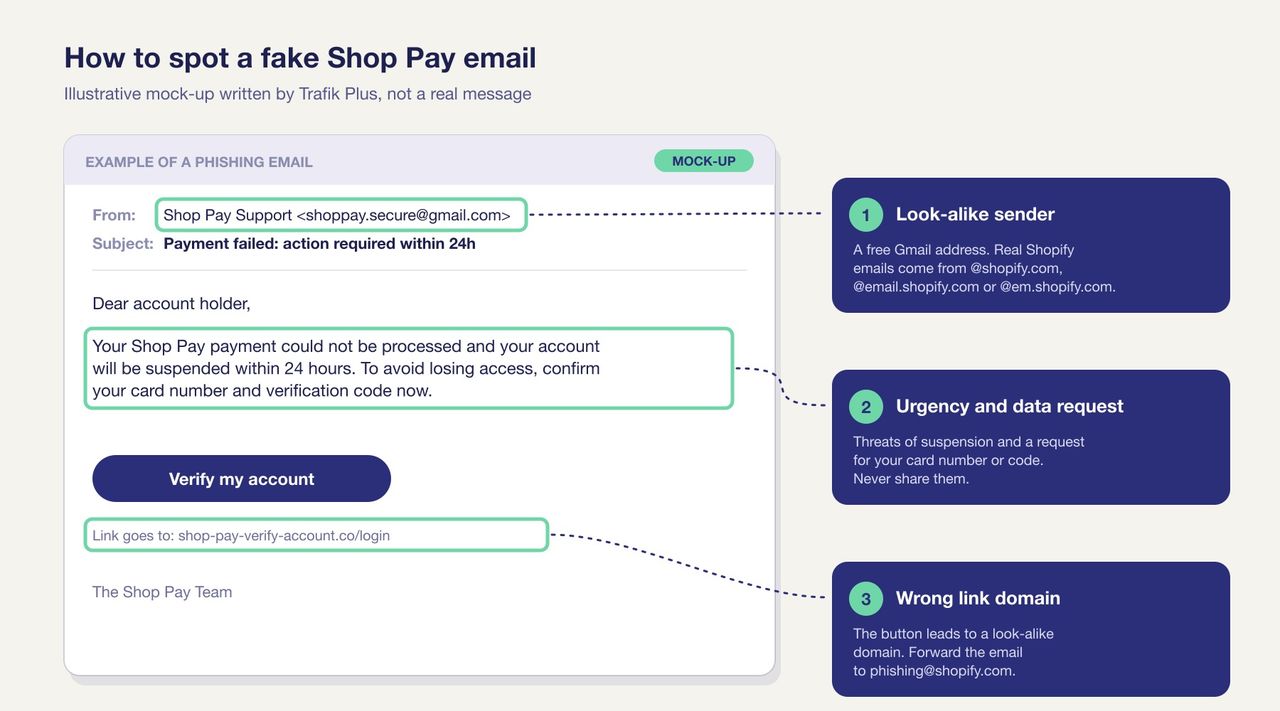
Forward suspected phishing to phishing@shopify.com, and do not click links in texts. If you entered your card on a fake page, call your bank first. Merchants should also read our breakdown of the Shopify checkout hijack, where attackers injected a fake payment form into real stores.
Shop Pay for merchants: pros and cons
Shopify's own figures are strong: Shop Pay "lifts conversion by up to 50% compared to guest checkout", "outpaces all other accelerated checkouts by at least 10%", and its mere presence increases lower-funnel conversion by 5% (Shopify(opens in a new tab)). Those numbers come from a study Shopify ran with an unnamed consulting firm in April 2023, so treat them as best-case vendor figures and measure your own checkout before and after.
Criterion | Shop Pay |
|---|---|
Extra fee | ❌ No, Shopify Payments rates only |
Faster checkout for returning shoppers | ✅ Yes, details pre-filled |
Exposure in the Shop app | ✅ Yes, with Sell with Shop when eligible |
Chargeback protection | ✅ Yes, Shopify Protect for eligible US stores |
Works with third-party payment gateways | ❌ No, except in the US, Australia and France under conditions |
Pay later in France or the EU | ❌ No, Installments is limited to the US, Canada, UK and Australia |
Easy to test before launch | ❌ No, you must place a real order and refund it |
The main downside is dependence: Shop Pay ties you to Shopify Payments, and subscriptions created with Shop Pay keep relying on it. For most stores the trade is still worth it, because fewer typed fields means fewer drop-offs. If checkout abandonment is your problem, our guide to reducing cart abandonment covers the other on-site fixes.
Is Shop Pay available in France and the EU?
Yes for Shop Pay, no for Shop Pay Installments. Shop Pay comes with Shopify Payments, which is available to merchants in France and many other EU countries. In France, Shopify Payments covers mainland France only, accepts Visa, Mastercard, American Express and Cartes Bancaires, and Shopify lists Shop Pay, Apple Pay and Google Pay as the accelerated checkouts. Shopify's French page states that these "are automatically activated with Shopify Payments" (Shopify Help Center(opens in a new tab)).
For French shoppers, the experience is the same as in the US: save your details once, confirm with a code or passkey, and pay in one tap. Split payment in France goes through other providers.
How to enable or disable Shop Pay
Turn on Shop Pay
- In your Shopify admin, go to Settings > Payments.
- In the Shopify Payments section, click Manage.
- In the Shop Pay section, tick Shop Pay, then click Save.
Finish your Shopify Payments setup (business details and bank account) within 21 days of your first Shop Pay payment, otherwise customers are refunded automatically (Shopify Help Center(opens in a new tab)). To test, place a real order, then cancel and refund it.
Turn off Shop Pay
- Go to Settings > Payments and click Manage under Shopify Payments.
- Click More actions, then Manage payment methods.
- In the Shop section, turn off Shop Pay, then confirm with Deactivate.
Before you do, check your subscriptions: subscriptions created with Shop Pay fail once it is off and are cancelled after several failed attempts (Shopify Help Center(opens in a new tab)).
Where the Shop Pay button appears in your theme
Shop Pay always appears at checkout, but your theme decides whether shoppers also see it earlier. In Pops, the theme we develop, an accelerated checkout button block shows the Shop Pay button on product pages, the price block can show Shopify's instalment message where Installments is available, and the cart shows express checkout buttons. If you are choosing between a cart drawer and a cart page, keep those buttons visible in both.
FAQ
What is Shop Pay?
Shop Pay is Shopify's accelerated checkout. It saves your email, payment method and shipping and billing details so you can pay in a few taps on any store that offers it, after confirming your identity with a code or passkey.
Is Shop Pay safe to use?
Yes. Saved cards are encrypted, stores never see your full card number, Shopify is certified PCI DSS Level 1, and a verification code or passkey is required on new devices. The main risk comes from scam stores and phishing messages, not from Shop Pay itself.
Is Shop Pay legit or a scam?
Shop Pay is a legitimate service built and run by Shopify. Messages that ask for your code, password or card details by email, text or phone are scams; real Shopify emails come from domains such as @shopify.com.
Why did I get a Shop Pay code I didn't request?
Usually someone typed your phone number by mistake, or you created a Shop Pay account when saving your details at a store. Don't share the code. If it keeps happening, log out of all devices at shop.app or opt out of Shop Pay.
Is Shop Pay the same as Affirm?
No. Shop Pay is Shopify's checkout. Only Shop Pay Installments, the pay-later option, is powered by Affirm, and it is available in the US, Canada, the UK and, in early access, Australia.
Does Shop Pay cost merchants anything?
No extra fee. Shop Pay is included with Shopify Payments and transactions are charged at your Shopify Payments rates. Shop Pay Installments has its own fee.
Is Shop Pay available in France?
Yes. French merchants get Shop Pay with Shopify Payments (mainland France only), alongside Apple Pay and Google Pay. Shop Pay Installments is not available in France.

Keep reading

SEO vs PPC: Organic vs Paid Search on a Fixed Budget
SEO vs PPC for a Shopify store with a fixed budget: cost per click vs cost per page, click share data, when to move spend, and a worked $3,000 budget split.

Shopify Email Flows: 7 Automations That Earn Without Ad Spend
The seven Shopify email flows that turn traffic you already paid for into revenue: timing, content and setup in Shopify Messaging and Klaviyo, with 2026 benchmarks.

What Is a Shopify CRO Agency? What CRO Means, What It Costs, and Whether You Need One (2026)
What conversion rate optimization (CRO) is, what a Shopify CRO agency actually does, what it costs, the benefits for your store, and the quick wins to try before hiring one.