
Shrine Theme Alternative: Pops vs Shrine vs Shrine Pro (2026)

Summarize this article with AI


Shrine vs Shrine Pro vs Pops: what $149 and $349 buy you, where Shrine wins, and why a Theme Store theme built on theme blocks can be the better Shrine alternative.
Shrine is one of the best-known Shopify themes sold outside the Shopify Theme Store. Shrine Solutions sells it from its own website in two versions: Shrine at $149 and Shrine Pro at $349, both one-time payments. It is popular with dropshipping and one-product stores because it builds in conversion features, like quantity breaks, bundle offers and urgency text, that usually cost a monthly app.
If you are looking for a Shrine theme alternative, or trying to choose between Shrine and Shrine Pro, this comparison puts both versions next to Pops, the newest theme from Trafik Plus, a Shopify Theme Store partner since 2022. Pops is built on Shopify theme blocks and made for brands that sell something you eat, drink or put on your face.
Disclosure: we make Pops. Pops facts come from its documentation. Shrine facts come from shrine.io: its feature list, FAQ, refund policy and theme updates page as of 14 October 2026. Where Shrine is the better choice, we say so.
The short answer
Pick Shrine if price comes first and your store runs on the conversion blocks dropshippers rely on: quantity breaks, urgency text, estimated shipping and a sticky add to cart, for $149.
Pick Shrine Pro if you want all of that plus bundle offers, gifts on quantity, product upsells, a 20-feature cart drawer, a mega menu and breadcrumbs, and you are fine paying $349 with no trial and no refund.
Pick Pops if you want a theme reviewed and sold through the Shopify Theme Store, built on theme blocks, with code you can read, free updates and a free trial, and with a bundle builder, cart upsells, stories and motion built in. Pops costs more, $400, and is still in review: you cannot buy it yet.
Pops, Shrine and Shrine Pro at a glance
Shrine
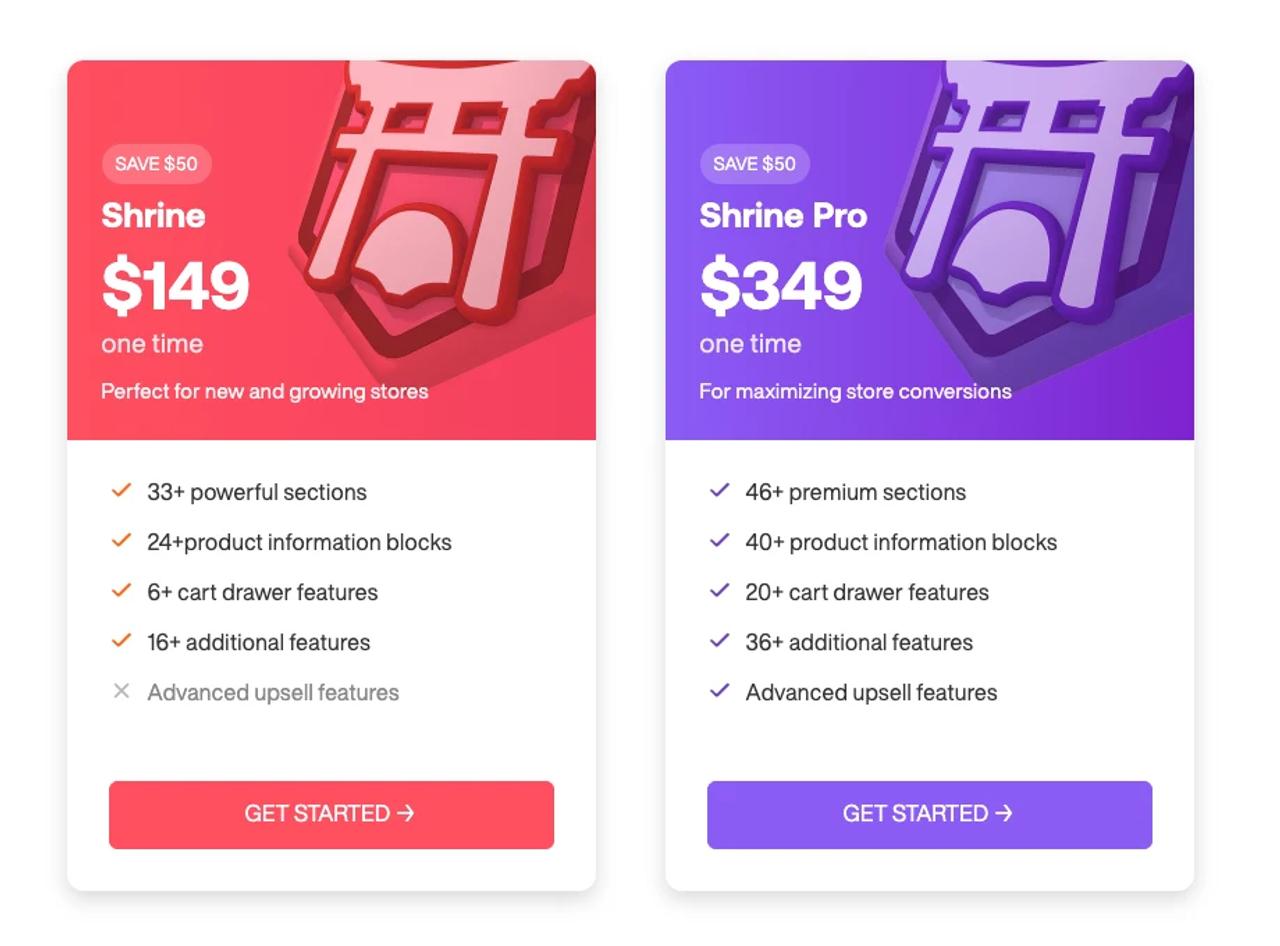
Shrine is the entry version. Its pricing card(opens in a new tab) lists 33+ sections, 24+ product information blocks, 6+ cart drawer features and 16+ additional features, and leaves out the advanced upsell features. The latest release is Shrine 2.1.0, from 11 December 2025, according to the theme updates page(opens in a new tab).
Shrine Pro
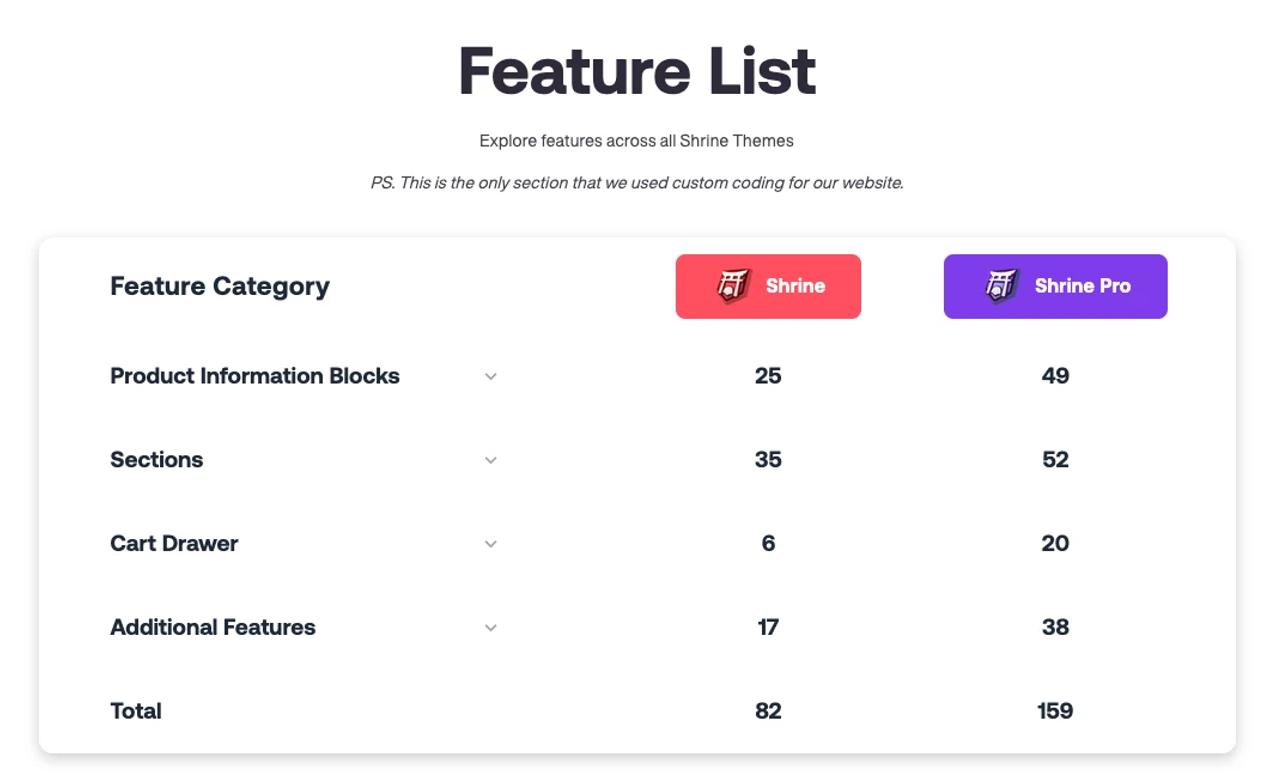
Shrine Pro is the full version, for $349. Shrine’s feature list(opens in a new tab) counts 159 features in Pro against 82 in Shrine. Pro follows its own release line: it went from 1.0.4 in December 2023 to 1.9.0 on 9 July 2026.
Pops
Pops is a Theme Store theme from Trafik Plus, built on Shopify theme blocks(opens in a new tab). It ships with three presets, Pops for energy drinks, Lueur for makeup and skincare and Scoop for protein cereal, and its documentation(opens in a new tab) is in English and French. It will cost $400 one-time once the Theme Store team approves it.
Shrine vs Shrine Pro: what the extra $200 buys
Shrine’s feature list(opens in a new tab) splits both versions into four groups, and Pro roughly doubles each one:
Feature group | Shrine | Shrine Pro |
|---|---|---|
Product information blocks | 25 | 49 |
Sections | 35 | 52 |
Cart drawer features | 6 | 20 |
Additional features | 17 | 38 |
Total | 82 | 159 |
Price (one-time) | $149 | $349 |
Latest version | 2.1.0 (11 December 2025) | 1.9.0 (9 July 2026) |
The counts change with the page you read. The pricing cards say 33+ and 46+ sections, the FAQ(opens in a new tab) says « Shrine : 74 features, Shrine Pro : 128 features », and the product pages say 70+ and 120+. The feature list is the most detailed, so we use it.
What Pro adds, in practice:
- On the product page: bundle offers, gifts on quantity, product upsells, a clickable discount, Trustpilot stars, shipping checkpoints, a video block, a countdown timer, a subscriptions widget, content tabs and breadcrumbs.
- Sections: a video slideshow hero, Facebook and Trustpilot testimonials, a shoppable image, Instagram-style stories, a 3D parallax hero, TikTok videos, a timeline, Lottie (JSON) animations and a sticky call to action.
- Cart drawer: a countdown, a checkpoint progress bar, free and conditional gifts, a policies checkbox, upsells shoppers can toggle, and savings totals.
- Store-wide: a mega menu, 2,500 icons, section load animations, a country and currency selector, sections hidden per device, add to cart in every section and three advertorial templates.
Both versions share the basics a conversion-focused store looks for: quantity breaks (basic in Shrine, advanced in Pro), urgency text, estimated shipping, a sticky add to cart, a sizing chart, a before/after slider, comparison and pricing tables, tickers, a bundle deals section and a promo popup.
Is Shrine Pro worth it?
If you would otherwise install bundle, upsell and cart drawer apps, yes: Shrine’s Pro page(opens in a new tab) prices the apps it replaces at more than $150 a month. If your store lives on quantity breaks and a sticky add to cart, Shrine covers it for $200 less, and you can upgrade later by paying the difference.
Still, we would rather buy a theme from the Shopify Theme Store. Shopify reviews every theme before listing it, you can try it free in your own store before paying, and it installs and updates from your Shopify admin. Shrine Pro offers none of that, and with no refunds, $349 is a blind buy. If you want a premium theme with that safety net, Pops will be on the Theme Store for $400.
Shrine theme review: pros and cons
Pros
- Price. $149 for Shrine and $349 for Pro, one-time: below most premium Theme Store themes, and below Pops at $400.
- Conversion blocks built in. Quantity breaks, urgency and estimated shipping in both versions; bundles, gifts and upsells in Pro, without a monthly app.
- A long feature list. 159 features in Pro, including advertorial templates and a mega menu.
- Active development. Shrine 2.0.0 added full right-to-left support in August 2025, and Pro shipped 1.6.0, 1.7.0, 1.8.0 and 1.9.0 between November 2025 and July 2026.
- Community. A Discord server Shrine says has more than 10,000 members, plus email support.
- Available today, with real stores to look at on its demo stores page(opens in a new tab).
Cons
- No refunds. Shrine’s refund policy(opens in a new tab) says « all sales are final and no refunds will be issued under any circumstances ». Buyers also waive the EU 14-day right of withdrawal.
- No free trial. The FAQ(opens in a new tab) says one is being worked on.
- One year of updates and support, unless you add the $20 lifetime support option at checkout.
- Not on the Theme Store. Shopify does not review it, and you install it with a license key instead of from your Shopify admin.
- Review numbers that don’t add up. The Shrine page(opens in a new tab) header reads 4.8/5 from 17,049 reviews while its review widget shows 174; the Shrine Pro page(opens in a new tab) header reads 4.7/5 from 48,836+ reviews while its widget shows 4. None of them come from an independent marketplace.
- Code you can’t read, and a setting that blocks right-click and text selection. More on that under For developers.
Design and creative effects
Shrine is built for direct-response selling. Its demo stores(opens in a new tab), like PHERO cosmetics on Shrine and CHUG energy milk or Aeon supplements on Pro, stack benefit icons, review avatars, tickers, comparison tables and before/after sliders: the look of a landing page made for paid ads. Pro adds a 3D parallax hero, section load animations and Lottie animations.
Pops goes for brand over funnel. It has falling-content physics, a cursor trail, floating media and Lottie files, animated headings and section dividers, all set from blocks(opens in a new tab). Its pages read like a CPG brand site rather than an advertorial.
Neither is better in the abstract. Shrine suits a one-product store testing ads; Pops suits a brand selling a range of flavours or shades.
Page building: theme blocks vs classic sections
Shrine is a fork of Dawn. It uses classic sections, each with its own fixed list of blocks, and no theme blocks: you add the blocks a section allows, where it allows them. Its theme updates page does not mention theme blocks.
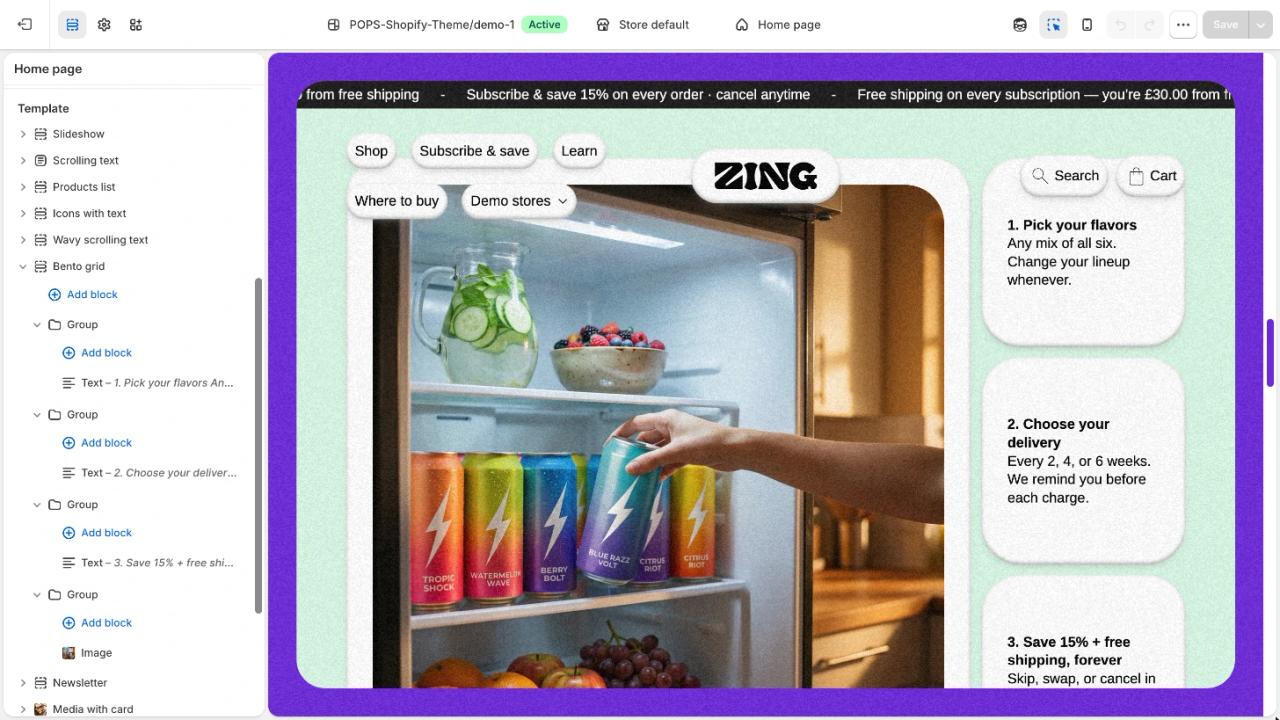
Pops is built on theme blocks(opens in a new tab), Shopify’s newer architecture, where blocks are shared across sections and can nest inside each other. Its generic Section(opens in a new tab) takes any theme block or app block, so you can build a layout Trafik Plus never designed, without code. See our list of themes built on theme blocks for how Pops compares with others.
Product pages
Both themes do a lot here. Shrine Pro lists 49 product information blocks, from bundle offers to shipping checkpoints, review avatars and a custom product field.
Pops’s product information section(opens in a new tab) has a nutrition table with Nutri-Score, a sticky add to cart, pre-orders set from a metafield, combined listings, support for up to 2,048 variants and scheduled badges(opens in a new tab) driven by metaobjects. It can also set one colour across the product page(opens in a new tab) from the selected variant.
Shrine Pro wins on sheer count and on dropshipping blocks like gifts on quantity and Trustpilot stars. Pops wins for food, drink and beauty, where nutrition facts and long variant lists matter.
Cart and order value
The cart drawer is where Shrine Pro is strongest: 20 features, including a goal-based progress bar, a timer, free and conditional gifts, upsells shoppers can toggle and savings totals. Shrine has 6.
Pops raises order value with a build-a-box(opens in a new tab): up to 24 products, minimum and maximum quantities, four discount tiers and a progress bar. It adds cart upsells(opens in a new tab) of 2 to 10 products, a shareable cart link(opens in a new tab), a countdown timer(opens in a new tab) and stories(opens in a new tab). Our build-a-box guide shows how the box works.
If you sell one hero product with gifts and tiered offers, Shrine Pro covers more. If you sell boxes and bundles of many flavours, Pops does.
Discovery and navigation
Shrine Pro has a mega menu and breadcrumbs. Pops has no mega menu, breadcrumbs or recently viewed products; it has a predictive search drawer(opens in a new tab) and View more pagination on collections.
Selling in several languages
Both themes work with Shopify Markets and support right-to-left languages: Shrine since 2.0.0, Pops through logical CSS. Shrine Pro adds a country and currency selector and a setting to limit the store to a list of countries. Pops’s documentation is public, in English and French; Shrine’s help centre sits behind a login on its dashboard.
For developers
This is where the themes differ most.
In both Shrine and Shrine Pro, the main JavaScript file, main.js, is obfuscated: 207 KB of renamed variables you cannot read or safely edit. Shopify’s Theme Store requirements(opens in a new tab) say themes « must not include minified .css or .js files », except ES6 code and third-party libraries, so a Theme Store theme cannot ship code like this. Shrine’s base.css is also a 379 KB minified file.
The same theme has a security setting that, when turned on, blocks right-click, text selection, image dragging, F12 and the keyboard shortcuts for developer tools and view source. It slows down casual copying, but it also stops shoppers from copying text, like a discount code or an ingredient list. A separate script opens every external link in a new tab.
Pops ships readable vanilla JavaScript web components, uses GSAP for motion and exposes a JavaScript events API(opens in a new tab) for apps and custom code. As a Theme Store theme, it must meet Shopify’s minimum average Lighthouse scores of 60 for performance and 90 for accessibility on the home, product and collection pages.
Price, licensing and support
Shrine costs $149 and Shrine Pro $349, one-time, shown on shrine.io as down from $199 and $399. Multi-license bundles lower the price per store: 2 Shrine licenses for $249 or 3 for $314, 2 Shrine Pro licenses for $523 or 4 for $828. A license covers one store at a time and can be moved to another store.
Updates and support last one year; a $20 lifetime support option extends them for good. There is no free trial and, under the refund policy, no refund. You can pay by card, PayPal, Apple Pay, Google Pay or crypto, and support runs through Discord and email.
Pops will cost $400 one-time on the Shopify Theme Store. Like any Theme Store theme, you can try it free in your store until you publish it, updates are free, and you add it from your Shopify admin. Pops is in review with the Theme Store team: its listing is not live yet, and it has no reviews.
Which should you choose?
- Choose Shrine if budget comes first and your store runs on quantity breaks, urgency and a sticky add to cart.
- Choose Shrine Pro if you run a dropshipping or one-product store, want bundles, gifts and cart upsells without apps, and don’t need to try the theme before paying.
- Choose Pops if you are building a food, drink or beauty brand and want a theme Shopify reviews, code you can read and extend, theme blocks and a bundle builder, and you can wait for its Theme Store launch.
Comparing more themes? Our Shopify themes page lists Trafik Plus themes, Pops vs Shapes compares Pops with a Theme Store rival, and our best Shopify themes for beverage brands covers drinks stores.
How we compared
We read Shrine’s homepage, feature list, FAQ, product pages, refund policy and theme updates page on 14 October 2026; prices are in US dollars, before tax. Pops facts come from its documentation. We make Pops.
Pops vs Shrine vs Shrine Pro: full comparison table
“Not mentioned” means we found no sign of the feature, not that it is missing.
Pops | Shrine | Shrine Pro | |
|---|---|---|---|
Price | $400 one-time | $149 one-time | $349 one-time |
Where you buy it | Shopify Theme Store (in review) | shrine.io | shrine.io |
Reviewed by Shopify | Yes, to be listed | No | No |
Free trial | Yes, until you publish | No | No |
Refunds | Not mentioned | No, all sales final | No, all sales final |
Updates | Free through the Theme Store | 1 year, or lifetime for $20 | 1 year, or lifetime for $20 |
Licence | One store | One store at a time, transferable | One store at a time, transferable |
Architecture | Theme blocks | Classic sections (Dawn fork) | Classic sections (Dawn fork) |
Quantity breaks | Discount tiers in the build-a-box | Basic | Advanced |
Bundles | Build-a-box, up to 24 products | Bundle deals section | Bundle offer block and section |
Free gift with purchase | No | No | Gifts on quantity, free and conditional gifts in cart |
Cart drawer | Upsells (2 to 10 products), shareable cart link | 6 features | 20 features |
Countdown timer | Yes | No | Yes |
Stories | Yes | No | Yes |
Nutrition table | Yes, with Nutri-Score | No | No |
Mega menu | No | No | Yes |
Breadcrumbs | No | No | Yes |
Right-to-left languages | Yes | Yes (since 2.0.0) | Yes |
JavaScript | Readable web components, events API | Obfuscated main.js | Obfuscated main.js |
Right-click and copy blocking | No | Optional security setting | Optional security setting |
Documentation | Public, English and French | Help centre behind a login | Help centre behind a login |
Support | Trafik Plus | Discord and email | Discord and email |
Reviews | None yet | 4.8/5 claimed on shrine.io | 4.7/5 claimed on shrine.io |
FAQ
What is the best Shrine theme alternative?
It depends on what you sell. For a food, drink or beauty brand that wants a theme reviewed by Shopify, built on theme blocks, with a bundle builder and readable code, Pops is our pick. We make it, and it is still in review on the Theme Store. For a one-product dropshipping store, Shrine Pro remains hard to beat on features for the price.
What is the difference between Shrine and Shrine Pro?
Shrine Pro has 159 features against 82 in Shrine, according to Shrine’s feature list(opens in a new tab): 49 product blocks instead of 25, 52 sections instead of 35, a 20-feature cart drawer instead of 6, and Pro-only tools like bundle offers, gifts on quantity, product upsells, a mega menu and breadcrumbs. Shrine costs $149, Shrine Pro $349.
Is Shrine Pro worth it?
If it replaces bundle, upsell and cart drawer apps you would pay for every month, the $200 difference pays for itself quickly. If you only need quantity breaks, urgency and a sticky add to cart, Shrine is enough. You can also upgrade later(opens in a new tab) by paying the difference. Neither version can be refunded, though, so we would rather buy from the Shopify Theme Store, where Shopify reviews each theme and you can try it free before paying. Pops will be sold there.
Is the Shrine theme on the Shopify Theme Store?
No. Shrine Solutions sells Shrine and Shrine Pro from shrine.io. Its FAQ(opens in a new tab) says « Being confined to the Shopify App Store restricts our capabilities with Shrine. »
Can I get a refund on Shrine or Shrine Pro?
No. Shrine’s refund policy(opens in a new tab) says « all sales are final and no refunds will be issued under any circumstances », and buyers waive the EU 14-day right of withdrawal.
Is there a free trial or free version of Shrine?
No. Shrine’s FAQ(opens in a new tab) says there is no free trial yet and that one is being worked on. Copies offered as free downloads or resold elsewhere are not sold by Shrine Solutions, which ties updates and support to a license key.
How many stores can I use Shrine on?
One store per license, at a time. Shrine’s FAQ(opens in a new tab) says you can move a license to another store later, and you need more licenses to run more stores at once. Bundles of 2 or 3 Shrine licenses, and 2 or 4 Shrine Pro licenses, lower the price per store.
When can I buy Pops?
Pops is in review with the Shopify Theme Store team. Once it is approved, it will cost $400 one-time and, like any Theme Store theme, you can try it free in your store until you publish it. Until then, the Pops documentation(opens in a new tab) shows everything it does.

Keep reading

Best Shopify Themes in 2026: How to Choose One on the Theme Store
Free or paid, Horizon or Prestige: 7 criteria to choose a Shopify theme on the Theme Store, how to try it before buying, and our 6 best Shopify themes for 2026.

Pops vs Shapes: Shopify Theme Review and Comparison for Food, Drink and Beauty Brands (2026)
Our Shapes Shopify theme review next to Pops, its closest rival: pros and cons, features and price, with a full comparison table.

Top 5 Shopify themes for beverage brands (2026)
Which Shopify theme suits a drinks or canned beverage brand in 2026? Our top 5, from Pops and Local to Shapes, Savor and Release, with prices and features.