
How to Create Bundles on Shopify With the Free Shopify Bundles App

Summarize this article with AI


Shopify Bundles, Shopify’s free app, creates fixed bundles and multipacks. Setup, steps, limits, and when Snap Bundle fits better.
Selling two or more products together, for a little less than they cost separately, is one of the simplest ways to raise your average order value. If you want to know how to create bundles on Shopify without code, start with Shopify Bundles, the free app Shopify makes itself.
This guide covers what a bundle is, how to install Shopify Bundles, and how to build a fixed bundle and a multipack step by step. It also lists the limits you should know before you start. Then we look at Snap Bundle, the bundle app we develop at Trafik Plus, for the formats Shopify Bundles doesn’t handle. Every Shopify Bundles fact below was checked against the Shopify Help Center and the App Store listing on November 4, 2026.
The short answer: Shopify Bundles is free, works on every Shopify plan and handles fixed bundles and multipacks. It doesn’t do customer-built (mix-and-match) bundles, quantity breaks or subscriptions. For those formats you need a third-party app such as Snap Bundle, which has a free plan.
What is a product bundle?
A bundle is two or more products sold together as one purchase, usually for less than the sum of their individual prices. Most Shopify product bundles fall into four families:
- Fixed bundle: a set of products the merchant picks, such as a shampoo, conditioner and hair mask. Shoppers can often choose an option for each item (size, color, scent).
- Multipack: several units of the same product, such as a 3-pack of socks, with a variant choice for each unit.
- Mix-and-match bundle: shoppers build their own set from a selection, such as “any 3 candles for $45.”
- Quantity breaks: price tiers shown under the Add to cart button, such as “1 for $20, 2 for $36, 3 for $50.”
For the full definition, all seven bundle types and real store examples, read our guide to bundles in ecommerce.
Why sell bundles on your Shopify store?
A visitor who lands on your product page has already cost you the ad spend to get them there. Every extra item they add is a sale with no new acquisition cost. That is what bundles are for:
- Raise average order value: shoppers leave with several items instead of one.
- Lift conversion: a bundle reads as a good deal and gives undecided shoppers a reason to buy now.
- Move slow stock: pairing a slower product with a best seller clears it without discounting it on its own.
- Show how products work together: a “complete routine” bundle teaches shoppers how your range fits together.
- Build repeat purchases: a customer who tries several products at once has more reasons to come back for refills.
What is the Shopify Bundles app?
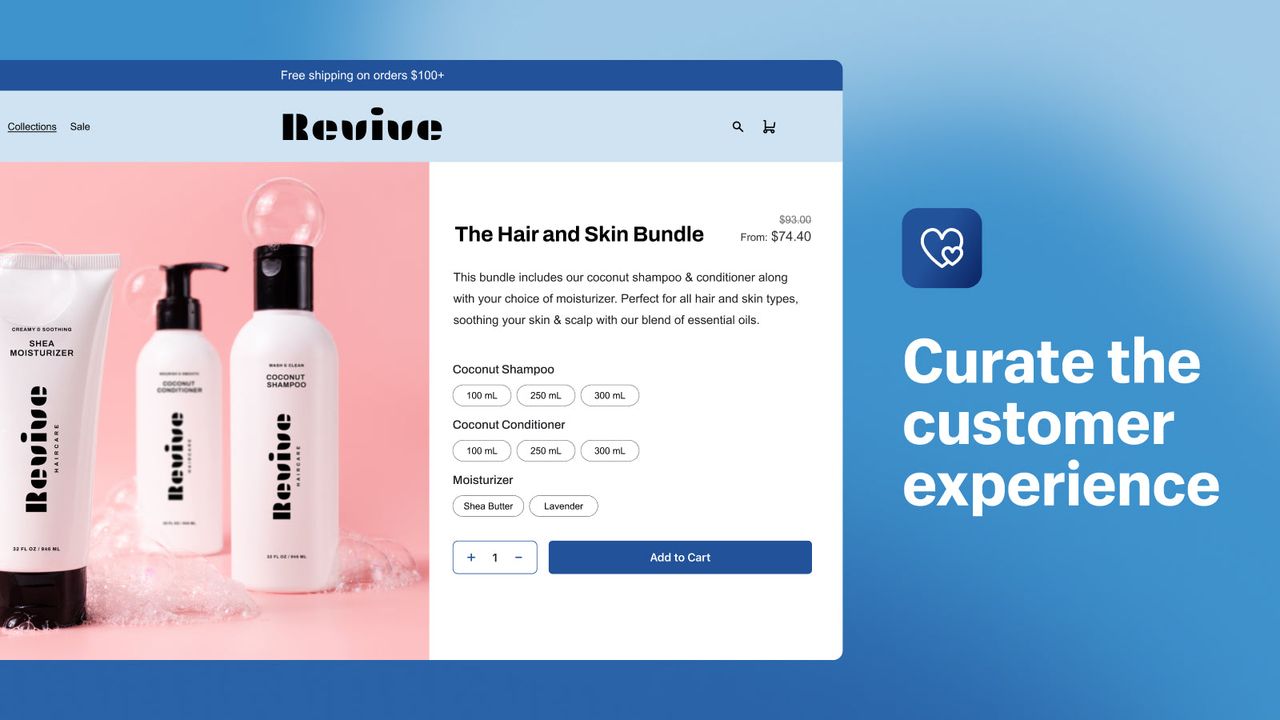
Shopify Bundles(opens in a new tab) is a free app built by Shopify and launched on July 11, 2023. Before it, native Shopify bundles were mostly a Shopify Plus feature that needed a developer. Today the app works on every Shopify plan, needs no code, and its admin is available in 20 languages.
It creates two kinds of bundles right from your Shopify admin:
- fixed bundles, made of several different products;
- multipacks, made of several units of the same product.
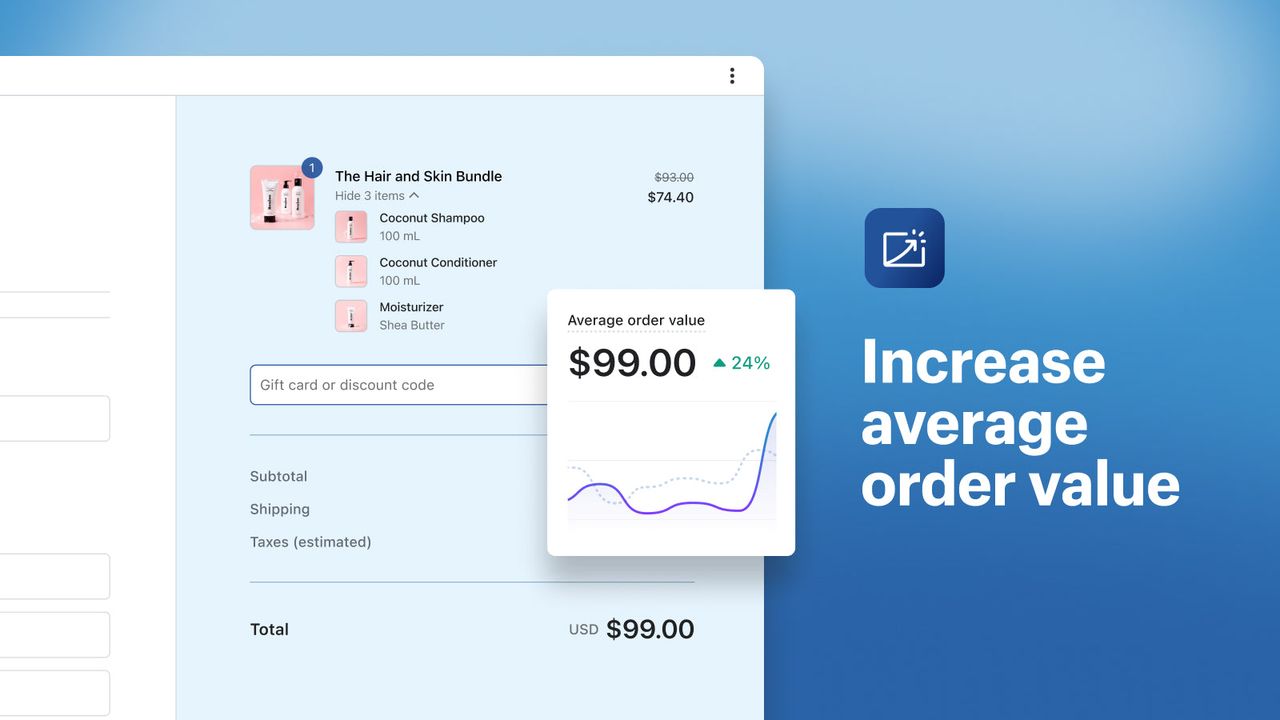
Each bundle becomes a product in its own right, with its own product page, images, description and price. Shoppers pick the variant of each item in the bundle on that page.
As of November 4, 2026, the listing(opens in a new tab) shows a rating of 2.9 out of 5 from 571 reviews. That average hides a split: 227 reviews give it five stars, but 130 give it one star, 71 two stars and 81 three stars. That makes 282 reviews, or 49%, at three stars or fewer. Merchants like that it’s free; many find it too basic.
How to install the Shopify Bundles app
Before you start, check that your store meets Shopify’s eligibility requirements(opens in a new tab):
- your store uses the Online Store sales channel or a custom (headless) storefront;
- you’re on the upgraded checkout: stores with checkout.liquid customizations can’t sell bundles;
- the products you want to bundle already exist in your catalog.
Installing takes about a minute:
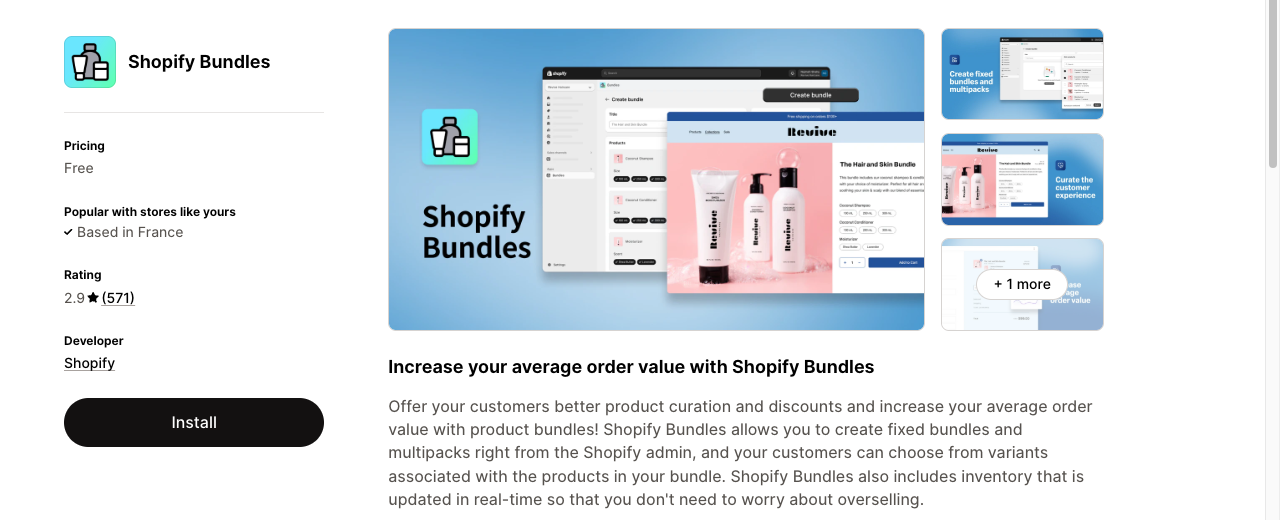
- Open the Shopify Bundles listing on the Shopify App Store(opens in a new tab).
- Click Install, then confirm in your Shopify admin.
- The app then appears under Apps in your admin, as Bundles.
How to create a fixed bundle on Shopify
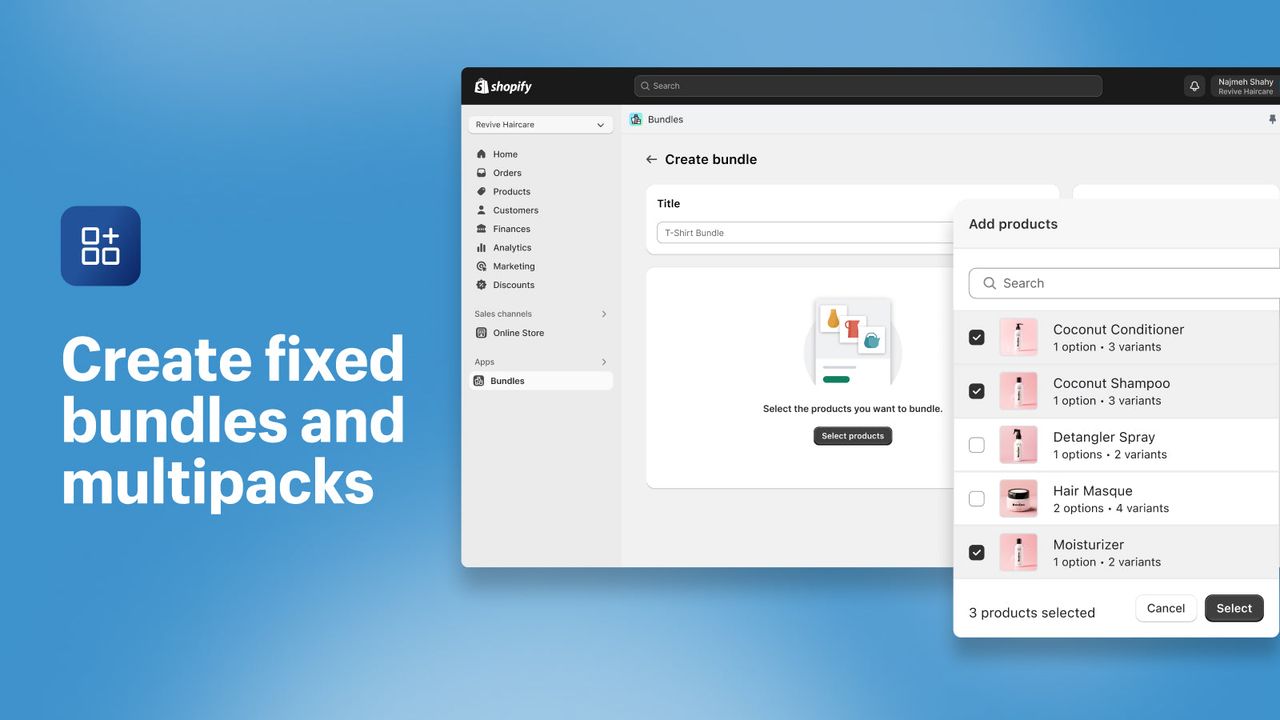
With the app installed, here is how to create bundles on Shopify, following Shopify’s own steps(opens in a new tab):
- From your Shopify admin, go to Apps > Bundles.
- Click Create bundle.
- Enter a title, such as “Complete Hydration Routine.”
- Click Select products, tick the products to include, then click Select.
- Adjust quantities and the variants shoppers can choose. If several products share an option name, such as Size, you can tick Combine options with matching names.
- Click Save and continue.
- On the product details page, add the bundle’s images, description and price. Add a compare-at price too, so shoppers see the crossed-out price and the saving. Our guide to bundle pricing shows how deep that discount can go without eating your margin.
- Under Status, switch the bundle from Draft to Active, then click Save.
A new bundle is a draft by default: until you set it to Active, it won’t show on your store. Add it to a collection and to your navigation too, or shoppers won’t find it.
How to create a multipack
A multipack uses the same steps as a fixed bundle. The only difference is at step 5:
- After selecting your product, click the … menu next to it.
- Choose Duplicate product to add another unit to the bundle.
- Repeat, or adjust the quantity, until you have the number of units you want.
Each unit keeps its own variant picker: in a 3-pack of T-shirts, a shopper can choose three different colors.
How Shopify Bundles handles inventory and orders
This is the app’s main strength: the bundle stays tied to the products inside it.
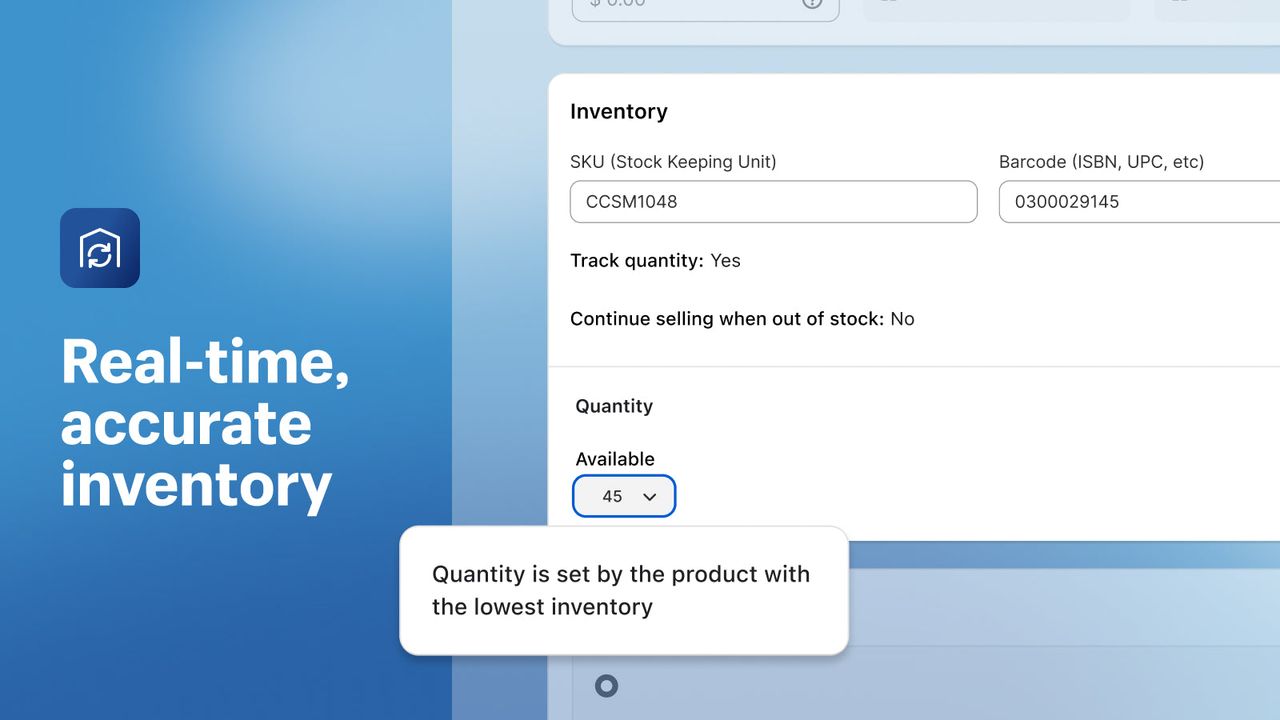
- Synced inventory: each bundle sale draws down the stock of every product inside it, in real time.
- Automatic availability: a bundle’s available quantity depends on the product with the least stock. If one product sells out, the bundle can’t be bought.
- Clear orders: the order lists each product in the bundle with its own SKU, which keeps picking, packing and ERP or 3PL syncs simple.
- Weight and shipping: weight comes from the bundled products, and shipping rates follow their shipping profiles.
- Discounts work: discount codes and automatic discounts apply to bundles, split across the bundled products by price. Include the bundle product itself in a product or collection discount: selecting only its components won’t discount it.
- Analytics: the app shows bundle total sales, bundle orders, top sellers and most-ordered bundles.
Shopify Bundles limitations to know
Shopify Bundles covers simple needs, but Shopify’s documentation(opens in a new tab) lists several limits worth knowing before you commit:
- No mix-and-match bundles: shoppers can’t build their own set. On Shopify Plus, a developer can use the Bundles API; otherwise you need an app, as in our guide to building a build-a-box on Shopify.
- No quantity breaks: you can’t show “buy 1, 2 or 3” tiers under the Add to cart button, or add a free gift at a tier. Our list of volume discount apps covers that format.
- No offer on your existing product page: the bundle is a new product. It doesn’t appear as an offer on the main product’s page, where the shopper is deciding.
- Size limits: up to 30 products per fixed bundle, and 3 options and 100 variants per bundle in total. That 100-variant cap is the one stores with many sizes and colors hit first.
- Static price: if a bundled product’s price changes, the bundle price doesn’t update. You have to change it by hand.
- No subscriptions or pre-orders: bundles don’t work with purchase options (subscriptions, pre-orders, try before you buy) or with the Shopify Subscriptions app.
- Some sales channels only: bundles sell on the Online Store, the Shop app, Shopify POS and headless storefronts. Other channels, such as marketplaces, aren’t supported.
- No import, export or bulk editing, and a bundle can’t contain another bundle.
- No exchanges: a bundle can’t be exchanged, not even for an identical bundle.
- Overall stock only: inventory isn’t tracked by location, and bundles don’t show up in option filters in Search & Discovery.
- SKU changes break it: the bundle has its own SKU, and if a component’s SKU changes, Shopify says to delete and recreate the bundle.
If one of these limits blocks you, you need a third-party app. We compare the main ones in our roundup of the best Shopify bundle apps.
A Shopify Bundles alternative: Snap Bundle
Snap Bundle is the bundle app we develop at Trafik Plus, for bundles and for quantity breaks. Launched in May 2024, it is rated 4.9 out of 5 from 48 reviews on the Shopify App Store(opens in a new tab) as of November 4, 2026, and carries the Built for Shopify badge, which Shopify gives to apps that meet its highest standards for performance, design and integration. Since we make it, its features below come from the app itself, not from its listing.
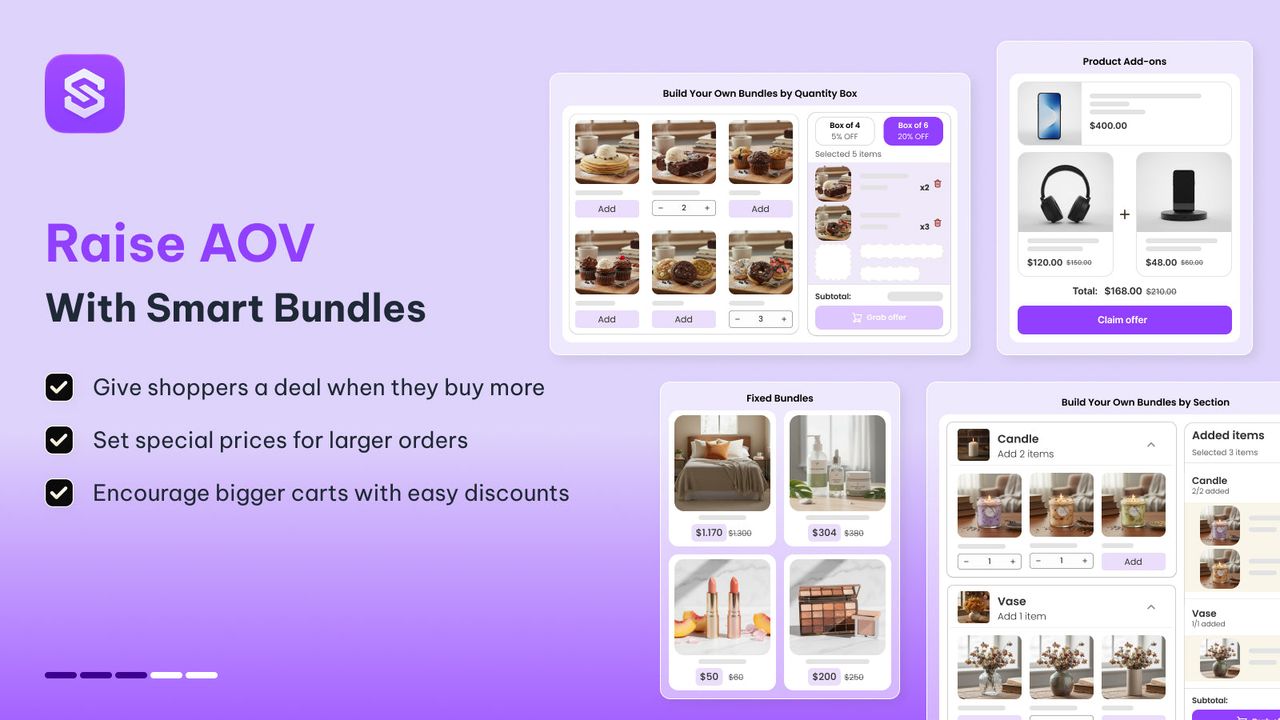
Where Shopify Bundles creates a new product, Snap Bundle adds offers to your existing product pages, as theme app blocks, with no code.
What Snap Bundle adds
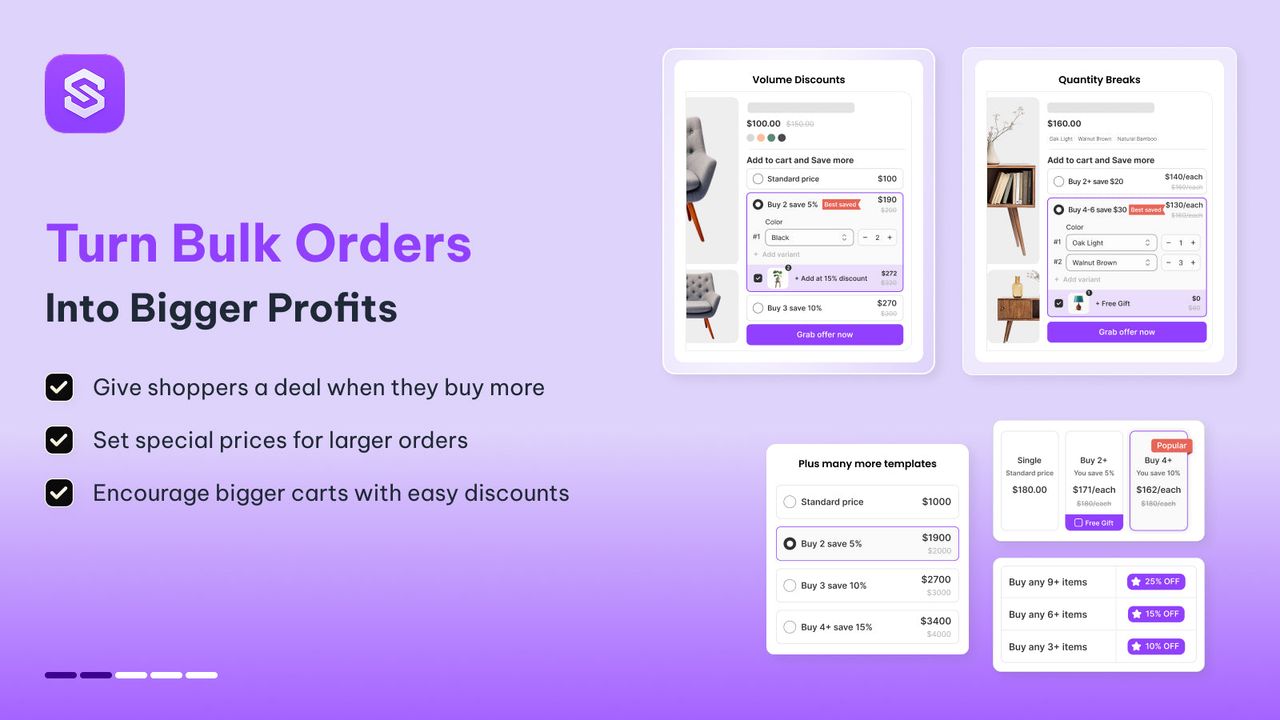
- Every bundle format in one app: quantity breaks, fixed bundles, mix-and-match bundles with a full-page builder, product add-ons, and a one-click post-purchase upsell shown right after payment.
- Quantity breaks with a free gift: several price tiers under the Add to cart button, with a gift you can attach to any tier.
- An offer where shoppers decide: the offer sits on the product page, at the moment the visitor chooses how many to buy.
- Your product prices stay put: product pages keep their usual price, and the discount is applied by Shopify Functions, Shopify’s native discount engine.
- Nudges that help shoppers buy: custom badges, low-stock counters and announcement bars.
- Built for multi-language stores: widget text is machine-translated into your store’s languages, and you can edit each translation.
- Per-offer analytics: views, add-to-cart clicks and average order value, so you know which offer actually earns.
- Free to start: the free plan doesn’t limit the number of campaigns or offers.
How much does Snap Bundle cost?
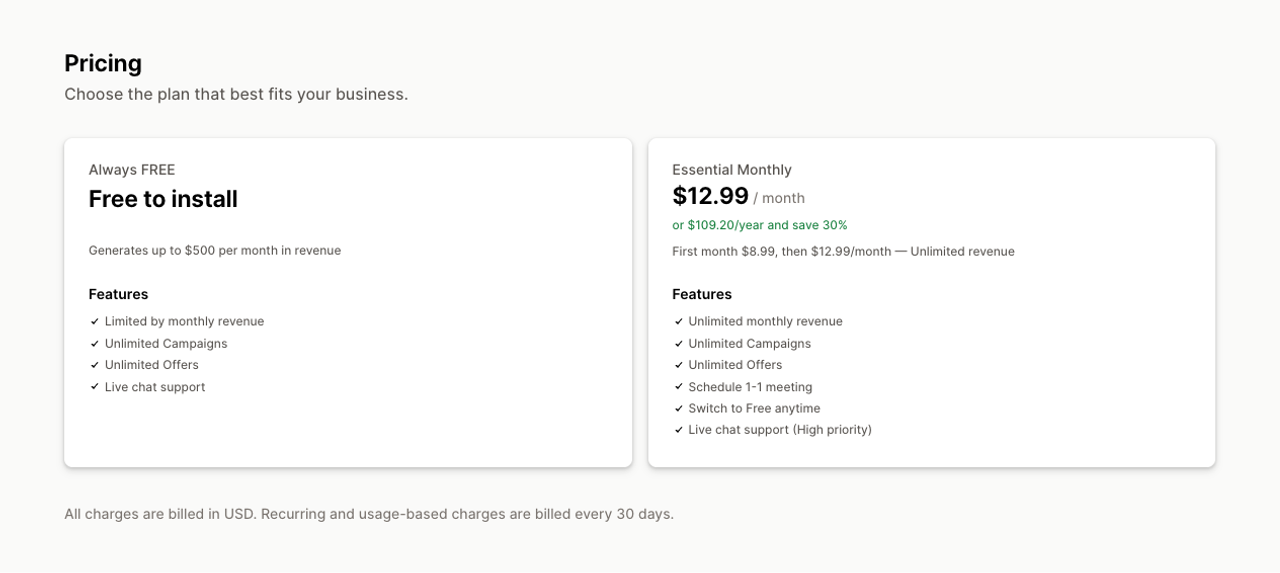
- Free plan: $0 while its offers generate less than $500 in revenue a month, with unlimited campaigns and offers. Past $500 in a month, offers stop showing on your storefront until the next reset or an upgrade.
- Essential plan: $12.99 a month ($8.99 for the first month), or $109.20 a year. It has no revenue cap, which makes Snap Bundle one of the only bundle apps whose price doesn’t climb as your bundle sales grow.
Shopify Bundles vs Snap Bundle
Shopify Bundles | Snap Bundle | |
|---|---|---|
Price | Free | Free up to $500 revenue/month, then $12.99/month |
Fixed bundles | Yes (as a new product) | Yes (on the product page) |
Multipacks | Yes | Yes, through quantity breaks |
Mix-and-match bundles | No | Yes |
Quantity breaks | No | Yes |
Free gift at a tier | No | Yes |
Product add-ons | No | Yes |
Post-purchase upsell | No | Yes |
Analytics | Sales and orders per bundle | Views, add-to-cart clicks and AOV per offer |
Bundled product inventory | Synced automatically | Uses your existing products’ inventory |
Shopify App Store rating (Nov 4, 2026) | 2.9/5 (571 reviews) | 4.9/5 (48 reviews), Built for Shopify |
When Shopify Bundles is enough
To be fair, you don’t always need Snap Bundle. Shopify Bundles is a good fit if you only want to sell a few fixed bundles as standalone products, at no cost, whatever your revenue. It is also the one to pick if you sell bundles in person through Shopify POS. And keep in mind that once Snap Bundle’s offers bring in more than $500 in a month, you need its paid plan.
Which one should you use?
- You want a few fixed bundles or multipacks, with no budget: start with Shopify Bundles.
- You want quantity breaks, gifts at a tier or mix-and-match bundles: install Snap Bundle, free to start.
- You want to raise AOV right on your product pages and measure each offer: Snap Bundle fits better.
Both apps can run on the same store. Just avoid applying two discounts to the same product at once, so they don’t stack.
Install Snap Bundle for free →(opens in a new tab)
Shopify Bundles FAQ
Is the Shopify Bundles app free?
Yes. Shopify Bundles is a free app made by Shopify, with no subscription and no fee on sales.
Does Shopify Bundles work on the Basic plan?
Yes. The app works on every Shopify plan, not only Shopify Plus. Your store needs the Online Store channel (or a headless storefront) and the upgraded checkout.
How many products and variants can a Shopify bundle have?
A fixed bundle can hold up to 30 products, with a maximum of 3 options and 100 variants in total.
Can I create mix-and-match bundles with Shopify Bundles?
No. Shopify Bundles only handles fixed bundles and multipacks. To let shoppers build their own set, you need a third-party app such as Snap Bundle, or the Bundles API on Shopify Plus.
Does Shopify Bundles work with subscriptions?
No. Bundles don’t work with purchase options such as subscriptions, pre-orders or try before you buy, or with the Shopify Subscriptions app.
Can I sell Shopify Bundles in my retail store with POS?
Yes. Shopify’s Help Center(opens in a new tab) lists Shopify POS as a supported channel, along with the Online Store, the Shop app and headless storefronts.
Is there a more complete free alternative to Shopify Bundles?
Yes. Snap Bundle is free while its offers generate less than $500 a month, with unlimited campaigns. It adds quantity breaks, mix-and-match bundles, product add-ons and a post-purchase upsell.
Can I use Shopify Bundles and Snap Bundle at the same time?
Yes. Both apps can be installed on the same store. Just avoid applying two discounts to the same product, so they don’t stack.

Keep reading

Best Shopify Bundle Apps for Supplement Brands in 2026
The best Shopify bundle apps for supplement brands compared: supplement stacks, 30/60/90-day supply breaks, Subscribe & Save bundles and what each costs.

Best Shopify Bundle Apps for Skincare Brands in 2026
We compared 7 Shopify bundle apps for skincare brands: routine sets, build-your-own boxes, discovery kits and refill discounts, with prices checked in October 2026.

Best Shopify Bundle Apps for Pet Food Brands in 2026
We compared 7 Shopify bundle apps for pet food brands: multi-bag quantity breaks, wet food variety packs, puppy starter kits and subscribe-and-save bundles.